• Picasso IA लोगो
    Logo Picasso IA
  • होम
  • AI इमेज
    Nano Banana 2
  • AI वीडियो
    Veo 3.1 Fast
  • AI चैट
    Gemini 3 Pro
  • इमेज एडिट करें
  • इमेज सुधारें
  • बैकग्राउंड हटाएं
  • टेक्स्ट टू स्पीच
  • इफ़ेक्ट्स
    NEW
  • पीढ़ियाँ
  • बिलिंग
  • सहायता
  • खाता
  1. संग्रह
  2. टेक्स्ट टू इमेज
  3. Gen4 Image

Gen4 Image के साथ संदर्भों को किसी भी दृश्य में बदलें

Gen4 Image एक विशिष्ट समस्या का समाधान करता है: standard text-to-image generation आपको आपकी चाहत के काफ़ी करीब कुछ देती है, लेकिन शायद ही कभी बिल्कुल सटीक। अगर आपको output में कोई खास चेहरा, product, outfit, या object चाहिए, तो तीन तक reference photos अपलोड करने से समीकरण बदल जाता है। model उन references को आपके text prompt के साथ पढ़ता है और एक image बनाता है जो दोनों को दर्शाती है। reference tagging system मुख्य mechanism है। आप हर uploaded photo को एक छोटा alphanumeric tag देते हैं, फिर अपने prompt में @tag notation का उपयोग करके उन tags को सीधे उनके नाम से बुलाते हैं। इससे आप references को प्राकृतिक रूप से मिला सकते हैं, जैसे एक photo के व्यक्ति को दूसरी में वर्णित scene में रखना। outputs डिफ़ॉल्ट रूप से छह aspect ratios में 1080p पर आते हैं, portrait 9:16 से लेकर cinema-wide 21:9 तक। Product teams इसका उपयोग studio के बिना virtual catalog images शूट करने के लिए करती हैं। Brand designers इसका उपयोग पूरे campaign में consistent visuals बनाने के लिए करती हैं। Concept artists इसका उपयोग real reference material के साथ scenes को जल्दी से block out करने के लिए करती हैं। चाहे project कोई भी हो, workflow वही रहता है: अपने references अपलोड करें, एक clear prompt लिखें, और उपयोग के लिए तैयार एक साफ़ 1080p image प्राप्त करें।

आधिकारिक

Runwayml

1.02m रन

Gen4 Image

2025-06-27

व्यावसायिक उपयोग

Gen4 Image के साथ संदर्भों को किसी भी दृश्य में बदलें

विषय-सूची

  • अवलोकन
  • यह कैसे काम करता है
  • अक्सर पूछे जाने वाले प्रश्न
  • क्रेडिट लागत
  • विशेषताएँ
  • उपयोग के मामले
  • उदाहरण
Nano Banana Pro प्राप्त करें

अवलोकन

Gen4 Image एक text-to-image model है जो आपके text prompt के साथ 3 तक reference photos स्वीकार करता है, जिससे आपको अंतिम frame में क्या जाएगा, इस पर सटीक नियंत्रण मिलता है। अधिकांश AI image tools आपको अपनी इच्छा का वर्णन करने और सबसे अच्छे की आशा करने देते हैं। Gen4 Image आपको उसे दिखाने देता है। Picasso IA पर, आप अपने references अपलोड करते हैं, हर एक को tag करते हैं, और उन्हें अपने prompt के अंदर सीधे उनके नाम से बुलाते हैं, ताकि output आपकी वास्तविक मंशा से मेल खाए, न कि उसकी किसी व्याख्या से। चाहे आप एक product को कई angles से दोहरा रहे हों या किसी विशिष्ट face या object के चारों ओर एक scene बना रहे हों, अनुमान लगाने की आवश्यकता समाप्त हो जाती है。

यह कैसे काम करता है

  • output में जिस subject, style, object, या person को आप चाहते हैं, उसका प्रतिनिधित्व करने वाली 1 से 3 reference images अपलोड करें।
  • हर reference को एक छोटा alphanumeric tag दें (उदाहरण के लिए, @jacket या @model) ताकि आप उन्हें अपने prompt में अलग-अलग संबोधित कर सकें।
  • अपना text prompt लिखें और tags को उन वाक्यों में डालें जहाँ वे लागू होते हैं, model को स्पष्ट रूप से बताएं कि scene में हर reference कैसा दिखना चाहिए।
  • अपनी resolution (720p या 1080p) चुनें और 16:9 से 21:9 तक का aspect ratio चुनें ताकि यह आपके project के आवश्यक format से मेल खाए।
  • generate पर क्लिक करें और एक तैयार image प्राप्त करें जो आपके references को आपके वर्णित scene के साथ मिलाती है।

अक्सर पूछे जाने वाले प्रश्न

क्या इसे उपयोग करने के लिए मुझे programming skills या technical knowledge की ज़रूरत है? नहीं, बस Picasso IA पर Gen4 Image खोलें, जो settings आप चाहते हैं उन्हें समायोजित करें, और generate पर क्लिक करें।

क्या इसे आज़माना मुफ़्त है? हाँ, आप इसे सीधे अपने browser में चला सकते हैं, बिना कुछ install किए या code की एक भी line लिखे।

परिणाम पाने में कितना समय लगता है? अधिकांश generations कुछ ही सेकंड में पूरी हो जाती हैं। Resolution और scene की जटिलता समय को थोड़ा प्रभावित कर सकती है, लेकिन आपको ज़्यादा इंतज़ार नहीं करना पड़ेगा।

क्या मैं real people या products की reference images का उपयोग कर सकता हूँ? हाँ। reference system बिल्कुल इसी के लिए बनाया गया है: एक photo अपलोड करके और अपने prompt में tag करके output को किसी विशिष्ट face, product, outfit, या object से जोड़ें।

मैं किन aspect ratios में generate कर सकता हूँ? model 16:9, 9:16, 4:3, 3:4, 1:1, और 21:9 का समर्थन करता है, जो social media posts से लेकर cinematic widescreen frames तक सब कुछ कवर करता है।

अगर मेरे कुछ references सही ढंग से नहीं दिख रहे हों तो क्या होगा? जांचें कि हर tag prompt text में स्पष्ट रूप से दिखाई दे रहा है और reference image एक ही subject पर स्पष्ट रूप से focused है। upload करने से पहले object या person के चारों ओर tight cropping करने से आमतौर पर accuracy बेहतर होती है।

मैं जिन images को generate करता हूँ, उन्हें कहाँ उपयोग कर सकता हूँ? output एक standard image file है जिसे आप तुरंत download कर सकते हैं और बिना किसी restriction के किसी भी project, presentation, या publishing workflow में उपयोग कर सकते हैं।

क्रेडिट लागत

प्रत्येक जेनरेशन 1 क्रेडिट का उपयोग करता है

1 क्रेडिट

या 5 क्रेडिट्स 5 जेनेरेशन के लिए

विशेषताएँ

यह मॉडल आपके लिए क्या कर सकता है

Reference image control

आउटपुट को किसी विशिष्ट व्यक्ति, object, या visual style से जोड़ने के लिए 3 तक photos का उपयोग करें।

Prompt tagging system

हर reference को एक छोटे tag से label करें और उसे अपने text prompt के अंदर सीधे नाम से बुलाएँ।

1080p default output

Images पूरी 1080p resolution पर generate होती हैं, print, web, या client delivery के लिए पर्याप्त sharp।

Six aspect ratios

किसी भी platform या layout के लिए 16:9, 9:16, 4:3, 3:4, 1:1, या 21:9 में से चुनें।

Reproducible results

एक seed value सेट करें ताकि multiple runs में वही output बिल्कुल दोबारा बनाया जा सके।

No coding required

एक prompt दर्ज करें, references अपलोड करें, और सीधे browser में generate पर क्लिक करें।

उपयोग के मामले

वस्तु की एक photo अपलोड करके और उसके चारों ओर आप जो background या setting चाहते हैं उसका वर्णन करके product mockups बनाएं

उनकी reference photo को tag करके और हर नए prompt में उसे बुलाकर, एक विशिष्ट व्यक्ति की शक्ल-सूरत को कई scenes में दोहराएं

कपड़ों की किसी item photo का reference लेकर और उसे एक styled editorial scene में रखकर fashion या outfit mockups बनाएं

अपने product, color palette, या style की reference photo के साथ हर generation को anchor करके consistent brand visuals तैयार करें

एक mood board या texture photo के साथ लिखित scene description का reference लेकर concept art बनाएं

एक ही reference images का उपयोग करके लेकिन अलग aspect ratio setting के साथ 9:16 या 1:1 format में social media posts बनाएं

एक single prompt में दो references मिलाएँ, जैसे एक photo के विशिष्ट subject को दूसरी photo के location में रखना

उदाहरण

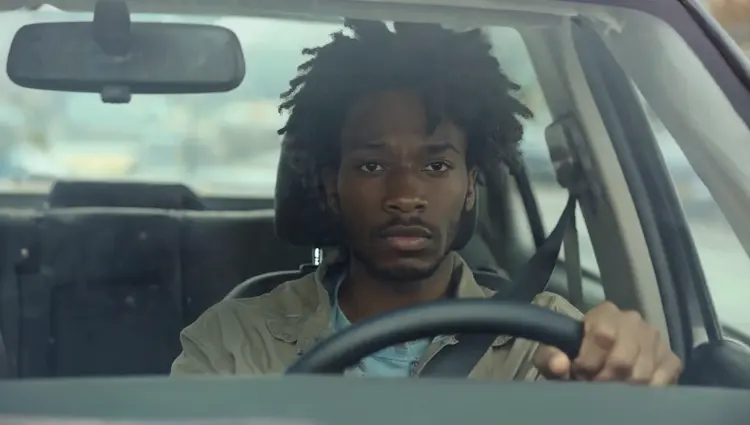
show me the man from @img_1 framed through the windshield of a car like the reference @img_2
इनपुट
Input 1
Input 2
परिणाम
show me the man from @img_1 framed through the windshield of a car like the reference @img_2
40.5s
उदाहरण देखें
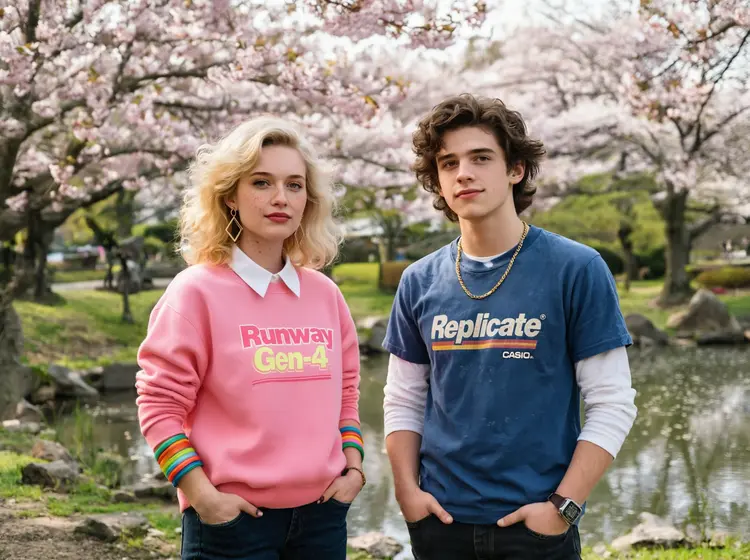
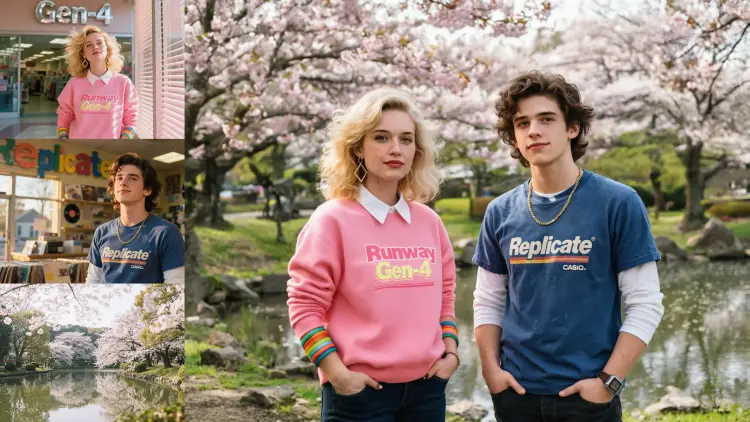
a close up portrait of @woman and @man standing in @park, hands in pockets, looking cool. She is wearing her pink sweater and bangles.
इनपुट
Input 1
Input 2
+1परिणाम
a close up portrait of @woman and @man standing in @park, hands in pockets, looking cool. She is wearing her pink sweater and bangles.
36.9s
उदाहरण देखें
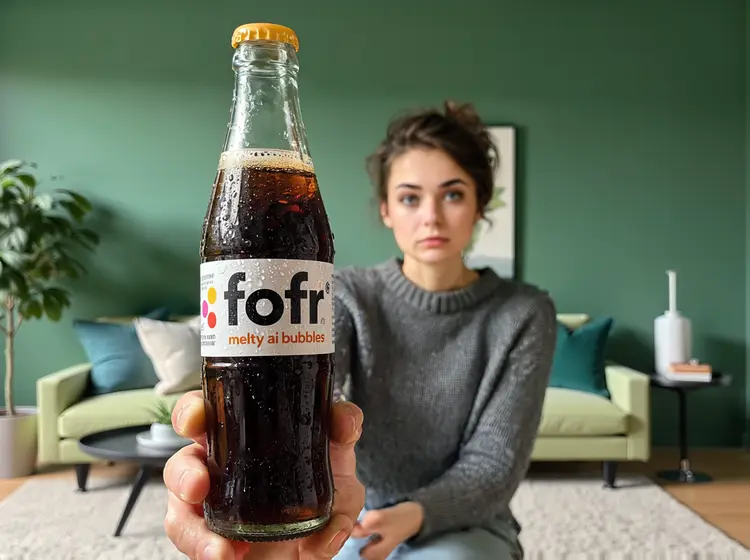
@woman holds the @bottom up, the bottle is the subject, the @woman is visible but she is blurred, she is in the @living_room, it is a product photo shoot
इनपुट
Input 1
Input 2
+1परिणाम
@woman holds the @bottom up, the bottle is the subject, the @woman is visible but she is blurred, she is in the @living_room, it is a product photo shoot
35.2s
उदाहरण देखें
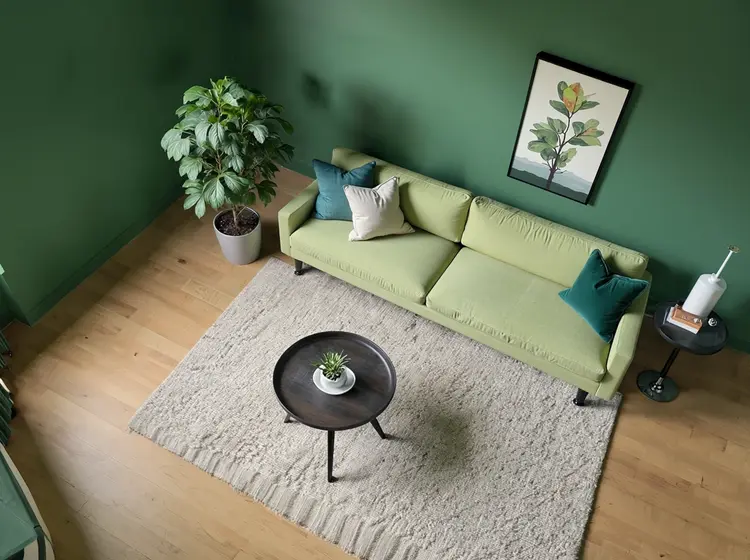
a top down isometric view of @living_room
इनपुट
Input 1
परिणाम
a top down isometric view of @living_room
26.4s
उदाहरण देखें
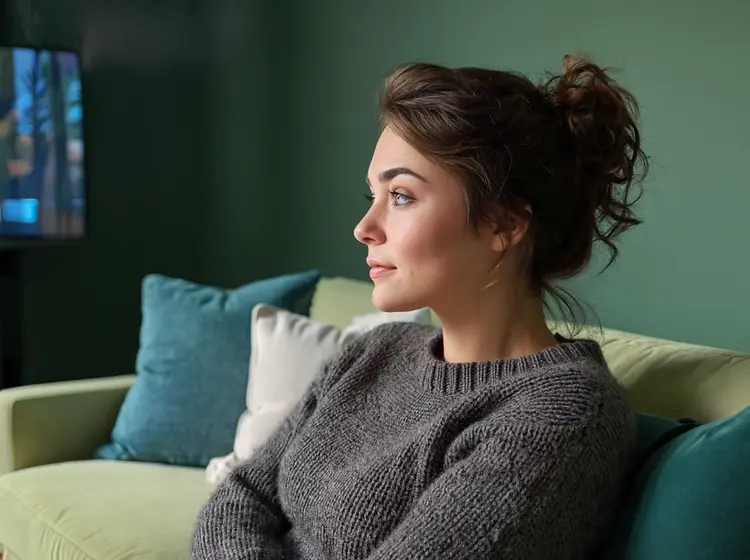
a close up portrait of @woman, she is lounging on the sofa in @living_room, it is evening and low light, she is watching TV and the screen illuminates her, seen from a side angle
इनपुट
Input 1
Input 2
परिणाम
a close up portrait of @woman, she is lounging on the sofa in @living_room, it is evening and low light, she is watching TV and the screen illuminates her, seen from a side angle
31.0s
उदाहरण देखें
a @woman and @robot are lounging on the sofa in @living_room, it is evening and low light
इनपुट
Input 1
Input 2
+1परिणाम
a @woman and @robot are lounging on the sofa in @living_room, it is evening and low light
35.4s
उदाहरण देखें
a close up portrait of @woman, she is standing on stage in the middle of giving a tech talk at a large conference
इनपुट
Input 1
परिणाम
a close up portrait of @woman, she is standing on stage in the middle of giving a tech talk at a large conference
25.2s
उदाहरण देखें

श्रेणी बदलें

इफेक्ट्स

टेक्स्ट से इमेज

टेक्स्ट से इमेज

टेक्स्ट से वीडियो

बड़े भाषा मॉडल

बड़े भाषा मॉडल

टेक्स्ट से स्पीच

टेक्स्ट से स्पीच

सुपर रेजोल्यूशन

सुपर रेजोल्यूशन

लिपसिंक

AI संगीत निर्माण

AI संगीत निर्माण

वीडियो संपादन

स्पीच से टेक्स्ट

स्पीच से टेक्स्ट

AI वीडियो एन्हांस

बैकग्राउंड हटाएँ

बैकग्राउंड हटाएँ