• Picasso IA लोगो
    Logo Picasso IA
  • होम
  • AI इमेज
    Nano Banana 2
  • AI वीडियो
    Veo 3.1 Fast
  • AI चैट
    Gemini 3 Pro
  • इमेज एडिट करें
  • इमेज सुधारें
  • बैकग्राउंड हटाएं
  • टेक्स्ट टू स्पीच
  • इफ़ेक्ट्स
    NEW
  • पीढ़ियाँ
  • बिलिंग
  • सहायता
  • खाता
  1. संग्रह
  2. टेक्स्ट टू इमेज
  3. Flux Schnell Lora

Flux Schnell LoRA: त्वरित कस्टम AI कला

Flux Schnell LoRA एक टेक्स्ट-टू-इमेज मॉडल है, जिसे शैलीगत वैयक्तिकरण से समझौता किए बिना गति के लिए बनाया गया है। यह आपके प्रॉम्प्ट के साथ किसी भी LoRA वेट्स को स्वीकार करता है, ताकि आप हर बनाई गई छवि पर एक प्रशिक्षित दृश्य शैली लागू कर सकें, चाहे वह एक समान चरित्र रूप हो, ब्रांड सौंदर्य हो, या कोई विशिष्ट कला निर्देशन। यह मॉडल केवल 4 inference steps तक में चलता है, और सामान्य diffusion models की तुलना में लगने वाले समय के एक अंश में 1-megapixel छवि तैयार करता है। आप एक साधारण scale slider से LoRA प्रभाव को समायोजित कर सकते हैं, एक हल्के शैली संकेत से लेकर पूर्ण शैली अधिग्रहण तक। आउटपुट format विकल्प (WEBP, JPG, PNG) और समायोज्य quality settings आपको वेब, प्रिंट, या आगे संपादन के लिए तैयार फ़ाइलें बिना किसी post-processing के export करने देते हैं। इसे ऐसे creative workflow में शामिल करें जहाँ आपको तेज़ visual iteration चाहिए, जैसे किसी client के लिए कई concept variants बनाना या storyboard के लिए consistent characters तैयार करना। आप शब्द और style file लाते हैं; बाकी काम model कुछ ही सेकंड में संभाल लेता है।

आधिकारिक

Black Forest Labs

3.72m रन

Flux Schnell Lora

2024-11-11

व्यावसायिक उपयोग

Flux Schnell LoRA: त्वरित कस्टम AI कला

विषय-सूची

  • अवलोकन
  • यह कैसे काम करता है
  • अक्सर पूछे जाने वाले प्रश्न
  • क्रेडिट लागत
  • विशेषताएँ
  • उपयोग के मामले
  • उदाहरण
Nano Banana Pro प्राप्त करें

अवलोकन

Flux Schnell LoRA एक टेक्स्ट-टू-इमेज model है, जिसे शैली अनुकूलन से समझौता किए बिना गति के लिए बनाया गया है। जहाँ अधिकांश fine-tuning workflows लंबी generation queues की मांग करते हैं, यह model कुछ ही सेकंड में चलता है। Picasso IA पर, आप एक custom LoRA weight लोड कर सकते हैं, एक prompt लिख सकते हैं, और अपनी कॉफी समाप्त करने से पहले एक styled image वापस पा सकते हैं। यह उन creators के लिए व्यावहारिक विकल्प है जिन्हें visual identities, client briefs, या personal projects के बीच तेज़ी से iterate करने की आवश्यकता होती है।

यह कैसे काम करता है

  • उस image का वर्णन करने वाला prompt टाइप करें जिसे आप subject और composition से लेकर lighting और mood तक बनाना चाहते हैं।
  • base generation के ऊपर एक विशिष्ट visual style, character, या concept लागू करने के लिए एक LoRA weight लोड करें।
  • शैली को कितनी मजबूती से लागू किया जाए, इसे नियंत्रित करने के लिए LoRA scale समायोजित करें, हल्के प्रभाव से लेकर पूर्ण अधिग्रहण तक।
  • अपना aspect ratio (square, portrait, landscape, widescreen) और output format (WebP, JPG, या PNG) चुनें।
  • generate पर क्लिक करें और कुछ ही सेकंड में अपनी image प्राप्त करें, जो तुरंत डाउनलोड और उपयोग के लिए तैयार हो।

अक्सर पूछे जाने वाले प्रश्न

क्या इसे उपयोग करने के लिए मुझे programming skills या technical knowledge की आवश्यकता है? नहीं, बस Picasso IA पर Flux Schnell LoRA खोलें, अपनी इच्छित settings समायोजित करें, और generate पर क्लिक करें।

क्या इसे आज़माना free है? हाँ, आप बिना किसी setup या subscription के Flux Schnell LoRA के साथ images बनाना शुरू कर सकते हैं। generation credits और limits के लिए platform पर मौजूदा plan details देखें।

जनरेशन में कितना समय लगता है? जब speed-optimized mode सक्षम होता है, तो अधिकांश images 5 सेकंड से कम में render हो जाती हैं। higher-precision mode पर स्विच करने में थोड़ा अधिक समय लगता है, लेकिन इससे अधिक detailed results मिल सकते हैं।

LoRA क्या है और मैं इसका उपयोग कैसे करूँ? LoRA एक हल्की style या subject file है जो base model के drawing तरीके को संशोधित करती है। आप compatible weight URL को LoRA field में चिपकाते हैं और model उस शैली को आपके output में मिला देता है। LoRA scale slider नियंत्रित करता है कि प्रभाव कितना प्रबल है।

कौन से output formats समर्थित हैं? आप अपनी images को WebP, JPG, या PNG के रूप में डाउनलोड कर सकते हैं। WebP सबसे छोटा file size देता है, PNG बिना compression artifacts के पूर्ण quality रखता है, और JPG web use के लिए दोनों के बीच संतुलन बनाता है।

क्या मैं विविधताओं के लिए उसी prompt को कई बार चला सकता हूँ? हाँ। किसी विशिष्ट परिणाम को पुन: उत्पन्न करने के लिए एक fixed seed सेट करें, या हर बार एक नई variation पाने के लिए इसे random छोड़ दें। आप एक ही batch में कई images भी generate कर सकते हैं।

मैं बनाई गई images का उपयोग कहाँ कर सकता हूँ? आपके द्वारा बनाई गई images platform के standard output terms का पालन करती हैं। यदि आप community-sourced LoRA weights का उपयोग करते हैं, तो किसी भी commercial use से पहले उन weights से जुड़ा license जाँचें।

क्रेडिट लागत

प्रत्येक जेनरेशन 1 क्रेडिट का उपयोग करता है

1 क्रेडिट

या 5 क्रेडिट्स 5 जेनेरेशन के लिए

विशेषताएँ

यह मॉडल आपके लिए क्या कर सकता है

LoRA वेट समर्थन

हर जनरेट की गई छवि पर एक प्रशिक्षित दृश्य पहचान लागू करने के लिए कोई भी संगत शैली फ़ाइल लोड करें।

तेज़ जनरेशन

केवल 4 inference steps में एक पूरी 1-megapixel छवि तैयार करता है, जिससे प्रतीक्षा समय काफी कम हो जाता है।

शैली तीव्रता नियंत्रण

बेस model और आपकी कस्टम शैली के बीच मिश्रण करने के लिए LoRA scale को 0 से 1 तक समायोजित करें।

कई aspect ratios

किसी भी platform या format के अनुरूप 1:1, 16:9, 9:16, और 4:5 सहित 11 ratio presets में से चुनें।

लचीले output formats

0 से 100 तक adjustable quality settings के साथ WEBP, JPG, या PNG के रूप में export करें।

पुनरुत्पादन योग्य परिणाम

हर बार समान output फिर से बनाने के लिए seed value सेट करें जब भी आपको एक सुसंगत परिणाम की आवश्यकता हो।

स्पीड mode toggle

सबसे तेज़ output के लिए optimized FP8 mode और deterministic results के लिए BF16 mode के बीच स्विच करें।

उपयोग के मामले

अपने brand की visual style पर प्रशिक्षित एक custom LoRA लोड करें और ऐसे product images बनाएं जो बिना किसी manual editing के मेल खाते हों

एक character description टाइप करें और multiple scenes में consistent portraits बनाने के लिए character LoRA लागू करें

विभिन्न text prompts के साथ एक style LoRA जोड़कर एक विशिष्ट art style में social media visuals का batch बनाएं

एक ही prompt पर side by side कई LoRA styles का परीक्षण करें ताकि design project के लिए सबसे उपयुक्त विकल्प चुना जा सके

कम और अधिक प्रभाव के बीच LoRA scale को समायोजित करके concept art variations तेज़ी से बनाएं, ताकि अलग-अलग style intensities देखी जा सकें

सभी panels में समान LoRA weights और seed का पुन: उपयोग करके एक समान visual identity के साथ storyboard frames तैयार करें

एक लिखित scene description को मेल खाती LoRA file का उपयोग करके प्रशिक्षित cartoon या painterly style में illustration में बदलें

उदाहरण

v3ct0r style, simple vector art, isolated on white bg, xmas tree with beautifully wrapped gifts beneath it, character asset, clip art
0.5s
उदाहरण देखें
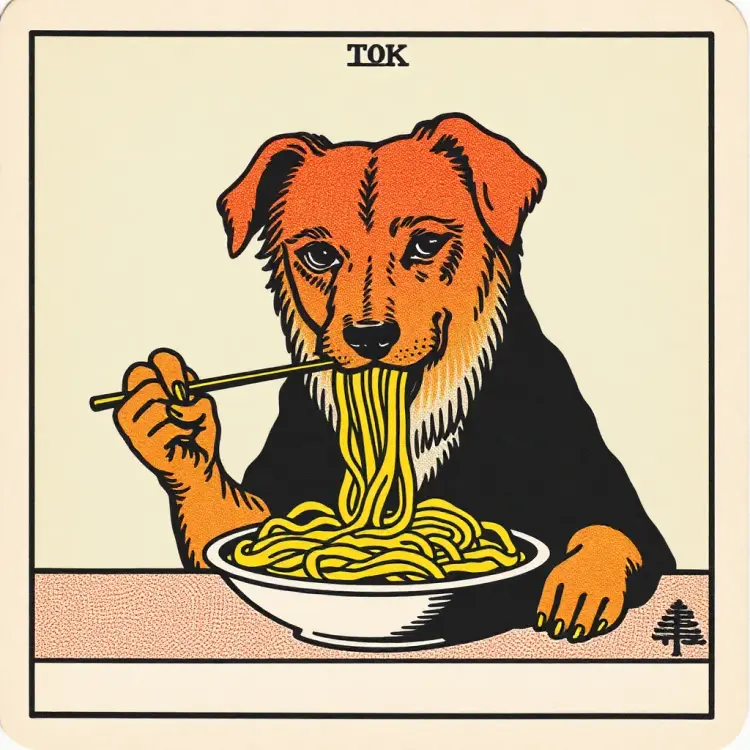
a dog eating pasta, in the style of TOK a trtcrd, tarot style
0.6s
उदाहरण देखें
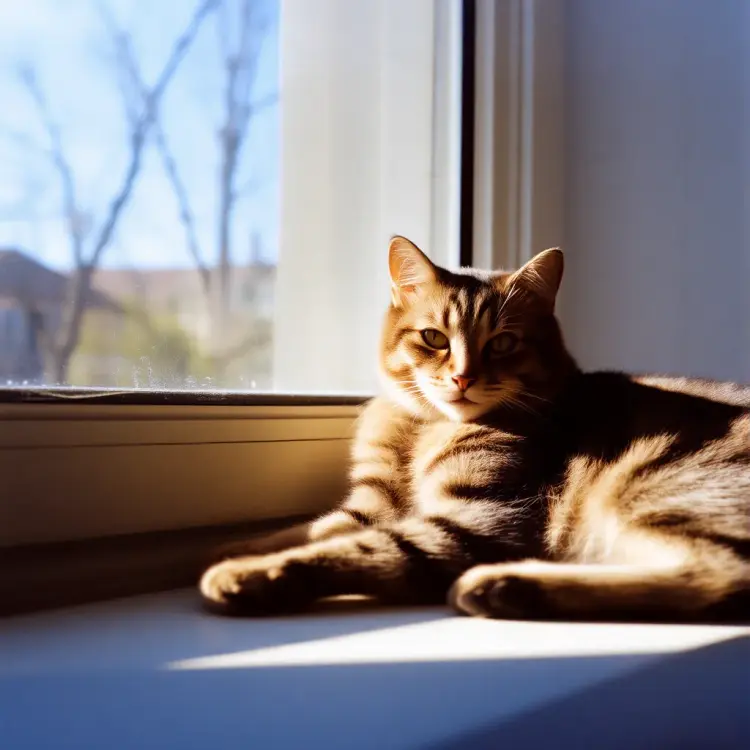
A tabby cat lounging on a sun-dappled windowsill, half its body in shadow, half in bright light, flmft style
0.6s
उदाहरण देखें
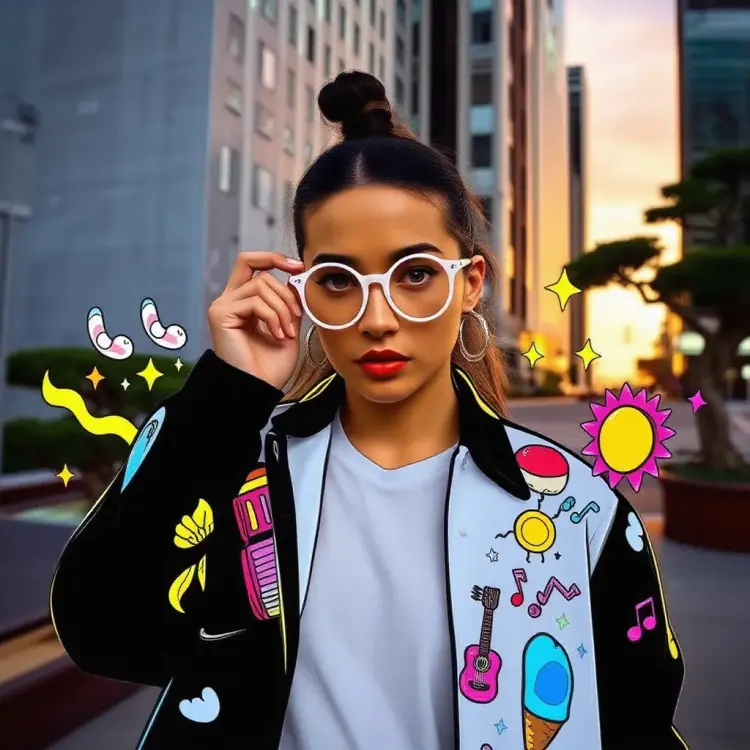
In the style of TOK, a vibrant urban streetwear photo of a woman, white shirt, editorial featuring an edgy, fashion-forward model in a dramatic action pose, adjusting quirky 90s round sunglasses while giving a direct, intense gaze. Set in futuristic Tokyo at sunset, with towering marble structures and sculpted bonsai trees. The model wears a eye-catching, pop art-inspired jacket adorned with whimsical, cartoon-like illustrations. Surrounding the subject, a playful mix of animated doodles including Neon-outlined daisies, swirling smoke tendrils, stylized flames, kawaii ice cream cones, glittery sparkles, electric guitar silhouettes, floating music notes, colorful stars, bubble letters, emoji-style suns, abstract squiggles, and graffiti-style tags. The overall aesthetic blends eclectic streetwear with digital art, creating a funky, contemporary vibe that's both expressive and unconventional.
0.6s
उदाहरण देखें
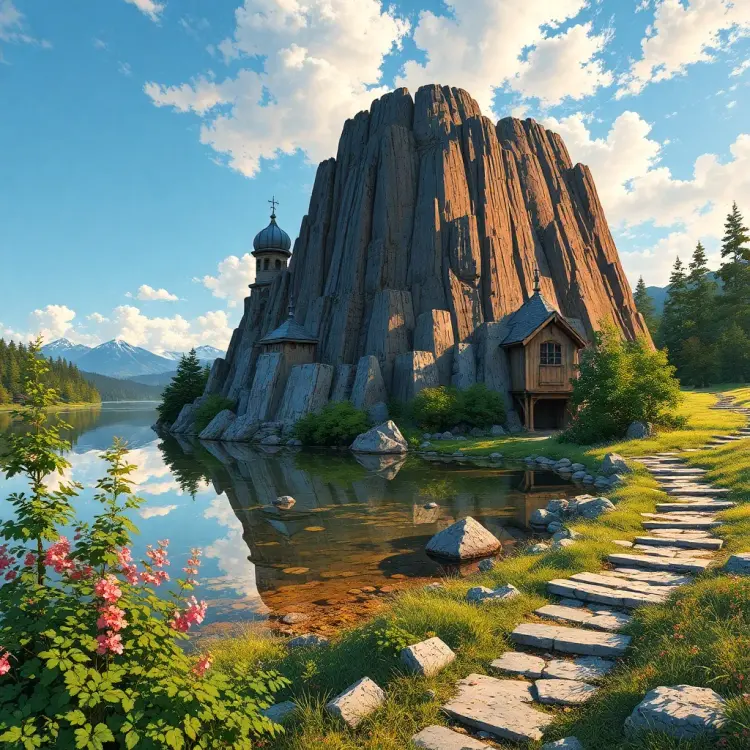
GHIBSKY style, the most beautiful place in the universe
8.8s
उदाहरण देखें
r3dcma, 35mm movie still;

::Ethereal misty fjord:: Towering cliffs, ::mirror-like water::, ancient longship emerging from fog, ::waterfall cascading:: into crystalline pool, ::Nordic runes:: carved into rock face, ::aurora borealis:: painting the sky, ::floating lanterns::, mystical stone archway, ::twilight ambiance::, epic scale, ::Terrence Malick-inspired::, anamorphic lens flare

In the style of r3dcma.
r3dcma, 35mm movie still; ::Ethereal misty fjord:: Towering cliffs, ::mirror-like water::, ancient longship emerging from fog, ::waterfall cascading:: into crystalline pool, ::Nordic runes:: carved into rock face, ::aurora borealis:: painting the sky, ::floating lanterns::, mystical stone archway, ::twilight ambiance::, epic scale, ::Terrence Malick-inspired::, anamorphic lens flare In the style of r3dcma.
2.2s
उदाहरण देखें
a closeup BLKLGHT portrait photo of a cyberpunk
0.6s
उदाहरण देखें

श्रेणी बदलें

इफेक्ट्स

टेक्स्ट से इमेज

टेक्स्ट से इमेज

टेक्स्ट से वीडियो

बड़े भाषा मॉडल

बड़े भाषा मॉडल

टेक्स्ट से स्पीच

टेक्स्ट से स्पीच

सुपर रेजोल्यूशन

सुपर रेजोल्यूशन

लिपसिंक

AI संगीत निर्माण

AI संगीत निर्माण

वीडियो संपादन

स्पीच से टेक्स्ट

स्पीच से टेक्स्ट

AI वीडियो एन्हांस

बैकग्राउंड हटाएँ

बैकग्राउंड हटाएँ