• Picasso IA लोगो
    Logo Picasso IA
  • होम
  • AI इमेज
    Nano Banana 2
  • AI वीडियो
    Veo 3.1 Fast
  • AI चैट
    Gemini 3 Pro
  • इमेज एडिट करें
  • इमेज सुधारें
  • बैकग्राउंड हटाएं
  • टेक्स्ट टू स्पीच
  • इफ़ेक्ट्स
    NEW
  • पीढ़ियाँ
  • बिलिंग
  • सहायता
  • खाता
  1. संग्रह
  2. टेक्स्ट टू इमेज
  3. Hunyuan Image 2.1

Hunyuan Image 2.1 के साथ टेक्स्ट से 2K इमेजें जनरेट करें

Hunyuan Image 2.1 लिखित विवरणों को उच्च-रेज़ोल्यूशन 2K इमेजों में बदलता है जिन्हें आप तुरंत उपयोग कर सकते हैं। चाहे आप एक मार्केटर हों जो अभियान बना रहे हैं, एक डिज़ाइनर हों जो किसी कॉन्सेप्ट का प्रोटोटाइप तैयार कर रहे हैं, या एक कंटेंट क्रिएटर हों जिसे जल्दी से एक ताज़ा विज़ुअल चाहिए, यह मॉडल आपको एक टेक्स्ट प्रॉम्प्ट से कुछ ही सेकंड में तैयार इमेज देता है। कोई आर्ट स्किल नहीं, कोई सॉफ़्टवेयर नहीं, कोई इंतज़ार नहीं। यह मॉडल सात आस्पेक्ट रेशियो सपोर्ट करता है, 1:1 स्क्वायर से लेकर 16:9 वाइडस्क्रीन और 9:16 पोर्ट्रेट तक, ताकि आपका आउटपुट बिना बाद में क्रॉप किए ठीक उसी कैनवास में फिट हो जाए जिसकी आपको ज़रूरत है। आप WebP, JPG, या PNG में एक्सपोर्ट कर सकते हैं और पिक्सेल-परफेक्ट परिणामों के लिए आउटपुट गुणवत्ता को 100 तक नियंत्रित कर सकते हैं। एक अंतर्निहित सीड सेटिंग का मतलब है कि आप किसी विशिष्ट परिणाम को फिर से बना सकते हैं या उस पर भरोसे के साथ आगे काम कर सकते हैं। इसे अपनी क्रिएटिव वर्कफ़्लो में आइडिएशन और प्रोडक्शन के बीच शामिल करें। एक प्रॉम्प्ट लिखें, अपना फ़ॉर्मेट चुनें, और मॉकअप, सोशल मीडिया, प्रेज़ेंटेशन, या प्रिंट के लिए तैयार एक 2K इमेज डाउनलोड करें। अगर पहली परिणाम बिल्कुल सही न हो, तो प्रॉम्प्ट समायोजित करें और कुछ ही सेकंड में फिर से जनरेट करें।

आधिकारिक

Tencent

18k रन

Hunyuan Image 2.1

2025-09-11

व्यावसायिक उपयोग

Hunyuan Image 2.1 के साथ टेक्स्ट से 2K इमेजें जनरेट करें

विषय-सूची

  • अवलोकन
  • यह कैसे काम करता है
  • अक्सर पूछे जाने वाले प्रश्न
  • क्रेडिट लागत
  • विशेषताएँ
  • उपयोग के मामले
  • उदाहरण
Nano Banana Pro प्राप्त करें

अवलोकन

Hunyuan Image 2.1 एक सादा टेक्स्ट प्रॉम्प्ट लेता है और एक स्पष्ट 2K रेज़ोल्यूशन इमेज लौटाता है। न डिज़ाइन सॉफ़्टवेयर, न रेफरेंस फ़ाइलें, न पहले का अनुभव आवश्यक। यदि आप अपनी इच्छित चीज़ का वर्णन करने वाला एक वाक्य लिख सकते हैं, तो आप कुछ ही सेकंड में एक तैयार विज़ुअल पा सकते हैं। Picasso IA Hunyuan Image 2.1 को सीधे आपके ब्राउज़र में उपलब्ध कराता है, इसलिए विचार और इमेज के बीच की दूरी जितनी कम हो सकती है उतनी कम है। यह उत्पाद मॉकअप से लेकर इलस्ट्रेटेड दृश्यों तक विषयों और शैलियों की एक विस्तृत श्रृंखला को संभालता है, वह भी आपके द्वारा टाइप की जाने वाली सेटिंग्स के अलावा किसी कॉन्फ़िगरेशन के बिना।

यह कैसे काम करता है

  • एक टेक्स्ट प्रॉम्प्ट लिखें जिसमें आप जिस इमेज को चाहते हैं उसका वर्णन हो, और बेहतर परिणामों के लिए विषय, स्थान, प्रकाश, और शैली जैसी जानकारी शामिल करें
  • अपने प्रोजेक्ट के अनुसार उपयुक्त आस्पेक्ट रेशियो चुनें: सोशल पोस्ट के लिए स्क्वायर, बैनरों के लिए वाइडस्क्रीन, मोबाइल लेआउट के लिए पोर्ट्रेट, और बीच में चार और विकल्प
  • अपना आउटपुट फ़ॉर्मेट (WebP, JPG, या PNG) चुनें और यदि फ़ॉर्मेट समर्थन करता है तो गुणवत्ता स्तर सेट करें
  • मॉडल चलाएँ और कुछ ही सेकंड में 2K रेज़ोल्यूशन इमेज प्राप्त करें
  • परिणाम डाउनलोड करें, या अपने प्रॉम्प्ट को समायोजित करें और तब तक फिर से चलाएँ जब तक इमेज आपके मनचाहे रूप से मेल न खा जाए

अक्सर पूछे जाने वाले प्रश्न

क्या इसे उपयोग करने के लिए मुझे प्रोग्रामिंग कौशल या तकनीकी ज्ञान चाहिए? नहीं, बस Picasso IA पर Hunyuan Image 2.1 खोलें, अपनी इच्छित सेटिंग्स समायोजित करें, और जनरेट करें पर क्लिक करें।

क्या इसे आज़माना निःशुल्क है? हाँ, आप Picasso IA पर बिना किसी अग्रिम लागत के मॉडल चला सकते हैं। अपनी योजना में शामिल जनरेशनों की संख्या के बारे में विवरण के लिए प्लेटफ़ॉर्म की क्रेडिट प्रणाली देखें।

परिणाम पाने में कितना समय लगता है? अधिकांश प्रॉम्प्ट कुछ ही सेकंड में एक तैयार 2K इमेज लौटाते हैं। अत्यधिक विस्तृत या जटिल विवरणों में थोड़ा अधिक समय लग सकता है, लेकिन आपको शायद ही कभी एक मिनट से ज़्यादा इंतज़ार करना पड़ता है।

कौन से आउटपुट फ़ॉर्मेट समर्थित हैं? आप अपनी इमेज को WebP, JPG, या PNG के रूप में डाउनलोड कर सकते हैं। WebP और JPG में 0 से 100 तक का गुणवत्ता स्लाइडर होता है ताकि आप फ़ाइल आकार और निष्ठा के बीच संतुलन बना सकें। PNG हमेशा लॉसलेस होता है।

क्या मैं आस्पेक्ट रेशियो नियंत्रित कर सकता हूँ? हाँ। सात अनुपात उपलब्ध हैं: 1:1, 16:9, 9:16, 4:3, 3:4, 3:2, और 2:3। इससे बाद में किसी क्रॉपिंग के बिना अधिकांश सोशल मीडिया फ़ॉर्मेट, प्रेज़ेंटेशन स्लाइड, और प्रिंट लेआउट कवर हो जाते हैं।

मैं वही इमेज दो बार कैसे प्राप्त करूँ? जनरेट करने से पहले एक सीड नंबर दर्ज करें। एक ही सीड और प्रॉम्प्ट का उपयोग करने वाला कोई भी रन वही इमेज बनाता है, जिससे छोटे प्रॉम्प्ट संपादनों की साथ-साथ तुलना करना आसान हो जाता है।

मैं आउटपुट्स का उपयोग कहाँ कर सकता हूँ? इमेज बिना एम्बेडेड वॉटरमार्क के डाउनलोड होती हैं और आपके खाते की उपयोग शर्तों के अधीन, क्लाइंट वर्क, सोशल पोस्ट, वेबसाइटों, या व्यक्तिगत प्रोजेक्ट्स में सीधे उपयोग के लिए तैयार होती हैं.

क्रेडिट लागत

प्रत्येक जेनरेशन 1 क्रेडिट का उपयोग करता है

1 क्रेडिट

या 5 क्रेडिट्स 5 जेनेरेशन के लिए

विशेषताएँ

यह मॉडल आपके लिए क्या कर सकता है

2K रेज़ोल्यूशन आउटपुट

हर जनरेट की गई इमेज 2K गुणवत्ता में दी जाती है ताकि तीखे, प्रिंट-तैयार परिणाम मिलें।

सात आस्पेक्ट रेशियो

अपने सटीक कैनवास आकार से मेल खाने के लिए 1:1, 16:9, 9:16, 4:3, 3:4, 3:2, या 2:3 में से चुनें।

तीन आउटपुट फ़ॉर्मेट

अपने प्रोजेक्ट की आवश्यकताओं के अनुसार अपनी इमेज को WebP, JPG, या PNG के रूप में डाउनलोड करें।

समायोज्य गुणवत्ता सेटिंग

फ़ाइल आकार और दृश्य निष्ठा के बीच संतुलन के लिए आउटपुट गुणवत्ता को 0 से 100 तक सेट करें।

पुनरुत्पादनीय जनरेशन

वही इमेज फिर से पाने के लिए सीड वैल्यू सेट करें या एक निश्चित शुरुआती बिंदु से आगे बढ़ें।

तेज़ प्रोसेसिंग मोड

आउटपुट बदले बिना जनरेशन समय कम करने के लिए गति-ऑप्टिमाइज़्ड सेटिंग सक्षम करें।

कोडिंग की आवश्यकता नहीं

एक प्रॉम्प्ट टाइप करें, अपनी सेटिंग्स चुनें, और सीधे ब्राउज़र से अपनी इमेज डाउनलोड करें।

उपयोग के मामले

एक टेक्स्ट विवरण से उत्पाद की लाइफस्टाइल इमेज जनरेट करें, जो ई-कॉमर्स लिस्टिंग में सीधे जोड़ने के लिए तैयार हो

दृश्य, कलर पैलेट, और मूड का वर्णन करके एक सोशल मीडिया पोस्ट के लिए कस्टम बैकग्राउंड बनाएं

यह टाइप करके कि अंतिम दृश्य कैसा दिखना चाहिए, एक पिच डेक के लिए कॉन्सेप्ट इलस्ट्रेशन तैयार करें

एक ही वर्णनात्मक वाक्य से Instagram स्टोरी के लिए 9:16 पोर्ट्रेट इमेज जनरेट करें

कई प्रॉम्प्ट वैरिएशन को लगातार चलाकर एक ब्लॉग लेख के हेडर के लिए कई विज़ुअल विकल्प तैयार करें

एक लिखित आर्ट डायरेक्शन ब्रीफ़ को एक डिज़ाइन टीम के काम करने के लिए 2K रेफरेंस इमेज में बदलें

साधारण टेक्स्ट में रचना का वर्णन करके एक वीडियो थंबनेल के लिए वाइडस्क्रीन 16:9 दृश्य बनाएं

उदाहरण

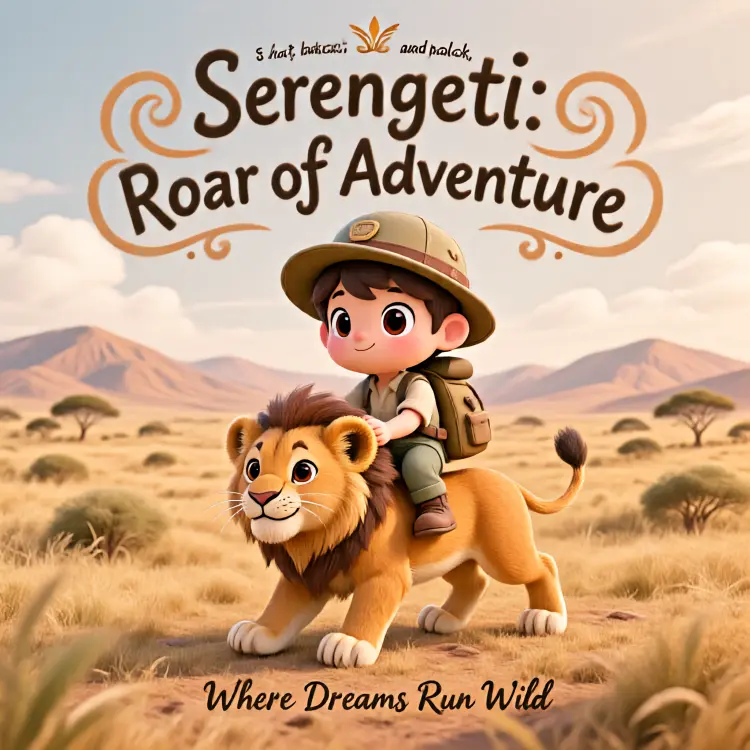
A wildlife poster design for the Serengeti plains features a central illustration of a chibi-style explorer riding a lion cub, set against a backdrop of rolling hills. At the top of the composition, the title "Serengeti: Roar of Adventure" is displayed in a large, whimsical font with decorative, swirling letters. The main scene depicts a wide-eyed chibi explorer, characterized by a large head and a small body, sitting atop a friendly lion cub. The explorer wears a green explorer's hat, a backpack, and holds onto the cub's mane, looking forward with a look of wonder. The lion cub, with a light brown mane and a smiling expression, strides forward, its body rendered in warm orange tones. In the background, the Serengeti plains are illustrated with rolling hills and savanna grass, all in shades of warm yellow and soft brown. Below the main illustration, the tagline "Where Dreams Run Wild" is written in a smaller, elegant script. The overall presentation is that of a poster design, combining a cute chibi illustration style with playful, whimsical typography.
3.1s
उदाहरण देखें
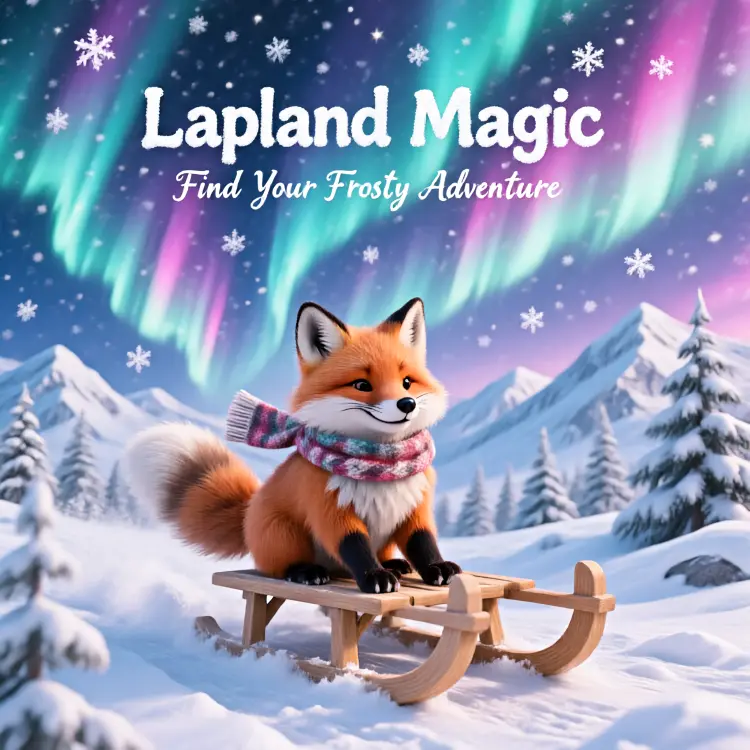
A vibrant winter wonderland poster for Lapland is presented, featuring a central illustration of a fluffy fox sledding down a snowy hill beneath an aurora borealis sky. In the foreground, a small, fluffy fox with bright orange fur is depicted joyfully riding a simple wooden sled. The fox wears a cozy, patterned scarf around its neck, and its tail curls happily as it glides over the snow. The background is dominated by a spectacular aurora borealis, with swirling curtains of light in shades of icy cyan and pink dancing across the night sky, interspersed with sparkling white snowflakes. Snow-covered mountains and pine trees are visible beneath the aurora. At the top of the poster, the text "Lapland Magic" is displayed in a large, playful font that resembles snowflakes. A smaller tagline, "Find Your Frosty Adventure," is written in an elegant script below the main title. The overall color palette consists of of icy cyan, pink, and sparkling white, creating a magical and inviting atmosphere. The presentation is that of a graphic design poster, combining illustration and typography.
3.1s
उदाहरण देखें
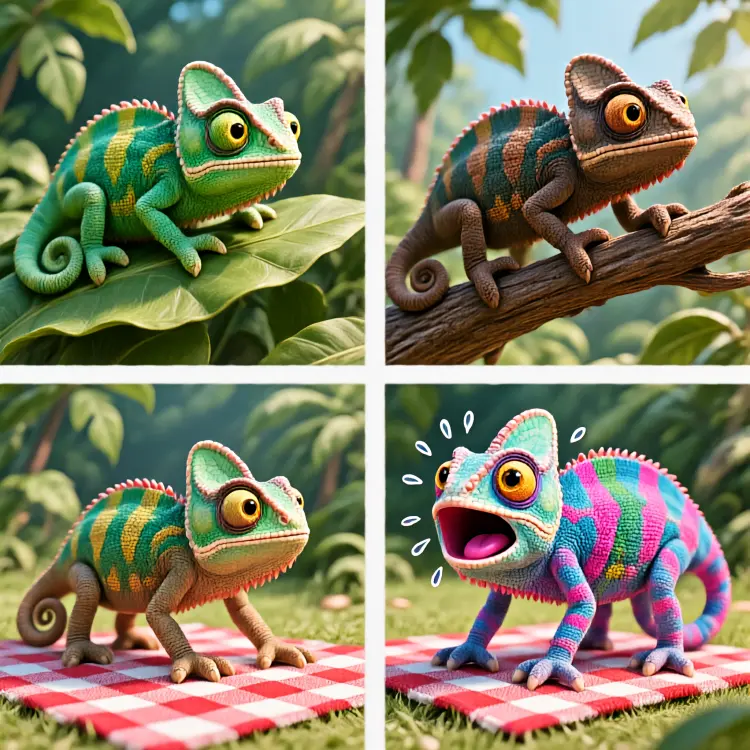
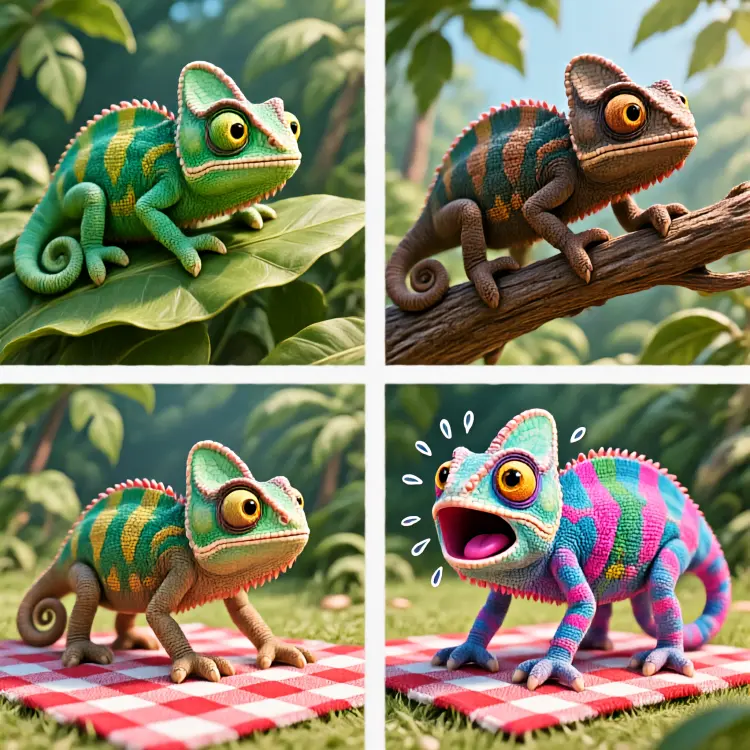
A cartoon consisting of four panels, arranged in a 2x2 grid, depicts a chameleon's dilemma. Top left: A cartoon-style chameleon rests on a broad, emerald green leaf. Its skin, the exact same green color, with light green texture details, creates perfect camouflage, almost blending in with the background. The chameleon's large eyes flicker curiously, its body relaxed against a backdrop of blurred green jungle. Top right: The same chameleon climbs from the edge of the leaf onto a rough, dark brown branch. Its body has completely transformed to the same dark brown as the branch, and its skin mimics the texture of bark. Its head is slightly raised, its mouth curled upward, and its eyes reveal a look of pride and satisfaction. Bottom left: The chameleon confidently approaches a picnic blanket spread on the grass. One of its front paws has already stepped onto the blanket, which features a red and white checkered pattern. The chameleon's body, still brown, is about to fully step onto the intricately patterned fabric, its expression filled with anticipation. Bottom right: The chameleon stands perfectly in the center of the red and white checkered picnic blanket. Its color system has malfunctioned, and its body surface rapidly and chaotically flashes through a variety of colors and patterns, including neon pink spots, electric blue stripes, and pixelated blocks, completely failing to match the checkered background. Its eyes are wide open, its mouth gaping in a frightened O shape, and animated lines and beads of sweat appear around its body, indicating panic. The overall image exhibits the clean lines and vibrant colors of a four-panel comic book.
3.2s
उदाहरण देखें

श्रेणी बदलें

इफेक्ट्स

टेक्स्ट से इमेज

टेक्स्ट से इमेज

टेक्स्ट से वीडियो

बड़े भाषा मॉडल

बड़े भाषा मॉडल

टेक्स्ट से स्पीच

टेक्स्ट से स्पीच

सुपर रेजोल्यूशन

सुपर रेजोल्यूशन

लिपसिंक

AI संगीत निर्माण

AI संगीत निर्माण

वीडियो संपादन

स्पीच से टेक्स्ट

स्पीच से टेक्स्ट

AI वीडियो एन्हांस

बैकग्राउंड हटाएँ

बैकग्राउंड हटाएँ