Seedance 2.5 وصل الآن · Nano Banana 2 وGPT Image 2.5 غير محدودة حتى ١٥ نوفمبرترقية
  • شعار Picasso IALogo Picasso IA
  • الرئيسية
  • صورة
  • فيديو
  • موسيقى
  • صوت
  • دردشة
  • ثلاثي الأبعاد
  • مؤثر بالذكاء الاصطناعيNEW
  • AI ToolkitNEW
  • SupercomputerNEW
  • APINEW
  • MCPNEW
  • التوليدات
  • الفواتير
  • الدعم
  • الحساب
انتقل إلى المحتوى
  • استكشاف
  • صورة
  • فيديو
  • دردشة
  • غير محدودة
  • تحرير الفيديو
  • مزامنة الشفاه
  • تحسين
  • موسيقى
  • صوت
  • تفريغ صوتي
  • ثلاثي الأبعاد
  • ترقية الدقة
  • إزالة الخلفية
ابدأ مجانًاابدأ مجانًا الآنجديدإنشاءابدأ الإنشاءالأسعارالأسعار80% OFF
Crea GratisStart Freeابدأ مجانًاCrie GrátisEssai Gratuitमुफ़्त शुरूEmpieza Gratis YaStart Free Nowابدأ مجانًا الآنComece Grátis JáCommencer Gratuitementअभी मुफ़्त शुरू करेंNuevoNewجديدNovoNouveauनयाCrearCreateإنشاءCriarCréerबनाएंEmpieza a CrearStart Creatingابدأ الإنشاءComece a CriarCommencer à Créerबनाना शुरू करेंPreciosPricingالأسعارPreçosTarifsमूल्यPreciosPricingالأسعارPreçosTarifsमूल्य80% OFF
  • ExplorarExploreاستكشافExplorarExplorerएक्सप्लोर
  • Inicio RápidoQuickstartالبدء السريعInício RápidoDémarrage Rapideत्वरित शुरुआत
  • DocumentaciónDocsالوثائقDocumentaçãoDocumentationडॉक्स
  • PreciosPricingالأسعارPreçosTarifsकीमत
  • Claves de APIAPI Keysمفاتيح APIChaves de APIClés APIAPI कुंजियाँ
  • MCPMCPخادم MCPMCPMCPMCP
  1. ExplorarExploreاستكشافExplorarExplorerएक्सप्लोर
  2. VídeoVideoالفيديوVídeoVidéoवीडियो
  3. Seedance 2.5 LiteSeedance 2.5 LiteSeedance 2.5 LiteSeedance 2.5 LiteSeedance 2.5 LiteSeedance 2.5 Lite
  4. Referencia de la APIAPI Referenceمرجع APIReferência da APIRéférence de l'APIAPI संदर्भ
IlimitadoUnlimitedغير محدودIlimitadoIllimitéअसीमितVídeoVideoالفيديوVídeoVidéoवीडियो
$0$0$0$0$0$0
/ ejecución/ run/ تشغيل/ execução/ requête/ रन
desde ~$0.2205/s en otras APIsfrom ~$0.2205/s elsewhereابتداءً من ⁦~$0.2205⁩/ثانية لدى الآخرينa partir de ~$0.2205/s em outros provedoresà partir de ~$0.2205/s ailleursदूसरी जगह ~$0.2205/⁠सेकंड से शुरू
Referencia de la API de Seedance 2.5 LiteSeedance 2.5 Lite API Referenceمرجع واجهة Seedance 2.5 Lite APIReferência da API do Seedance 2.5 LiteRéférence de l'API Seedance 2.5 LiteSeedance 2.5 Lite API संदर्भ
Texto a VídeoText to Videoتحويل النص إلى فيديوTexto para VídeoTexte vers Vidéoटेक्स्ट से वीडियो
Texto e imagen a vídeo con audio, clips de 5, 10 o 15 segundos y salida en 480p o 720p.Text and image to video with audio, clips of 5, 10 or 15 seconds and 480p or 720p output.تحويل النص والصورة إلى فيديو مع الصوت ومقاطع مدتها 5 أو 10 أو 15 ثانية ودقة 480p أو 720p.Texto e imagem para vídeo com áudio, clipes de 5, 10 ou 15 segundos e saída em 480p ou 720p.Texte et image vers vidéo avec audio, des clips de 5, 10 ou 15 secondes et une sortie en 480p ou 720p.टेक्स्ट और इमेज से वीडियो: ऑडियो, 5, 10 या 15 सेकंड की क्लिप और 480p या 720p आउटपुट।
Copiar Prompt para AgenteCopy Agent Promptنسخ موجّه الوكيلCopiar Prompt para AgenteCopier le Prompt pour l'Agentएजेंट प्रॉम्प्ट कॉपी करें
Ver DocumentaciónView Docsعرض الوثائقVer DocumentaçãoVoir la Documentationडॉक्स देखें
cURLcURLcURLcURLcURLcURL
Copiar para AgenteCopy for Agentنسخ للوكيلCopiar para AgenteCopier pour l'Agentएजेंट के लिए कॉपी करें
PlaygroundPlaygroundمساحة التجربةPlaygroundPlaygroundप्लेग्राउंड
APIAPIواجهة APIAPIAPIAPI
En Esta PáginaOn This Pageفي هذه الصفحةNesta PáginaSur cette Pageइस पेज पर
Cómo Llamar a la APICalling the APIاستدعاء APIComo Chamar a APIAppeler l'APIAPI को कॉल करना
En Esta PáginaOn This Pageفي هذه الصفحةNesta PáginaSur cette Pageइस पेज पर
cURLcURLcURLcURLcURLcURL
  • Cómo Llamar a la APICalling the APIاستدعاء APIComo Chamar a APIAppeler l'APIAPI को कॉल करना
  • ConfiguraciónSetupالإعدادConfiguraçãoConfigurationसेटअप
  • Parámetros de la PeticiónRequest Parametersمعاملات الطلبParâmetros da RequisiçãoParamètres de la Requêteरिक्वेस्ट पैरामीटर
  • ModosModesالأوضاعModosModesमोड
  • Petición de EjemploExample Requestمثال على الطلبRequisição de ExemploExemple de Requêteउदाहरण रिक्वेस्ट
  • AutenticaciónAuthenticationالمصادقةAutenticaçãoAuthentificationप्रमाणीकरण
  • Cola y SondeoQueue and Pollingقائمة الانتظار والاستعلام الدوريFila e Consulta PeriódicaFile d'Attente et Interrogationकतार और पोलिंग
  • EnvíoSubmitالإرسالEnviarEnvoiभेजना
  • SondeoPollالاستعلامConsultarInterrogationपोल करना
  • ResultadoResultالنتيجةResultadoRésultatनतीजा
  • CancelaciónCancelالإلغاءCancelarAnnulationरद्द करना
  • SalidaOutputالمخرجاتSaídaSortieआउटपुट
  • Errores y LímitesErrors and Limitsالأخطاء والحدودErros e LimitesErreurs et Limitesत्रुटियाँ और सीमाएँ
  • PreciosPricingالأسعارPreçosTarifsकीमत
  • JSON SchemaJSON Schemaمخطط JSON SchemaJSON SchemaJSON SchemaJSON Schema

Seedance 2.5 Lite usa el ID de modelo picassoia/seedance-2.5-lite. Texto e imagen a vídeo con audio, clips de 5, 10 o 15 segundos y salida en 480p o 720p.

Cómo Llamar a la API

Envía las peticiones a https://api.picassoia.com/v1/models/picassoia/seedance-2.5-lite/predictions con un cuerpo JSON cuyo input coincida con los parámetros de abajo.

Configuración

Guarda tu API key en tu servidor, en una variable de entorno, y envíala en la cabecera Authorization de cada petición.

Shell
1export PICASSOIA_API_KEY="pia_sk_…"

Seedance 2.5 Lite uses the model ID picassoia/seedance-2.5-lite. Text and image to video with audio, clips of 5, 10 or 15 seconds and 480p or 720p output.

Calling the API

Send requests to https://api.picassoia.com/v1/models/picassoia/seedance-2.5-lite/predictions with a JSON body whose input matches the parameters below.

Setup

Keep your API key on your server, in an environment variable, and send it in the Authorization header of every request.

Shell
1export PICASSOIA_API_KEY="pia_sk_…"

يستخدم Seedance 2.5 Lite معرّف النموذج picassoia/seedance-2.5-lite. تحويل النص والصورة إلى فيديو مع الصوت ومقاطع مدتها 5 أو 10 أو 15 ثانية ودقة 480p أو 720p.

استدعاء API

أرسل الطلبات إلى https://api.picassoia.com/v1/models/picassoia/seedance-2.5-lite/predictions بجسم JSON يتوافق فيه الكائن input مع المعاملات أدناه.

الإعداد

احتفظ بمفتاح API على خادمك، في متغير بيئة، وأرسله في ترويسة Authorization مع كل طلب.

Shell
1export PICASSOIA_API_KEY="pia_sk_…"

O Seedance 2.5 Lite usa o ID de modelo picassoia/seedance-2.5-lite. Texto e imagem para vídeo com áudio, clipes de 5, 10 ou 15 segundos e saída em 480p ou 720p.

Como Chamar a API

Envie requisições para https://api.picassoia.com/v1/models/picassoia/seedance-2.5-lite/predictions com um corpo JSON cujo input siga os parâmetros abaixo.

Configuração

Guarde sua API key no seu servidor, em uma variável de ambiente, e envie-a no cabeçalho Authorization de cada requisição.

Shell
1export PICASSOIA_API_KEY="pia_sk_…"

Seedance 2.5 Lite utilise l'identifiant de modèle picassoia/seedance-2.5-lite. Texte et image vers vidéo avec audio, des clips de 5, 10 ou 15 secondes et une sortie en 480p ou 720p.

Appeler l'API

Envoyez vos requêtes à https://api.picassoia.com/v1/models/picassoia/seedance-2.5-lite/predictions avec un corps JSON dont l'objet input correspond aux paramètres ci-dessous.

Configuration

Gardez votre API key sur votre serveur, dans une variable d'environnement, et envoyez-la dans l'en-tête Authorization de chaque requête.

Shell
1export PICASSOIA_API_KEY="pia_sk_…"

Seedance 2.5 Lite का मॉडल ID picassoia/seedance-2.5-lite है। टेक्स्ट और इमेज से वीडियो: ऑडियो, 5, 10 या 15 सेकंड की क्लिप और 480p या 720p आउटपुट।

API को कॉल करना

https://api.picassoia.com/v1/models/picassoia/seedance-2.5-lite/predictions पर ऐसी JSON बॉडी के साथ रिक्वेस्ट भेजें जिसका input नीचे दिए गए पैरामीटर से मेल खाता हो।

सेटअप

अपनी API key अपने सर्वर पर किसी एनवायरनमेंट वेरिएबल में रखें, और उसे हर रिक्वेस्ट के Authorization हेडर में भेजें।

Shell
1export PICASSOIA_API_KEY="pia_sk_…"
  • الرئيسية
  • مجموعة الأدوات
  • المكتبة
  • الحساب
ابدأ مجانًاابدأ مجانًا الآنجديدإنشاءابدأ الإنشاءالأسعارالأسعار80% OFF
  • استكشاف
  • البدء السريع
  • الوثائق
  • الأسعار
  • مفاتيح API
  • خادم MCP
  1. استكشاف
  2. الصور
  3. PicassoIA Image
  4. مرجع API
غير محدودالصورالتكلفة ⁦$0⁩ لكل طلب مع خطة Infinite؛ ويتقاضى مزوّدون آخرون ⁦$0.02⁩/ميغابكسل مقابل نموذج مماثل، بتاريخ ١ أكتوبر ٢٠٢٦$0/ تشغيل⁦$0.02⁩/ميغابكسل لدى الآخرين

مرجع واجهة PicassoIA Image API

تحويل النص إلى صورة

تحويل النص إلى صورة مع صورة أو صورتين لكل طلب و7 نسب أبعاد.

عرض الوثائق
1
2
3
4curl -s -X POST https://api.picassoia.com/v1/models/picassoia/picassoia-image/predictions \
  -H "Authorization: Bearer $PICASSOIA_API_KEY" \
  -H "Content-Type: application/json" \
  -d '{"input":{"prompt":"A giant translucent jellyfish drifts between the white trunks of a birch forest at dusk, its glowing bell as wide as a car and its long ribbon tentacles trailing just above the ferns. Blue twilight mixes with the jellyfish'\''s soft violet glow, which lights the bark and the low mist on the ground. Wide shot on a 35mm lens with the jellyfish in the left half of the frame and an open path between the trees to the right, quiet and dreamlike, photorealistic.","aspect_ratio":"16:9"}}'
مساحة التجربةواجهة API

في هذه الصفحة

  • 1.استدعاء API
  • الإعداد
  • معاملات الطلب
  • الأوضاع
  • مثال على الطلب
  • 2.المصادقة
  • 3.قائمة الانتظار والاستعلام الدوري
  • الإرسال
  • الاستعلام
  • النتيجة
  • الإلغاء
  • 4.المخرجات
  • 5.الأخطاء والحدود
  • 6.الأسعار
  • 7.مخطط JSON Schema

يستخدم PicassoIA Image معرّف النموذج picassoia/picassoia-image. تحويل النص إلى صورة مع صورة أو صورتين لكل طلب و7 نسب أبعاد.

استدعاء API

أرسل الطلبات إلى https://api.picassoia.com/v1/models/picassoia/picassoia-image/predictions بجسم JSON يتوافق فيه الكائن input مع المعاملات أدناه.

الإعداد

احتفظ بمفتاح API على خادمك، في متغير بيئة، وأرسله في ترويسة Authorization مع كل طلب.

Shell
1export PICASSOIA_API_KEY="pia_sk_…"

معاملات الطلب

promptstringمطلوب
القيمة الافتراضيةلا يوجد
ما ينبغي أن تُظهره المخرجات. عدد الأحرف: حتى 4000.
aspect_ratiostring
القيمة الافتراضية"1:1"
شكل المخرجات. وحيث يتوفر الخيار match_input_image، فإنه يحافظ على نِسب أبعاد الصورة المدخلة، أو الصورة الأولى عند وجود عدة صور. الخيارات: 1:1 و16:9 و9:16 و4:3 و3:4 و3:2 و2:3.
num_outputsinteger
القيمة الافتراضية1
عدد النتائج المطلوب إنشاؤها. من ⁦1⁩ إلى ⁦2⁩.
output_formatstring
القيمة الافتراضية"jpg"
صيغة ملف النتيجة. الخيارات: webp وjpg وpng.
output_qualityinteger
القيمة الافتراضية80
جودة الضغط، لصيغتَي JPG وWebP. من ⁦0⁩ إلى ⁦100⁩.
seedinteger
القيمة الافتراضيةلا يوجد
اضبطها لإعادة إنتاج نتيجة ما، أو احذفها لتكون عشوائية.
المعاملالنوعمطلوبالقيمة الافتراضيةالوصف
promptstringنعممطلوبلا يوجدما ينبغي أن تُظهره المخرجات. عدد الأحرف: حتى 4000.
aspect_ratiostringلا"1:1"شكل المخرجات. وحيث يتوفر الخيار match_input_image، فإنه يحافظ على نِسب أبعاد الصورة المدخلة، أو الصورة الأولى عند وجود عدة صور. الخيارات: 1:1 و16:9 و9:16 و4:3 و3:4 و3:2 و2:3.
num_outputsintegerلا1عدد النتائج المطلوب إنشاؤها. من ⁦1⁩ إلى ⁦2⁩.
output_formatstringلا"jpg"صيغة ملف النتيجة. الخيارات: webp وjpg وpng.
output_qualityintegerلا80جودة الضغط، لصيغتَي JPG وWebP. من ⁦0⁩ إلى ⁦100⁩.
seedintegerلالا يوجداضبطها لإعادة إنتاج نتيجة ما، أو احذفها لتكون عشوائية.

الأوضاع

يتحدد الوضع بالملفات التي ترسلها مع الموجّه، إن وُجدت. وتستخدم جميع الأوضاع نقطة النهاية نفسها.

الأوضاعالملفات
تحويل النص إلى صورةالموجّه فقط

مثال على الطلب

تحويل النص إلى صورة

cURL
1
2
3
4curl -s -X POST https://api.picassoia.com/v1/models/picassoia/picassoia-image/predictions \
  -H "Authorization: Bearer $PICASSOIA_API_KEY" \
  -H "Content-Type: application/json" \
  -d '{"input":{"prompt":"a lighthouse at sunset, oil painting"}}'
Node.js
1
2
3
4
5
6
7
8
9
10
11
12
13
14
15
16
17
18
19
20
21
22
23
24
25const API = 'https://api.picassoia.com/v1'
const headers = {
  Authorization: `Bearer ${process.env.PICASSOIA_API_KEY}`,
  'Content-Type': 'application/json',
}
const sleep = (s) => new Promise((resolve) => setTimeout(resolve, s * 1000))

const input = {
  prompt: "a lighthouse at sunset, oil painting"
}

const created = await fetch(`${API}/models/picassoia/picassoia-image/predictions`, {
  method: 'POST',
  headers,
  body: JSON.stringify({ input }),
})
let prediction = await created.json()
if (!created.ok) throw new Error(`${prediction.code}: ${prediction.detail}`)

while (!['succeeded', 'failed', 'canceled'].includes(prediction.status)) {
  await sleep(prediction.eta?.next_poll_in_seconds ?? 2)
  prediction = await (await fetch(prediction.urls.get, { headers })).json()
}
if (prediction.status !== 'succeeded') throw new Error(prediction.error ?? prediction.status)
console.log(prediction.output)
Python
1
2
3
4
5
6
7
8
9
10
11
12
13
14
15
16
17
18
19import os, time, requests

API = "https://api.picassoia.com/v1"
HEADERS = {"Authorization": f"Bearer {os.environ['PICASSOIA_API_KEY']}"}

payload = {"input": {
    "prompt": "a lighthouse at sunset, oil painting",
}}

response = requests.post(f"{API}/models/picassoia/picassoia-image/predictions", json=payload, headers=HEADERS)
prediction = response.json()
if not response.ok:
    raise RuntimeError(f"{prediction['code']}: {prediction['detail']}")
while prediction["status"] not in ("succeeded", "failed", "canceled"):
    time.sleep((prediction.get("eta") or {}).get("next_poll_in_seconds", 2))
    prediction = requests.get(prediction["urls"]["get"], headers=HEADERS).json()
if prediction["status"] != "succeeded":
    raise RuntimeError(prediction["error"] or prediction["status"])
print(prediction["output"])

المصادقة

يحتاج كل طلب إلى مفتاح API في ترويسة Authorization، كرمز Bearer. أنشئ المفاتيح من حسابك؛ يُعرض المفتاح كاملًا مرة واحدة.

HTTP
1Authorization: Bearer $PICASSOIA_API_KEY

إدارة مفاتيح API

قائمة الانتظار والاستعلام الدوري

يمر كل تنبؤ بثلاث خطوات: أنشئه، ثم استعلم عنه دوريًا حتى ينتهي، ثم اقرأ النتيجة.

الإرسال

تستجيب الواجهة بالرمز 201، عادةً في غضون ثوانٍ، بالتنبؤ في الحالة starting، مع تقدير للوقت في eta والعنوان الذي تستعلم عنه في urls.get. وإذا فشل التنبؤ على الفور، كأن يرفض مرشّح الأمان المدخلات، تظل الاستجابة 201، مع التنبؤ في الحالة failed والخطأ الخاص به.

cURL
1
2
3
4curl -s -X POST https://api.picassoia.com/v1/models/picassoia/picassoia-image/predictions \
  -H "Authorization: Bearer $PICASSOIA_API_KEY" \
  -H "Content-Type: application/json" \
  -d '{"input":{"prompt":"a lighthouse at sunset, oil painting"}}'
Node.js
1
2
3
4
5
6
7
8
9
10
11
12
13
14
15
16
17const API = 'https://api.picassoia.com/v1'
const headers = {
  Authorization: `Bearer ${process.env.PICASSOIA_API_KEY}`,
  'Content-Type': 'application/json',
}

const input = {
  prompt: "a lighthouse at sunset, oil painting"
}
const created = await fetch(`${API}/models/picassoia/picassoia-image/predictions`, {
  method: 'POST',
  headers,
  body: JSON.stringify({ input }),
})
let prediction = await created.json()
if (!created.ok) throw new Error(`${prediction.code}: ${prediction.detail}`)
console.log(prediction.id, prediction.status) // api_…, starting
Python
1
2
3
4
5
6
7
8
9
10
11
12
13import os, requests

API = "https://api.picassoia.com/v1"
HEADERS = {"Authorization": f"Bearer {os.environ['PICASSOIA_API_KEY']}"}

payload = {"input": {
    "prompt": "a lighthouse at sunset, oil painting",
}}
response = requests.post(f"{API}/models/picassoia/picassoia-image/predictions", json=payload, headers=HEADERS)
prediction = response.json()
if not response.ok:
    raise RuntimeError(f"{prediction['code']}: {prediction['detail']}")
print(prediction["id"], prediction["status"])  # api_…, starting
الاستجابة · 201 Created
1
2
3
4
5
6
7
8
9
10
11
12
13
14
15
16
17
18
19
20
21
22
23
24
25
26
27
28{
  "id": "api_3f9c2b7e8d1a4c6f9e0b1a2c3d4e5f60",
  "model": "picassoia/picassoia-image",
  "input": {
    "prompt": "a lighthouse at sunset, oil painting",
    "aspect_ratio": "1:1",
    "num_outputs": 1,
    "output_format": "jpg",
    "output_quality": 80
  },
  "output": null,
  "error": null,
  "status": "starting",
  "created_at": "2026-10-01T09:30:00.000Z",
  "started_at": null,
  "completed_at": null,
  "metrics": {
    "predict_time": null
  },
  "urls": {
    "get": "https://api.picassoia.com/v1/predictions/api_3f9c2b7e8d1a4c6f9e0b1a2c3d4e5f60",
    "cancel": "https://api.picassoia.com/v1/predictions/api_3f9c2b7e8d1a4c6f9e0b1a2c3d4e5f60/cancel"
  },
  "eta": {
    "seconds": 12,
    "next_poll_in_seconds": 6
  }
}

الاستعلام

استعلم عن urls.get مجددًا بعد eta.next_poll_in_seconds: عند منتصف الوقت المقدَّر، ثم عند بلوغه، ثم كل ثانيتين.

cURL
1
2
3
4# Repeat after eta.next_poll_in_seconds until status is
# succeeded, failed or canceled.
curl -s https://api.picassoia.com/v1/predictions/api_3f9c2b7e8d1a4c6f9e0b1a2c3d4e5f60 \
  -H "Authorization: Bearer $PICASSOIA_API_KEY"
Node.js
1
2
3
4
5
6const sleep = (s) => new Promise((resolve) => setTimeout(resolve, s * 1000))

while (!['succeeded', 'failed', 'canceled'].includes(prediction.status)) {
  await sleep(prediction.eta?.next_poll_in_seconds ?? 2)
  prediction = await (await fetch(prediction.urls.get, { headers })).json()
}
Python
1
2
3
4
5import time

while prediction["status"] not in ("succeeded", "failed", "canceled"):
    time.sleep((prediction.get("eta") or {}).get("next_poll_in_seconds", 2))
    prediction = requests.get(prediction["urls"]["get"], headers=HEADERS).json()
الاستجابة · 200 OK · قيد التنفيذ
1
2
3
4
5
6
7
8
9{
  "id": "api_3f9c2b7e8d1a4c6f9e0b1a2c3d4e5f60",
  "status": "processing",
  "output": null,
  "eta": {
    "seconds": 6,
    "next_poll_in_seconds": 6
  }
}

النتيجة

عندما تكون قيمة status هي succeeded، يحتوي output على النتيجة. ويحمل التنبؤ الفاشل سببه في error، أما التنبؤ المُلغى فقد أُوقف قبل أن ينتهي. وهذه الحالات الثلاث نهائية.

cURL
1
2
3
4# The last poll holds the result: "output" when "status" is succeeded,
# "error" when it is failed. With jq, just those three fields:
curl -s https://api.picassoia.com/v1/predictions/api_3f9c2b7e8d1a4c6f9e0b1a2c3d4e5f60 \
  -H "Authorization: Bearer $PICASSOIA_API_KEY" | jq '.status, .output, .error'
Node.js
1
2if (prediction.status !== 'succeeded') throw new Error(prediction.error ?? prediction.status)
console.log(prediction.output)
Python
1
2
3if prediction["status"] != "succeeded":
    raise RuntimeError(prediction["error"] or prediction["status"])
print(prediction["output"])
الاستجابة · 200 OK · مكتمل
1
2
3
4
5
6
7
8
9
10
11
12
13{
  "id": "api_3f9c2b7e8d1a4c6f9e0b1a2c3d4e5f60",
  "status": "succeeded",
  "output": [
    "https://…/output-1.jpg"
  ],
  "error": null,
  "completed_at": "2026-10-01T09:30:08.000Z",
  "metrics": {
    "predict_time": 6.4
  },
  "eta": null
}

الإلغاء

يوقف الطلب POST urls.cancel أي تنبؤ لا يزال في قائمة الانتظار (لأي نموذج) أو أي صورة لا تزال قيد التوليد؛ أما الفيديو الذي بدأ توليده بالفعل فتكون الاستجابة له 409 not_cancelable.

المعرّفات والأوقات وعناوين URL في هذه الاستجابات مجرد أمثلة: ستحمل استجاباتك قيمها الخاصة.

المخرجات

عندما ينجح التنبؤ، تكون قيمة output قائمة بعنوان URL واحد أو عنوانين للصور.

مخرجات حقيقية
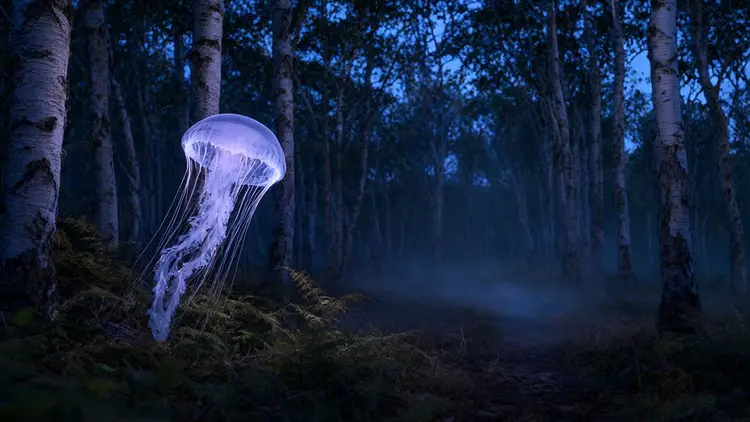
  • PicassoIA Image
  • PicassoIA Image
  • PicassoIA Image
  • PicassoIA Image
  • PicassoIA Image
  • PicassoIA Image

الأخطاء والحدود

الأخطاء عبارة عن تفاصيل مشكلات (problem details) بصيغة JSON مع code ثابت، والاستجابة 422 تذكر كل حقل به خطأ.

الحدود

  • التنبؤات في قائمة الانتظار أو قيد التشغيل في الوقت نفسه: 5 لكل حساب
  • جسم الطلب حتى 10 ميغابايت؛ والصور بصيغة data URL حتى 5 ميغابايت لكل منها
  • عدد أحرف الموجّه: حتى 4000
  • تُرفض الحقول غير المعروفة بالخطأ 422 invalid_input
جميع رموز الأخطاء

الأسعار

التكلفة ⁦$0⁩ لكل طلب مع خطة Infinite نشطة: لا تستهلك تنبؤات API أي أرصدة، أيًّا كانت الإعدادات.

يتقاضى مزوّدون آخرون ⁦$0.02⁩/ميغابكسل مقابل نموذج مماثل (بتاريخ ١ أكتوبر ٢٠٢٦).

أسعار API

مخطط JSON Schema

المخطط نفسه الذي تقدّمه الواجهة عبر GET /v1/models/picassoia/picassoia-image.

JSON Schema
1
2
3
4
5
6
7
8
9
10
11
12
13
14
15
16
17
18
19
20
21
22
23
24
25
26
27
28
29
30
31
32
33
34
35
36
37
38
39
40
41
42
43
44
45
46
47
48
49
50
51
52
53
54
55
56
57
58
59
60
61
62
63
64
65
66
67
68
69
70
71
72
73{
  "input_schema": {
    "$schema": "https://json-schema.org/draft/2020-12/schema",
    "type": "object",
    "properties": {
      "prompt": {
        "type": "string",
        "minLength": 1,
        "maxLength": 4000,
        "description": "What the image should show."
      },
      "aspect_ratio": {
        "default": "1:1",
        "description": "Aspect ratio of the images.",
        "type": "string",
        "enum": [
          "1:1",
          "16:9",
          "9:16",
          "4:3",
          "3:4",
          "3:2",
          "2:3"
        ]
      },
      "num_outputs": {
        "default": 1,
        "description": "How many images to create: 1 or 2.",
        "type": "integer",
        "minimum": 1,
        "maximum": 2
      },
      "output_format": {
        "default": "jpg",
        "description": "File format of the images.",
        "type": "string",
        "enum": [
          "webp",
          "jpg",
          "png"
        ]
      },
      "output_quality": {
        "default": 80,
        "description": "Quality of JPG and WebP images, from 0 to 100.",
        "type": "integer",
        "minimum": 0,
        "maximum": 100
      },
      "seed": {
        "description": "Random seed. Set it to reproduce a result.",
        "type": "integer",
        "minimum": -9007199254740991,
        "maximum": 9007199254740991
      }
    },
    "required": [
      "prompt"
    ],
    "additionalProperties": false
  },
  "output_schema": {
    "$schema": "https://json-schema.org/draft/2020-12/schema",
    "type": "array",
    "items": {
      "type": "string",
      "format": "uri"
    },
    "minItems": 1,
    "maxItems": 2,
    "description": "URLs of the generated images, in the requested output_format."
  }
}