• شعار Picasso IA
    Logo Picasso IA
  • الرئيسية
  • صورة ذكاء اصطناعي
    Nano Banana 2
  • فيديو ذكاء اصطناعي
    Veo 3.1 Fast
  • دردشة ذكاء اصطناعي
    GPT 5
  • تحرير الصور
  • تحسين الصورة
  • إزالة الخلفية
  • تحويل النص إلى كلام
  • التأثيرات
    NEW
  • التوليدات
  • الفواتير
  • الدعم
  • الحساب
  1. مجموعة
  2. تحويل النص إلى صورة
  3. Flux 2 Dev

أرصدةترقية

flux-2-dev: توليد صور عالية الجودة من النص

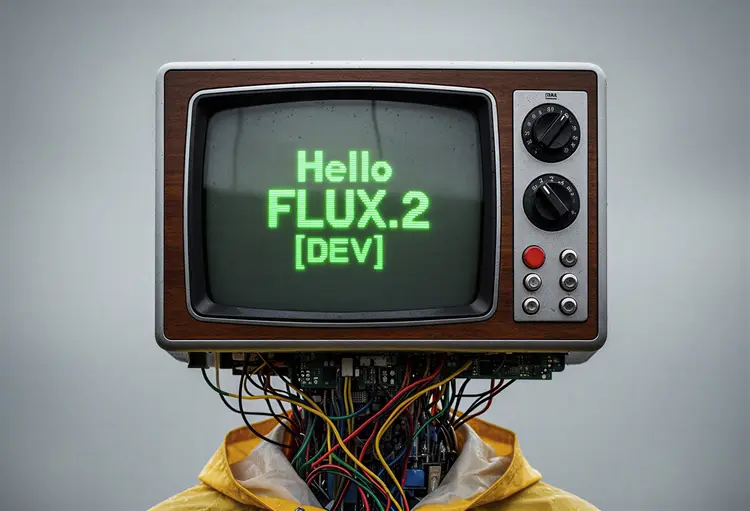
يُمكّن flux-2-dev المبدعين من توليد صور عالية الجودة من نصوص بسيطة أو صور مرجعية. مع نسب أبعاد مرنة، صيغ إخراج قابلة للتخصيص، والتحكم في جودة الصورة، يتكيف مع أي سير عمل إبداعي أو مهني. سواء كنت بحاجة إلى عمل فني أصلي، صور تسويقية، أو رسومات مفاهيم سريعة، يوفر flux-2-dev توليد صور سريع، موثوق، وقابل للتكرار. استخدم الصور المرجعية لنتائج أكثر دقة أو ابدأ من الصفر بخيالك فقط.

رسمي

Black Forest Labs

36.3k تشغيل

Flux 2 Dev

2025-11-24

الاستخدام التجاري

flux-2-dev: توليد صور عالية الجودة من النص
جدول المحتويات
  • نظرة عامة
  • كيف يعمل
  • مزايا black-forest-labs/flux-2-dev
  • الأسئلة المتكررة
  • تكلفة الأرصدة
  • حالات الاستخدام
  • أمثلة
احصل على Nano Banana Pro

نظرة عامة

يُمكّنك نموذج الذكاء الاصطناعي black-forest-labs/flux-2-dev من توليد صور عالية الجودة من نصوص وحتى تحسين الصور باستخدام صور مرجعية خاصة بك — كل ذلك عبر الإنترنت ومجاني تمامًا. صُمم هذا النموذج داخل Picasso IA ليجعل الإبداع سهلاً، مما يجعل إنشاء الصور وتحريرها متاحًا للجميع، مع نتائج فورية بنقرات قليلة فقط.

كيف يعمل

  • ببساطة أدخل نصًا وصفيًا لتوجيه نموذج الذكاء الاصطناعي في توليد صورة فريدة.
  • اختياريًا، قم بتحميل صورة مرجعية للتأثير على الأسلوب أو التكوين أو تفاصيل الإخراج.
  • استلم صورتك المخصصة في ثوانٍ، جاهزة للاستخدام أو المشاركة أو المزيد من التعديل.
  • تتم كل المعالجة عبر الإنترنت — لا حاجة للتنزيل أو التثبيت.

مزايا black-forest-labs/flux-2-dev

  • توليد نص إلى صورة متقدم يقدم نتائج مفصلة وجذابة بصريًا من نصوص بسيطة.
  • تحرير وتحسين سهل باستخدام الصور المرجعية — مثالي للإبداعات الشخصية.
  • واجهة Picasso IA البديهية لا تتطلب خبرة تقنية، مما يجعل الذكاء الاصطناعي القوي متاحًا للجميع.
  • مجاني 100% للاستخدام، بدون تكاليف خفية أو اشتراكات.
  • استمتع بأداء سريع وموثوق لنتائج فورية في كل مرة.

الأسئلة المتكررة

ماذا يمكنني أن أنشئ باستخدام black-forest-labs/flux-2-dev؟
يمكنك توليد صور أصلية من نصوص أو تحسين الصور باستخدام مراجع خاصة بك — مثالي للفن، التصميم، والمشاريع الإبداعية.

هل هذا النموذج الذكي مجاني حقًا للاستخدام؟
نعم، يمكنك استخدام black-forest-labs/flux-2-dev على Picasso IA مجانًا، بدون قيود.

هل أحتاج إلى مهارات برمجة أو معرفة تقنية لتشغيل هذا الذكاء الاصطناعي؟
لا.

كم من الوقت يستغرق استلام الصور المولدة؟
تظهر معظم النتائج خلال ثوانٍ، مما يتيح تجربة وإبداع سريع.

هل يمكنني استخدام صوري الخاصة كمدخلات؟
نعم، يمكنك تحميل صور مرجعية لتوجيه الذكاء الاصطناعي في التوليد أو التحرير.

هل هناك قيود على الاستخدام التجاري أو الشخصي للصور المولدة؟
تحقق من شروط استخدام Picasso IA لأحدث المعلومات بخصوص حقوق استخدام الصور.

ما أنواع النصوص التي تعمل بشكل أفضل؟
النصوص الواضحة والوصفية تساعد الذكاء الاصطناعي على توليد نتائج دقيقة ومبدعة.

هل أنت مستعد لإطلاق العنان لإبداعك؟ جرّب black-forest-labs/flux-2-dev الآن وابتكر صورًا مذهلة فورًا!

تكلفة الأرصدة

كل توليد يستهلك 1 رصيد

1 رصيد
أو 5 أرصدة لـ 5 توليدات

حالات الاستخدام

إنشاء أعمال فنية أصلية أو رسومات من النص

توليد صور تسويقية أو صور مفاهيم

تحسين أو تحرير الصور الموجودة باستخدام نصوص

إنتاج محتوى وسائل التواصل الاجتماعي بنسب أبعاد محددة

النمذجة السريعة لتصميم المنتجات أو واجهات المستخدم

مخططات تعليمية ووسائل بصرية مساعدة

بطاقات تهنئة أو ملصقات مخصصة

سرد بصري أو إنشاء قصص مصورة

أمثلة

replace the couple next to the fire in image 1 by the man in image 2 and the woman in image 3
المدخل
Input 1
Input 2
+1النتيجة
replace the couple next to the fire in image 1 by the man in image 2 and the woman in image 3
11.0s
عرض المثال
Change the color of the gloves to the color of image 2
المدخل
Input 1
Input 2
النتيجة
Change the color of the gloves to the color of image 2
8.6s
عرض المثال
Photorealistic infographic showing the complete Berlin TV Tower (Fernsehturm) from ground base to antenna tip, full vertical view with entire structure visible including concrete shaft, metallic sphere, and antenna spire. Slight upward perspective angle looking up toward the iconic sphere, perfectly centered on clean white background. Left side labels with thin horizontal connector lines: the text '368m' in extra large bold dark grey numerals (#2D3748) positioned at exactly the antenna tip with 'TOTAL HEIGHT' in small caps below. The text '207m' in extra large bold with 'TELECAFÉ' in small caps below, with connector line touching the sphere precisely at the window level. Right side label with horizontal connector line touching the sphere's equator: the text '32m' in extra large bold dark grey numerals with 'SPHERE DIAMETER' in small caps below. Bottom section arranged in three balanced columns: Left - Large text '986' in extra bold dark grey with 'STEPS' in caps below. Center - 'BERLIN TV TOWER' in bold caps with 'FERNSEHTURM' in lighter weight below. Right - 'INAUGURATED' in bold caps with 'OCTOBER 3, 1969' below. At the very bottom center, below the columns, add small italicized text 'Run Flux.2 on Replicate' in medium grey (#A0AEC0). All typography in modern sans-serif font (such as Inter or Helvetica), color #2D3748 unless specified, clean minimal technical diagram style. Horizontal connector lines are thin, precise, and clearly visible, touching the tower structure at exact corresponding measurement points. Professional architectural elevation drawing aesthetic with dynamic low angle perspective creating sense of height and grandeur, poster-ready infographic design with perfect visual hierarchy.
2.0s
عرض المثال
Replace the color of the car to blue
المدخل
Input 1
النتيجة
Replace the color of the car to blue
5.2s
عرض المثال

تبديل الفئة

تأثيرات

تحويل النص إلى صورة

تحويل النص إلى صورة

تحويل النص إلى فيديو

نماذج اللغة الكبيرة

نماذج اللغة الكبيرة

تحويل النص إلى كلام

تحويل النص إلى كلام

دقة فائقة

دقة فائقة

مزامنة الشفاه

توليد الموسيقى بالذكاء الاصطناعي

توليد الموسيقى بالذكاء الاصطناعي

تحرير الفيديو

تحويل الكلام إلى نص

تحويل الكلام إلى نص

تحسين الفيديو بالذكاء الاصطناعي

إزالة الخلفية

إزالة الخلفية