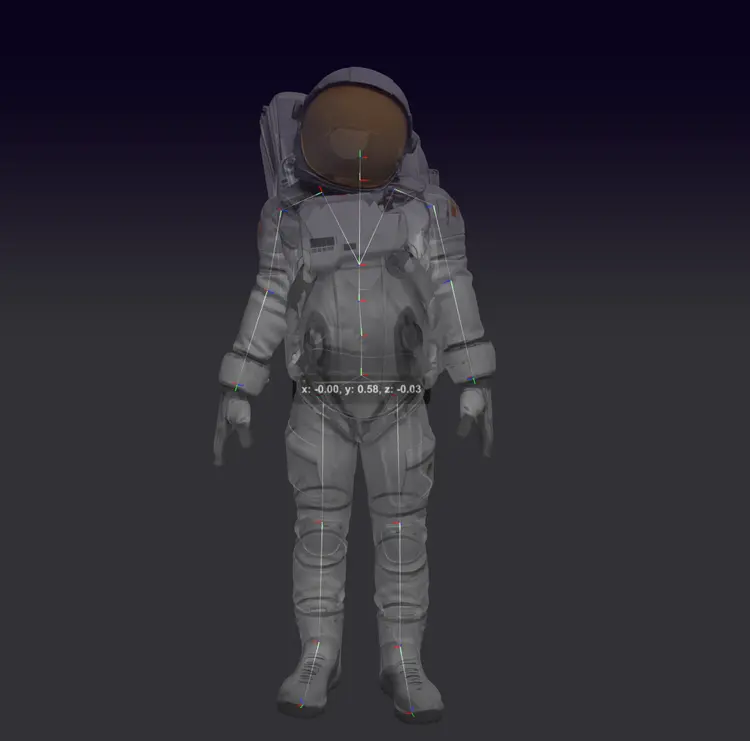
Create Character v1 takes a bipedal 3D mesh and automatically generates a full bone rig, so you can go straight to animation without spending hours on manual setup. For character artists and game developers, rigging is often the most tedious step between a finished model and a moving character. This model removes that bottleneck entirely. It accepts FBX and GLB files, the two most common formats in 3D pipelines. The auto-rig option places bones throughout the body, oriented correctly for standard animation workflows. You can also toggle front-facing orientation so the character exports pointed in the direction your game engine or animator expects. Drop it into a character production pipeline between modeling and animation, or use it as a standalone tool to prep an asset you downloaded or purchased. Whether you are a solo creator finishing a game character or a studio artist handling a batch of NPCs, the model handles the structural work so you can focus on the animation itself.
Create Character v1 takes any bipedal 3D mesh and adds a working skeleton to it, so you can animate without doing manual rigging by hand. If you have ever modeled a character and then had no clear path to making it move, this fills that gap directly. Upload your FBX or GLB file on Picasso IA, set a couple of options, and get back an animation-ready character in minutes. It handles humanoid figures, stylized game assets, and concept art characters, as long as the mesh is bipedal.
Do I need programming skills or technical knowledge to use this? No, just open Create Character v1 on Picasso IA, adjust the settings you want, and hit generate.
What file formats does the model accept? It accepts FBX and GLB files. Both are widely supported by 3D modeling tools and game engines, so you can feed the output directly into most pipelines without conversion.
What does auto-rigging actually generate? When your mesh has no skeleton, auto-rigging builds one from scratch based on your character's proportions. The bones are placed at joints like shoulders, elbows, hips, and knees, giving you a functional rig without placing joints by hand.
Does the model work on stylized or non-realistic characters? Yes. As long as the mesh is bipedal, the model can rig it. Cartoon proportions, elongated limbs, and stylized anatomy are all handled. Very unusual proportions may need a small manual adjustment after the fact.
Can I use the output in a commercial project? The rigged file you get back is yours to use. Check the usage terms on Picasso IA for any plan-specific conditions.
What if the bones come out misaligned? If the alignment is off, check that your mesh is roughly in a T-pose or A-pose before uploading. Re-exporting from your 3D software with a cleaner rest pose usually resolves the issue.
Everything this model can do for you
Generates a full skeleton on any bipedal mesh without manual bone placement.
Accepts the two most common 3D character formats used in game and animation pipelines.
Outputs the rigged character oriented forward, matching the default axis of most 3D engines.
Switch automatic rigging on or off depending on whether your mesh already has a partial rig.
Produces a rigged character file in seconds rather than the hours manual rigging typically takes.
Returns a rigged mesh ready to import directly into animation software or a game engine.