• Picasso AI Logo
    Logo Picasso IA
  • Home
  • AI Image
    Nano Banana 2
  • AI Video
    Veo 3.1 Lite
  • AI Chat
    Gemini 3 Pro
  • Edit Images
  • Upscale Image
  • Remove Background
  • Text to Speech
  • Effects
    NEW
  • Generations
  • Billing
  • Support
  • Account
  1. Collection
  2. Super Resolution
  3. Crystal Upscaler

Upscale Portraits to 4x with Crystal Upscaler

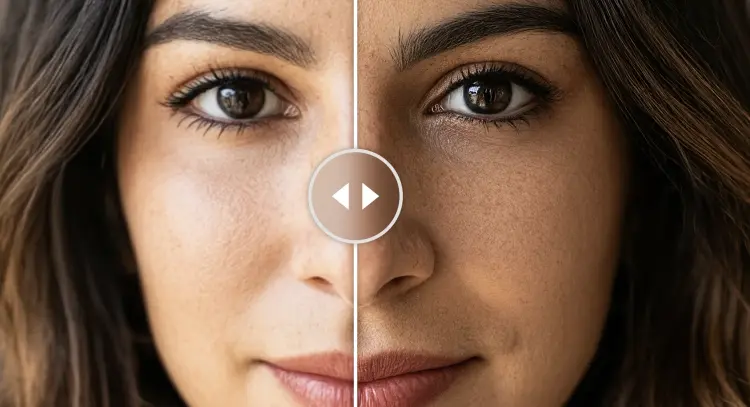
Crystal Upscaler is a high-precision image upscaling model built specifically for portraits and faces. When a photo is too small to print, too compressed to crop, or just noticeably soft when displayed at full size, this model reconstructs the missing detail rather than simply guessing it. It reads facial geometry and texture to produce output that holds up at large sizes. The model scales images up to 4x the original resolution, taking a 512×512 photo to 2048×2048 without smearing edges or flattening fine detail. You can export in PNG for lossless use or JPG for faster upload and a smaller file size. The face-specific tuning makes a real difference on portrait subjects: eyes, hair, and skin come through with clarity that general resizers cannot match. Photographers, social media managers, and designers working with older or compressed images can drop Crystal Upscaler into their final step before delivery. It works well on headshots, product portraits, and scanned photos that need extra resolution before printing. Run it once and see the difference on a photo you already have.

Official

Philz1337x

116.8k runs

Crystal Upscaler

2025-08-22

Commercial Use

Upscale Portraits to 4x with Crystal Upscaler

Table of contents

  • Overview
  • How It Works
  • Frequently Asked Questions
  • Credit Cost
  • Features
  • Use Cases
Get Nano Banana Pro

Overview

Crystal Upscaler is a portrait-focused image upscaling model available on Picasso IA that takes low-resolution or compressed face photos and outputs them at up to 4x the original size with recovered detail. Unlike generic resize tools, it is tuned specifically for human faces, which means edges around eyes, strands of hair, and skin texture come through clearly rather than blurring into mush. It solves a real problem: you have a photo that looks fine at thumbnail size but falls apart the moment you try to crop it, print it, or display it at full resolution. That gap between what you have and what you need is exactly what this model closes.

How It Works

  • Upload your portrait or face photo directly in the tool, with no file conversion needed beforehand.
  • Select the scale factor (default is 4x) to set how large the output image will be relative to the original.
  • Choose your output format: PNG for a lossless file ready for further editing, or JPG for a smaller file suited to uploads.
  • Hit generate and Crystal Upscaler processes the image, reading facial structure to reconstruct fine detail at the higher resolution.
  • Download the result and compare it side by side with the original to see where detail was recovered.

Frequently Asked Questions

Do I need programming skills or technical knowledge to use this? No, just open Crystal Upscaler on Picasso IA, adjust the settings you want, and hit generate.

Is it free to try? Yes, you can run Crystal Upscaler at no cost on Picasso IA. Try it with any portrait you already have.

How long does it take to get results? Most images process in a few seconds. Larger files or higher scale factors may take slightly longer, but you rarely wait more than a minute.

What output formats are supported? You can download your upscaled image as a PNG or JPG. PNG keeps every pixel lossless, while JPG at 95% quality gives you a smaller file with minimal visible difference.

Can I adjust the scale factor? Yes. The default is 4x, but you can change the scale factor to fit your target size before running the model.

What happens if the result has artifacts or doesn't look right? Try adjusting the scale factor or run the model again with a cleaner input image. Results improve when the source photo has a reasonably clear subject with visible facial features.

Where can I use the outputs? The upscaled images are yours to use however you need: print, publish online, include in a client delivery, or use as source material for further editing.

Credit Cost

Each generation consumes 50 credits

50 credits

or 250 credits for 5 generations

Features

Everything this model can do for you

4x upscaling

Output images up to four times the original resolution with preserved edge sharpness.

Portrait-optimized

Tuned specifically for human faces, recovering eye, skin, and hair detail that general upscalers lose.

PNG and JPG output

Choose lossless PNG for editing workflows or JPG for faster delivery and smaller file size.

Consistent face structure

Maintains accurate facial geometry across the upscale so proportions look natural.

No setup required

Open the tool, upload your image, and get a result in seconds without any technical configuration.

High-fidelity detail

Reconstructs fine textures like pores and hair strands instead of smoothing them into a blur.

Scale factor control

Set the exact scale multiplier to match your target resolution before exporting.

Use Cases

Upscale a low-resolution headshot to print-ready quality at 4x the original size

Sharpen a compressed face photo before using it in a presentation or pitch deck

Restore detail in an old scanned portrait that was digitized at low DPI

Resize a social media profile photo so it stays crisp when displayed at large sizes

Upscale a product shot featuring a person to use in a print catalog or banner

Recover eye and skin detail in a photo that was over-compressed or resized incorrectly

Enlarge a small face crop from a group photo for individual use without visible blurring

Creating large prints from smartphone photos

Switch Category

Effects

Text To Image

Text To Image

Text To Video

Large Language Models

Large Language Models

Text To Speech

Text To Speech

Super Resolution

Super Resolution

Lipsync

AI Music Generation

AI Music Generation

Video Editing

Speech To Text

Speech To Text

AI Enhance Videos

Remove Backgrounds

Remove Backgrounds