• Picasso AI Logo
    Logo Picasso IA
  • Home
  • AI Image
    Nano Banana 2
  • AI Video
    Veo 3.1 Lite
  • AI Chat
    Gemini 3 Pro
  • Edit Images
  • Upscale Image
  • Remove Background
  • Text to Speech
  • Effects
    NEW
  • Generations
  • Billing
  • Support
  • Account
  1. Collection
  2. Text to Image
  3. Flux 2 Max

Create 4MP Images from Text with Flux 2 Max

Flux 2 Max generates high-resolution images from text prompts, reaching up to 4 megapixels in a single run. If you need polished visuals for a product page, social campaign, or personal project, you no longer need a design team or expensive software. Type what you want, pick your resolution, and get a clean result in seconds. The model accepts up to eight reference images, so you can feed it existing visuals to steer the style, composition, or subject matter. Resolution options span from 0.5 MP to 4 MP, and aspect ratio presets range from 1:1 square to 9:16 portrait. Outputs come back as WebP, JPEG, or PNG, and a quality slider lets you balance file size against sharpness. Flux 2 Max fits neatly into content workflows where speed and image quality both matter. Art directors can iterate on mood boards in minutes. Freelancers can produce client-ready mockups without leaving the browser. Load it on Picasso IA, write your prompt, and see the first result before your coffee cools.

Official

Black Forest Labs

36.3k runs

Flux 2 Max

2025-11-24

Commercial Use

Create 4MP Images from Text with Flux 2 Max

Table of contents

  • Overview
  • How It Works
  • Frequently Asked Questions
  • Credit Cost
  • Features
  • Use Cases
  • Examples
Get Nano Banana Pro

Overview

Flux 2 Max is a text-to-image model that produces high-resolution images directly from written descriptions, reaching up to 4 megapixels per output. It solves a real problem for content creators and designers who need polished visuals quickly but lack the time or budget for a full production pipeline. On Picasso IA, you write a prompt, choose your settings, and receive a finished image without installing any software or writing a line of code. The model also accepts up to eight reference images, so you can anchor the output to an existing visual style, brand palette, or photographic reference.

How It Works

  • Write a text prompt describing the image you want, specifying subject, style, lighting, color palette, and any relevant visual details.
  • Optionally upload up to eight reference images in JPEG, PNG, GIF, or WebP format to influence the composition, tone, or subject matter of the result.
  • Choose an aspect ratio from ten presets (1:1, 16:9, 9:16, 4:5, and more), or enter a fully custom width and height in multiples of 32 pixels.
  • Select a target resolution between 0.5 MP and 4 MP. For most web and social media use cases, 1 MP or 2 MP delivers sharp results in the shortest time.
  • Pick your output format (WebP, JPEG, or PNG) and set the quality level, then click generate to receive your image within seconds.

Frequently Asked Questions

Do I need programming skills or technical knowledge to use this? No, just open Flux 2 Max on Picasso IA, adjust the settings you want, and hit generate.

Is it free to try? Yes, you can run Flux 2 Max without a paid subscription to see the output quality for yourself. The free tier gives you enough runs to decide whether the model fits your needs.

How long does it take to get results? Most generations finish within a few seconds. Higher resolution outputs, such as 4 MP, may take slightly longer depending on server load, but you will rarely wait more than 15 seconds.

What output formats are supported? You can download your image as WebP, JPEG, or PNG. For WebP and JPEG, a quality slider from 0 to 100 lets you control the balance between file size and sharpness.

Can I customize the output quality or style? Yes. You can set the resolution, aspect ratio, output quality, and safety tolerance independently. Uploading reference images also gives you direct influence over the visual style and composition of each result.

What happens if I am not happy with the result? Adjust the seed number or rewrite part of the prompt and run it again. Each iteration brings you closer, and you can run as many attempts as you need until the output matches what you had in mind.

Credit Cost

Each generation consumes 4 credits

4 credits

or 20 credits for 5 generations

Features

Everything this model can do for you

Up to 4MP output

Generate images at resolutions up to 4 megapixels for large-format digital assets or print-ready files.

Reference image input

Feed up to eight source images to steer composition, style, or subject with no extra prompt work required.

Flexible aspect ratios

Choose from ten presets, from 1:1 square to 16:9 widescreen, or set a fully custom width and height.

Multi-format export

Download results as WebP, JPEG, or PNG with a quality slider from 0 to 100 for lossy formats.

Reproducible outputs

Lock in a seed number to recreate the same image across multiple runs with identical settings.

Adjustable safety filter

Set content tolerance from strict to permissive to match the requirements of your specific project.

Match-input mode

Set the aspect ratio and resolution to mirror an uploaded reference image automatically for consistent sizing.

Automatic aspect ratio matching from input images

Use Cases

Type a detailed scene description and generate a photorealistic image at 2 or 4 megapixels for use in a web article or social post.

Upload a product photo as a reference image and describe a new background or lighting setup to create an edited version without a photo editor.

Feed in up to eight brand reference images and generate new on-brand visuals that match an existing color palette or aesthetic.

Choose a 9:16 aspect ratio and generate portrait-format images sized for Instagram Stories or TikTok thumbnails directly from a text prompt.

Lock in a seed value and regenerate the same composition with small prompt variations to compare different visual directions side by side.

Set a custom width and height to produce a 4 megapixel image for a print-ready flyer or billboard mockup.

Take a rough written concept for a scene and iterate through multiple generations until the composition matches your vision.

Educational content generation using reference images

Examples

1 MP
1:1
webp
30.8s
Output Quality: 80
Safety Tolerance: 2

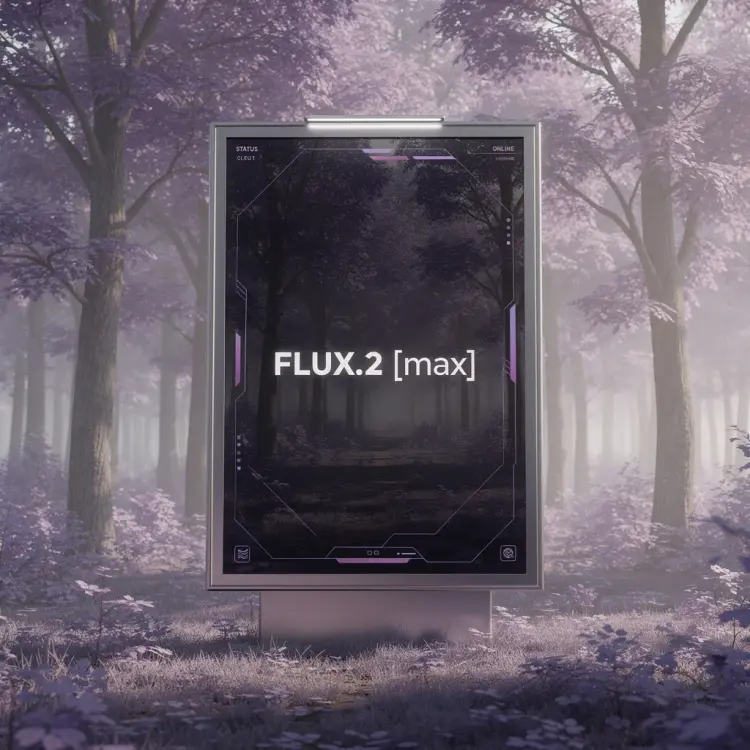
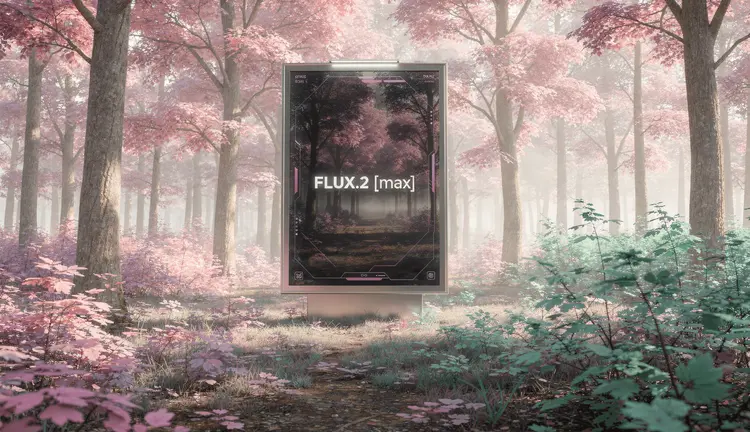
A photorealistic wide shot of a large minimalist digital billboard standing in the middle of a forest filled with purple and lavender-hued trees. Soft violet foliage surrounds the scene, creating a surreal yet elegant atmosphere. The billboard has a sleek metal frame with subtle overhead lights, blending advanced technology with dreamlike nature. On the screen, a dark glass display shows a clean, futuristic UI with gentle lavender and magenta accents. The billboard is transparent, showing the trees behind it. Centered text reads: “FLUX.2 [max]” in a modern sans-serif font, calm, confident, and precise. Soft daylight with a purple color cast, cinematic composition, ultra-high resolution, premium AI launch aesthetic, minimalism, tranquil mood.

Switch Category

Effects

Text To Image

Text To Image

Text To Video

Large Language Models

Large Language Models

Text To Speech

Text To Speech

Super Resolution

Super Resolution

Lipsync

AI Music Generation

AI Music Generation

Video Editing

Speech To Text

Speech To Text

AI Enhance Videos

Remove Backgrounds

Remove Backgrounds