• Picasso AI Logo
    Logo Picasso IA
  • Home
  • AI Image
    Nano Banana 2
  • AI Video
    Veo 3.1 Lite
  • AI Chat
    Gemini 3 Pro
  • Edit Images
  • Upscale Image
  • Remove Background
  • Text to Speech
  • Effects
    NEW
  • Generations
  • Billing
  • Support
  • Account
  1. Collection
  2. Text to Image
  3. Flux Kontext Max

Flux Kontext Max: Rewrite Any Image with Text

Flux Kontext Max is a text-based image editing model that modifies existing photos and graphics from a plain-language prompt. You describe what you want changed, whether that is swapping a background, adding an object, or correcting text visible in the image, and the model applies the edit in one pass. It is built for the common frustration of having a near-perfect visual that just needs one specific fix, without requiring a design application or technical knowledge. The model handles both structural edits and fine text details with the same prompt interface. You can change the entire background of a product photo, rewrite a label or sign that appears inside the image, or shift the mood of a scene by describing new lighting conditions. Flexible aspect ratio support means you can reformat images for different platforms in the same step, and prompt upsampling helps when your description is rough by automatically sharpening the instruction before generation. In practice, it fits into any workflow where you iterate on visuals quickly: social media content, ad mockups, e-commerce product images, and presentation graphics. You upload the base image, type your instruction, and download the updated file. Try it on Picasso IA and see how much a single sentence can change.

Official

Black Forest Labs

6.07m runs

Flux Kontext Max

2025-05-28

Commercial Use

Flux Kontext Max: Rewrite Any Image with Text

Table of contents

  • Overview
  • How It Works
  • Frequently Asked Questions
  • Credit Cost
  • Features
  • Use Cases
  • Examples
Get Nano Banana Pro

Overview

Flux Kontext Max is a premium text-driven image editing model that applies targeted changes to any photo or graphic from a plain-language instruction. Upload your image on Picasso IA, describe what you want changed, and get back a clean edited file within seconds. It is especially effective for edits that involve text inside the image, where most models fall short, making it practical for anyone working on ads, product packaging, social graphics, or branded content. You do not need to select areas, draw masks, or open a separate design tool.

How It Works

  • Upload your base image in JPEG, PNG, GIF, or WebP format, or skip the image entirely and use only a text prompt to generate a new image from scratch.
  • Write your editing instruction in the prompt field in plain language, describing exactly what you want to change, add, or remove.
  • Select your output aspect ratio from the panel, or choose "match input image" to preserve the original dimensions.
  • Toggle prompt upsampling if your instruction is brief, so the model can elaborate it before processing.
  • Click generate and download your result in PNG or JPG format, ready to use immediately.

Frequently Asked Questions

Do I need programming skills or technical knowledge to use this? No, just open Flux Kontext Max on Picasso IA, adjust the settings you want, and hit generate.

Is it free to try? Yes, you can run Flux Kontext Max for free on Picasso IA without entering a credit card. Usage limits may apply depending on your plan.

How long does it take to get results? Most edits finish in under 15 seconds. More detailed prompts or higher-resolution inputs may take a few seconds longer, but turnaround is consistently fast.

What output formats are supported? The model outputs PNG or JPG files. PNG is the default and preserves the most detail, while JPG produces a smaller file size for quicker sharing.

Can I customize the output quality or style? Yes. Writing more specific instructions in the prompt gives you more control over the result. The safety tolerance slider also lets you widen or narrow what content the model will produce.

How many times can I run the model? You can iterate as many times as your plan allows. Since each run finishes quickly, it is practical to test several prompt variations in a single session.

Where can I use the outputs? The images you download are yours to use in any project, including social posts, client presentations, printed materials, and website assets.

Credit Cost

Each generation consumes 1 credit

1 credit

or 5 credits for 5 generations

Features

Everything this model can do for you

Text-driven edits

Describe any change in plain language and the model applies it directly to your uploaded image.

Typography accuracy

Rewrite, fix, or translate visible text inside an image with higher fidelity than general-purpose models.

Flexible aspect ratios

Choose from 14 preset ratios or match the input image dimensions automatically.

Prompt upsampling

Automatically refines short or vague instructions into more precise prompts before processing.

Clean file output

Download edited images in PNG or JPG, ready for publishing without additional post-processing.

Reproducible results

Lock a seed value to regenerate the same output consistently across multiple sessions.

Adjustable content filtering

Set safety tolerance from strict to permissive to fit different content workflows.

Reproducible outputs with seed setting

Use Cases

Replace the background in a product photo by typing a description of the new setting, such as a clean white studio or an outdoor market scene

Rewrite visible text inside a mockup, billboard, or product label image by describing the corrected or updated wording directly in the prompt

Remove or add specific objects from a scene, such as clearing clutter off a desk or placing a branded item on a table in an existing photo

Adjust the lighting or time of day in a photo by describing the change, such as turning a flat indoor shot into a warm golden-hour scene

Generate color or style variants of a product image for A/B testing by editing only the relevant visual element in each run

Localize images by rewriting text visible within them into a different language, directly in the prompt without using external tools

Reformat an existing image for a new platform by selecting a different aspect ratio while applying a content edit in the same step

Automate batch editing for visual consistency

Examples

match_input_image
jpg
5.8s
Safety Tolerance: 2

Using this style, a bunny, a dog and a cat are having a tea party seated around a small white table

match_input_image
jpg
6.5s
Safety Tolerance: 2

Using this style, a bunny, a dog and a cat are having a tea party seated around a small white table

match_input_image
jpg
5.1s
Safety Tolerance: 2

In the text "Choose joy", change 'joy' to 'Max', so it says "Choose Max"

match_input_image
jpg
5.6s
Safety Tolerance: 2

Change the jacket and t-shirt to be viking warrior clothing

match_input_image
jpg
5.7s
Safety Tolerance: 2

Convert to a 90s cartoon

match_input_image
jpg
4.9s
Safety Tolerance: 2

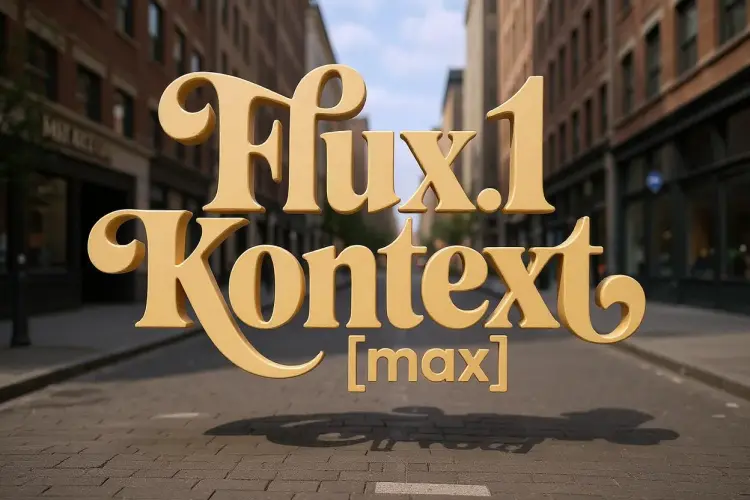
Make the letters 3D, floating in space on a city street

Switch Category

Effects

Text To Image

Text To Image

Text To Video

Large Language Models

Large Language Models

Text To Speech

Text To Speech

Super Resolution

Super Resolution

Lipsync

AI Music Generation

AI Music Generation

Video Editing

Speech To Text

Speech To Text

AI Enhance Videos

Remove Backgrounds

Remove Backgrounds