• Picasso AI Logo
    Logo Picasso IA
  • Home
  • AI Image
    Nano Banana 2
  • AI Video
    Veo 3.1 Fast
  • AI Chat
    Gemini 3 Pro
  • Edit Images
  • Upscale Image
  • Remove Background
  • Text to Speech
  • Effects
    NEW
  • Generations
  • Billing
  • Support
  • Account
  1. Collection
  2. Text to Image
  3. Ai Avatars

Generate AI Avatars from Your Face Photo

AI Avatars takes a single selfie and places it into any scene you describe, producing a polished portrait without needing a photographer or editing software. If you want a professional headshot, a branded profile image, or a fun portrait in an unusual setting, this model handles the photo work for you. The model supports three output styles: HyperRealistic for near-photographic results, Realistic for clean and natural-looking portraits, and Stylistic for more creative renditions. You can describe any background or environment in the prompt, and the avatar will appear naturally within it. The option to add a second face photo means you can generate couple or two-person portraits in a single run. Upload your photo, write a short scene description, choose a style, and the result is ready in seconds. It fits into profile update workflows, content creation pipelines, and personal branding projects where you need fast, consistent images without scheduling a photo session.

Official

Easel

37.3k runs

Ai Avatars

2025-04-02

Commercial Use

Generate AI Avatars from Your Face Photo

Table of contents

  • Overview
  • How It Works
  • Frequently Asked Questions
  • Credit Cost
  • Features
  • Use Cases
  • Examples
Get Nano Banana Pro

Overview

AI Avatars takes a face photo and places it into a fully generated scene, solving the common problem of needing professional-looking profile images or branded portraits without a photographer or studio. On Picasso IA, you describe the setting you want, upload one or two selfies, and get back a polished avatar that looks like it belongs in a real environment. The model handles face mapping, lighting consistency, and scene integration automatically. Whether you need a corporate headshot backdrop or a creative digital portrait, the result is a finished image you can use immediately.

How It Works

  • Upload a front-facing photo of the person whose face will appear in the avatar (a clear selfie with even lighting works best)
  • Optionally upload a second face image if you want a two-person scene
  • Type a short description of the setting you want the person placed in, such as "standing in a modern office space" or "at a rooftop event"
  • Select the output style: Hyper Realistic for maximum photographic detail, Realistic for a clean natural look, or Stylistic for a more artistic finish
  • Hit generate and receive your finished avatar image ready to download

Frequently Asked Questions

Do I need programming skills or technical knowledge to use this? No, just open AI Avatars on Picasso IA, adjust the settings you want, and hit generate.

Is it free to try? Yes, you can run the model on Picasso IA without a paid plan to get started. Check your dashboard for current credit pricing and generation limits.

How long does it take to get results? Most generations finish within 15 to 30 seconds depending on the chosen style and current server load. Hyper Realistic outputs may take slightly longer due to the added detail pass.

What output style should I pick? Use Hyper Realistic when you want a photographic finish that could pass for a camera shot. Realistic is the safe default for professional use. Stylistic suits creative projects, social media graphics, or illustrated profile images.

Can I generate avatars with two people in the same scene? Yes. Upload a second face image in the optional input, and the model will place both people into the same generated scene with consistent lighting and positioning.

What makes a good source photo? A front-facing selfie with the face clearly visible and evenly lit gives the best results. Avoid photos where the face is angled sharply, partially covered, or in heavy shadow.

Where can I use the generated avatars? The images are yours to use however you like, including professional profiles, team pages, social media, and printed materials. No watermarks are added to the output.

Credit Cost

Each generation consumes 1 credit

1 credit

or 5 credits for 5 generations

Features

Everything this model can do for you

Single photo input

Generate a complete avatar scene from just one front-facing selfie.

Three output styles

Choose HyperRealistic, Realistic, or Stylistic to match the tone of your project.

Two-person portraits

Add a second face image to produce couple or team portraits in one generation.

Scene control

Describe any background setting in the prompt to place your avatar in a specific environment.

Gender-aware generation

Set the gender for each person to get accurate and consistent results.

Fast output

Receive a finished avatar image in seconds without waiting for manual editing.

No editing skills needed

Works directly from a photo upload and a text description, no software experience required.

Use Cases

Generate a professional headshot-style avatar by uploading a selfie and describing a clean office or studio backdrop

Create a couple portrait by uploading two face photos and setting a shared background scene

Produce a stylized artistic avatar for a social media profile by choosing the Stylistic output mode

Make a realistic avatar for a business profile page without visiting a photo studio

Test different scene backgrounds for a personal brand photo shoot before committing to a real session

Generate gender-inclusive avatars for team bios by specifying the gender setting for each person

Create themed event photos by describing a specific setting in the prompt and uploading a face photo

Examples

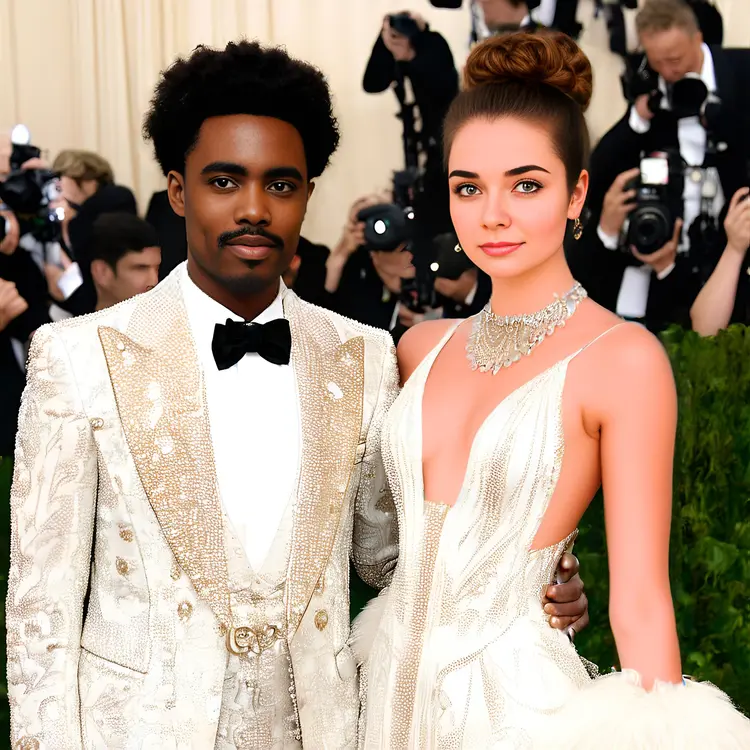
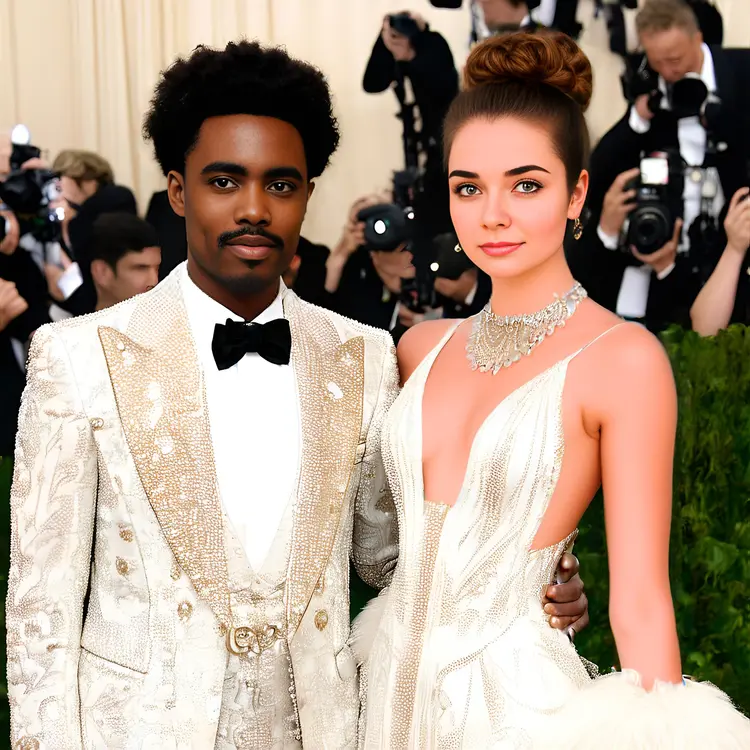
at the Met Gala, dressed in very fancy outfits, captured in a full body shot
23.6s
View Example

Switch Category

Effects

Text To Image

Text To Image

Text To Video

Large Language Models

Large Language Models

Text To Speech

Text To Speech

Super Resolution

Super Resolution

Lipsync

AI Music Generation

AI Music Generation

Video Editing

Speech To Text

Speech To Text

AI Enhance Videos

Remove Backgrounds

Remove Backgrounds