Imagen 3 is a text-to-image model that produces richly lit, highly detailed visuals from written descriptions. It's available on Picasso IA for anyone who needs specific imagery without hiring a photographer or designer. Where most image tools give you a rough approximation of a complex scene, Imagen 3 interprets layered descriptions with a level of precision that makes the output usable in real projects, not just as a quick draft. It handles five aspect ratios out of the box, so your output fits any format you work with. The model handles a wide range of visual styles, from photorealistic portraits to stylized illustrations, with consistent quality across every format. It processes fine-grained details like fabric textures, reflective surfaces, and natural lighting conditions that many image models flatten into muddy approximations. Output formats include JPG and PNG, and you have direct control over the safety filter level to match your project's content requirements. It fits into creative workflows where you need a fast visual starting point, whether you're a blogger, marketer, or independent creator. Open Imagen 3 on Picasso IA, write a detailed prompt, and you have a production-ready image in under a minute.
Imagen 3 is a text-to-image model built to produce richly lit, highly detailed visuals from written descriptions. It's available on Picasso IA for anyone who needs a specific image without a photoshoot budget or a design hire. Where many image tools average out complex scenes into soft, vague results, Imagen 3 reads layered descriptions and renders them with enough precision to use in real projects. It supports five aspect ratios natively, so the output fits your target format without extra cropping or resizing.
Do I need programming skills or technical knowledge to use this? No, just open Imagen 3 on Picasso IA, adjust the settings you want, and hit generate.
Is it free to try? Yes, you can run Imagen 3 without any upfront payment. Some usage tiers apply depending on how many images you generate.
How long does it take to get results? Most images are ready within a few seconds. Very detailed prompts may take slightly longer, but results typically arrive in under 30 seconds.
What output formats are supported? Imagen 3 outputs in JPG and PNG. JPG is standard for web publishing; PNG is the better choice when you need to edit the file or keep sharp edges.
Can I customize the output style? Yes. Your prompt is the main control. Describe the lighting, composition, color tone, and visual style you want, and the model adjusts accordingly. Running the same prompt again produces different variations to choose from.
What aspect ratios are available? You can choose from five: 1:1 for square, 9:16 for mobile and vertical content, 16:9 for widescreen, 3:4 for portrait, and 4:3 for horizontal layouts.
Where can I use the outputs? Images generated with Imagen 3 are yours to use in blog posts, marketing materials, presentations, print layouts, social media content, and personal or commercial projects.
Everything this model can do for you
Produces fine textures, reflective surfaces, and nuanced lighting that hold up at high zoom.
Choose from 1:1, 9:16, 16:9, 3:4, or 4:3 to match any platform or format.
Download in the format your workflow needs, with no extra conversion step.
Set the content filter level to match your project's content requirements.
Captures soft shadows, directional light, and ambient glow with photographic accuracy.
Type a prompt, click generate, and download your image, no technical setup needed.
Maintains strong subject framing and background separation across varied prompt types.
Word “light” made from various colorful feathers, black background
A view of a person's hand holding a eucalyptus sprig - a macro DSLR image highlighting the balance of human and nature
A close-up photo of an origami bird soaring through a cityscape, in a flock with others of different colors and patterns, casting intricate shadows on the buildings below
A foggy 1940s European train station at dawn, framed by intricate wrought-iron arches and misted glass windows. Steam rises from the tracks, blending with dense fog. Two lovers stand in an emotional embrace near the train, backlit by the warm, amber glow of dim lanterns. The departing train is partially visible, its red tail lights fading into the mist. The woman wears a faded red coat and clutches a small leather diary, while the man is dressed in a weathered soldier's uniform. Dust motes float in the air, illuminated by the soft golden backlight. The atmosphere is melancholic and timeless, evoking the bittersweet farewell of wartime cinema.
A portrait of an Asian woman with neon green lights in the background, shallow depth of field.
A close-up shot captures a winter wonderland scene - soft snowflakes fall on a snow-covered forest floor. Behind a frosted pine branch, a red squirrel sits, its bright orange fur a splash of color against the white. It holds a small hazelnut. As it enjoys its meal, it seems oblivious to the falling snow.
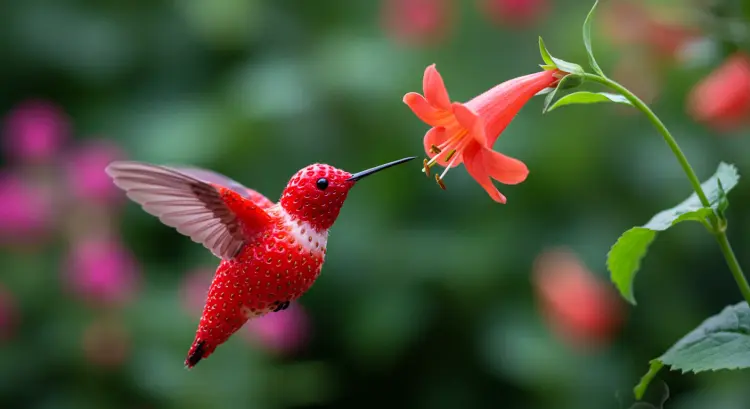
A close-up, macro photography stock photo of a strawberry intricately sculpted into the shape of a hummingbird in mid-flight, its wings a blur as it sips nectar from a vibrant, tubular flower. The backdrop features a lush, colorful garden with a soft, bokeh effect, creating a dreamlike atmosphere. The image is exceptionally detailed and captured with a shallow depth of field, ensuring a razor-sharp focus on the strawberry-hummingbird and gentle fading of the background. The high resolution, professional photographers style, and soft lighting illuminate the scene in a very detailed manner, professional color grading amplifies the vibrant colors and creates an image with exceptional clarity. The depth of field makes the hummingbird and flower stand out starkly against the bokeh background.