• Picasso AI Logo
    Logo Picasso IA
  • Home
  • AI Image
    Nano Banana 2
  • AI Video
    Veo 3.1 Lite
  • AI Chat
    Gemini 3 Pro
  • Edit Images
  • Upscale Image
  • Remove Background
  • Text to Speech
  • Effects
    NEW
  • Generations
  • Billing
  • Support
  • Account
  1. Collection
  2. Text to Image
  3. Imagen 3 Fast

Create AI Images in Seconds with Imagen 3 Fast

Imagen 3 Fast is a text-to-image model built around one clear priority: speed. When you need a visual to test a concept, fill a layout, or check whether a creative direction works, it returns results in seconds instead of making you wait for a slower, more detailed render. The trade-off is intentional. You get a usable image quickly, which is exactly what the drafting phase demands. The model accepts any text description and generates images in five aspect ratios, from square 1:1 for social profiles to wide 16:9 for video thumbnails or tall 9:16 for stories. You choose whether to download as JPG for web delivery or PNG for editing. A content safety filter runs on every generation, and you can adjust how strict it is based on your project's requirements. In a real workflow, this model fits between the idea stage and the final execution. Write a prompt, see the result in seconds, decide what works, and keep adjusting without waiting. Once you have a visual direction that clicks, take it forward into a more detailed render or use the result as-is for drafts, presentations, or client reviews.

Official

Google

350.7k runs

Imagen 3 Fast

2025-02-06

Commercial Use

Create AI Images in Seconds with Imagen 3 Fast

Table of contents

  • Overview
  • How It Works
  • Frequently Asked Questions
  • Credit Cost
  • Features
  • Use Cases
  • Examples
Get Nano Banana Pro

Overview

Imagen 3 Fast is a text-to-image model built for speed over maximum detail, making it the right pick when results need to arrive quickly. On Picasso IA, you type a description, choose your settings, and have an image ready in seconds. It is most useful in the early stages of a project, when you need to test several ideas before committing to a visual direction. The faster turnaround also makes it practical for batch work, where waiting on every generation would slow the whole session down.

How It Works

  • Type a plain-language description of the scene, subject, or style you want in the prompt field
  • Choose an aspect ratio from five options: 1:1, 9:16, 16:9, 3:4, or 4:3 based on where the image will be used
  • Select your output format: JPG for web-ready compressed images or PNG for lossless files you plan to edit
  • Adjust the safety filter level if your project has specific content requirements
  • Click generate and download your image in a few seconds

Frequently Asked Questions

Do I need programming skills or technical knowledge to use this? No, just open Imagen 3 Fast on Picasso IA, adjust the settings you want, and hit generate.

Is it free to try? You can generate images at no upfront cost. For high-volume use, credit consumption depends on your account plan, so check the pricing page if you plan to run large batches.

How long does it take to get results? Most images are ready within a few seconds. The model is specifically designed to minimize render time, so results arrive fast even when your prompt describes a complex or detailed scene.

What output formats are supported? You can save results as JPG or PNG. JPG is the better option for images you plan to publish online; PNG is the right choice when you need to edit the file or avoid compression artifacts.

Can I customize the output style? Your text prompt is the main tool for shaping the result. More specific descriptions produce more accurate images, so mention style, lighting, color palette, and composition when you want tighter control.

What happens if I am not satisfied with the result? Run the generation again with a revised prompt. Because results come back quickly, it costs very little time to try a different approach. Adjust your wording, switch the aspect ratio, or add more detail and generate again.

Credit Cost

Each generation consumes 1 credit

1 credit

or 5 credits for 5 generations

Features

Everything this model can do for you

Fast output

Returns a finished image in seconds, reducing wait time during the drafting and ideation phase.

Five aspect ratios

Choose from 1:1, 9:16, 16:9, 3:4, and 4:3 to fit social, story, video, or print formats.

JPG and PNG export

Download as a compressed JPG for web use or a lossless PNG for files you plan to edit.

Adjustable content filter

Three safety levels let you control how strict the filter runs for your project.

Text-only input

Describe the image you want in plain language, with no reference photos or uploads needed.

Budget-friendly generation

Lower cost per run makes it practical for high-volume batches or rapid iteration sessions.

Simple integration with a user-friendly interface

Use Cases

Generate placeholder visuals for a website layout by describing the scene and letting the model fill the space in seconds

Create multiple concept variations from a single prompt to compare visual directions before choosing one to develop further

Produce quick product background images by typing a description of the setting, lighting, and mood you want

Draft social media visuals in the correct aspect ratio by writing a short description and picking 9:16 for stories or 16:9 for banners

Test whether a written brief translates into a usable image before investing time in a more detailed render

Generate batch illustrations for a presentation by writing one focused prompt per slide concept

Create visual references for art direction by describing the composition, color palette, and style you have in mind

Inspiration for illustrators and writers

Examples

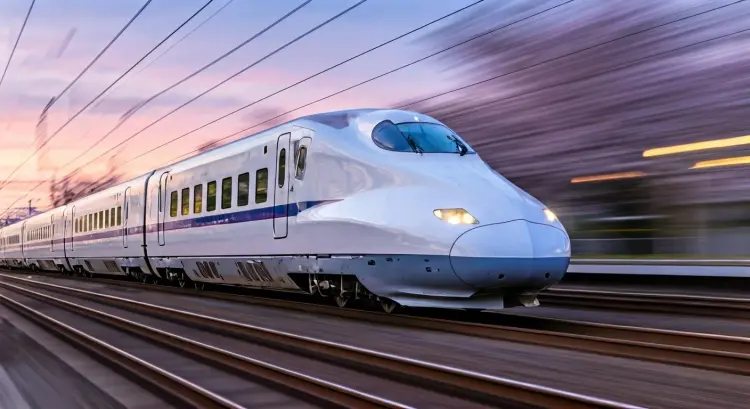
16:9
3.2s
Safety Filter Level: block_medium_and_above

Bullet train cutting through cherry blossom petals at dusk, creating a vortex of pink and white. The polished silver exterior reflects the setting sun in a continuous streak of fire. Station lights blend into a single continuous line as the train cleaves through space. The world outside the windows is nothing but beautiful motion blur.

1:1
3.1s
Safety Filter Level: block_medium_and_above

Racing motorcycle blazing through neon-lit streets at night, leaving trails of light in its wake. Wind-whipped rain streaks horizontally across the frame, creating a sense of intense velocity. The rider's leather jacket ripples violently against the air resistance, barely visible through the speed blur. Everything in the background is reduced to stretched lines of color, emphasizing the pure forward momentum.

Switch Category

Effects

Text To Image

Text To Image

Text To Video

Large Language Models

Large Language Models

Text To Speech

Text To Speech

Super Resolution

Super Resolution

Lipsync

AI Music Generation

AI Music Generation

Video Editing

Speech To Text

Speech To Text

AI Enhance Videos

Remove Backgrounds

Remove Backgrounds