• Picasso AI Logo
    Logo Picasso IA
  • Home
  • AI Image
    Nano Banana 2
  • AI Video
    Veo 3.1 Lite
  • AI Chat
    Gemini 3 Pro
  • Edit Images
  • Upscale Image
  • Remove Background
  • Text to Speech
  • Effects
    NEW
  • Generations
  • Billing
  • Support
  • Account
  1. Collection
  2. Text to Image
  3. Imagen 4 Ultra

Generate High-Detail AI Images with Imagen 4 Ultra

Imagen 4 Ultra is a text-to-image model built around one priority: quality. While many AI image generators trade off sharpness for speed, this model takes longer to process and delivers finer detail, more accurate lighting, and more realistic textures in return. If you need a finished image that holds up at full size, this is the right tool. You write a prompt, choose an aspect ratio from five options (1:1, 9:16, 16:9, 3:4, or 4:3), and pick your output format, either JPG or PNG. The model renders high-resolution images that capture subtle gradients, complex backgrounds, and fine facial features that lower-tier models often flatten. The content safety settings give you control over what gets filtered, so you can dial them up for brand-safe work or relax them slightly for more creative prompts. Imagen 4 Ultra fits naturally into workflows where the output goes straight to a client, a print file, or a public-facing design. You do not need to post-process or upscale the result. Run a prompt, review it, adjust the wording, and run again until you have exactly what you need.

Official

Google

632.7k runs

Imagen 4 Ultra

2025-05-21

Commercial Use

Generate High-Detail AI Images with Imagen 4 Ultra

Table of contents

  • Overview
  • How It Works
  • Frequently Asked Questions
  • Credit Cost
  • Features
  • Use Cases
  • Examples
Get Nano Banana Pro

Overview

Imagen 4 Ultra is a text-to-image model designed for results that need to be right the first time. Where most AI image tools trade processing time for detail, this one takes the opposite approach: it spends more time on each image and returns finer textures, more accurate colors, and sharper edges at full resolution. On Picasso IA, you write a text prompt, choose your output dimensions and format, and receive an image you can drop directly into a print layout, a design file, or a client presentation. It is the right model to reach for when visual accuracy matters more than getting a result in under three seconds.

How It Works

  • Write a text prompt describing exactly what you want to see, including the subject, background, lighting conditions, and any stylistic details like "soft natural light" or "flat color illustration."
  • Select an aspect ratio from five options: 1:1 for square social posts, 9:16 for vertical phone content, 16:9 for widescreen, or 3:4 and 4:3 for standard photo proportions.
  • Choose your output format: JPG for a compressed file ready for web or email, or PNG for lossless quality suited to designs you plan to edit further.
  • Set the content safety filter to the level that fits your project, from strict filtering for brand-safe work to more permissive settings for creative briefs.
  • Submit the request and review the result. If the composition is close but something is off, edit a few words in the prompt and run it again until the output matches your intent.

Frequently Asked Questions

Do I need programming skills or technical knowledge to use this? No, just open Imagen 4 Ultra on Picasso IA, adjust the settings you want, and hit generate.

Is it free to try? Yes, you can run Imagen 4 Ultra at no cost. No account setup or payment information is required to start generating. Just write a prompt and go.

How long does it take to get results? Imagen 4 Ultra trades speed for output quality, so generation takes longer than faster-tier models. Most images are ready within 15 to 60 seconds. The exact time depends on the complexity of your prompt and current server demand.

What output formats are supported? You can download your image as a JPG or PNG. JPG works well for web publishing and keeps file sizes small. PNG is a better fit when you need lossless quality or plan to run the image through additional editing software.

What happens if I am not happy with the result? Rewrite your prompt with more specific language. If the lighting is wrong, describe it explicitly. If the proportions are off, add details about framing and distance. Small, targeted changes to the wording often produce noticeably different outputs. Run it as many times as you need until the result is right.

Can I use the images in commercial projects? The images you generate can be used in personal and commercial projects. Check Picasso IA's terms of service for the full details on permitted uses and licensing.

Credit Cost

Each generation consumes 1 credit

1 credit

or 5 credits for 5 generations

Features

Everything this model can do for you

Quality-first rendering

Delivers sharper detail, more accurate lighting, and finer textures compared to faster AI image models.

Five aspect ratios

Choose from 1:1, 9:16, 16:9, 3:4, and 4:3 to fit portrait, landscape, or square formats exactly.

JPG and PNG output

Download your image in whichever format your project requires, ready to use as-is.

Adjustable content filters

Set safety filtering to strict, moderate, or permissive to match your creative brief.

No coding required

Write a text prompt, pick your settings, and generate without any technical setup.

Prompt-driven refinement

Iterate by adjusting your description until the output matches your vision exactly.

Print-ready resolution

Images are sized for direct use in print or publishing without post-processing.

Versatile application for various industries

Use Cases

Generate a photorealistic product image on a white background from a detailed text description of the item

Create a scene illustration for a children's book by describing characters, setting, and lighting in the prompt

Turn a concept brief into a print-ready hero image for a landing page or marketing campaign

Produce a realistic portrait of a fictional character by describing age, expression, clothing, and background

Visualize an interior design concept by describing the room style, furniture, colors, and natural light conditions

Generate a high-resolution landscape or environment art piece from a cinematic scene description

Build a set of social media visuals in different aspect ratios from the same text prompt

Support educational content with engaging visuals

Examples

16:9
jpg
8.9s
Safety Filter Level: block_only_high

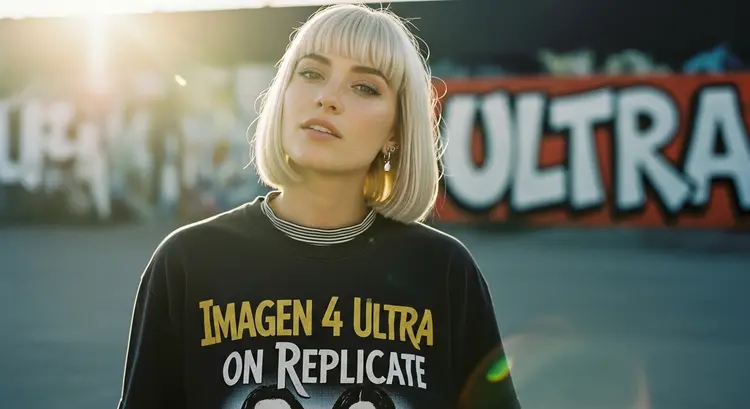
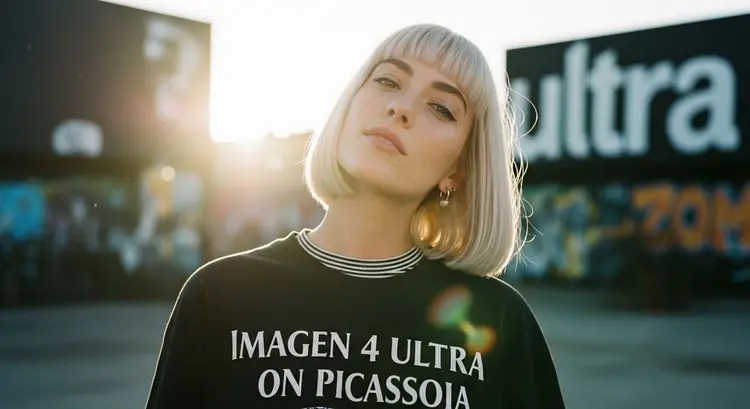
The photo: Create a cinematic, photorealistic medium shot capturing the nostalgic warmth of a mid-2000s indie film. The focus is a young woman with a sleek, straight bob haircut in cool platinum white with freckled skin, looking directly and intently into the camera lens with a knowing smirk, her head is looking up slightly. She wears an oversized band t-shirt that says "Imagen 4 Ultra on Replicate" in huge stylized text over a long-sleeved striped top and simple silver stud earrings. The lighting is soft, golden hour sunlight creating lens flare and illuminating dust motes in the air. The background shows a blurred outdoor urban setting with graffiti-covered walls (the graffiti says "ultra" in stylized graffiti lettering), rendered with a shallow depth of field. Natural film grain, a warm, slightly muted color palette, and sharp focus on her expressive eyes enhance the intimate, authentic feel

Switch Category

Effects

Text To Image

Text To Image

Text To Video

Large Language Models

Large Language Models

Text To Speech

Text To Speech

Super Resolution

Super Resolution

Lipsync

AI Music Generation

AI Music Generation

Video Editing

Speech To Text

Speech To Text

AI Enhance Videos

Remove Backgrounds

Remove Backgrounds