• Picasso AI Logo
    Logo Picasso IA
  • Home
  • AI Image
    Nano Banana 2
  • AI Video
    Veo 3.1 Lite
  • AI Chat
    Gemini 3 Pro
  • Edit Images
  • Upscale Image
  • Remove Background
  • Text to Speech
  • Effects
    NEW
  • Generations
  • Billing
  • Support
  • Account
  1. Collection
  2. Text to Image
  3. Ideogram V2a

Generate AI Art Faster with Ideogram v2a

Ideogram v2a is a text-to-image model built for speed without sacrificing detail. If you've ever needed a quick visual for a social post, presentation, or personal project and didn't want to wait or pay premium rates, this model hits that sweet spot. Type a description, pick your settings, and get a polished image back in seconds. It supports a wide range of resolutions and aspect ratios, from square social thumbnails to tall mobile-first layouts and wide cinematic banners. The style presets, including Realistic, Anime, Design, and 3D Render, let you shift the visual tone without rewriting your prompt. Magic Prompt automatically refines your input to get better, more varied results, even when you write in a different language. Ideogram v2a fits naturally into fast-moving creative workflows where you need volume without paying for every iteration. Bloggers, marketers, and small studio teams can run dozens of variations in a single session. Open it on Picasso IA, type your first prompt, and see results in seconds.

Official

Ideogram Ai

1.56m runs

Ideogram V2a

2025-02-27

Commercial Use

Generate AI Art Faster with Ideogram v2a

Table of contents

  • Overview
  • How It Works
  • Frequently Asked Questions
  • Credit Cost
  • Features
  • Use Cases
  • Examples
Get Nano Banana Pro

Overview

Ideogram v2a is a text-to-image model that converts written prompts into clean, detailed visuals without design software or technical setup. On Picasso IA, it's available to anyone who needs quality images fast, whether for social content, client work, or personal projects. The model runs significantly quicker and at lower cost than its predecessor while keeping the full range of style options, resolutions, and prompt controls intact. It's a practical choice when speed and output volume both matter.

How It Works

  • Write a prompt describing the image you want, including subject, setting, mood, and any visual details
  • Choose a style preset (Realistic, Anime, Design, 3D Render, or General) to define the visual tone
  • Select your preferred aspect ratio or a specific resolution to match the platform or format you need
  • Optionally enable Magic Prompt to let the model automatically expand and refine your description
  • Click generate, review the result, and download it or adjust the seed to get a fresh variation

Frequently Asked Questions

Do I need programming skills or technical knowledge to use this? No, just open Ideogram v2a on Picasso IA, adjust the settings you want, and hit generate.

Is it free to try? Yes, you can generate images with Ideogram v2a at no cost. Some usage limits may apply depending on your account tier.

How long does it take to get results? Most images generate in a few seconds. The exact time varies slightly based on resolution and current load, but it's consistently fast.

What output resolutions are supported? The model outputs images across a wide range of sizes, from tall portrait formats (512x1536) to wide landscape ratios (1536x640) and a standard square (1024x1024). You can also choose from 11 predefined aspect ratios.

Can I control the visual style of the image? Yes. Six style presets are available: Auto, General, Realistic, Design, 3D Render, and Anime. Switching styles does not require rewriting your prompt.

What happens if I'm not happy with the result? Change the seed to generate a new variation from the same prompt, or adjust the wording to shift the output. Magic Prompt can also help if your original description is too brief or unclear.

Credit Cost

Each generation consumes 1 credit

1 credit

or 5 credits for 5 generations

Features

Everything this model can do for you

Fast generation

Produces a full image from a text prompt in seconds, even at higher resolutions.

Multiple style presets

Switch between Realistic, Anime, Design, and 3D Render to match your visual direction.

Flexible aspect ratios

Choose from 11 aspect ratios including 16:9, 9:16, 3:1, and 1:1 for any platform.

Magic Prompt

Automatically refines your input to increase variety and output quality, with multilingual support.

Wide resolution range

Output images from portrait (512x1536) to landscape (1536x640) and square (1024x1024).

Reproducible outputs

Lock in a seed to recreate the same image across runs or minor prompt edits.

No coding needed

Write a prompt, pick your settings, and generate without touching any code or API.

Perfect for both amateur and professional creators.

Use Cases

Generate a product shot on a clean background by describing the item and selecting the Realistic style preset

Create a social media illustration in 9:16 or 1:1 format by writing the scene and choosing the matching aspect ratio

Produce an anime-style character portrait by writing a description and setting the style to Anime

Draft multiple logo concept thumbnails by typing your brand idea and running variations with different seeds

Build a mood board for a design project by generating images in Design style from brief scene descriptions

Turn a text description of a 3D environment into a rendered visualization using the Render 3D style preset

Iterate on ad creative concepts by generating the same prompt at different aspect ratios to fit various placements

Enhance presentations with customized images.

Examples

None
3:2
10.5s
Style Type: None
Magic Prompt Option: Auto

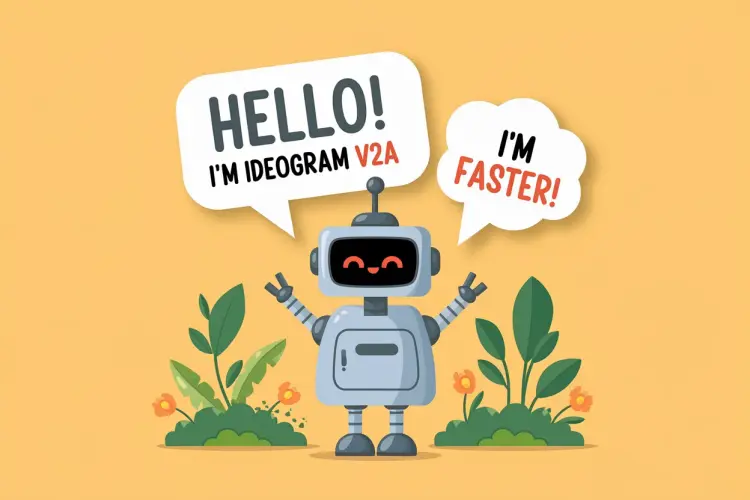
Vector art of a friendly robot, in a speech bubble it says "Hello! I'm Ideogram V2A" in a friendly font, in a second speech bubble it says "I'm faster!", the robot is in a 3D garden

None
3:2
10.2s
Style Type: None
Magic Prompt Option: Auto

Vector art of a cute robot, in a speech bubble it says "Hello! This is Ideogram V2A" in a friendly font, the robot is in a garden

None
16:9
11.7s
Style Type: None
Magic Prompt Option: On

A beautiful landscape photo

Switch Category

Effects

Text To Image

Text To Image

Text To Video

Large Language Models

Large Language Models

Text To Speech

Text To Speech

Super Resolution

Super Resolution

Lipsync

AI Music Generation

AI Music Generation

Video Editing

Speech To Text

Speech To Text

AI Enhance Videos

Remove Backgrounds

Remove Backgrounds