• Picasso AI Logo
    Logo Picasso IA
  • Home
  • AI Image
    Nano Banana 2
  • AI Video
    Veo 3.1 Lite
  • AI Chat
    Gemini 3 Pro
  • Edit Images
  • Upscale Image
  • Remove Background
  • Text to Speech
  • Effects
    NEW
  • Generations
  • Billing
  • Support
  • Account
  1. Collection
  2. Text to Image
  3. Ideogram V2a Turbo

Ideogram v2a Turbo: Instant AI Images from Text

Ideogram v2a Turbo is a text-to-image AI model that turns written prompts into finished visuals in a fraction of the time older models require. If you've ever sat watching a progress bar creep along just to see if your idea works, this model cuts that wait down noticeably, letting you iterate more and second-guess less. Choose from six style modes (Auto, General, Realistic, Design, Anime, and Render 3D) to steer the visual direction without rewriting your prompt. Magic Prompt, when turned on, reads your description and internally refines it to produce sharper, more varied results, so even a rough instruction produces something worth keeping. You can also control the output resolution and aspect ratio, from square social posts to wide cinematic crops. It fits naturally into any workflow where speed matters: concept art rounds, client mood boards, ad asset drafts, or personal projects where you want to see ten ideas instead of one. Open it on Picasso IA, type your prompt, pick a style, and generate.

Official

Ideogram Ai

349.1k runs

Ideogram V2a Turbo

2025-02-27

Commercial Use

Ideogram v2a Turbo: Instant AI Images from Text

Table of contents

  • Overview
  • How It Works
  • Frequently Asked Questions
  • Credit Cost
  • Features
  • Use Cases
  • Examples
Get Nano Banana Pro

Overview

Ideogram v2a Turbo is a text-to-image model built for fast iteration without sacrificing output quality. It addresses the common frustration of slow generation cycles, where waiting on each image means losing the thread of a creative idea before you can test it. On Picasso IA, you type a prompt, choose a style, and see the result in seconds. This makes it practical for anyone who generates, reviews, and adjusts visuals regularly, from ad drafts to concept art to personal projects.

How It Works

  • Write a text prompt describing the image you want, from a detailed scene to a single concept phrase.
  • Select a style type from Auto, General, Realistic, Design, Anime, or Render 3D to steer the visual direction.
  • Choose an aspect ratio or a specific pixel resolution to match where the image will be used.
  • Enable Magic Prompt to let the model interpret and refine your description before generating.
  • Hit generate, then download the result or adjust any setting and run it again immediately.

Frequently Asked Questions

Do I need programming skills or technical knowledge to use this? No, just open Ideogram v2a Turbo on Picasso IA, adjust the settings you want, and hit generate.

Is it free to try? Yes, free generations are available for users who want to test the model before signing up for a plan. The exact number of free runs depends on your current account tier.

How long does it take to get results? Most images finish in a few seconds. Ideogram v2a Turbo is specifically designed to minimize wait time, so you can run multiple iterations in a short session without delays adding up.

What output formats are supported? Images are delivered as PNG files. You can download them directly and bring them into any design tool, presentation, or document with no additional conversion needed.

Can I customize the output quality or style? Yes. Pick from six style types, set the aspect ratio or resolution to fit your target format, and control how much the model rewrites your prompt via the Magic Prompt setting.

What happens if I'm not happy with the result? Change the prompt, switch the style type, or toggle Magic Prompt and generate again. Because each run takes only seconds, iterating is quick rather than costly.

How many times can I run the model? Generation limits depend on your account plan. Free accounts include a set number of daily runs, and paid plans provide additional capacity for heavier use.

Credit Cost

Each generation consumes 1 credit

1 credit

or 5 credits for 5 generations

Features

Everything this model can do for you

Multiple style modes

Choose from Auto, General, Realistic, Design, Anime, or Render 3D to direct the visual output without rewriting your prompt.

Magic Prompt optimizer

Automatically refines your input text to produce sharper, more varied results from even brief or rough descriptions.

Flexible resolution control

Pick from dozens of preset resolutions or set an aspect ratio to match your target format exactly.

Reproducible results

Set a seed value to recreate the same image across multiple runs or compare small prompt variations side by side.

Fast generation

Produces a finished image in seconds, so you can run multiple iterations in the time most models take for one.

Multilingual prompt support

Magic Prompt interprets prompts written in languages other than English and translates intent into accurate visuals.

Wide aspect ratio selection

Generate content in 11 preset aspect ratios, from square 1:1 to ultra-wide 3:1 and tall portrait 1:3.

Ideal for professionals and hobbyists alike.

Use Cases

Generate product concept art in multiple art styles from a single text description to compare visual directions quickly

Create social media images at the exact resolution needed (square, portrait, or landscape) without cropping or resizing afterward

Produce anime-style character illustrations from a written description to use as references for artists or clients

Draft a series of ad visuals by writing different product angles as prompts and cycling through style options

Turn a rough written brief into a realistic scene to show a client what a photo shoot could look like before booking it

Use Magic Prompt to write your prompt in a language other than English and still receive high-quality, accurate results

Generate multiple variations of the same concept by adjusting the style type while keeping the same seed for consistency

Experiment with creative prompts for inspiration.

Examples

None
3:2
7.8s
Style Type: None
Magic Prompt Option: Auto

A portrait photo of a woman sitting with a flat white coffee in a Parisienne cafe

None
3:2
6.1s
Style Type: None
Magic Prompt Option: Auto

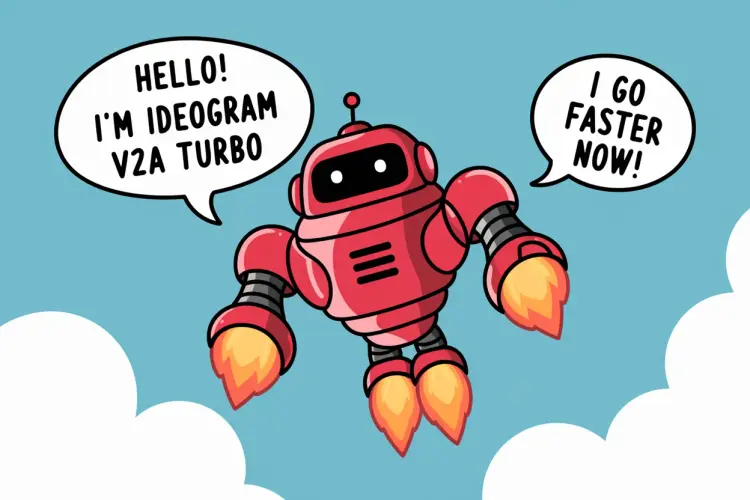
Vector art of a friendly robot, in a speech bubble it says "Hello! I'm Ideogram V2A turbo" in a friendly font, in a second speech bubble it says "I go faster now!", the robot is flying through the sky with turbo boosters

None
3:2
6.9s
Style Type: None
Magic Prompt Option: Auto

Vector art of a friendly speedy robot, in a speech bubble it says "Hello! I'm Ideogram V2A turbo" in a friendly font, in a second speech bubble it says "I go faster now!", the robot is travelling at speed, with motion lines

Switch Category

Effects

Text To Image

Text To Image

Text To Video

Large Language Models

Large Language Models

Text To Speech

Text To Speech

Super Resolution

Super Resolution

Lipsync

AI Music Generation

AI Music Generation

Video Editing

Speech To Text

Speech To Text

AI Enhance Videos

Remove Backgrounds

Remove Backgrounds