• Picasso AI Logo
    Logo Picasso IA
  • Home
  • AI Image
    Nano Banana 2
  • AI Video
    Veo 3.1 Lite
  • AI Chat
    Gemini 3 Pro
  • Edit Images
  • Upscale Image
  • Remove Background
  • Text to Speech
  • Effects
    NEW
  • Generations
  • Billing
  • Support
  • Account
  1. Collection
  2. Text to Image
  3. Ideogram V3 Balanced

Create Realistic AI Images with Ideogram v3 Balanced

Ideogram v3 Balanced is a text-to-image model built for creators who need consistently good results without waiting on long generation times. Whether you are mocking up a social post, drafting a product visual, or experimenting with an art style, it produces sharp, detailed images from a single text prompt with no setup required. The model ships with a wide range of artistic style presets, from oil painting to flat vector, so you can match a specific aesthetic without writing complex prompt instructions. It also supports multiple aspect ratios and resolutions, meaning you can output a square graphic, a vertical story, or a wide banner from the same interface. For editing existing images, the inpainting option lets you mask a specific area and rewrite just that part while the rest stays intact. It fits naturally into iterative creative workflows: generate a first version, tweak the prompt or swap the style preset, and run again until the image matches what you had in mind. You can reuse a seed to reproduce exact results, or drop the seed entirely to get fresh variations each time. If you need a reliable text-to-image model that does not trade quality for speed, Ideogram v3 Balanced is worth running.

Official

Ideogram Ai

234.7k runs

Ideogram V3 Balanced

2025-04-30

Commercial Use

Create Realistic AI Images with Ideogram v3 Balanced

Table of contents

  • Overview
  • How It Works
  • Frequently Asked Questions
  • Credit Cost
  • Features
  • Use Cases
  • Examples
Get Nano Banana Pro

Overview

Ideogram v3 Balanced is a text-to-image model that generates detailed, stylistically consistent images from written prompts. It holds a middle ground between fast outputs and high visual quality, making it a practical choice for creators who iterate often. On Picasso IA, you can run it directly from a browser with no installation, no account token, and no prompt engineering experience needed. Type a description, pick a style preset, and the model does the rest.

How It Works

  • Write a text prompt describing the image you want, including details like subject, setting, lighting, and mood.
  • Choose an aspect ratio or a specific resolution that matches your intended output format, such as a social post, banner, or print.
  • Select a style preset from the dropdown if you want the output to match a particular aesthetic, or leave it on Auto.
  • Toggle Magic Prompt on if you want the model to expand and refine your description before generating.
  • Click generate and download the image. If the result is close but not quite right, adjust the prompt or switch the style preset and run again.

Frequently Asked Questions

Do I need programming skills or technical knowledge to use this? No, just open Ideogram v3 Balanced on Picasso IA, adjust the settings you want, and hit generate.

Is it free to try? Yes, free generations are available so you can test the model before committing to any plan. Check your account credits page for the current limits.

How long does it take to get results? Most generations return within a few seconds. The exact time depends on the chosen resolution and current service load.

What output formats are supported? Images are delivered as standard downloadable files. You set the resolution and aspect ratio before generating, so the output arrives at the exact dimensions you need.

Can I customize the output quality or style? Yes. You can choose from over 50 style presets, set a specific resolution, adjust the aspect ratio, and use Magic Prompt to refine your input automatically.

How many times can I run the model? The number of generations depends on your plan. Each run uses credits, and you can see your remaining balance in your Picasso IA account.

What happens if I am not happy with the result? Tweak the prompt, swap the style preset, or change the aspect ratio and generate again. If you want to reproduce a result you liked, save the seed number from that run.

Credit Cost

Each generation consumes 1 credit

1 credit

or 5 credits for 5 generations

Features

Everything this model can do for you

Style presets

Choose from over 50 artistic styles, from Watercolor to Flat Vector, without writing extra prompt instructions.

Inpainting support

Mask any region of an existing image and rewrite just that area while the surrounding pixels stay unchanged.

Flexible aspect ratios

Output images in 15 preset ratios from 1:3 portrait to 3:1 landscape to match any content format.

Seed control

Fix the seed to reproduce identical results across sessions, or leave it random for fresh variations every run.

Magic Prompt

Automatically refines and expands your prompt to increase output variety and quality with minimal extra effort.

Style references

Upload reference images to guide the visual style of the generation toward a specific look.

High-resolution outputs

Generate images at resolutions up to 1536px on the long edge for print-ready or large-format use.

Easy integration into creative workflows

Use Cases

Generate a realistic product image on a white background from a text description of the item's shape, color, and material

Apply a vintage poster style preset to a street photography prompt to get a retro-styled illustration without manual styling

Inpaint a specific area of an image, such as replacing the background behind a subject, while preserving the rest of the photo

Produce a 16:9 banner image for a YouTube thumbnail by writing a short scene description and setting the aspect ratio before generating

Create multiple variations of a logo concept by keeping the same seed and switching between style presets like Flat Vector and Art Deco

Turn a rough concept brief into a polished editorial illustration by describing the composition, mood, and color palette in a text prompt

Generate a children's book illustration by selecting the corresponding style preset and writing a short scene description

Supporting educational or training content creation

Examples

None
3:2
8.3s
Style Type: None
Magic Prompt Option: Auto

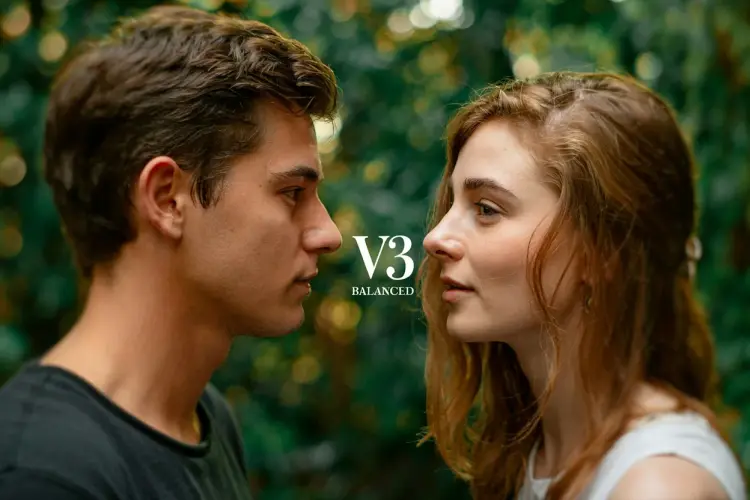
The text "V3 Balanced" in the center middle. A color film-inspired portrait of a young man and a young woman looking at each other, a shallow depth of field that blurs the surrounding elements, drawing attention to their eyes. The fine grain and cast suggest a high ISO film stock, while the wide aperture lens creates a pleasing bokeh effect, enhancing the candid and natural documentary style.

None
3:2
10.2s
Style Type: None
Magic Prompt Option: Auto

a photo of a puppy holding a sign that says "Ideogram v3 balanced"

None
3:2
10.9s
Style Type: None
Magic Prompt Option: Auto

beautiful bauhaus stark typographic poster saying "Ideogram v3 on Replicate", pink and gold

None
3:2
9.9s
Style Type: None
Magic Prompt Option: Auto

a photo of a puppy holding a sign that says "Ideogram v3 balanced"

Switch Category

Effects

Text To Image

Text To Image

Text To Video

Large Language Models

Large Language Models

Text To Speech

Text To Speech

Super Resolution

Super Resolution

Lipsync

AI Music Generation

AI Music Generation

Video Editing

Speech To Text

Speech To Text

AI Enhance Videos

Remove Backgrounds

Remove Backgrounds