• Picasso AI Logo
    Logo Picasso IA
  • Home
  • AI Image
    Nano Banana 2
  • AI Video
    Veo 3.1 Lite
  • AI Chat
    Gemini 3 Pro
  • Edit Images
  • Upscale Image
  • Remove Background
  • Text to Speech
  • Effects
    NEW
  • Generations
  • Billing
  • Support
  • Account
  1. Collection
  2. Text to Image
  3. Ideogram V3 Turbo

Create Realistic Images with Ideogram v3 Turbo

Ideogram v3 Turbo is a text-to-image model built for speed without sacrificing quality. It produces sharp, photorealistic photos, bold graphic designs, and stylistically consistent artwork from a short text prompt. If you need high-quality images fast and without a steep setup process, this is the model to reach for. The model ships with over 50 preset artistic styles, from oil painting to retro poster to Bauhaus, so you can pin down a visual direction without writing a lengthy prompt. You can set the exact output resolution or choose from a list of common aspect ratios, from square to cinematic widescreen. There is also an inpainting mode: upload an image and a mask, and the model fills in only the masked regions while leaving the rest intact. Ideogram v3 Turbo fits naturally into workflows where you need many visual options quickly. Use it to test a dozen concept directions in the time it would normally take to finish one, then take the best result into your editing software. The Magic Prompt feature can also rephrase and expand your raw idea into a richer description if you are starting from scratch.

Official

Ideogram Ai

2.03m runs

Ideogram V3 Turbo

2025-04-30

Commercial Use

Create Realistic Images with Ideogram v3 Turbo

Table of contents

  • Overview
  • How It Works
  • Frequently Asked Questions
  • Credit Cost
  • Features
  • Use Cases
  • Examples
Get Nano Banana Pro

Overview

Ideogram v3 Turbo is a text-to-image model that prioritizes speed while keeping image quality high. On Picasso IA, you type a prompt, choose a style, and have a finished image in seconds, whether you need a product photo, a design mockup, or a full illustration. The Turbo variant delivers the same visual quality as the full v3 model at a significantly faster generation time, making it the right pick for anyone iterating through multiple creative directions in one session. If your workflow demands volume without waiting, this model is built for it.

How It Works

  • Type your text prompt in the input field. You can write a short phrase or a detailed scene description.
  • Select an aspect ratio or set a specific pixel resolution that matches your intended use.
  • Optionally choose a style preset or style type (Realistic, Design, General) to define the visual aesthetic before generating.
  • Click generate. The model processes your prompt and returns a finished image within seconds.
  • Download the result, adjust your prompt or settings, and run again with or without the same seed to control consistency.

Frequently Asked Questions

Do I need programming skills or technical knowledge to use this? No, just open Ideogram v3 Turbo on Picasso IA, adjust the settings you want, and hit generate.

Is it free to try? Yes, you can run Ideogram v3 Turbo without a paid subscription to start. Check the current plan details on Picasso IA for generation limits.

How long does it take to get results? Most images are ready in a few seconds. Generation time varies slightly depending on resolution and server load, but the Turbo variant is the fastest option in the v3 family.

What output formats are supported? The model returns standard image files you can download and use immediately in any design, publishing, or social media workflow.

Can I customize the output quality or style? Yes. You can select from over 50 named style presets, switch between style types, set a specific resolution, and toggle Magic Prompt on or off. Each setting changes the output in a measurable way.

What happens if I'm not happy with the result? Change one variable at a time, such as the style preset or a phrase in your prompt, and run it again. If you found a result you partially liked, save the seed and adjust the prompt to steer the output in the direction you want.

Where can I use the outputs? Images you generate are yours to use. Drop them into presentations, social posts, client mockups, or print materials.

Credit Cost

Each generation consumes 1 credit

1 credit

or 5 credits for 5 generations

Features

Everything this model can do for you

Speed-optimized generation

Produces a 1024x1024 image in a fraction of the time of the standard v3 model.

50+ style presets

Select a named artistic style, from watercolor to Cubism, without writing style instructions into your prompt.

Flexible resolution

Choose from over 60 pixel dimensions, from 512x1536 to 1536x640, to fit any output format.

Inpainting support

Upload an image with a black-and-white mask to regenerate only the selected region, leaving the rest unchanged.

Magic Prompt

Automatically expands a short phrase into a richer prompt to increase image variety and output quality.

Aspect ratio control

Pick from 15 standard ratios, including 16:9, 9:16, and 1:1, without calculating pixel dimensions.

Seed-based reproducibility

Set a seed value to get the same output every time and iterate confidently from a proven base.

Style type selector

Switch between Auto, General, Realistic, and Design modes to shift the output aesthetic in one click.

Use Cases

Generate a product photo on a clean white background from a text description of the item

Create a social media graphic in a specific visual style, like Bauhaus or vintage poster, without any design software

Fill in a missing section of an existing photo by uploading a mask that marks the area to regenerate

Produce multiple logo concept sketches in different styles from a single brand description prompt

Generate a portrait in a cinematic 16:9 aspect ratio for use as a YouTube thumbnail or banner

Turn a rough concept note into a polished illustration by letting Magic Prompt expand and refine the wording

Test different color palettes and moods for the same scene by running the same seed with adjusted style settings

Experiment with diverse styles for artistic projects

Examples

None
3:2
6.8s
Style Type: None
Style Preset: None
Magic Prompt Option: Auto

color film portrait of a man looking to the side with a shallow depth of field, high ISO film grain, wide aperture motion blur effect, "Ideogram V3 Turbo" mechanic garage style badge on the shoulder

None
3:2
8.0s
Style Type: None
Style Preset: None
Magic Prompt Option: Auto

renaissance painting of a chihuahua with "Ideogram 3.0 Turbo" on the dog contest medal, strong side light

None
3:2
6.1s
Style Type: None
Magic Prompt Option: Auto

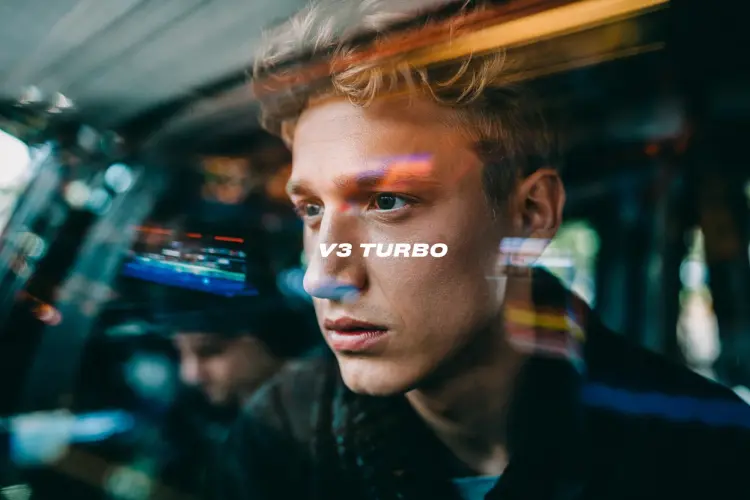
The text "V3 Turbo" in the center middle. A color film-inspired portrait of a young man looking to the side with a shallow depth of field that blurs the surrounding elements, drawing attention to his eye. The fine grain and cast suggest a high ISO film stock, while the wide aperture lens creates a motion blur effect, enhancing the candid and natural documentary style.

None
3:2
7.2s
Style Type: None
Magic Prompt Option: Auto

a photo of a puppy holding a sign that says "Ideogram v3 turbo"

Switch Category

Effects

Text To Image

Text To Image

Text To Video

Large Language Models

Large Language Models

Text To Speech

Text To Speech

Super Resolution

Super Resolution

Lipsync

AI Music Generation

AI Music Generation

Video Editing

Speech To Text

Speech To Text

AI Enhance Videos

Remove Backgrounds

Remove Backgrounds