• Picasso AI Logo
    Logo Picasso IA
  • Home
  • AI Image
    Nano Banana 2
  • AI Video
    Veo 3.1 Lite
  • AI Chat
    Gemini 3 Pro
  • Edit Images
  • Upscale Image
  • Remove Background
  • Text to Speech
  • Effects
    NEW
  • Generations
  • Billing
  • Support
  • Account
  1. Collection
  2. Text to Image
  3. Kandinsky 2.2

Kandinsky 2.2: Free AI Image Generator Online

Kandinsky 2.2 takes a text description and converts it into a finished image, no drawing tools or design skills required. It accepts prompts written in multiple languages, so you're not limited to English to get accurate, high-quality results. The model handles a wide range of visual styles, from photorealistic scenes to stylized illustrations, making it practical for anyone who needs original visuals fast. You can generate images at resolutions up to 2048×2048, giving you enough pixel density for print projects or high-resolution digital publishing. A negative prompt field lets you specify what to keep out of the frame, cutting revision time significantly. You also control the number of denoising steps the model runs, letting you trade generation speed for visual sharpness based on what the project demands. This model fits naturally into any workflow where you need quick visual drafts, whether you're building a mood board, pitching a concept to a client, or filling a content calendar. Output formats include WebP, JPEG, and PNG, so the file drops straight into any design tool or CMS. Set your prompt, adjust the parameters, and start generating.

Ai Forever

10.03m runs

Kandinsky 2.2

2023-07-12

Commercial Use

Kandinsky 2.2: Free AI Image Generator Online

Table of contents

  • Overview
  • How It Works
  • Frequently Asked Questions
  • Credit Cost
  • Features
  • Use Cases
  • Examples
Get Nano Banana Pro

Overview

Kandinsky 2.2 is a text-to-image model that converts written descriptions into original artwork, illustrations, and photorealistic scenes. On Picasso IA, you type what you want to see, select your output dimensions, and receive a result within seconds. The model accepts prompts in multiple languages, so non-English speakers get accurate results without rewriting their ideas. It handles a wide range of visual tasks, from quick concept sketches and mood board assets to polished digital art ready for publishing.

How It Works

  • Write a text prompt describing your image in detail, including the subject, visual style, setting, mood, and any specific color or lighting you want
  • Optionally add a negative prompt to exclude unwanted elements from the composition, such as blurry areas, specific objects, or distorted anatomy
  • Choose an output resolution from 384×384 up to 2048×2048 based on how large and detailed the final image needs to be
  • Adjust the prior and main inference step counts to balance between generation speed and output detail, then click generate
  • Download your finished image in WebP, JPEG, or PNG and drop it directly into your project

Frequently Asked Questions

Do I need programming skills or technical knowledge to use this? No, just open Kandinsky 2.2 on Picasso IA, adjust the settings you want, and hit generate.

Is it free to try? Yes, you can run Kandinsky 2.2 without a paid plan. The model is available directly in your browser with no installation required.

How long does it take to get results? Most images finish within 10 to 30 seconds. The exact time depends on the resolution you pick and how many inference steps you set. Larger outputs at higher step counts fall closer to the upper end of that range.

What output formats are supported? Kandinsky 2.2 exports images in WebP, JPEG, and PNG. WebP gives the smallest file size for web use, while PNG is the best option when you need lossless quality for further editing.

Can I customize the output quality or style? Yes. You can raise the inference step count for finer detail, use a negative prompt to remove specific unwanted elements, and lock a seed value to reproduce or refine a result across multiple runs.

How many times can I run the model? You can generate as many images as you want in a session. There is no per-image cap, so you can iterate freely until the output matches what you had in mind.

Where can I use the outputs? Images from Kandinsky 2.2 work in blog posts, social media content, presentations, product mockups, or any other visual project. Picasso IA does not add watermarks to your downloads.

Credit Cost

Each generation consumes 1 credit

1 credit

or 5 credits for 5 generations

Features

Everything this model can do for you

Multilingual prompts

Write your description in any language and the model interprets it without requiring English input.

High resolution output

Generate images up to 2048×2048 pixels, suitable for print materials and large-format digital use.

Negative prompt control

Specify elements to exclude from the image, giving you precise control over the final composition.

Seed reproducibility

Reuse a fixed seed to recreate an image exactly or build on a known result across multiple runs.

Multiple output formats

Download finished images in WebP, JPEG, or PNG depending on where you plan to use them.

Adjustable inference steps

Increase denoising steps for sharper, more refined outputs or reduce them for faster previews.

Batch generation

Generate several image variations from a single prompt in one run to compare results side by side.

Fast, high-resolution image synthesis

Use Cases

Generate concept art for a video game environment by typing a detailed description of the scene, lighting, and atmosphere

Design an illustration for a book by writing out the characters, setting, and visual tone you want the image to capture

Produce multiple background variations for a product photo shoot by iterating on the same prompt with different seeds

Create original social media graphics by describing the composition, color palette, and subject in plain language

Visualize an interior design concept by typing a description of the room layout, furniture style, and lighting conditions

Draft character design references for animation projects by specifying costume details, body proportions, pose, and art style

Create custom artwork for blog headers, presentations, or digital reports without relying on stock photo libraries

Storyboarding and mood board development

Examples

1024x1024
12.3s
Num Outputs: 1
Num Inference Steps: 100

watercolor mixed media masterpiece beautiful white cozy house with chimneys, a purple door, richly decorated with lupine, flower pots overgrown with moss, Provence, gold accents, shabby chic style, isolated on white, extremely photorealistic details, realistic high detail, high resolution

1024x1024
12.4s
Num Outputs: 1
Num Inference Steps: 100

glass ball, on a wooden table, fantastic castle, blurry and dreamy illustration, in a miniature country, round window, ornate palace of greenery, whimsical design

1024x1024
21.1s
Num Outputs: 1
Num Inference Steps: 200

a two year old girl helps a small robot stand up, the photo is realistic, high definition, color image with a park background

1024x1024
12.5s
Num Outputs: 1
Num Inference Steps: 100

a red cat photo, 8k

1024x1024
11.2s
Num Outputs: 1
Num Inference Steps: 100

HD quality, futuristic future cityscape, unusual apartment buildings, architecture, light, dawn, details, Milky Way, 8k

1024x1024
17.0s
Num Outputs: 1
Num Inference Steps: 150

a beautiful landscape photo, epic, dawn light, 8k, mountains, river, dramatic, award winning

896x1024
16.0s
Num Outputs: 1
Num Inference Steps: 150

Detailed portrait of a masked woman, bright peacock feathers, complex, elegant, highly detailed, digital painting, art, fluid, illustration, green highlighted lines, complex patterns, cyberpunk Alphonse Mucha

1024x1024
9.0s
Num Outputs: 1
Num Inference Steps: 75

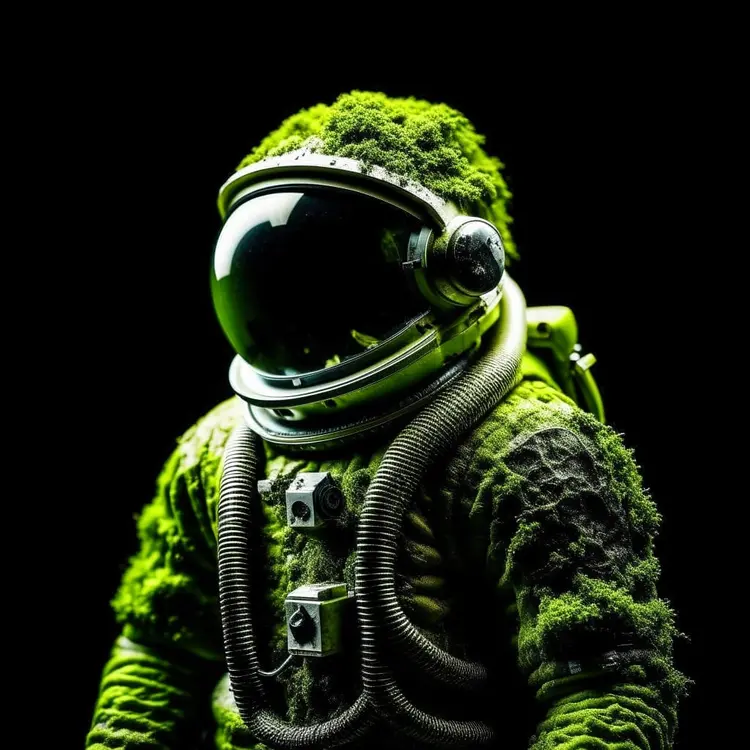
A moss covered astronaut with a black background

Switch Category

Effects

Text To Image

Text To Image

Text To Video

Large Language Models

Large Language Models

Text To Speech

Text To Speech

Super Resolution

Super Resolution

Lipsync

AI Music Generation

AI Music Generation

Video Editing

Speech To Text

Speech To Text

AI Enhance Videos

Remove Backgrounds

Remove Backgrounds