• Picasso AI Logo
    Logo Picasso IA
  • Home
  • AI Image
    Nano Banana 2
  • AI Video
    Veo 3.1 Lite
  • AI Chat
    Gemini 3 Pro
  • Edit Images
  • Upscale Image
  • Remove Background
  • Text to Speech
  • Effects
    NEW
  • Generations
  • Billing
  • Support
  • Account
  1. Collection
  2. Text to Image
  3. Photon Flash

Generate Sharp Images Instantly with Photon Flash

Photon Flash is a text-to-image model built around one idea: fast results without a quality penalty. Where most image generators force a trade-off between speed and output sharpness, Photon Flash runs at accelerated pace while keeping images clean and detailed. On Picasso IA, you write a prompt, optionally attach a reference image, and get a finished visual in seconds. It handles a wide range of aspect ratios, from vertical phone formats like 9:16 to cinematic widescreen 21:9, so output fits directly into your project without manual cropping. You can also feed in reference images to steer composition, visual style, or character consistency. The weight slider on each reference lets you decide how closely the output follows the input image. Drop it into any workflow where you need fast visual drafts: social posts, ad concepts, presentation decks, or product mockups. The setup is minimal and the output is immediate.

Official

Luma

164.6k runs

Photon Flash

2024-12-05

Commercial Use

Generate Sharp Images Instantly with Photon Flash

Table of contents

  • Overview
  • How It Works
  • Frequently Asked Questions
  • Credit Cost
  • Features
  • Use Cases
  • Examples
Get Nano Banana Pro

Overview

Photon Flash is a text-to-image model built for speed without a quality trade-off. Where most image generators make you wait, Photon Flash returns a finished image in seconds. On Picasso IA, the process is straightforward: write a description, choose your aspect ratio, and hit generate. It fits naturally into any workflow where quick visual drafts matter, whether you are testing a product idea, building out a content calendar, or putting a concept on screen before a meeting.

How It Works

  • Write a text prompt describing your image in as much or as little detail as you want, including subject, setting, lighting, mood, or style
  • Pick an aspect ratio that matches your output: 9:16 for stories and mobile, 16:9 for banners and thumbnails, 1:1 for social posts, or one of four other available ratios
  • Optionally upload a reference image for composition guidance, a style reference to set the visual tone, or a character reference to keep a specific subject consistent across images
  • Adjust the reference weight slider to control how closely the output follows your reference, from a light hint to a strong influence
  • Hit generate and download your image; reuse the same seed value to reproduce the same result in future runs

Frequently Asked Questions

Do I need programming skills or technical knowledge to use this? No, just open Photon Flash on Picasso IA, adjust the settings you want, and hit generate.

Is it free to try? Yes, you can run Photon Flash on Picasso IA without a paid plan to see how it performs on your prompts. No credit card or account setup is required.

How long does it take to get results? Most images are ready within a few seconds. Generation time depends on your prompt complexity and the selected aspect ratio, but Photon Flash is built to minimize wait time as a core priority.

What aspect ratios are supported? Seven ratios are available: 1:1, 3:4, 4:3, 9:16, 16:9, 9:21, and 21:9. These span portrait, square, and widescreen formats, so your output fits directly into most platforms without manual cropping.

Can I use reference images to shape the output? Yes. You can supply up to three reference inputs: one for composition, one for style, and one for character consistency. Each has its own weight slider, so you decide how strongly each one influences the result.

What happens if I am not happy with a result? Adjust your prompt wording, change the reference weight, or run with a different seed. Since Photon Flash generates images quickly, testing several variations adds only a minute or two to your session.

Credit Cost

Each generation consumes 1 credit

1 credit

or 5 credits for 5 generations

Features

Everything this model can do for you

Speed-first design

Produces a full-resolution image in seconds without compromising output quality.

Multiple aspect ratios

Supports seven formats including 9:16, 16:9, 1:1, and 21:9 for any project type.

Image reference input

Feed in a reference photo to guide the composition of the generated image.

Style reference control

Use a style image to steer the visual aesthetic of the output toward a specific look.

Character reference

Maintain consistent character appearance across multiple generated images with one reference photo.

Adjustable reference weight

Set how strongly each reference image influences the result on a sliding scale.

Reproducible outputs

Lock in a seed value to regenerate the exact same image whenever you need it.

Use Cases

Generate a product mockup on a clean background from a short written description of the item

Create a social media image in portrait format (9:16) from a single text prompt in seconds

Use a reference photo to guide the composition and get a generated image that matches the layout

Apply a style reference image to produce outputs with a consistent visual aesthetic across a series

Generate multiple widescreen (16:9) thumbnails quickly from different prompt variations to pick the best

Produce a character-consistent image series by supplying a character reference photo alongside each prompt

Draft ad creative concepts in different aspect ratios without waiting for a designer

Examples

16:9
9.3s
Image Reference Weight: 0.85
Style Reference Weight: 0.85

Hand reaching up for falling purple flower petals, subdue, realistic camera

16:9
7.1s
Image Reference Weight: 0.85
Style Reference Weight: 0.85

Beautiful dog in yellow background setting

16:9
6.2s
Image Reference Weight: 0.85
Style Reference Weight: 0.85

Rainforest tree frog realistic above view

16:9
7.0s
Image Reference Weight: 0.85
Style Reference Weight: 0.85

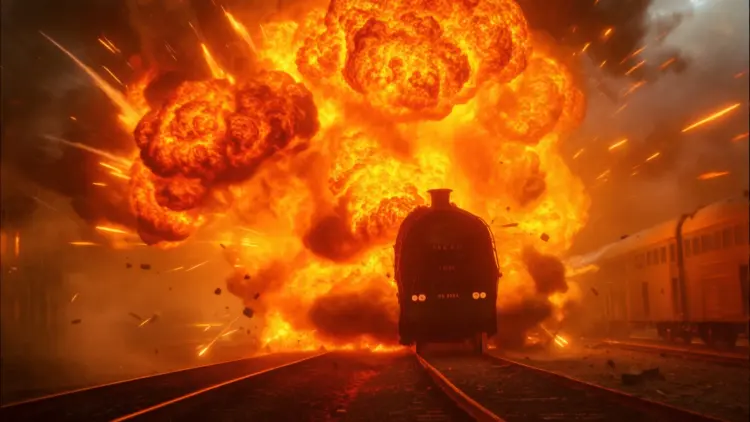
A train car is engulfed in a massive explosion, with flames and smoke billowing into the sky as debris flies in all directions, cinematic photograph, explosive action, high contrast, dynamic lighting.

Switch Category

Effects

Text To Image

Text To Image

Text To Video

Large Language Models

Large Language Models

Text To Speech

Text To Speech

Super Resolution

Super Resolution

Lipsync

AI Music Generation

AI Music Generation

Video Editing

Speech To Text

Speech To Text

AI Enhance Videos

AI Enhance Videos

Remove Backgrounds

Remove Backgrounds