• Picasso AI Logo
    Logo Picasso IA
  • Home
  • AI Image
    Nano Banana 2
  • AI Video
    Veo 3.1 Lite
  • AI Chat
    Gemini 3 Pro
  • Edit Images
  • Upscale Image
  • Remove Background
  • Text to Speech
  • Effects
    NEW
  • Generations
  • Billing
  • Support
  • Account
  1. Collection
  2. Text to Image
  3. Image 01

Generate Consistent Character Images with Image 01

Image 01 is a text-to-image model built around one of the hardest problems in AI-generated visuals: character consistency. Most generators produce a different-looking face every time you run a prompt, even when you describe the same person. Image 01 lets you upload a face photo as a reference, and the model anchors the subject's appearance across every image in the batch. Beyond character reference, Image 01 handles a full range of creative formats. You can pick from eight aspect ratios to match any platform, from square social posts to cinematic 21:9 panoramas. A built-in prompt optimizer rewrites your input to get sharper, more detailed outputs, and you can request multiple image variations in one run to compare results side by side. Image 01 fits naturally into workflows where visual consistency matters: brand shoots, storyboarding, content series, and product photography. Whether you need one hero image or a full set of character studies, you can iterate in seconds without starting from scratch each time. Open it on Picasso IA and start generating immediately.

Official

Minimax

1.60m runs

Image 01

2025-03-03

Commercial Use

Generate Consistent Character Images with Image 01

Table of contents

  • Overview
  • How It Works
  • Frequently Asked Questions
  • Credit Cost
  • Features
  • Use Cases
  • Examples
Get Nano Banana Pro

Overview

Image 01 is a text-to-image model that addresses one of the most persistent frustrations in AI image creation: keeping a character's face consistent across multiple outputs. Standard generators treat every prompt run independently, so the same written description can produce a noticeably different face each time. Image 01 solves this by letting you attach a reference photo, which it uses to anchor the subject's appearance in every image you generate. On Picasso IA, you access it entirely through a browser with no installation or configuration required. It also works without a reference photo when you only need a single, polished image from a written scene.

How It Works

  • Write a text prompt describing the scene, subject, style, and mood you want to produce.
  • Optionally upload a clear face photo to lock in a specific character's appearance.
  • Select one of eight aspect ratios to match the platform or format you are targeting.
  • Set the number of image variations you want from this run.
  • Hit generate and download the finished images directly, with no additional post-processing steps.

Frequently Asked Questions

Do I need programming skills or technical knowledge to use this? No, just open Image 01 on Picasso IA, adjust the settings you want, and hit generate.

Is it free to try? Yes, you can run Image 01 without a paid subscription. Some usage limits may apply depending on your account plan.

How long does it take to get results? Most single images are ready within a few seconds. Requesting several variations in one batch adds a little extra time but typically finishes within a minute.

What output formats are supported? Image 01 returns standard image files you can download immediately. No conversion software or additional export steps are required.

Can I customize the output quality or style? Yes. You control the aspect ratio, number of images per run, and the prompt text. Enabling the prompt optimizer lets the model refine your input for sharper results, and a face reference photo adds direct control over the subject's appearance.

Where can I use the outputs? Downloaded images carry no watermarks, so you can use them in personal projects, client deliverables, or published content. Check Picasso IA's terms for details on commercial licensing.

What happens if I'm not happy with the result? Tweak your prompt, swap the reference photo, or change the aspect ratio and run again. The prompt optimizer can also rewrite your input automatically to produce a more precise result.

Credit Cost

Each generation consumes 1 credit

1 credit

or 5 credits for 5 generations

Features

Everything this model can do for you

Character reference

Upload one face photo and Image 01 preserves that subject's appearance across every generated image.

Eight aspect ratios

Choose from 1:1, 16:9, 9:16, 4:3, 3:4, 3:2, 2:3, or 21:9 to match any platform or format.

Batch generation

Request multiple image variations in a single run to compare results and select the best one.

Prompt optimizer

Built-in prompt rewriting sharpens your description and produces more detailed images automatically.

Text-only generation

Skip the reference photo entirely and generate high-quality images from a description alone.

No watermarks

Download finished images as clean files ready for direct use in projects or client work.

Quick iteration

Adjust your prompt, reference photo, or aspect ratio and run again in seconds to refine any result.

Ideal for artists, marketers, and content creators

Use Cases

Generate a series of social media posts featuring the same person in different settings, all from a single face photo

Create storyboard panels for a short film where the main character looks identical across every scene

Produce product lifestyle shots by describing the scene in text and letting the model build the image around a reference subject

Turn a written character description into a finished portrait without any photo reference, using only a text prompt

Generate multiple aspect-ratio versions of the same scene in one run, sized for Instagram, YouTube, and Twitter simultaneously

Build a set of brand ambassador visuals where the spokesperson's face stays consistent across different backgrounds and styles

Create concept art for a game or story by describing a character in text and locking in their face with a reference photo

Exploring creative ideas and artistic expressions

Examples

3:2
46.5s
Number Of Images: 1
Prompt Optimizer: Yes

a closeup portrait photo of a woman

16:9
30.5s
Number Of Images: 1
Prompt Optimizer: No

a painted scene of a person sitting by a large window in what appears to be a café or restaurant. The person has their hair up in a bun and is wearing a light-colored top and dark pants, deeply absorbed in reading a book. Through the window, a bustling city street is visible with blurred figures of people walking, warm glowing lights from buildings, and a generally atmospheric evening or night-time urban setting.

3:4
39.0s
Number Of Images: 1
Prompt Optimizer: Yes

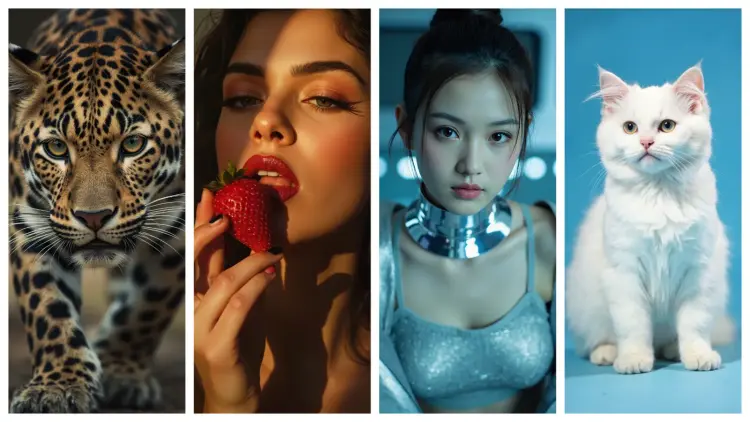
a white cat on a blue background

1:1
30.2s
Number Of Images: 1
Prompt Optimizer: Yes

A portrait with teal lighting showing a cyberpunk wearing a futuristic outfit

3:4
30.5s
Number Of Images: 1
Prompt Optimizer: Yes

A close-up portrait of a leopard with distinctive spotted pattern and intense eyes

Switch Category

Effects

Text To Image

Text To Image

Text To Video

Large Language Models

Large Language Models

Text To Speech

Text To Speech

Super Resolution

Super Resolution

Lipsync

AI Music Generation

AI Music Generation

Video Editing

Speech To Text

Speech To Text

AI Enhance Videos

Remove Backgrounds

Remove Backgrounds