Z Image Turbo is a text-to-image model built for speed without sacrificing visual quality. Where other image generators can take minutes per request, this model returns a 1024×1024 image in a handful of seconds. If you've ever abandoned a creative session because the wait times killed your momentum, this is built for you. The model packs 6 billion parameters into an architecture optimized for low-step generation, meaning it produces sharp, detailed results with as few as 8 inference steps. You can output images as JPG, PNG, or WebP, and dial in output quality from 0 to 100. A fixed seed lets you rerun the same prompt and get an identical result, which is useful when you're iterating on a design and need a consistent baseline. Z Image Turbo fits naturally into any fast-paced creative workflow. Sketch an idea in words, get the image back quickly, adjust the prompt, and repeat until it looks right. You can access it on Picasso IA directly in your browser, no downloads or additional accounts required. Open it, type your prompt, and you'll have an image in seconds.
Z Image Turbo is a text-to-image model built around one priority: speed. With 6 billion parameters and an architecture tuned for low-step generation, it returns a finished image from a text prompt in a fraction of the time most image models take. On Picasso IA, you get access to it directly in your browser, no installs and no waiting. Type a description, set a few options if you want, and the image is ready before you've lost your train of thought.
Do I need programming skills or technical knowledge to use this? No, just open Z Image Turbo on Picasso IA, adjust the settings you want, and hit generate.
Is it free to try? Yes, Z Image Turbo is available to try on Picasso IA without a paid subscription. Some usage limits may apply depending on your account tier.
How long does it take to get results? Z Image Turbo is built for speed. Most outputs arrive in a few seconds, even at 1024×1024 resolution. The exact time depends on current server load, but it runs consistently faster than standard diffusion models at comparable quality.
What output formats are supported? You can download your image as JPG, WebP, or PNG. JPG and WebP support a quality setting from 0 to 100; PNG is lossless and ignores the quality slider.
Can I customize the output quality or style? Yes. You control the output quality level, the image dimensions, and the number of inference steps. The prompt itself is your main style tool: describe the mood, lighting, medium, and composition you want.
How many times can I run the model? You can run it as many times as you need within your account limits. Each run is independent, so you can tweak the prompt or seed and generate a fresh result each time.
What happens if I'm not happy with the result? Adjust your prompt to be more specific about what you want, try a different seed, or change the number of inference steps. Small changes in the prompt often produce noticeably different outputs.
Everything this model can do for you
Returns a 1024×1024 image in seconds using as few as 8 inference steps.
Produces sharp, detailed results with a large architecture optimized for fast generation.
Choose JPG, PNG, or WebP depending on your project's file requirements.
Set quality from 0 to 100 to balance file size against image fidelity.
Lock a seed value to reproduce the exact same image from the same prompt.
Set width and height independently, with a sensible 1024×1024 default.
Generate images from a written description alone, no reference image needed.
Easy integration for creative and business workflows
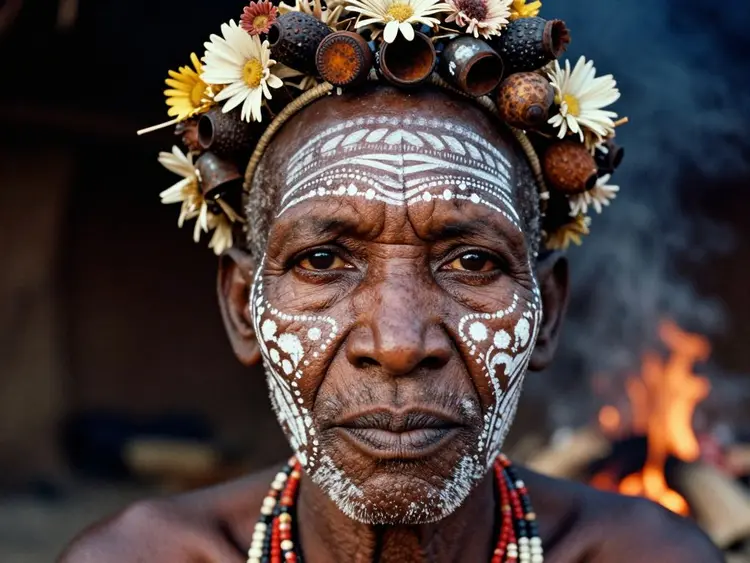
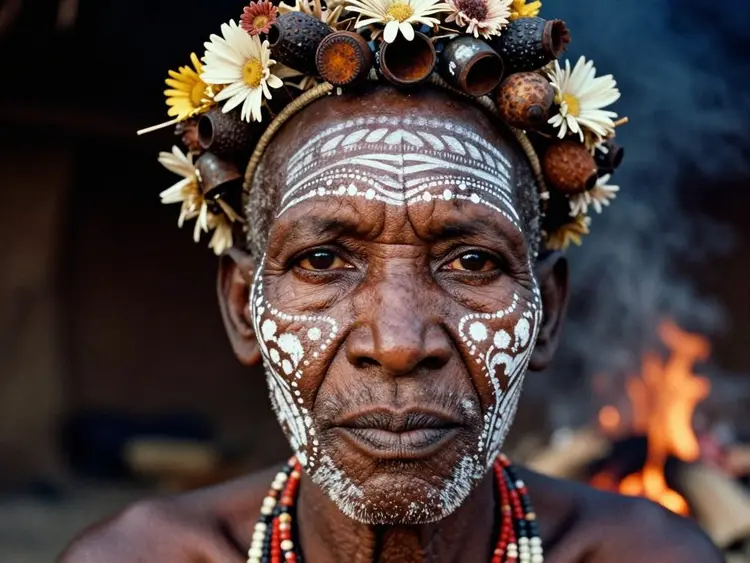
A hyper-realistic, close-up portrait of a tribal elder from the Omo Valley, painted with intricate white chalk patterns and adorned with a headdress made of dried flowers, seed pods, and rusted bottle caps. The focus is razor-sharp on the texture of the skin, showing every pore, wrinkle, and scar that tells a story of survival. The background is a blurred, smoky hut interior, with the warm glow of a cooking fire reflecting in the subject's dark, soulful eyes. Shot on a Leica M6 with Kodak Portra 400 film grain aesthetic.