• Picasso AI Logo
    Logo Picasso IA
  • Home
  • AI Image
    Nano Banana 2
  • AI Video
    Veo 3.1 Lite
  • AI Chat
    Gemini 3 Pro
  • Edit Images
  • Upscale Image
  • Remove Background
  • Text to Speech
  • Effects
    NEW
  • Generations
  • Billing
  • Support
  • Account
  1. Collection
  2. Text to Image
  3. Qwen Image Edit Plus Lora

Edit Any Photo with Qwen Image Edit Plus LoRA

Qwen Image Edit Plus LoRA is an AI model that edits existing images based on plain-text instructions. Instead of manually adjusting layers in a photo editor, you describe what you want changed and the model applies it directly to your upload. This makes photo editing accessible to anyone without design software or technical skills. It accepts JPEG, PNG, GIF, or WEBP uploads alongside a text prompt describing the edit. You can adjust the output aspect ratio to match your original image or switch to standard formats like 16:9 or 1:1. Optional LoRA weights let you apply a specific visual style consistently across multiple images, with a configurable scale to dial the intensity up or down. Whether you need to retouch product photos, apply a consistent filter style to a batch of portraits, or test a concept edit before committing to it in production, this model fits directly into your existing creative process. Try it now on Picasso IA with no setup or account required.

Official

Qwen

1.02m runs

Qwen Image Edit Plus Lora

2025-08-04

Commercial Use

Edit Any Photo with Qwen Image Edit Plus LoRA

Table of contents

  • Overview
  • How It Works
  • Frequently Asked Questions
  • Credit Cost
  • Features
  • Use Cases
  • Examples
Get Nano Banana Pro

Overview

Qwen Image Edit Plus LoRA is a text-driven image editor that applies your written instructions directly to any uploaded photo. Instead of opening a desktop application and navigating menus, you describe what you want changed and the model handles the execution in seconds. Available on Picasso IA, it accepts JPEG, PNG, GIF, and WEBP files and returns edited results in your chosen format and aspect ratio. The optional LoRA support means you can load a specific visual style and apply it consistently across multiple sessions, which is especially useful for batch editing or building a recognizable aesthetic across a series of images.

How It Works

  • Upload a reference image in JPEG, PNG, GIF, or WEBP format using the image input field
  • Write a text prompt that describes the specific edit you want applied to that image
  • Optionally paste a LoRA weights identifier to apply a particular visual style to the edit
  • Adjust aspect ratio, output format (WEBP, JPG, or PNG), and quality level to match your needs
  • Hit generate and download the final edited image directly from the results panel

Frequently Asked Questions

Do I need programming skills or technical knowledge to use this? No, just open Qwen Image Edit Plus LoRA on Picasso IA, adjust the settings you want, and hit generate.

Is it free to try? Yes, the model is available to try on Picasso IA without any payment required at the base tier. Some usage limits may apply depending on your account plan.

How long does it take to get results? Most edits process in under 10 seconds with fast mode enabled by default. More detailed prompts or higher output quality settings may add a few extra seconds.

What output formats are supported? You can download results as WEBP, JPG, or PNG. WEBP is the default and offers a good balance between file size and visual quality. PNG is the right choice when you need a lossless file for further editing.

Can I customize the output quality or style? Yes. The quality setting runs from 0 to 100 (95 by default), and aspect ratio options include 1:1, 16:9, 9:16, 4:3, 3:4, or matching the input image. LoRA scale controls how strongly the loaded style is applied to the output.

What happens if I'm not happy with the result? Rewrite the prompt to be more specific about what you want changed, then run the model again. Setting a fixed seed lets you keep all other variables the same and only change the instruction text.

Credit Cost

Each generation consumes 1 credit

1 credit

or 5 credits for 5 generations

Features

Everything this model can do for you

LoRA style control

Load custom weights to apply a specific visual style across every edited image.

Text-based editing

Describe the change in plain language and the model applies it without manual tools.

Multi-format input

Accepts JPEG, PNG, GIF, and WEBP reference images with no conversion needed.

Flexible aspect ratios

Output at 1:1, 16:9, 9:16, 4:3, 3:4, or match the original image dimensions.

Configurable quality

Set output quality from 0 to 100 for fine control over file size versus sharpness.

Fast processing

Speed-optimized mode cuts generation time without changing the instruction format.

Multiple output formats

Save results as WEBP, JPG, or PNG to match your workflow requirements.

Batch editing with multiple image support

Use Cases

Remove a specific object from a product photo by describing what should be taken out and replaced with background

Change the color of clothing in a fashion photo by writing a prompt that specifies the exact new color

Apply a consistent illustration style to multiple portrait photos using a LoRA weight file

Add atmospheric effects like fog, rain, or golden-hour lighting to an outdoor scene photo

Swap the background of a product image while keeping the subject perfectly intact

Convert a daytime cityscape photo into a nighttime version by describing the lighting change

Test different visual styles on the same image by switching LoRA weights between runs

Visual storytelling and presentation assets

Examples

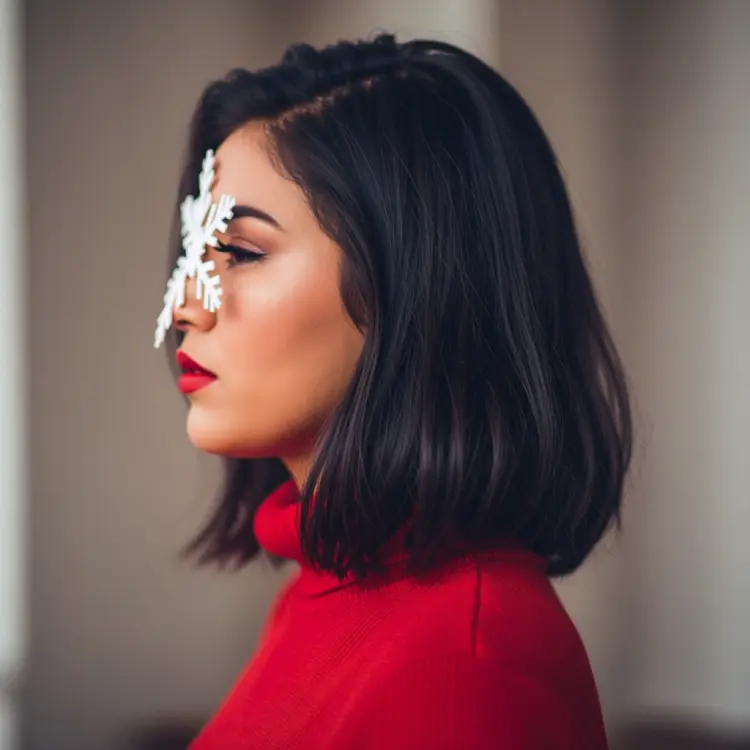
match_input_image
webp
11.4s
Go Fast: Yes
Lora Scale: 1.25
Lora Weights: dx8152/qwen-edit-2509-multiple-angles
Output Quality: 95

rotate around the 90 degrees around the subject

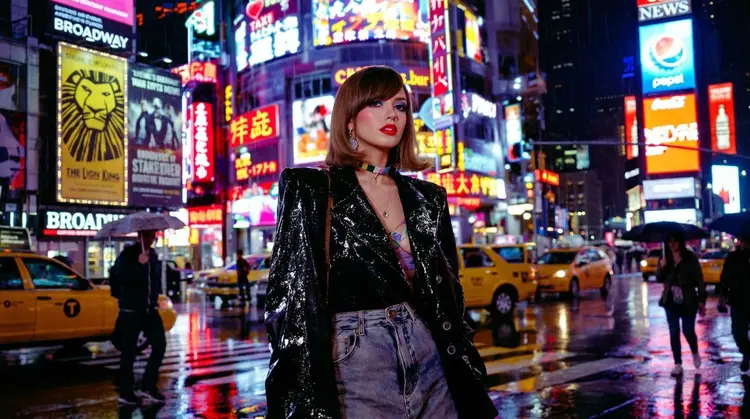
match_input_image
webp
11.4s
Go Fast: Yes
Lora Scale: 1.25
Lora Weights: dx8152/qwen-edit-2509-multiple-angles
Output Quality: 95

rotate around the 90 degrees around the subject

Switch Category

Effects

Text To Image

Text To Image

Text To Video

Large Language Models

Large Language Models

Text To Speech

Text To Speech

Super Resolution

Super Resolution

Lipsync

AI Music Generation

AI Music Generation

Video Editing

Speech To Text

Speech To Text

AI Enhance Videos

Remove Backgrounds

Remove Backgrounds