• Picasso AI Logo
    Logo Picasso IA
  • Home
  • AI Image
    Nano Banana 2
  • AI Video
    Veo 3.1 Lite
  • AI Chat
    Gemini 3 Pro
  • Edit Images
  • Upscale Image
  • Remove Background
  • Text to Speech
  • Effects
    NEW
  • Generations
  • Billing
  • Support
  • Account
  1. Collection
  2. Text to Image
  3. Realvisxl V3.0 Turbo

Photorealistic AI Images with RealVisXL v3.0 Turbo

RealVisXL v3.0 Turbo is a text-to-image model built for users who need photorealistic results without the long wait. If you have typed a prompt and ended up with something that looks painted or over-processed, this model was built to fix that. It generates images that look like photographs, with accurate skin tones, natural lighting, and fine surface texture. The turbo pipeline cuts generation time without gutting output quality. You get sharp, lifelike images from a prompt alone, or you can feed in a reference photo and adjust how much the model borrows from it using the prompt strength slider. Negative prompts let you push out common artifacts like open mouths, cartoonish shading, or soft-focus noise, so your first result lands closer to what you actually wanted. This model fits naturally into workflows where visual quality matters: product shots, character references, portfolio mockups, and social media content. You write a prompt, adjust a few settings, and get a clean image file. No watermark is applied by default, and the result is ready to use without any post-processing step.

Adirik

459.7k runs

Realvisxl V3.0 Turbo

2023-12-27

Commercial Use

Photorealistic AI Images with RealVisXL v3.0 Turbo

Table of contents

  • Overview
  • How It Works
  • Frequently Asked Questions
  • Credit Cost
  • Features
  • Use Cases
  • Examples
Get Nano Banana Pro

Overview

RealVisXL v3.0 Turbo is a photorealistic text-to-image model on Picasso IA, built for creators who want camera-quality results from a written prompt. It targets a specific frustration: AI-generated images that look waxy, painted, or artificially smooth. This model prioritizes accurate skin tones, natural light behavior, and fine surface texture. It also supports img2img and inpainting workflows, so you can start from an existing photo rather than a blank prompt.

How It Works

  • Write a description of the image you want in the prompt field. Add a negative prompt to list styles or artifacts you want to avoid, such as cartoonish shading or soft focus.
  • Optionally upload a reference image to run in img2img mode. Set the prompt strength between 0 and 1 to control how far the model departs from the original photo.
  • For inpainting, upload your base image and a mask image. White areas in the mask will be replaced; black areas stay unchanged.
  • Adjust the width, height, and number of inference steps if you need a larger canvas or a more detailed result.
  • Choose a scheduler from the dropdown. The default DPM++ SDE Karras setting works well for most prompts.
  • Click generate and download the result. No watermark is applied by default.

Frequently Asked Questions

Do I need programming skills or technical knowledge to use this? No, just open RealVisXL v3.0 Turbo on Picasso IA, adjust the settings you want, and hit generate.

Is it free to try? Yes, you can start generating images on Picasso IA without a paid subscription. Check the current plan details on the platform for information on generation limits.

How long does it take to get results? On default settings at 768x768, the model typically returns a result in under 10 seconds. Increasing the number of inference steps or the output dimensions will add time.

What output formats are supported? The model outputs standard image files that you can download directly from the results panel. No conversion step is needed before using them in your projects.

Can I customize the output quality or style? Yes. You can change the scheduler, guidance scale, and number of inference steps. You can also enable a refiner pass to add extra sharpness or detail to the final output.

What happens if I am not happy with the result? Run the model again without a fixed seed to get a different result. Adjust your prompt and negative prompt to steer it closer to what you want, or lower the guidance scale if the output looks over-saturated or unnatural.

Where can I use the outputs? The images have no watermark by default, so you can use them in client deliverables, social media posts, presentations, or personal creative projects.

Credit Cost

Each generation consumes 1 credit

1 credit

or 5 credits for 5 generations

Features

Everything this model can do for you

Turbo pipeline

Generates a 768x768 photorealistic image in under 10 seconds on default settings.

Img2img mode

Feed in a reference photo and control how far the output departs from it using the prompt strength slider.

Inpainting support

Mask specific areas of an image to replace only that region while keeping the rest intact.

Negative prompt control

Exclude unwanted styles, artifacts, or features by listing them in the negative prompt field.

Scheduler selection

Choose from eight sampling schedulers to fine-tune output texture, sharpness, and detail.

No watermarks

Download clean image files by default, ready for client work or direct publishing.

Seed-based reproduction

Lock in a fixed seed to reproduce an exact output or iterate from a stable starting point.

Refiner modes

Apply an ensemble or base refiner pass to add extra sharpness and detail to the final image.

Use Cases

Generate a photorealistic portrait from a text description of a person's appearance, clothing, and lighting setup

Produce a product image on a clean neutral background by describing the item and the surface it sits on

Convert an existing photo into a refined version by writing what changes you want and adjusting the prompt strength slider

Fill in or replace a specific section of an image using an inpaint mask while keeping the rest of the photo intact

Create a realistic outdoor or indoor scene for use as a digital backdrop or social media visual

Generate multiple variations of the same concept by running the model several times without a fixed seed

Test visual ideas for a client brief by generating a realistic mockup from a short written description

Educational or presentation visuals

Examples

768x768
4m 34s
Refine: no_refiner
Scheduler: DPM++_SDE_Karras
Num Outputs: 1
Guidance Scale: 2
Apply Watermark: No
High Noise Frac: 0.8
Prompt Strength: 0.8
Num Inference Steps: 25
(worst quality, low quality, illustration, 3d, 2d, painting, cartoons, sketch), open mouth

RAW photo of sweaty Pikachu as a real character, film grain,sweaty face, extreme detailed face,angry, sharp teeth,as gore movie,gruesome:1.0

1024x1024
8.0s
Refine: base_image_refiner
Scheduler: DPM++_SDE_Karras
Num Outputs: 1
Guidance Scale: 2
Apply Watermark: No
High Noise Frac: 0.8
Prompt Strength: 0.8
Num Inference Steps: 25
(worst quality, low quality, illustration, 3d, 2d, painting, cartoons, sketch), open mouth, disfigured, nsfw

a man wearing a corduroy outfit at a fashion photoshoot

1024x1024
8.2s
Refine: base_image_refiner
Scheduler: DPM++_SDE_Karras
Num Outputs: 1
Guidance Scale: 2
Apply Watermark: No
High Noise Frac: 0.8
Prompt Strength: 0.8
Num Inference Steps: 25
(worst quality, low quality, illustration, 3d, 2d, painting, cartoons, sketch), open mouth, disfigured, nsfw

a latina woman with a pearl earring

768x768
5.0s
Refine: base_image_refiner
Scheduler: DPM++_SDE_Karras
Num Outputs: 1
Guidance Scale: 2
Apply Watermark: No
High Noise Frac: 0.8
Prompt Strength: 0.8
Num Inference Steps: 25
(worst quality, low quality, illustration, 3d, 2d, painting, cartoons, sketch), open mouth, disfigured, nsfw

front shot, portrait photo of a 22 y.o woman, looks away, full lips, natural skin, skin moles, stormy weather, (cinematic, film grain:1.1)

768x768
5.0s
Refine: base_image_refiner
Scheduler: DPM++_SDE_Karras
Num Outputs: 1
Guidance Scale: 2
Apply Watermark: No
High Noise Frac: 0.8
Prompt Strength: 0.8
Num Inference Steps: 25
(worst quality, low quality, illustration, 3d, 2d, painting, cartoons, sketch), open mouth, disfigured

dark shot, front shot, closeup photo of a 25 y.o latino man, perfect eyes, natural skin, skin moles, looks at viewer, cinematic shot

768x768
4.0s
Refine: no_refiner
Scheduler: DPM++_SDE_Karras
Num Outputs: 1
Guidance Scale: 2
Apply Watermark: No
High Noise Frac: 0.8
Prompt Strength: 0.8
Num Inference Steps: 25
(worst quality, low quality, illustration, 3d, 2d, painting, cartoons, sketch)

A landscape photo of iceland, with aurora, snow, ice and erupting lava

768x768
4.0s
Refine: no_refiner
Scheduler: DPM++_SDE_Karras
Num Outputs: 1
Guidance Scale: 2
Apply Watermark: No
High Noise Frac: 0.8
Prompt Strength: 0.8
Num Inference Steps: 25
(worst quality, low quality, illustration, 3d, 2d, painting, cartoons, sketch), open mouth, disfigured face

A color portrait photo of a man wearing sunglasses

768x768
4.0s
Refine: no_refiner
Scheduler: DPM++_SDE_Karras
Num Outputs: 1
Guidance Scale: 2
Apply Watermark: No
High Noise Frac: 0.8
Prompt Strength: 0.8
Num Inference Steps: 25
(worst quality, low quality, illustration, 3d, 2d, painting, cartoons, sketch), open mouth, disfigured face

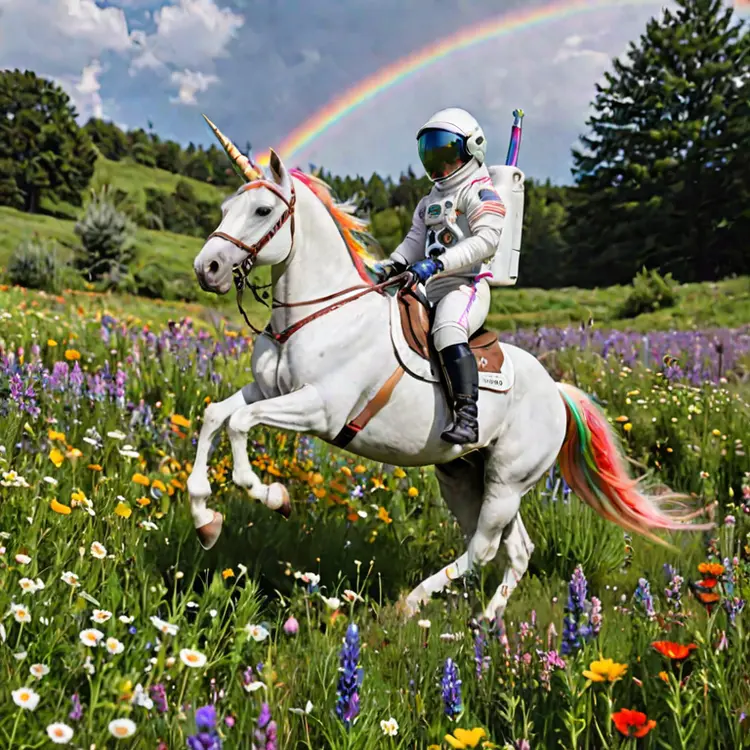
A photo of an astronaut riding a rainbow unicorn through a wildflower meadow

768x768
2m 49s
Refine: no_refiner
Scheduler: DPM++_SDE_Karras
Num Outputs: 1
Guidance Scale: 2
Apply Watermark: No
High Noise Frac: 0.8
Prompt Strength: 0.8
Num Inference Steps: 25
(worst quality, low quality, illustration, 3d, 2d, painting, cartoons, sketch), open mouth

An astronaut riding a rainbow unicorn

Switch Category

Effects

Text To Image

Text To Image

Text To Video

Large Language Models

Large Language Models

Text To Speech

Text To Speech

Super Resolution

Super Resolution

Lipsync

AI Music Generation

AI Music Generation

Video Editing

Speech To Text

Speech To Text

AI Enhance Videos

Remove Backgrounds

Remove Backgrounds