• Picasso AI Logo
    Logo Picasso IA
  • Home
  • AI Image
    Nano Banana 2
  • AI Video
    Veo 3.1 Fast
  • AI Chat
    GPT 5
  • Edit Images
  • Upscale Image
  • Remove Background
  • Text to Speech
  • Effects
    NEW
  • Generations
  • Billing
  • Support
  • Account
  1. Collection
  2. Text to Image
  3. Rd Fast

CreditsUpgrade

RD-Fast Pixel Art Generator — Text to Pixel Art Instantly

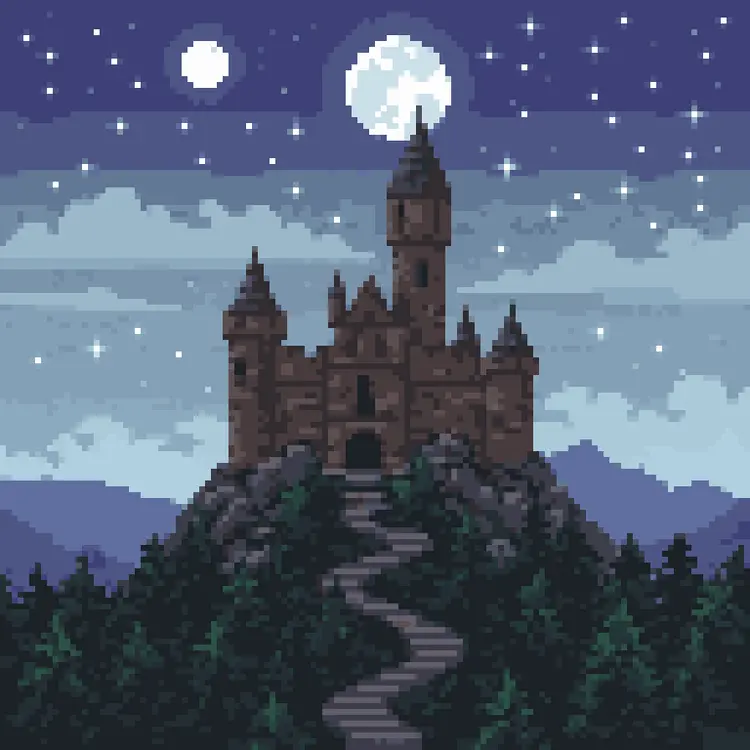
Pixel art takes hours to do by hand. RD-Fast cuts that down to seconds. Type a prompt, pick a style, and get clean pixel art back — whether you need a character portrait, a Minecraft-style texture, or a row of inventory items on a transparent sheet. It's built for speed without sacrificing the handcrafted look that makes pixel art worth using. The model ships with 14 distinct style presets that genuinely produce different results. "Retro" gives you that crunchy arcade-cabinet feel. "Detailed" adds proper shading and depth. "Character turnaround" outputs the same sprite from multiple angles so you can drop it straight into a game engine. You can also feed in a reference image to guide the output, or supply a palette image to lock the color choices to your existing art direction. If you're building a game, designing a UI mockup, or just want pixel art for a project without hiring an artist, RD-Fast slots into your workflow without friction. Generate a batch of variations, strip the background in one click, and export what you need. Try it now and have usable assets in under a minute.

Official

Retro Diffusion

9.9k runs

Rd Fast

2025-11-05

Commercial Use

RD-Fast Pixel Art Generator — Text to Pixel Art Instantly
Table of contents
  • Overview
  • How It Works
  • Key Features
  • Frequently Asked Questions
  • Credit Cost
  • Use Cases
Get Nano Banana Pro

Overview

rd-fast is a specialized AI text-to-image generation model built for one specific purpose: turning written prompts into pixel art at remarkable speed. Whether you are a game developer who needs quick sprite concepts, a hobbyist building a retro-style project, or a designer looking for 8-bit aesthetic visuals without the hours of manual work, this model closes the gap between imagination and output in seconds. On Picasso IA, rd-fast is accessible with no coding required, making pixel art creation approachable for anyone regardless of technical background. Type a description, hit generate, and you have instant results that carry the authentic look of classic pixel aesthetics.

How It Works

  • Write your prompt. Describe the scene, character, object, or environment you want in plain text. The more specific your description, the closer the output matches your vision. Think in terms of subject, style cues, color tone, and setting.
  • Adjust the settings. Before generating, you can tune parameters like image dimensions and inference steps to control the level of detail and rendering time. These controls are straightforward sliders and dropdowns, no technical expertise needed.
  • The model processes your input. rd-fast uses a diffusion-based approach optimized for pixel art aesthetics, rapidly interpreting your text and building an image pixel by pixel at a speed that prioritizes fast iteration cycles.
  • Your image is delivered instantly. Results appear directly in your browser within seconds. You can inspect the output, download it, or run another generation with a modified prompt right away.
  • Iterate freely. If the first result is close but not perfect, tweak your prompt or adjust a setting and regenerate. The fast processing time makes experimentation practical rather than costly.

Key Features

  • Pixel art-native output. Every image generated carries the genuine aesthetic of classic pixel art, not a filter applied on top of a photorealistic base. The model was trained specifically for this visual style, so the result looks intentional and authentic.
  • Speed-first architecture. rd-fast is engineered to prioritize generation time without sacrificing the core quality of the pixel art style. You get usable results in seconds, not minutes, which matters when you are iterating on multiple concepts.
  • No coding required. The entire workflow is prompt-driven and controlled through a visual interface. Anyone comfortable typing a sentence can produce professional-looking pixel art without touching a single line of code.
  • Flexible resolution and detail control. Adjust image size and inference steps to fit your specific use case, whether you need a small sprite thumbnail or a more detailed scene with finer pixel work.
  • Instant results in your browser. There is nothing to install, no local GPU required, and no file to upload. The generation happens in the cloud and the image appears on your screen ready to download or share.
  • High iteration efficiency. Because each generation completes so quickly, you can run multiple variations of a concept in the time it would traditionally take to sketch one version by hand.

Frequently Asked Questions

Do I need programming skills or technical knowledge to use this? No — just open rd-fast on Picasso IA, adjust the settings you want, and hit generate. The interface is fully visual, and no code of any kind is involved at any step.

Is it free to try? rd-fast is available to use online with free credits on the platform. You can run several generations to test the model, experiment with different prompts, and evaluate the output quality before deciding to use it more extensively. Check the platform for the current credit allocation for free accounts.

How long does it take to get results? Generation typically completes within a few seconds for standard settings. The exact time can vary slightly depending on the image dimensions and the number of inference steps you select, but the model is specifically optimized to minimize wait time. In most cases you will see your pixel art output faster than you can refine your next prompt.

Can I customize the output quality or style? Yes. You can adjust inference steps to influence the level of detail in the rendered output, with more steps generally producing more refined pixel work. You can also vary your text prompt to steer the style, mood, palette, and subject matter of the image. Combining prompt specificity with parameter adjustments gives you meaningful control over the final result.

What output formats are supported? Generated images are delivered as standard image files that you can download directly from the results view. These formats are broadly compatible with design tools, game engines, and image editors, so you can drop your pixel art straight into your project workflow without conversion steps.

Where can I use the outputs? The images you generate are yours to use across personal and creative projects. They work well as game sprites, background tiles, icon concepts, social media assets, or concept art for retro-themed designs. Always review the platform's usage terms to confirm rights for any commercial applications.

What happens if I am not happy with the result? Simply adjust your prompt and run the model again. Because generation is fast, iterating costs very little time. Changing a single word, adding a color descriptor, or shifting the subject framing can produce noticeably different results. Most users find the result they want within two or three attempts.

Ready to see what rd-fast can create for you? Open the model now and generate your first pixel art image in seconds.

Credit Cost

Each generation consumes 1 credit

1 credit
or 5 credits for 5 generations

Use Cases

Generate a full character sprite sheet with front, side, and back views by using the character turnaround style and a single character description.

Create seamless stone, grass, or wood textures for a 2D game level by enabling tile mode and choosing the texture or mc_texture style.

Turn a rough sketch or reference photo into a pixel art character by uploading the image and adjusting the prompt strength to blend your input with the new style.

Produce a sheet of inventory items — potions, keys, coins — on a transparent background using the item_sheet style and background removal.

Build UI elements like buttons, dialog boxes, and health bars by prompting in the ui style and exporting at the exact pixel dimensions your interface requires.

Design Minecraft-compatible item textures with automatic transparency by selecting the mc_item style and describing the item you need.

Generate 10 variations of a game enemy sprite from one prompt to find the right look before committing to a final design.

Create a 1-bit icon set for a retro-themed app or game jam by using the 1_bit style and prompting each icon individually in a single batch session.

Switch Category

Text To Image

Text To Image

Text To Video

Large Language Models

Large Language Models

Text To Speech

Text To Speech

Super Resolution

Super Resolution

Lipsync

AI Music Generation

AI Music Generation

Video Editing

Speech To Text

Speech To Text

AI Enhance Videos

Remove Backgrounds

Remove Backgrounds

Effects