SDXL is a text-to-image model that turns written prompts into high-resolution visuals at 1024×1024 pixels. Whether you need a product mockup, a social media graphic, or a concept illustration, you describe what you want and the model handles the rest. It's built for iteration, not just single outputs. The model accepts both text and image inputs, so you can start from scratch with a prompt or refine an existing image using img2img or inpainting. You can shape style, detail, and composition using parameters like the CFG scale, negative prompts, and multiple schedulers. A built-in refiner pipeline sharpens outputs when you want higher-detail results. On Picasso IA, SDXL runs without usage quotas or credit counters, so you can iterate freely until a result is exactly right. Paste your prompt, tweak the settings, and download a clean image ready for any project. No installation, no API credentials, no waiting for a queue.
SDXL is a text-to-image model that generates high-resolution visuals directly from written descriptions. On Picasso IA, you get access to it without any setup, installation, or API configuration. Type a description, pick your settings, and receive a sharp 1024×1024 image within seconds. It handles everything from photorealistic product shots to stylized illustrations, making it practical for creators who need results fast.
Do I need programming skills or technical knowledge to use this? No, just open SDXL on Picasso IA, adjust the settings you want, and hit generate.
Is SDXL free to try? Yes, you can run SDXL without paying or signing up for a premium tier. Generate as many images as you need with no credit system limiting your output.
How long does it take to get results? Most generations finish in 10 to 30 seconds depending on the number of inference steps and whether the refiner is active. Reducing steps speeds things up when you're quickly iterating on a concept.
Can I use my own images as a starting point? Yes. SDXL supports img2img mode, where you upload a reference image and describe the changes you want. Inpainting lets you mask a specific region and replace only that area while keeping the rest intact.
What image size does SDXL output? The default output is 1024×1024 pixels. You can adjust width and height independently to produce portrait, landscape, or custom-ratio outputs.
Are there any limits on how many images I can generate? No. On Picasso IA, SDXL has unlimited generation enabled. There are no credit caps, session quotas, or daily limits.
What can I do if I'm not happy with the result? Adjust the prompt, change the seed, or tweak the CFG scale and try again. Because there are no usage limits, iterating until you get exactly what you need costs nothing extra.
Each generation consumes 1 credit
1 credit
or 5 credits for 5 generations
With Elite or Infinite plans, enjoy unlimited generations with this model at no additional cost.
Everything this model can do for you
Turns a plain text prompt into a 1024×1024 image in roughly 10-30 seconds.
Accepts an input image to restyle, extend, or fix specific regions without redrawing from scratch.
A second-pass refiner sharpens details and textures for images that need higher-detail output.
Choose from seven scheduling algorithms to control speed, diversity, and sharpness of results.
Load custom LoRA weights to apply a consistent artistic style across every generation.
Specify what to exclude, giving you tighter control over composition and content.
Generate as many images as you want on Picasso IA with no credit caps or usage quotas.
Reproduce any result exactly by reusing the same seed across runs.
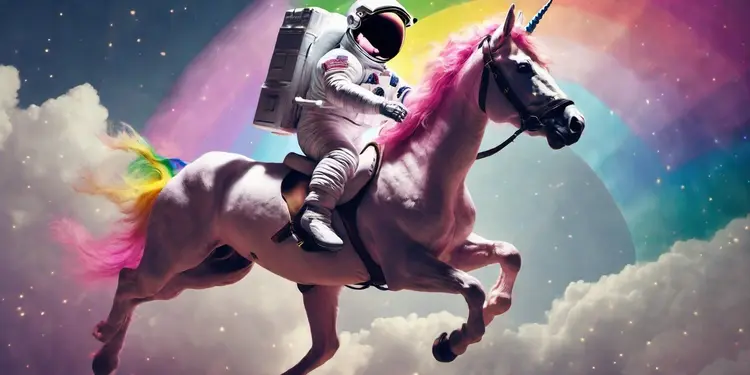
An astronaut riding a rainbow unicorn, cinematic, dramatic
A rainbow coloured bear
An astronaut riding a rainbow unicorn, cinematic, dramatic
A rainbow coloured tiger
Alien invasion
A film still of a robot, sci-fi, cool color grading, 70mm, bokeh, cinematic, anamorphic, beautiful
A beautiful landscape photo
An orange cat sitting on a bench
A studio photo of a rainbow coloured cat