• Picasso AI Logo
    Logo Picasso IA
  • Home
  • AI Image
    Nano Banana 2
  • AI Video
    Veo 3.1 Lite
  • AI Chat
    Gemini 3 Pro
  • Edit Images
  • Upscale Image
  • Remove Background
  • Text to Speech
  • Effects
    NEW
  • Generations
  • Billing
  • Support
  • Account
  1. Collection
  2. Text to Image
  3. Stable Diffusion 3.5 Large

Generate HD Art with Stable Diffusion 3.5 Large

Stable Diffusion 3.5 Large is a text-to-image model built for detail. Whether you need a product mockup, a concept illustration, or a stylized scene, you type a prompt and get a high-resolution image back. It solves the gap between a vague visual idea and a finished, usable asset. The model supports nine aspect ratios, so your output matches the canvas you're targeting, from a vertical social post to a wide banner. A negative prompt field lets you remove unwanted elements before generating, saving rounds of iteration. Query-Key Normalization gives the model consistent color balance and structural detail across different prompt styles, whether photorealistic or painterly. For designers, marketers, and artists, Stable Diffusion 3.5 Large fits where a stock photo search falls short. You describe exactly what you want instead of settling for a close match. Set a seed to reproduce a result, adjust the guidance scale until the output matches your prompt, and download a clean file in PNG, JPG, or WebP.

Official

Stability Ai

1.65m runs

Stable Diffusion 3.5 Large

2024-10-21

Commercial Use

Generate HD Art with Stable Diffusion 3.5 Large

Table of contents

  • Overview
  • How It Works
  • Frequently Asked Questions
  • Credit Cost
  • Features
  • Use Cases
  • Examples
Get Nano Banana Pro

Overview

Stable Diffusion 3.5 Large is a text-to-image model that generates high-resolution images from written prompts, with a focus on fine detail and stylistic range. On Picasso IA, you can run it directly in your browser without installing anything or writing a single line of code. It is built for creators who need precise visual output from a description, whether that is a clean product shot, a painted landscape, or a character portrait with specific features. The model uses Query-Key Normalization internally, which produces more consistent color balance and structural accuracy across different prompt styles.

How It Works

  • Write your text prompt describing the image you want, as specifically as you like
  • Choose an aspect ratio from nine options (1:1, 16:9, 9:16, and others) to match your canvas
  • Optionally upload a reference image to switch to image-to-image mode, where the output follows the uploaded photo's structure
  • Add a negative prompt to exclude any elements you do not want in the output
  • Hit generate, review the result, and download in PNG, JPG, or WebP

Frequently Asked Questions

Do I need programming skills or technical knowledge to use this? No, just open Stable Diffusion 3.5 Large on Picasso IA, adjust the settings you want, and hit generate.

Is it free to try? Yes, it is available to try without any upfront payment or account required for initial use. Check the pricing page for details on generation limits.

How long does it take to get results? Most generations finish in under 15 seconds depending on the aspect ratio and server load at the time. Square outputs at 1:1 tend to be fastest.

Can I customize the output quality or style? Yes. The guidance scale (CFG) controls how strictly the model follows your prompt. A lower value gives more creative variation; a higher value sticks closer to the text. Prompt strength in image-to-image mode controls how much of the uploaded photo is retained.

What output formats are supported? You can download your image in WebP (default), JPG, or PNG. PNG is best for designs where you need a transparent background or lossless quality.

How many times can I run the model? You can run as many generations as your plan allows. Each run counts as one generation, and you can reuse the same settings with a different seed to get fresh variations without rewriting the prompt.

Where can I use the outputs? The images you generate belong to you. Use them in client work, social media, presentations, or any personal or commercial project according to the platform's terms of use.

Credit Cost

Each generation consumes 1 credit

1 credit

or 5 credits for 5 generations

Features

Everything this model can do for you

High-resolution output

Generates detailed images at up to 1 megapixel with clean edges and fine texture.

Nine aspect ratios

Pick from 1:1, 16:9, 9:16, 2:3, 3:2, 4:5, 5:4, 21:9, or 9:21 to match your target canvas.

Negative prompt control

Exclude specific elements from the output before generating to skip unwanted details.

Seed-based reproducibility

Set a seed number to reproduce the exact same result across any subsequent run.

Image-to-image mode

Upload a reference photo and describe the changes to reshape existing visuals.

Multiple output formats

Download finished images in PNG, JPG, or WebP depending on your use case.

Guidance scale adjustment

Raise or lower the CFG value to control how closely the output follows the prompt.

Image-to-image mode with prompt strength control

Use Cases

Generate a photorealistic product shot on a plain background from a written description of the item

Create a stylized illustration for a blog post or social media by describing the scene and art style you want

Produce multiple variations of the same concept by changing one word in the prompt to compare different directions

Use image-to-image mode to redesign an existing photo by uploading it and describing the changes you want

Generate a landscape or environment background for a game, presentation, or video project from a text description

Create character concept art by describing physical traits, outfit, and lighting style in the prompt

Produce a mockup for a client pitch by typing the visual idea directly instead of commissioning a designer

Personal creative projects

Examples

1:1
webp
8.9s
Cfg: 4.5
Steps: 40
Output Quality: 90
Prompt Strength: 0.85

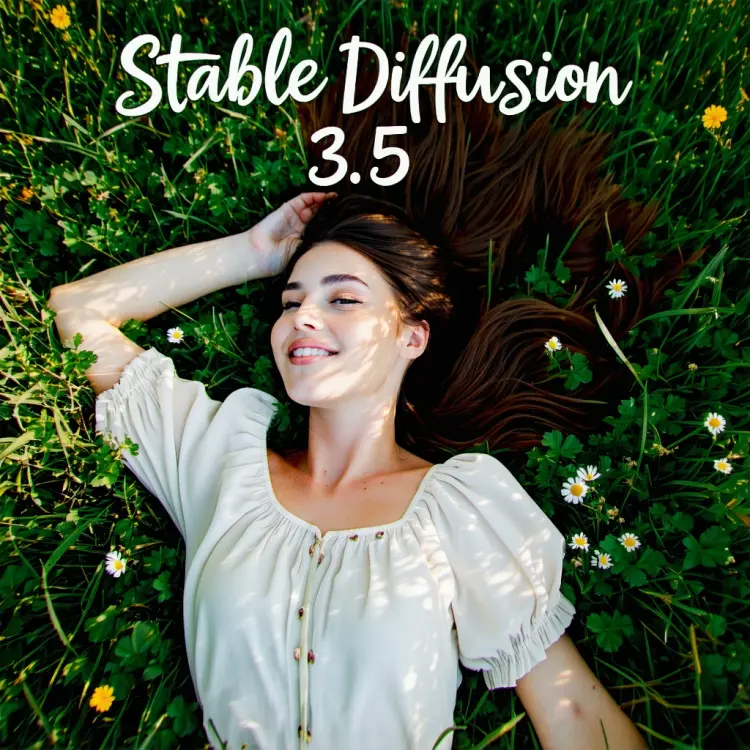
~*~aesthetic~*~ #boho #fashion, full-body 30-something woman laying on microfloral grass, candid pose, overlay reads Stable Diffusion 3.5, cheerful cursive typography font

1:1
webp
6.4s
Cfg: 3.5
Steps: 28
Output Quality: 90

a portrait of a man standing in front of a white wall. His gaze is directed to the right, looking towards something beyond the frame

1:1
webp
6.5s
Cfg: 3.5
Steps: 28
Output Quality: 90

a captivating anime-style illustration of a young woman in a white astronaut suit. She has long, dark wavy hair. Surrounding the astronaut are vibrant orange flowers with yellow centers. The background itself is a mesmerizing night sky filled with countless stars

1:1
webp
6.2s
Cfg: 3.5
Steps: 28
Output Quality: 90

collage art ‘We’re Leaving For the Future’ 1980s #vaporwave aesthetic internet art glued layered magazine cutout image shape scrap, torn ragged paper art, BASIC code, halftone, #pixelart

1:1
webp
6.3s
Cfg: 3.5
Steps: 28
Output Quality: 90

Scene of a giant ancient tortoise with a fantasy city built on its back. The tortoise’s shell is covered in lush, dense forest with towering trees and a hidden, misty village nestled in the foliage. The city consists of intricately designed buildings that blend seamlessly with the natural environment, featuring rope bridges connecting different sections of the city

1:1
webp
6.3s
Cfg: 3.5
Steps: 28
Output Quality: 90

Photo of three potions: the first potion is blue with the label “MANA”, the second potion is red with the label “HEALTH”, the third potion is green with the label “POISON”. Old apothecary

Switch Category

Effects

Text To Image

Text To Image

Text To Video

Large Language Models

Large Language Models

Text To Speech

Text To Speech

Super Resolution

Super Resolution

Lipsync

AI Music Generation

AI Music Generation

Video Editing

Speech To Text

Speech To Text

AI Enhance Videos

Remove Backgrounds

Remove Backgrounds