• Picasso AI Logo
    Logo Picasso IA
  • Home
  • AI Image
    Nano Banana 2
  • AI Video
    Veo 3.1 Lite
  • AI Chat
    Gemini 3 Pro
  • Edit Images
  • Upscale Image
  • Remove Background
  • Text to Speech
  • Effects
    NEW
  • Generations
  • Billing
  • Support
  • Account
  1. Collection
  2. Text to Image
  3. Stable Diffusion 3.5 Medium

Stable Diffusion 3.5 Medium: Free AI Art Generator

Stable Diffusion 3.5 Medium is a 2.5 billion parameter text-to-image model built on the MMDiT-X architecture. It turns written prompts into images without requiring any design background or specialized software. For creators who need a product photo, a concept illustration, or a social media visual on short notice, this model produces results fast and without guesswork. The model accepts nine different aspect ratios, from 2:3 portrait to 21:9 cinematic wide, so the output fits the format you actually need. A negative prompt field lets you specify what to exclude, cutting iteration time when you know exactly what you do not want in the image. You can also upload a reference photo and use the prompt strength control to decide how much of the original composition carries over into the new result. In a content workflow, it works as a fast first-draft tool: write a prompt, choose your format, and have a usable image ready in seconds. The seed parameter lets you pin a result and branch from it, making it easy to test prompt variations side by side. Open it on Picasso IA with no installation required and run your first generation in under a minute.

Official

Stability Ai

67.5k runs

Stable Diffusion 3.5 Medium

2024-10-29

Commercial Use

Stable Diffusion 3.5 Medium: Free AI Art Generator

Table of contents

  • Overview
  • How It Works
  • Frequently Asked Questions
  • Credit Cost
  • Features
  • Use Cases
  • Examples
Get Nano Banana Pro

Overview

Stable Diffusion 3.5 Medium is a 2.5 billion parameter text-to-image model that converts written descriptions into finished images. Built on the MMDiT-X architecture, it handles a wide range of visual styles from photorealistic product shots to illustrated concepts and abstract compositions. On Picasso IA, you can run it directly in your browser without installing anything or writing a single line of code. Whether you need a square crop for a social post or a wide 21:9 banner, the model adapts to your chosen format from the first generation.

How It Works

  • Type a text prompt describing the image you want, including subject, style, lighting, and specific details that matter to the final look.
  • Choose your aspect ratio from nine options (1:1 square, 9:16 portrait, 16:9 landscape, or 21:9 ultra-wide) to match the format where the image will appear.
  • Optionally add a negative prompt to list elements you want excluded, such as watermarks, blurry areas, or unwanted colors.
  • If you have a reference image, upload it to activate image-to-image mode and adjust the prompt strength slider to control how much the model preserves or rewrites the original.
  • Hit generate and download your result as WebP, JPG, or PNG depending on how you plan to use it.

Frequently Asked Questions

Do I need programming skills or technical knowledge to use this? No, just open Stable Diffusion 3.5 Medium on Picasso IA, adjust the settings you want, and hit generate.

Is it free to try? Yes, you can run the model without any upfront payment. Check the current plan details on the platform for generation limits and available credits.

How long does it take to get results? Most generations finish in under 15 seconds depending on the aspect ratio you choose and current server load. Larger formats like 21:9 may take slightly longer than a standard 1:1 square.

What output formats are supported? You can download your image as WebP, JPG, or PNG. WebP offers the best compression for web use, while PNG preserves full quality for editing or print.

Can I customize the output quality or style? Yes. Adjust the guidance scale (CFG) to control how strictly the model follows your prompt. A higher value produces results closer to your exact wording, while a lower value gives the model more creative latitude. In image-to-image mode, the prompt strength slider determines how much of the original photo carries through.

How many times can I run the model? Generation limits depend on your plan tier on Picasso IA. You can run multiple iterations and use seed values to branch from a result you like without losing your starting point.

Where can I use the outputs? The images you generate are yours to use in any project, from social media posts to client presentations to print materials.

Credit Cost

Each generation consumes 1 credit

1 credit

or 5 credits for 5 generations

Features

Everything this model can do for you

9 aspect ratios

Output in formats from 2:3 portrait to 21:9 cinematic wide without post-generation cropping.

Image-to-image mode

Upload a reference photo and control how much the model preserves or rewrites the original composition.

Negative prompts

List what to exclude so the model avoids unwanted elements from the very first generation.

Seed control

Pin a seed value to reproduce a result exactly or branch from a stable starting point.

Three output formats

Save as WebP, JPG, or PNG to match the requirements of your project.

Adjustable guidance scale

Set the CFG value to balance how closely the output follows your prompt wording.

2.5B parameter model

MMDiT-X architecture produces sharp, coherent details across a wide range of visual styles.

Fine-tune prompt strength for detailed edits

Use Cases

Write a product description prompt and get a clean, white-background image ready for an online store listing

Describe a scene with specific lighting and mood to produce a reference image for a client presentation

Upload an existing photo and restyle it into a different visual direction using image-to-image mode with a descriptive prompt

Generate social media visuals in 4:5 or 9:16 format from a text brief, skipping the crop-and-resize step

Add a negative prompt to exclude specific colors, artifacts, or elements and reduce iterations before landing on a usable result

Set a fixed seed to reproduce a composition you liked, then adjust the prompt wording to test different style variations

Produce the same scene in square, landscape, and portrait ratios for a multi-format campaign in one session

Rapid prototyping for creative projects

Examples

1:1
webp
4.2s
Cfg: 5
Steps: 40
Output Quality: 90
Prompt Strength: 0.85

a portrait of a man standing in front of a white wall. He is looking up towards something beyond the frame, fine art photography with dappled light

1:1
webp
4.4s
Cfg: 5
Steps: 40
Output Quality: 90
Prompt Strength: 0.85

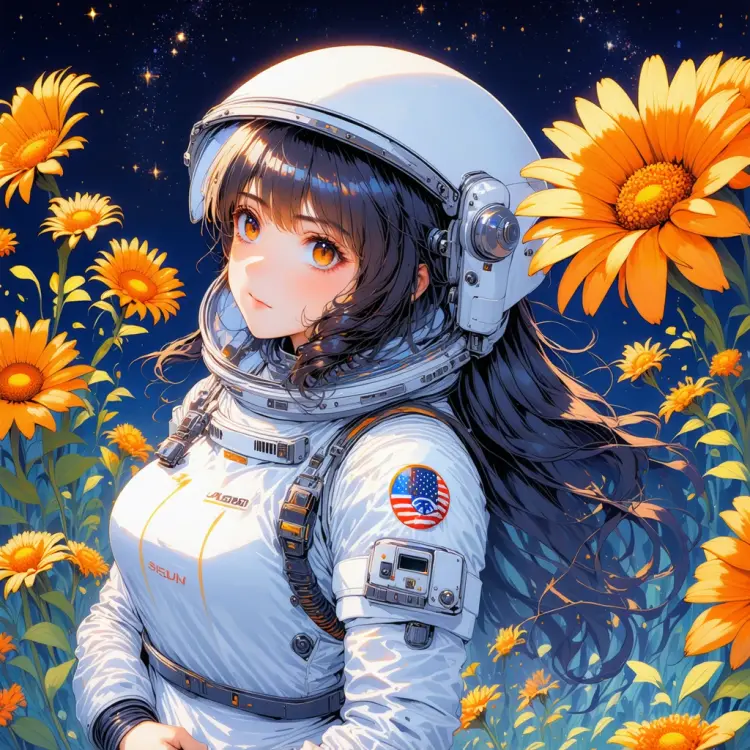
a captivating anime-style illustration of a woman in a white astronaut suit. She has long, dark wavy hair. Surrounding the astronaut are vibrant orange flowers with yellow centers. The background itself is a mesmerizing night sky filled with countless stars

1:1
webp
4.4s
Cfg: 5
Steps: 40
Output Quality: 90
Prompt Strength: 0.85

A photo of beautiful flowery meadow, at sunset

Switch Category

Effects

Text To Image

Text To Image

Text To Video

Large Language Models

Large Language Models

Text To Speech

Text To Speech

Super Resolution

Super Resolution

Lipsync

AI Music Generation

AI Music Generation

Video Editing

Speech To Text

Speech To Text

AI Enhance Videos

Remove Backgrounds

Remove Backgrounds