• Picasso AI Logo
    Logo Picasso IA
  • Home
  • AI Image
    Nano Banana 2
  • AI Video
    Veo 3.1 Lite
  • AI Chat
    Gemini 3 Pro
  • Edit Images
  • Upscale Image
  • Remove Background
  • Text to Speech
  • Effects
  • AI Toolkit
    NEW
  • Generations
  • Billing
  • Support
  • Account
Unlimited Videos ARE HERE ยท Nano Banana 2 & GPT Image 2.0 UNLIMITED UNTIL June 25Upgrade
  1. Collection
  2. Text to Video
  3. Avatar V

Create Talking Avatar Videos with Avatar V

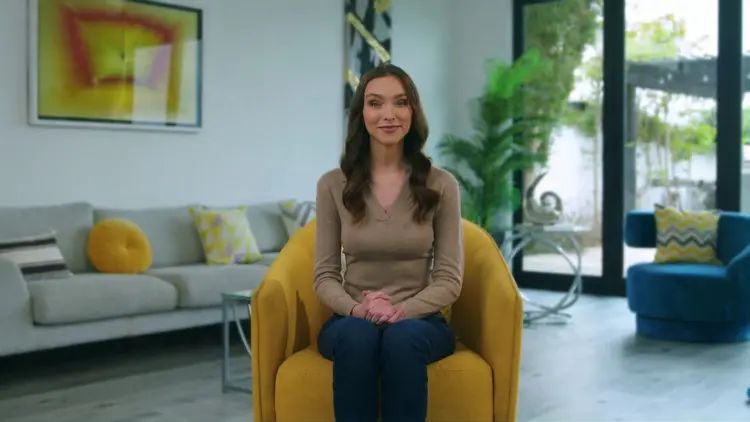
Avatar V turns written text into a realistic talking-head video without any filming equipment or actors. If you need a spokesperson clip for a product launch, a training module, or a social media post and do not have the budget for a production crew, this gets the job done in minutes. The model produces lip-synced animation tied to your typed script, keeping mouth, face, and body movement in time with every syllable. You choose from 720p, 1080p, or 4K output, set the aspect ratio to 16:9 for widescreen or 9:16 for vertical social formats, and control voice speed anywhere from 0.5x to 1.5x. Optional burned-in captions make the result accessible without any post-production work. Teams that publish videos at scale, such as e-learning producers or marketing agencies, can run multiple scripts through Avatar V and receive publish-ready files without touching video editing software. Type your script, adjust the settings, and download the finished clip.

Official

Heygen

208 runs

Avatar V

2026-05-18

Commercial Use

Create Talking Avatar Videos with Avatar V

Table of contents

  • Overview
  • How It Works
  • Frequently Asked Questions
  • Credit Cost
  • Features
  • Use Cases
Get Nano Banana Pro

Overview

Avatar V turns written text into a realistic talking avatar video, solving the problem of producing professional video content without a camera, studio, or on-screen presenter. On Picasso IA, you type what you want the avatar to say, pick a voice and a look, and the model renders a lip-synced video with natural head movement and expressive facial motion. Think of a training module where every frame is generated from a script, or a product explainer that goes live in minutes instead of days. Cross-reference-driven animation keeps the avatar's motion consistent and believable from start to finish. The result is a polished talking-head video you can hand off to a client or post online without shooting a single frame.

How It Works

  • Write the script you want the avatar to deliver, up to 5,000 characters of text.
  • Choose an avatar from the available library and a voice that fits the tone of your video.
  • Set the output resolution (720p, 1080p, or 4K) and the aspect ratio (16:9 for widescreen, 9:16 for vertical or social formats).
  • Optionally enable burned-in captions and adjust the voice speed between 0.5x and 1.5x to match the pacing you want.
  • Picasso IA renders the final lip-synced video, ready to download and use immediately.

Frequently Asked Questions

Do I need programming skills or technical knowledge to use this? No, just open Avatar V on Picasso IA, adjust the settings you want, and hit generate.

Is it free to try? Yes, you can run Avatar V without a paid subscription to test the output. Generation limits depend on your current plan, so check the pricing page to see what fits your needs. Most creators find the free tier enough to evaluate the quality before committing.

How long does it take to get results? Most videos are ready within one to three minutes, depending on script length and the resolution you choose. A short 30-second clip at 1080p processes faster than a five-minute script at 4K. If the queue is busy, it may take a few extra minutes.

What output formats are supported? Avatar V produces a standard MP4 video file at the resolution and aspect ratio you set before generating. You can drop it straight into any editing timeline, upload it to a hosting platform, or share it as is. No conversion steps needed.

Can I customize the output quality or style? Yes. You control resolution (720p, 1080p, or 4K), aspect ratio (16:9 or 9:16), voice speed, and whether captions are burned into the video. Swapping the avatar or the voice changes the visual style and tone of the output completely. Running the same script with a different avatar gives you a new video in minutes.

Where can I use the outputs? The video files come without a watermark and are yours to use in client deliverables, internal presentations, social media posts, online courses, or product demos. Check the terms on the platform to confirm usage rights for your specific case.

What happens if I'm not happy with the result? Edit the script, swap the voice or avatar, adjust the speed, and generate again. Each run is independent, so you can iterate quickly without losing previous versions. Trying a different avatar or slowing the voice speed by a notch often makes a noticeable difference.

Credit Cost

Each generation consumes 50 credits

50 credits

or 250 credits for 5 generations

Features

Everything this model can do for you

4K resolution

Render avatar videos at 720p, 1080p, or 4K for sharp, clear output on any screen size.

Dual aspect ratios

Switch between 16:9 widescreen and 9:16 vertical in one setting to match your target format.

Burned-in captions

Embed subtitles directly into the video so viewers follow along without sound.

Adjustable voice speed

Set the narration pace from 0.5x to 1.5x to suit the content and audience.

Natural lip sync

Mouth movement and facial expressions stay precisely aligned with every word in the script.

Long-form scripts

Submit up to 5,000 characters of text in a single run for extended video segments.

No post-production needed

Download a finished, publish-ready video file after one generation run.

Use Cases

Record a product walkthrough by typing the script and selecting an avatar, getting a spokesperson video without hiring talent or renting a studio

Produce training videos for different audiences by swapping the voice ID and script text, without re-filming for each version

Create vertical 9:16 clips with burned-in captions, sized and ready for short-form social platforms without any additional editing

Generate a weekly update video for an internal team by pasting the update text and selecting a consistent avatar identity

Build course modules with multiple avatar-narrated segments by running different script sections through the model one at a time

Test different voice speeds for the same script to find the pacing that works best before committing to a final version

Produce a 4K avatar video announcement for a brand channel that needs high-resolution assets for large-screen display

Switch Category

Effects

Text To Image

Text To Video

Large Language Models

Text To Speech

Super Resolution

Lipsync

AI Music Generation

Video Editing

Speech To Text

AI Enhance Videos

Remove Backgrounds