• Picasso AI Logo
    Logo Picasso IA
  • Home
  • AI Image
    Nano Banana 2
  • AI Video
    Veo 3.1 Lite
  • AI Chat
    Gemini 3 Pro
  • Edit Images
  • Upscale Image
  • Remove Background
  • Text to Speech
  • Effects
    NEW
  • Generations
  • Billing
  • Support
  • Account
  1. Collection
  2. Text to Video
  3. Sam 2 Video

Track and Isolate Objects in Video with SAM 2 Video

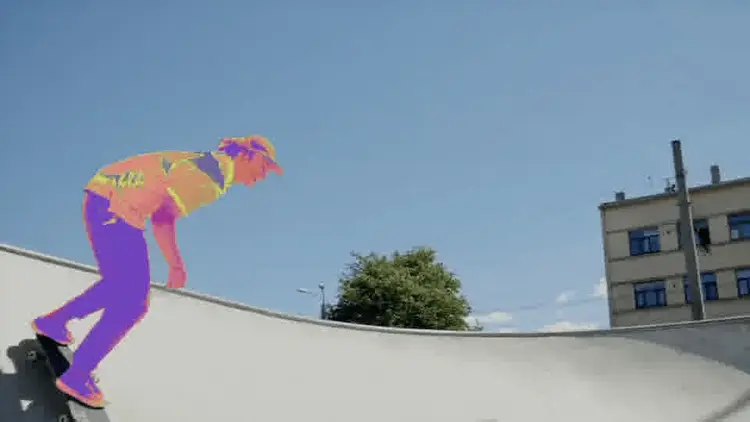
SAM 2 Video is a video object segmentation tool that tracks any object you click on, frame by frame, through an entire video clip. The core problem it solves is the manual, time-consuming work of isolating moving objects: instead of masking each frame by hand, you mark a starting point on the first frame and the model handles the rest. This makes it practical for video editors, VFX artists, and data labelers who work with large amounts of footage. The model offers three mask types to fit different workflows: a clean binary mask for cutout work, a colored highlight overlay for visual review, and a greenscreen-compatible output ready for compositing without extra post-processing. You can also request bounding box annotations, either alone or alongside pixel-level masks, and export results as a video file or an image sequence in WebP, JPG, or PNG. Multi-object tracking lets you click multiple subjects in a single clip and have each tracked independently. Whether you are building a training dataset, pulling subjects out of interview recordings, or preparing footage for a visual effects pass, SAM 2 Video fits directly into existing pipelines with no special software required. On Picasso IA, there are no per-generation credits or usage quotas, so you can process entire batch jobs without watching a limit counter.

Meta

43.8k runs

Sam 2 Video

2024-08-07

Commercial Use

Track and Isolate Objects in Video with SAM 2 Video

Table of contents

  • Overview
  • How It Works
  • Frequently Asked Questions
  • Credit Cost
  • Features
  • Use Cases
Get Nano Banana Pro

Overview

SAM 2 Video is a video object segmentation model that tracks anything you click on across every frame of a clip. On Picasso IA, you upload a video, click the objects you want isolated, and the model returns precise per-frame masks or bounding boxes. Imagine you filmed a product demo and need to pull the item out of the background: instead of masking each frame manually in an editor, you click once and the model does the tracking for you. It handles multiple objects per clip and delivers output as a video file or a frame-by-frame image sequence.

How It Works

  • Upload your video file using the input field on the model page.
  • Enter click coordinates on the starting frame, marking foreground points (objects to track) and background points (areas to exclude).
  • Choose your mask type: binary for a clean black-and-white cutout, highlighted for a colored overlay, or greenscreen for direct compositing.
  • Set your output format: a video file or an image sequence in WebP, JPG, or PNG, with optional frame-interval skipping to reduce file size.
  • Hit generate and download your annotated output with tracked objects masked across all frames.

Frequently Asked Questions

Do I need programming skills or technical knowledge to use this? No, just open SAM 2 Video on Picasso IA, adjust the settings you want, and hit generate.

Is it free to try? Yes, SAM 2 Video is available at no cost and there are no credit limits on how many clips you can process.

How long does it take to get results? Processing time depends on the length and resolution of your video. Short clips typically finish in under a minute.

What output formats are supported? You can export a video file or an image sequence in WebP, JPG, or PNG format. For sequences, you can also control compression quality with a 0-100 slider.

Can I track more than one object at a time? Yes. You can click multiple objects and assign each a separate label; the model tracks all of them through the clip in a single run.

How many times can I run the model? There are no usage caps. You can run SAM 2 Video as many times as you need without hitting any quota or paywall.

Where can I use the outputs? The masks and annotated frames work in any video editor, compositing application, or machine learning dataset pipeline that accepts standard image or video formats.

Credit Cost

Each generation consumes 2 credits

2 credits

or 10 credits for 5 generations

With Elite or Infinite plans, enjoy unlimited generations with this model at no additional cost.

Features

Everything this model can do for you

Click-based selection

Point at any object in a video frame and the model tracks it through every subsequent frame.

Three mask types

Choose binary, colored highlight, or greenscreen output to match your editing workflow.

Bounding box output

Add rectangular annotations around tracked objects, alone or combined with a pixel-level mask.

Flexible output formats

Export as a video file or an image sequence in WebP, JPG, or PNG at adjustable quality levels.

Multi-object tracking

Assign separate labels to multiple clicked objects and track them all in a single pass.

Frame interval control

Skip every Nth frame on export to reduce file size without rerunning the segmentation.

Unlimited generations

Process as many video clips as you want on Picasso IA with no credit caps or usage quotas.

Ideal for editing, analysis, and creative tasks

Use Cases

Click on a person in a video frame and export a greenscreen mask to composite them onto a different background in post-production

Isolate a product in a video advertisement and extract a binary mask for each frame to use in social media editing tools

Label multiple objects across video frames by clicking each one and downloading an annotated image sequence for a machine learning training dataset

Track a moving vehicle through dashcam footage and export bounding box annotations for object detection review

Remove or blur a background from a recorded interview by generating a per-frame mask and applying it in your video editor

Run 50 or more segmentation passes on the same clip with different click points to find the best object selection, without any usage limits

Extract a specific subject from wildlife or sports footage and export as a WebP sequence for a presentation or highlight reel

Enhancing accessibility with visual object emphasis

Switch Category

Effects

Text To Image

Text To Image

Text To Video

Large Language Models

Large Language Models

Text To Speech

Text To Speech

Super Resolution

Super Resolution

Lipsync

AI Music Generation

AI Music Generation

Video Editing

Speech To Text

Speech To Text

AI Enhance Videos

Remove Backgrounds

Remove Backgrounds