• Picasso AI Logo
    Logo Picasso IA
  • Home
  • AI Image
    Nano Banana 2
  • AI Video
    Veo 3.1 Fast
  • AI Chat
    Gemini 3 Pro
  • Edit Images
  • Upscale Image
  • Remove Background
  • Text to Speech
  • Effects
    NEW
  • Generations
  • Billing
  • Support
  • Account
  1. Collection
  2. Text to Image
  3. Fibo Edit

Edit Any Part of an Image with Fibo Edit

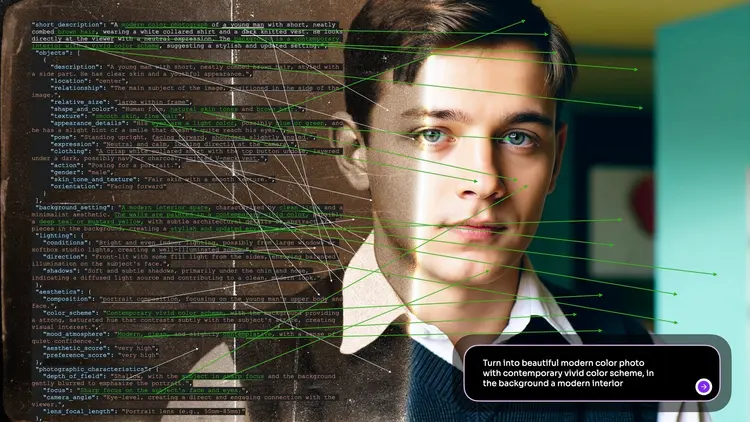
Fibo Edit takes the frustration out of image editing by letting you describe what you want to change in plain text. Instead of reaching for a brush or layer mask, you write an instruction like 'replace the sky with a sunset' or 'add a cat on the sofa,' and the model handles the rest. It is built for anyone who wants precise edits without spending hours in traditional editing software. The model accepts an optional mask so you can limit the edit to a specific region of the image, giving you control over exactly where changes appear. A guidance scale lets you dial in how closely the output follows your instruction, from subtle adjustments to bold changes. You can also supply a negative prompt to steer the result away from unwanted elements, and a seed value to reproduce a result you liked. Fibo Edit fits naturally into any content creation workflow. Drop in a product photo, describe the background you need, and get a clean result you can use right away. Whether you are preparing visuals for a campaign or making quick corrections to a personal project, the turnaround is fast enough to iterate on the spot.

Official

Bria

2.4k runs

Fibo Edit

2026-01-21

Commercial Use

Edit Any Part of an Image with Fibo Edit

Table of contents

  • Overview
  • How It Works
  • Frequently Asked Questions
  • Credit Cost
  • Features
  • Use Cases
Get Nano Banana Pro

Overview

Fibo Edit is an image editing AI that reads a plain-text instruction and applies it directly to a photo you provide. Rather than opening heavy editing software, selecting layers, or painting masks by hand, you type what you want changed and the model does the work. A product photographer who needs to swap a background, a designer adjusting a scene after the shoot, or a marketer retouching visuals for a campaign can act on those edits in seconds. For users who need precise, repeatable changes, Fibo Edit also supports a structured instruction format for step-by-step control over every edit. It runs on Picasso IA with no installation or coding required.

How It Works

  • Upload the photo you want to edit, along with an optional mask that marks the specific area to change
  • Write a plain-text instruction such as "make the sky blue" or "remove the bottle from the table"
  • Optionally add a negative prompt to prevent specific elements from appearing in the output
  • Set the guidance scale to decide how closely the model follows your instruction, from a subtle touch to a stronger reinterpretation
  • Review and download your edited image from Picasso IA once processing finishes

Frequently Asked Questions

Do I need programming skills or technical knowledge to use this? No, just open Fibo Edit on Picasso IA, adjust the settings you want, and hit generate.

Is it free to try? Yes, you can run Fibo Edit without a paid subscription to test the results. Credit usage depends on your account plan.

How long does it take to get results? Most edits finish within a few seconds. Larger images or more detailed instructions may add a moment to processing time.

What output formats are supported? Fibo Edit returns a standard image file you can download and use right away, with no watermark added.

Can I control how strongly the model applies the edit? Yes. The guidance scale lets you set the intensity of the change. A low value keeps the output close to the original; a higher value applies the instruction more aggressively.

What if the result does not look right? Rephrase the instruction, refine the mask to cover only the area that should change, or adjust the guidance scale. Adding a negative prompt can also help suppress unwanted visual elements in the output.

Can I get the same result twice? Yes. Fix the seed before generating and the model will return an identical output for the same inputs. This is useful when you want to iterate on one specific version of an edit.

Credit Cost

Each generation consumes 1 credit

1 credit

or 5 credits for 5 generations

Features

Everything this model can do for you

Text-driven edits

Describe any change in plain language and the model applies it directly to your image.

Mask control

Draw a mask over the area you want to edit and keep the rest of the image untouched.

Guidance scale

Adjust a single parameter to control how literally the model follows your instruction, from a subtle nudge to a full override.

Negative prompts

Specify what to exclude from the result to avoid unwanted elements appearing in the edited output.

Reproducible results

Set a seed value to regenerate the exact same edit whenever you need it.

Structured instructions

Pass a JSON-formatted instruction string for precise, programmatic control over the edit.

No coding required

Enter your instruction in a text field and click generate, no technical setup needed.

Use Cases

Swap a plain background in a product photo by writing a description of the background you want, without manually cutting around the subject.

Add an object to a scene by typing what you want to place and where, such as 'put a coffee cup on the table in the foreground.'

Change the color of a specific element in a photo by writing the edit instruction and drawing a mask around that area.

Remove an unwanted object from an image by masking it and instructing the model to fill the space with the surrounding context.

Test multiple visual variations of a scene by rerunning the same image with different text instructions and comparing outputs side by side.

Refine a generated image by describing the adjustment you want in one sentence and letting the model apply it without full regeneration.

Adjust the atmosphere of a photo by writing a lighting instruction, such as 'make the room look like it is lit by candlelight.'

Switch Category

Effects

Text To Image

Text To Image

Text To Video

Large Language Models

Large Language Models

Text To Speech

Text To Speech

Super Resolution

Super Resolution

Lipsync

AI Music Generation

AI Music Generation

Video Editing

Speech To Text

Speech To Text

AI Enhance Videos

Remove Backgrounds

Remove Backgrounds