• Picasso AI Logo
    Logo Picasso IA
  • Home
  • AI Image
    Nano Banana 2
  • AI Video
    Veo 3.1 Lite
  • AI Chat
    Gemini 3 Pro
  • Edit Images
  • Upscale Image
  • Remove Background
  • Text to Speech
  • Effects
    NEW
  • Generations
  • Billing
  • Support
  • Account
  1. Collection
  2. Text to Image
  3. Latent Consistency Model

Latent Consistency Model: AI Images in 0.6 Seconds

Latent Consistency Model is designed for one thing: speed. Where most image generation pipelines ask you to wait 10-30 seconds for a result, this model cuts that down to about 0.6 seconds per image. That time difference changes how you work. Instead of committing to a prompt and waiting, you can test variations as quickly as you can type them, making it practical for iteration-heavy tasks like concept art, ad mockups, or visual brainstorming. The model accepts a plain text prompt or, if you already have a photo to start from, it can restyle that image based on your description using img2img mode. A canny edge ControlNet input lets you define the structural composition of the output by feeding in an edge-detected image, so the model fills in style and color while matching the shapes you want. You can also run batches of multiple images in a single request, which means you can compare different phrasings of the same idea without running them one at a time. In a typical workflow, you might start with a rough prompt, generate five variations in batch mode, pick the one closest to what you need, and then refine it with a more specific prompt or an img2img pass from the selected image. The whole cycle can happen in under a minute. If you want to reproduce a specific result later, save the seed from that run. The speed and flexibility make this a practical tool for any project where time and iteration matter.

Fofr

1.52m runs

Latent Consistency Model

2023-10-25

Commercial Use

Latent Consistency Model: AI Images in 0.6 Seconds

Table of contents

  • Overview
  • How It Works
  • Frequently Asked Questions
  • Credit Cost
  • Features
  • Use Cases
  • Examples
Get Nano Banana Pro

Overview

Latent Consistency Model is a text-to-image AI that delivers finished images in roughly 0.6 seconds, cutting out the long wait that makes standard diffusion models impractical for rapid iteration. On Picasso IA, you can type a prompt and see a result almost immediately, which changes the whole working rhythm. The model also accepts an existing photo as input, letting you restyle it rather than starting from a blank canvas. It includes canny edge ControlNet support, so you can define the structural outline of a composition and let the model fill in the color, style, and detail around it.

How It Works

  • Type your prompt into the text box. If you want to restyle an existing image, upload it as the reference input before generating.
  • Set the output width and height manually, or choose to match the dimensions of your uploaded input image automatically.
  • To control the composition with an edge map, upload a canny edge image and set the ControlNet conditioning scale to determine how closely the output follows the structure.
  • Adjust the number of inference steps (1 to 8), guidance scale, and prompt strength to shape the balance between speed and output precision.
  • Hit generate and receive your image or batch of images in seconds, then download clean files directly from Picasso IA.

Frequently Asked Questions

Do I need programming skills or technical knowledge to use this? No, just open Latent Consistency Model on Picasso IA, adjust the settings you want, and hit generate.

Is it free to try? Yes, you can run Latent Consistency Model without any upfront cost. Free credits are available so you can test it with your own prompts right away without entering payment details.

How long does it take to get results? Each image takes approximately 0.6 seconds. Batches with multiple images take proportionally longer, but the total time is still far shorter than what you would wait with a standard diffusion pipeline.

What output formats are supported? The model returns standard image files ready to download. All outputs are clean files with no watermarks, so you can use them directly in any project.

Can I customize the output quality or style? Yes. The guidance scale controls how closely the output follows your text prompt. Prompt strength adjusts how much of your reference image carries through in img2img mode. The number of inference steps (1 to 8) trades speed for detail: fewer steps are faster, more steps produce sharper results.

How many times can I run the model? You can iterate as many times as you need. There is no hard limit on individual generation runs, so you can keep refining your result until you are satisfied.

Where can I use the outputs? The images you generate are yours to use however you like. They work for social media, client mockups, product visualizations, or any other creative project.

Credit Cost

Each generation consumes 1 credit

1 credit

or 5 credits for 5 generations

Features

Everything this model can do for you

Sub-second generation

Produce a 768×768 image in approximately 0.6 seconds per step.

Img2img support

Start from an existing photo and steer the result with a text prompt.

Canny ControlNet

Feed an edge map to lock the composition before the model fills in style and detail.

Large batch output

Generate multiple images from a single prompt in one request.

Adjustable guidance scale

Control how strictly the output follows your text prompt.

Seed control

Reuse a seed to reproduce identical results across different sessions.

Flexible sizing

Set output dimensions manually or match them to your input image automatically.

Safety checker for responsible content

Use Cases

Type a text prompt and get a finished image in under one second, with no waiting for slow diffusion pipelines

Upload a photo and apply a new style by writing a short description of the look you want

Feed an edge-detected version of a sketch as a control image to generate a refined illustration that matches your original composition

Run 10 or 20 images in a single batch to compare different prompt variations side by side

Adjust the guidance scale to shift the output from a loose interpretation to a strict prompt-match

Set a fixed seed to reproduce the same image consistently across multiple sessions

AI-assisted illustration and fine art

Batch image creation for content pipelines

Examples

768x768
1.3s
Num Images: 1
Guidance Scale: 8
Archive Outputs: No
Prompt Strength: 0.45
Sizing Strategy: width/height
Lcm Origin Steps: 50
Canny Low Threshold: 100
Num Inference Steps: 4
Canny High Threshold: 200
Control Guidance End: 1
Control Guidance Start: 0
Controlnet Conditioning Scale: 2

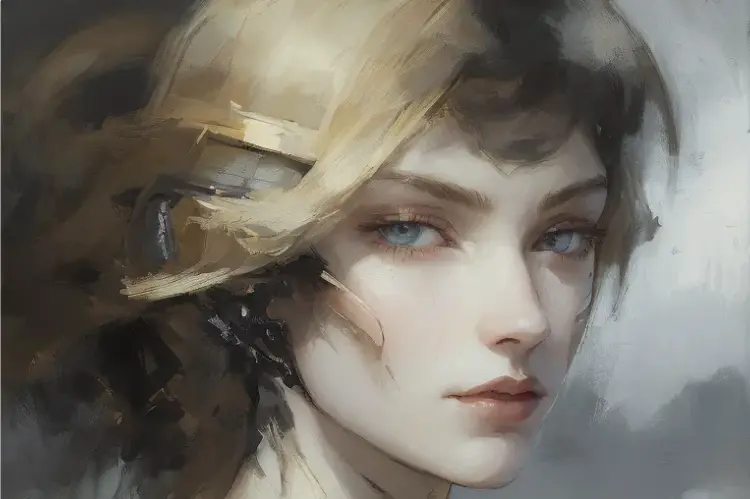
Self-portrait oil painting, a beautiful cyborg with golden hair, 8k

768x768
1.0s
Num Images: 1
Guidance Scale: 8
Archive Outputs: No
Prompt Strength: 0.45
Sizing Strategy: width/height
Lcm Origin Steps: 50
Canny Low Threshold: 100
Num Inference Steps: 4
Canny High Threshold: 200
Control Guidance End: 1
Control Guidance Start: 0
Controlnet Conditioning Scale: 2

Self-portrait oil painting, a beautiful cyborg with golden hair, 8k

768x768
1m 36s
Num Images: 1
Guidance Scale: 8
Archive Outputs: No
Prompt Strength: 0.45
Sizing Strategy: width/height
Lcm Origin Steps: 50
Canny Low Threshold: 100
Num Inference Steps: 4
Canny High Threshold: 200
Control Guidance End: 1
Control Guidance Start: 0
Controlnet Conditioning Scale: 2

Self-portrait oil painting, a beautiful cyborg with golden hair, 8k Self-portrait oil painting, a beautiful cyborg with purple hair, 8k Self-portrait oil painting, a beautiful cyborg with ginger hair, 8k Self-portrait oil painting, a beautiful cyborg with green hair, 8k

768x768
6.8s
Num Images: 4
Guidance Scale: 8
Archive Outputs: No
Prompt Strength: 0.3
Lcm Origin Steps: 50
Num Inference Steps: 8

detailed

768x768
2.4s
Num Images: 1
Guidance Scale: 8
Archive Outputs: No
Prompt Strength: 0.5
Lcm Origin Steps: 50
Num Inference Steps: 1

A landscape painting

768x768
2.5s
Num Images: 1
Guidance Scale: 8
Archive Outputs: No
Prompt Strength: 0.45
Lcm Origin Steps: 50
Num Inference Steps: 4

Self-portrait oil painting, a beautiful cyborg with golden hair, 8k

Switch Category

Effects

Text To Image

Text To Image

Text To Video

Large Language Models

Large Language Models

Text To Speech

Text To Speech

Super Resolution

Super Resolution

Lipsync

AI Music Generation

AI Music Generation

Video Editing

Speech To Text

Speech To Text

AI Enhance Videos

Remove Backgrounds

Remove Backgrounds