• Picasso AI Logo
    Logo Picasso IA
  • Home
  • AI Image
    Nano Banana 2
  • AI Video
    Veo 3.1 Lite
  • AI Chat
    Gemini 3 Pro
  • Edit Images
  • Upscale Image
  • Remove Background
  • Text to Speech
  • Effects
    NEW
  • Generations
  • Billing
  • Support
  • Account
  1. Collection
  2. Text to Image
  3. Sdxl Lightning 4step

SDXL Lightning 4Step: Fast, Free AI Images Online

SDXL Lightning 4Step is a text-to-image model that produces high-quality images in just four denoising steps. Most image generators need 20 to 50 steps to finish, which adds up when you are iterating on a concept and running dozens of variations. This model cuts that wait to a fraction of the time while keeping the output sharp and detailed at resolutions up to 1280 pixels wide. The input is a plain text prompt plus an optional negative prompt to block unwanted elements, giving you direct control over what appears in the image. You can choose from eight different schedulers, each of which shifts the visual character of the result in subtle but noticeable ways. A seed parameter lets you lock in a specific output and reproduce it exactly, which is useful when you need consistency across a set of related assets. It fits naturally into iterative design work: write a prompt, generate an image, refine a detail, and generate again without any friction. On Picasso IA there are no per-generation credits or usage quotas, so you can run as many iterations as your project demands. Open the model, type what you are picturing, and your first result arrives in seconds.

Bytedance

1026.45m runs

Sdxl Lightning 4step

2024-02-21

Commercial Use

SDXL Lightning 4Step: Fast, Free AI Images Online

Table of contents

  • Overview
  • How It Works
  • Frequently Asked Questions
  • Credit Cost
  • Features
  • Use Cases
  • Examples
Get Nano Banana Pro

Overview

SDXL Lightning 4Step is a text-to-image model that generates 1024×1024 images in just four denoising steps, making it one of the fastest ways to go from a written prompt to a finished visual. On Picasso IA, you can run it directly in your browser with no installation or technical setup. It was built for creators who want fast iteration: type a prompt, see a result, adjust a word, and go again. If you have ever spent 30 seconds waiting for a standard image generator only to tweak one adjective and start over, this model cuts that wait to almost nothing. It handles everything from concept art to product mockups, portraits to abstract textures, without requiring any design experience.

How It Works

  • Write a prompt in plain language describing the subject, visual style, mood, and any specific details you want in the image
  • Add a negative prompt to list elements you want the model to avoid, such as blurry edges, low quality, or unwanted objects
  • Choose your output resolution (1024 or 1280 pixels wide) and select a scheduler from the dropdown to influence the rendering style
  • Set a seed value if you want to reproduce a specific result later, or leave it blank to let the model pick one at random
  • Click generate and the model finishes four denoising passes in seconds, producing a full-resolution image ready to download

Frequently Asked Questions

Do I need programming skills or technical knowledge to use this? No, just open SDXL Lightning 4Step on Picasso IA, adjust the settings you want, and hit generate.

Is it free to try? Yes, the model is free to use online with no cost. You can run your first generation without creating an account or entering payment details.

How long does it take to get results? Four denoising steps means results typically arrive in a few seconds. The exact time varies slightly depending on the resolution and scheduler you choose.

What output formats are supported? Images are delivered as standard PNG files at the resolution you selected, ready to download and use in any design tool or publishing platform.

How many times can I run the model? There are no usage caps on Picasso IA. You can generate as many images as your project requires, with no credit limits or quotas of any kind.

Can I customize the output quality or style? Yes. You can adjust the scheduler, resolution, guidance scale, and seed. Switching the scheduler changes the visual character of the output; locking the seed lets you reproduce the same result across sessions.

What happens if I'm not happy with the result? Rewrite a word or two in your prompt, add the unwanted elements to the negative prompt, and run it again. With no generation limits, refining until you get the image you want costs nothing extra.

Credit Cost

Each generation consumes 1 credit

1 credit

or 5 credits for 5 generations

With Elite or Infinite plans, enjoy unlimited generations with this model at no additional cost.

Features

Everything this model can do for you

4-step generation

Produces a finished 1024-pixel image in four denoising steps, cutting render time to a fraction of standard models.

High resolution output

Supports widths and heights up to 1280 pixels for sharp, detailed results.

Negative prompt control

Block specific elements or styles from appearing by listing them in the negative prompt field.

Scheduler variety

Choose from eight schedulers including K_EULER and DPMSolverMultistep to shift the visual character of outputs.

Seed reproducibility

Lock in a seed value to reproduce the exact same image across multiple sessions.

Unlimited generations

Generate as many images as you want on Picasso IA with no credit caps or usage quotas.

Batch output

Request multiple images in a single run to compare style variations side by side.

Option to disable the safety checker for unrestricted results

Use Cases

Generate a product hero shot on a white background by describing the item and setting in a text prompt

Create social media visuals for a campaign by iterating on prompts until the style and mood match your brief

Produce concept art for a character or environment by combining style keywords with scene descriptions

Run 50+ prompt variations back to back without hitting credit limits to find the strongest composition

Generate background textures for game assets by specifying surface type, color palette, and lighting conditions

Create photorealistic portrait mockups for presentations by describing the subject, lighting, and backdrop

Test different visual styles for a brand identity project by switching adjectives in the prompt and comparing outputs side by side

Unique avatar and character design

Examples

1024x1024
0.8s
Scheduler: K_EULER
Num Outputs: 1
Guidance Scale: 0
Num Inference Steps: 4
worst quality, low quality

A pickup truck going up a mountain switchback

1024x1024
1.0s
Scheduler: K_EULER
Num Outputs: 1
Guidance Scale: 0
Num Inference Steps: 4
worst quality, low quality

A delicate porcelain teacup sits on a saucer, its surface adorned with intricate blue patterns

1024x1024
1.0s
Scheduler: K_EULER
Num Outputs: 1
Guidance Scale: 0
Num Inference Steps: 4
worst quality, low quality

In a fantastical scene, a creature with a human head and deer body emanates a green light

1024x1024
0.9s
Scheduler: K_EULER
Num Outputs: 1
Guidance Scale: 0
Num Inference Steps: 4
worst quality, low quality

a majestic lion stands proudly on a rock, overlooking the vast African savannah

1024x1024
0.9s
Scheduler: K_EULER
Num Outputs: 1
Guidance Scale: 0
Num Inference Steps: 4
worst quality, low quality

The 90s, a beautiful woman with a radiant smile and long hair, dressed in summer attire

1024x1024
0.9s
Scheduler: K_EULER
Num Outputs: 1
Guidance Scale: 0
Num Inference Steps: 4
worst quality, low quality

A dolphin leaps through the waves, set against a backdrop of bright blues and teal hues

1024x1024
0.9s
Scheduler: K_EULER
Num Outputs: 1
Guidance Scale: 0
Num Inference Steps: 4
worst quality, low quality

A firefighter with a rugged jawline rushes through the billowing smoke of an autumn blaze

1024x1024
0.9s
Scheduler: K_EULER
Num Outputs: 1
Guidance Scale: 0
Num Inference Steps: 4
worst quality, low quality

A monkey making latte art

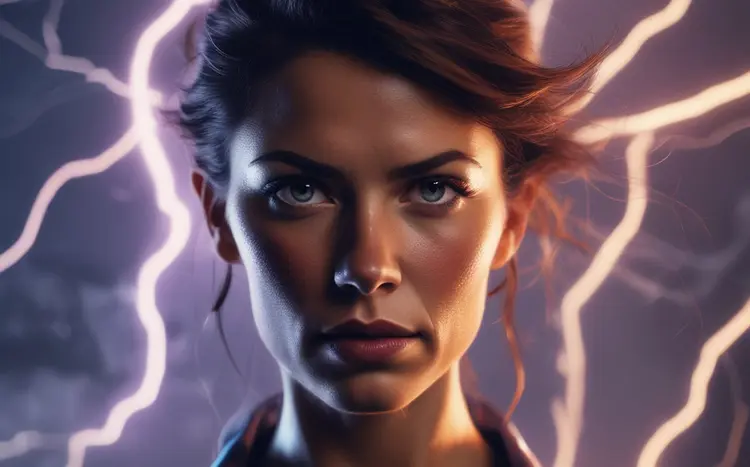
1024x1024
1.0s
Scheduler: K_EULER
Num Outputs: 1
Guidance Scale: 0
Num Inference Steps: 4
worst quality, low quality

self-portrait of a woman, lightning in the background

Switch Category

Effects

Text To Image

Text To Image

Text To Video

Large Language Models

Large Language Models

Text To Speech

Text To Speech

Super Resolution

Super Resolution

Lipsync

AI Music Generation

AI Music Generation

Video Editing

Speech To Text

Speech To Text

AI Enhance Videos

Remove Backgrounds

Remove Backgrounds