• Picasso AI Logo
    Logo Picasso IA
  • Home
  • AI Image
    Nano Banana 2
  • AI Video
    Veo 3.1 Lite
  • AI Chat
    Gemini 3 Pro
  • Edit Images
  • Upscale Image
  • Remove Background
  • Text to Speech
  • Effects
    NEW
  • Generations
  • Billing
  • Support
  • Account
  1. Collection
  2. Text to Image
  3. Stable Diffusion 3.5 Large Turbo

Stable Diffusion 3.5 Large Turbo: Fast AI Art

Stable Diffusion 3.5 Large Turbo is a text-to-image model built for creators who need detailed, high-resolution visuals without waiting through long generation queues. It converts a written description into a finished image using fewer inference steps than earlier diffusion models, so the creative loop stays fast even when you're iterating through multiple concepts. The model handles a wide range of artistic styles, from photorealistic portraits to painterly illustrations, and produces noticeably different outputs from the same prompt each run. You can lock results with a seed value, choose from nine aspect ratios to match social media or print formats, and use prompt strength controls to blend a reference image with new descriptors. Negative prompts let you strip out unwanted elements without post-processing. In a typical project, you'd use this model early in the visual workflow to generate references quickly, then fine-tune with seed locking and prompt adjustments until the output matches your vision. Whether you're working on product mockups, concept art, or social content batches, it fits wherever speed and variety both matter.

Official

Stability Ai

795.9k runs

Stable Diffusion 3.5 Large Turbo

2024-10-22

Commercial Use

Stable Diffusion 3.5 Large Turbo: Fast AI Art

Table of contents

  • Overview
  • How It Works
  • Frequently Asked Questions
  • Credit Cost
  • Features
  • Use Cases
  • Examples
Get Nano Banana Pro

Overview

Stable Diffusion 3.5 Large Turbo converts text descriptions into high-resolution images with fine detail and stylistic range. On Picasso IA, you access it directly in the browser with no installation required. The model uses fewer inference steps than older versions of the architecture, so each result arrives quickly without sacrificing sharpness or detail. It handles both pure text-to-image creation and image-to-image refinement, so you can start from scratch or redirect a photo you already have. It fits a broad range of visual tasks, from product mockups and concept art to social media content, all from a single written prompt.

How It Works

  • Write a text prompt describing the image you want, specifying the subject, artistic style, mood, and any compositional details you care about
  • Choose an aspect ratio that matches your intended use, from square (1:1) for social posts to portrait (9:16) for stories or widescreen (16:9) for banners
  • Optionally upload a reference image to activate image-to-image mode, then use the prompt strength slider to control how much the model reshapes the original
  • Add a negative prompt listing any visual elements you want excluded from the output
  • Hit generate and receive your image in seconds, then adjust the seed or rephrase the prompt to refine the result

Frequently Asked Questions

Do I need programming skills or technical knowledge to use this? No, just open Stable Diffusion 3.5 Large Turbo on Picasso IA, adjust the settings you want, and hit generate.

Is it free to try? Yes, Picasso IA makes this model available with free generations so you can test it before subscribing to a plan.

How long does it take to get results? Most images are ready in seconds. The model uses fewer inference steps than standard diffusion models, which keeps generation times short even for high-resolution outputs.

What output formats are supported? You can download your image as PNG, JPG, or WebP. WebP is the default and strikes a good balance between file size and quality for web publishing. PNG works best when you need a lossless file for editing or print-ready work.

Can I customize the output quality or style? Yes. You can adjust the guidance scale to control how closely the model follows your prompt, tune prompt strength when working with a reference image, and write a negative prompt to exclude unwanted elements. Changing these values without touching the seed lets you compare results side by side without changing the underlying composition.

How many times can I run the model? You can run it as many times as you need within your account plan's generation limits.

Where can I use the outputs? You own the images you generate and can use them for personal projects, client work, or social media posts, subject to your account plan's terms.

Credit Cost

Each generation consumes 1 credit

1 credit

or 5 credits for 5 generations

Features

Everything this model can do for you

Fast generation

Produces a detailed image in fewer inference steps than standard diffusion models, cutting wait time per result.

Image-to-image mode

Upload a reference photo and redirect its style or composition using a text prompt.

Aspect ratio control

Choose from nine ratios including 9:16, 16:9, and 1:1 to match your target platform or format.

Seed locking

Reuse a seed value to reproduce the same composition while varying the prompt across iterations.

Negative prompts

Specify what you want excluded from the output without manual post-processing.

Multiple output formats

Download results as PNG, JPG, or WebP depending on your publishing workflow.

Style diversity

Generates visually distinct outputs from the same prompt, spanning photorealistic and artistic styles.

Choice of output formats: JPG, PNG, WEBP

Use Cases

Generate product concept images from a text description, choosing an aspect ratio that matches your e-commerce listing format

Produce diverse visual references for a mood board by running the same prompt multiple times without a fixed seed

Refine an existing image by uploading it and writing a short prompt that redirects the composition or style

Create social media visuals in the correct ratio (9:16 for stories, 16:9 for banners) directly from a text description

Lock a composition with a seed value and experiment with different negative prompts to remove unwanted details from the output

Generate portrait illustrations in different artistic styles by rewording the prompt without touching any code

Build background textures or scene concepts for game assets by describing the setting and outputting in square format

Custom wallpapers and backgrounds

Examples

1:1
webp
2.5s
Cfg: 1
Steps: 4
Output Quality: 90
Prompt Strength: 0.85

a man and woman are standing together against a backdrop, the backdrop is divided equally in half down the middle, left side is red, right side is gold, the woman is wearing a t-shirt with a yoda motif, she has a long skirt with birds on it, the man is wearing a three piece purple suit, he has spiky blue hair

3:2
webp
0.9s
Cfg: 1
Steps: 4
Output Quality: 90
Prompt Strength: 0.85

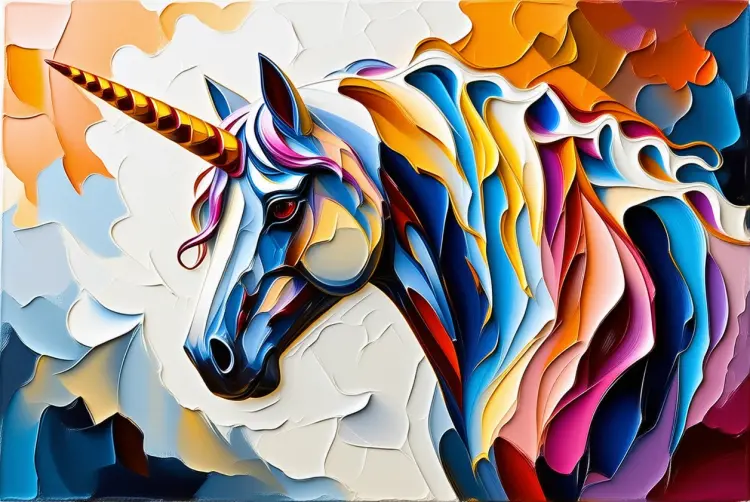
An impasto unicorn

Switch Category

Effects

Text To Image

Text To Image

Text To Video

Large Language Models

Large Language Models

Text To Speech

Text To Speech

Super Resolution

Super Resolution

Lipsync

AI Music Generation

AI Music Generation

Video Editing

Speech To Text

Speech To Text

AI Enhance Videos

Remove Backgrounds

Remove Backgrounds