• Picasso AI Logo
    Logo Picasso IA
  • Home
  • AI Image
    Nano Banana 2
  • AI Video
    Veo 3.1 Lite
  • AI Chat
    Gemini 3 Pro
  • Edit Images
  • Upscale Image
  • Remove Background
  • Text to Speech
  • Effects
    NEW
  • Generations
  • Billing
  • Support
  • Account
  1. Collection
  2. Text to Image
  3. Material Diffusion

Generate Tileable Textures with Material Diffusion

Material Diffusion is a text-to-image model purpose-built for generating tileable textures. Unlike standard image generators, it produces outputs that tile without visible seams, which makes it the right choice for anyone who needs repeating patterns for web backgrounds, game assets, fabric design, or printed materials. The model accepts a plain text prompt and returns an image you can tile across any surface. You can also feed it an existing image to generate variations in the same style, or use a mask to inpaint specific areas while keeping the rest intact. Resolution options run from 128 to 1024 pixels, and the scheduler and guidance scale controls let you steer how closely the output follows your prompt. In practice, Material Diffusion fits neatly into workflows where you need texture libraries built fast. Write a prompt, generate a few variations, download the result, and apply it directly in your design tool or game engine without additional editing. Try it now on Picasso IA with no account required.

Tstramer

2.33m runs

Material Diffusion

2022-11-13

Commercial Use

Generate Tileable Textures with Material Diffusion

Table of contents

  • Overview
  • How It Works
  • Frequently Asked Questions
  • Credit Cost
  • Features
  • Use Cases
  • Examples
Get Nano Banana Pro

Overview

Material Diffusion is a text-to-image model built specifically for generating tileable outputs, textures and patterns that repeat across a surface without visible edge breaks. Standard image generators produce single compositions; this one produces assets you can apply directly to any repeating surface. On Picasso IA, you type a prompt like "mossy cobblestone path" or "art deco bronze grid," hit generate, and receive a tiling-ready image in under a minute. It is a practical shortcut for anyone who builds texture libraries, removing the manual work of stitching edges in a photo editor afterward.

How It Works

  • Write a text prompt describing the material or pattern you need, for example "weathered teal wood planks" or "fine sand with scattered pebbles."
  • Optionally upload a reference image to generate variations from that starting point, setting the prompt strength to control how far the new output drifts from the original.
  • Choose your output resolution (512x512 by default) and select a scheduler from DDIM, K-LMS, or PNDM depending on your preference for output style.
  • Adjust guidance scale and denoising steps to dial in how closely the result follows your prompt.
  • Click generate, preview the output, and download the PNG to use directly in your project.

Frequently Asked Questions

Do I need programming skills or technical knowledge to use this? No, just open Material Diffusion on Picasso IA, adjust the settings you want, and hit generate.

Is it free to try? Yes, Material Diffusion is available to try on Picasso IA without a subscription. You can generate images right away without entering payment details or installing anything.

How long does generation take? Most outputs arrive in under 60 seconds. The exact time depends on the resolution you choose and how many denoising steps you set in the controls.

What file format does the model output? The model returns a standard PNG file. You can download it directly from the results panel and import it into any design tool, game engine, or 3D application that accepts image files.

Can I use an existing image as a starting point? Yes. Upload any image as your initial reference and set the prompt strength to control how much the model changes it. A lower value keeps more of the original detail; a higher value shifts the output significantly toward your prompt.

Can I use a mask for inpainting? Yes. Paint a black-and-white mask over your image, where black areas get replaced and white areas stay as they are. A prompt strength between 0.5 and 0.7 tends to give the most natural-looking results.

Where can I use the textures I generate? There are no watermarks on the output, so you can use the files in game engines, websites, print designs, or 3D scenes. Because the images tile without visible edge breaks, they work as repeating backgrounds or material maps right out of the box.

Credit Cost

Each generation consumes 1 credit

1 credit

or 5 credits for 5 generations

Features

Everything this model can do for you

Tileable outputs

Every generated image repeats without visible edges, ready to apply across any surface.

Image variations

Feed an existing texture as input and get styled alternatives in the same repeating format.

Inpainting support

Mask specific areas of an image and fill them with new content described in your prompt.

Adjustable resolution

Choose output sizes from 128 to 1024 pixels to match your project's exact needs.

Scheduler options

Switch between DDIM, K-LMS, and PNDM schedulers to control generation style and speed.

Prompt strength control

Set how much the prompt overrides an input image, from subtle variation to full replacement.

Repeatable results

Save your seed to reproduce the exact same texture across multiple sessions.

Fine-tune with random seed or deterministic results

Use Cases

Generate tileable stone, wood, or fabric textures from a text description for use in game environments

Create repeating background patterns for websites by describing the color scheme and style you want

Build a texture library for a 3D project by generating dozens of prompt variations in minutes

Use an existing texture as a starting point and generate styled variations while keeping the same tile structure

Inpaint a damaged or unwanted section of a tileable texture by drawing a mask over the area and describing the replacement

Produce printable fabric or wallpaper designs by describing the pattern, colors, and motif in a single prompt

Iterate on material concepts during the early design phase by testing multiple texture styles without hiring a texture artist

Custom wallpaper and surface design

Examples

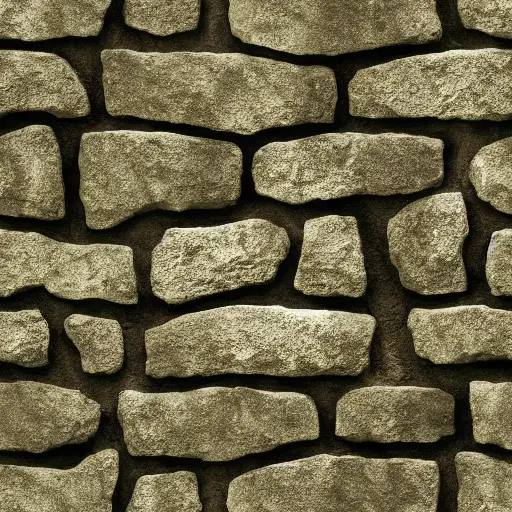
512x512
4m 14s
Scheduler: K-LMS
Num Outputs: 1
Guidance Scale: 7.5
Prompt Strength: 0.8
Num Inference Steps: 50

Mossy Runic Bricks seamless texture, trending on artstation, stone, moss, base color, albedo, 4k

Switch Category

Effects

Text To Image

Text To Image

Text To Video

Large Language Models

Large Language Models

Text To Speech

Text To Speech

Super Resolution

Super Resolution

Lipsync

AI Music Generation

AI Music Generation

Video Editing

Speech To Text

Speech To Text

AI Enhance Videos

Remove Backgrounds

Remove Backgrounds