• Logo Picasso IA
    Logo Picasso IA
  • Inicio
  • IA Imagen
    Nano Banana 2
  • IA Video
    Veo 3.1 Fast
  • IA Chat
    Gemini 3 Pro
  • Editar Imágenes
  • Mejorar Imagen
  • Eliminar Fondo
  • Texto a Voz
  • Efectos
    NEW
  • Generaciones
  • Facturación
  • Soporte
  • Cuenta
  1. Colección
  2. Texto a Imagen
  3. Qwen Image Edit 2511

Edita cualquier foto con Qwen Image Edit 2511

Qwen Image Edit 2511 toma una foto que tú proporcionas y una descripción en texto plano de lo que quieres cambiar, y luego genera una nueva versión de esa imagen que coincide con tus instrucciones. Esto es útil cuando necesitas ajustar un visual existente sin reconstruirlo desde cero, ya sea que estés reemplazando un fondo, cambiando el color de un producto o modificando detalles en una escena. El modelo ofrece una consistencia visual notablemente mejor en comparación con su predecesor, lo que significa que las áreas editadas se integran con las partes sin cambios de la imagen en lugar de verse parcheadas. Acepta entradas JPEG, PNG, GIF y WEBP, y genera resultados en los mismos formatos con ajustes de calidad de hasta 100. También puedes bloquear la relación de aspecto para que coincida con la imagen original o elegir una relación estándar como 16:9 o 1:1 para reformatear la salida para una plataforma específica. Los administradores de redes sociales, fotógrafos de productos y diseñadores gráficos pueden integrarlo en su flujo de edición para gestionar ajustes repetitivos de imágenes sin retoques manuales. Escribe una instrucción breve, sube la imagen de referencia y obtén un resultado pulido en cuestión de segundos.

Oficial

Qwen

3.77m ejecuciones

Qwen Image Edit 2511

2025-12-22

Uso comercial

Edita cualquier foto con Qwen Image Edit 2511

Tabla de contenidos

  • Descripción general
  • Cómo funciona
  • Preguntas frecuentes
  • Costo de Créditos
  • Características
  • Casos de uso
  • Ejemplos
Obtén Nano Banana Pro

Descripción general

Qwen Image Edit 2511 es un modelo de IA que edita fotos existentes basándose en instrucciones de texto plano. En lugar de abrir un editor de imágenes y trabajar con capas o máscaras, describes el cambio que quieres y el modelo lo aplica directamente a tu archivo. En Picasso IA, subes una imagen JPEG, PNG, GIF o WebP, escribes algo como "reemplaza el fondo por una calle lluviosa" o "cambia el color de la camisa a azul marino," y recibes una imagen revisada en cuestión de segundos. Esta versión ofrece una consistencia notablemente mejor en comparación con su predecesor, lo que significa que las partes de la imagen que no mencionaste se mantienen visualmente intactas entre ediciones.

Cómo funciona

  • Sube una o más imágenes de referencia en formato JPEG, PNG, GIF o WebP.
  • Escribe una instrucción de texto plano que describa la edición específica que quieres, como "elimina el texto del letrero" o "añade niebla al fondo."
  • Elige una relación de aspecto para la salida, o déjala configurada para que coincida con las dimensiones de tu imagen original.
  • Selecciona tu formato de salida preferido (WebP, JPG o PNG) y ajusta el nivel de calidad si es necesario.
  • Pulsa generar y recibe la imagen editada, normalmente en cuestión de segundos.

Preguntas frecuentes

¿Necesito habilidades de programación o conocimientos técnicos para usar esto? No, solo abre Qwen Image Edit 2511 en Picasso IA, ajusta los parámetros que quieras y pulsa generar.

¿Es gratis probarlo? Sí, puedes ejecutar Qwen Image Edit 2511 sin ningún pago inicial. Consulta la página de precios de Picasso IA para obtener detalles sobre los créditos y los límites del nivel gratuito.

¿Cuánto tarda en mostrar resultados? La mayoría de las ediciones se completan en menos de 10 segundos con el modo rápido activado por defecto. Las imágenes más grandes o complejas pueden tardar unos segundos adicionales según la instrucción.

¿Qué formatos de salida son compatibles? El modelo exporta en WebP, JPG o PNG. WebP es el formato predeterminado y equilibra bien el tamaño del archivo con la calidad. PNG es la opción adecuada cuando necesitas un archivo sin pérdida y sin artefactos de compresión.

¿Puedo personalizar la calidad o el estilo de salida? Sí. Puedes establecer un valor de calidad de 0 a 100 para salidas JPG y WebP, y puedes elegir una relación de aspecto distinta a la de tu imagen de origen si es necesario. Establecer una semilla fija te permite reproducir el mismo resultado para iteraciones consistentes.

¿Qué pasa si no estoy satisfecho con el resultado? Refina tu instrucción de texto para ser más específico sobre qué debe cambiar y qué debe permanecer igual. Pequeños ajustes de redacción en el prompt suelen producir resultados notablemente distintos, por lo que iterar es rápido y requiere poco esfuerzo.

¿Dónde puedo usar las salidas? Las imágenes editadas son tuyas para descargarlas y usarlas en cualquier proyecto. Entre los usos comunes se incluyen páginas de producto, publicaciones en redes sociales, presentaciones para clientes y maquetas de marketing. No se añaden marcas de agua a los archivos descargados.

Costo de Créditos

Cada generación consume 1 crédito

1 crédito

o 5 créditos para 5 generaciones

Características

Todo lo que este modelo puede hacer por ti

Ediciones guiadas por texto

Describe el cambio que quieres en lenguaje sencillo y recibe una imagen editada en segundos.

Consistencia mejorada

Las áreas editadas se integran en la imagen original sin costuras visibles ni transiciones parcheadas.

Múltiples formatos de entrada

Acepta imágenes de referencia JPEG, PNG, GIF y WEBP sin conversión de formato.

Relaciones de aspecto flexibles

Genera en 1:1, 16:9, 9:16, 4:3, 3:4 o coincide con las dimensiones de la imagen original.

Alta calidad de salida

Ajusta la calidad de salida hasta 100 para obtener resultados nítidos, listos para impresión o para la web.

Generación más rápida

El modo de velocidad opcional procesa tu solicitud con optimizaciones adicionales para una entrega más rápida.

Control de semilla

Establece un valor de semilla para reproducir el mismo resultado de edición en múltiples ejecuciones.

Casos de uso

Reemplaza el fondo de una foto de producto por un entorno de estudio describiendo la escena en unas pocas palabras

Cambia el color de un elemento en una foto, como convertir una camisa roja en azul, escribiendo una instrucción simple

Elimina objetos no deseados de una imagen describiendo qué quitar y con qué rellenar el espacio

Reformatea una foto existente a una proporción de 16:9 o 9:16 mientras ajustas la composición para encajar en el nuevo marco

Retoca la iluminación o el tono de un retrato describiendo el ajuste que quieres sin abrir un editor de imágenes

Adapta una imagen de producto para distintos contextos editando detalles visuales como colores, accesorios o elementos del fondo

Convierte una foto diurna al aire libre en una escena nocturna describiendo la iluminación y el cielo que quieres

Ejemplos

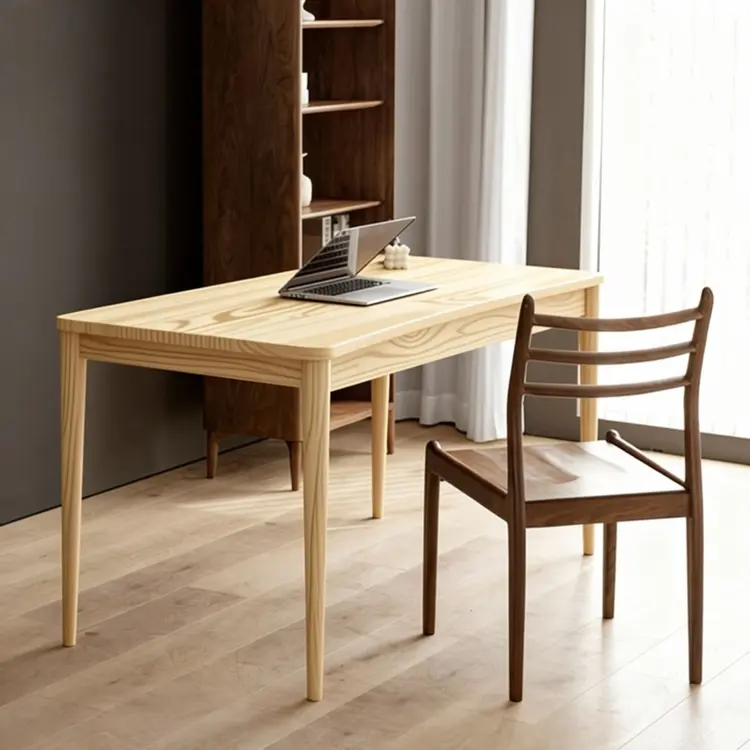
Replace the table top wood in Figure 1 with the light wood material from Figure 2
Entrada
Input 1
Input 2
Resultado
Replace the table top wood in Figure 1 with the light wood material from Figure 2
4.5s
Ver Ejemplo
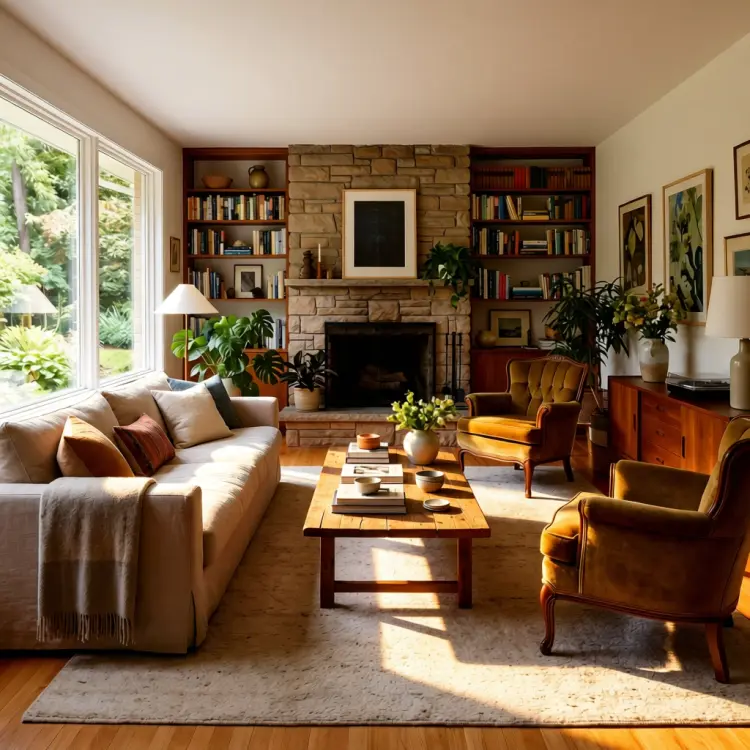
use soft lighting to relight the image.
Entrada
Input 1
Resultado
use soft lighting to relight the image.
2.8s
Ver Ejemplo
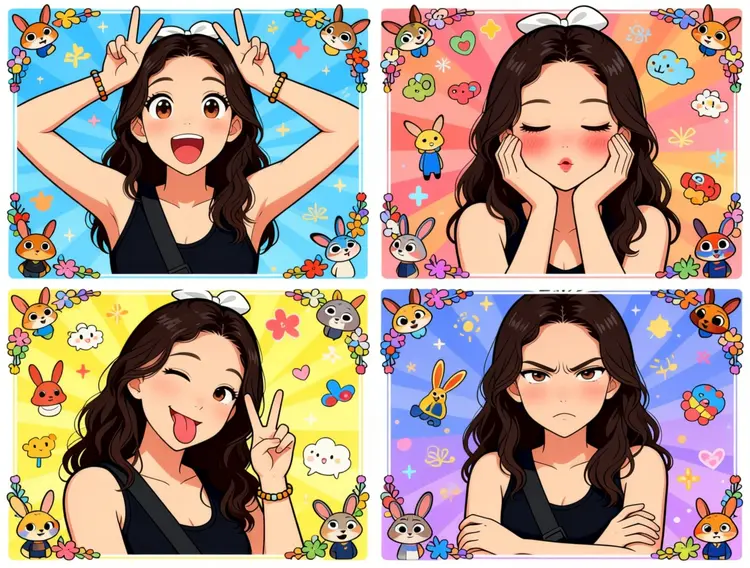
Generate a four-panel grid (2x2) image. The requirements are as follows:
Character & Panels
The character should remain consistent with the reference image, presented across four panels with different poses and expressions:
Top Left: Both hands raised above the head making double "V" (peace) signs. Eyes are wide open, mouth is open, showing a surprised and lively expression.
Top Right: Both hands cupping the cheeks. Eyes are slightly closed, mouth is pouting, and cheeks have a red blush, showing a cute and coquettish look.
Bottom Left: Head tilted slightly, one eye winking, tongue sticking out, and one hand making a "V" sign. A playful and mischievous look.
Bottom Right: Arms crossed over the chest. Brows are slightly furrowed, mouth is pouting, showing a slightly proud and "tsundere" (aloof but cute) expression.
Styling & Aesthetics
Clothing: Remains the same as in the reference image.
Background: A colorful background filled with cute cartoon elements like Zootopia.
Art Style: Overall 2D anime/manga style. Colors are vibrant, and the style is sweet and "healing" (comforting).
Details: Each small panel has an exquisite cartoon border decoration, filled with a sense of childhood wonder.
Entrada
Input 1
Resultado
Generate a four-panel grid (2x2) image. The requirements are as follows: Character & Panels The character should remain consistent with the reference image, presented across four panels with different poses and expressions: Top Left: Both hands raised above the head making double "V" (peace) signs. Eyes are wide open, mouth is open, showing a surprised and lively expression. Top Right: Both hands cupping the cheeks. Eyes are slightly closed, mouth is pouting, and cheeks have a red blush, showing a cute and coquettish look. Bottom Left: Head tilted slightly, one eye winking, tongue sticking out, and one hand making a "V" sign. A playful and mischievous look. Bottom Right: Arms crossed over the chest. Brows are slightly furrowed, mouth is pouting, showing a slightly proud and "tsundere" (aloof but cute) expression. Styling & Aesthetics Clothing: Remains the same as in the reference image. Background: A colorful background filled with cute cartoon elements like Zootopia. Art Style: Overall 2D anime/manga style. Colors are vibrant, and the style is sweet and "healing" (comforting). Details: Each small panel has an exquisite cartoon border decoration, filled with a sense of childhood wonder.
3.0s
Ver Ejemplo
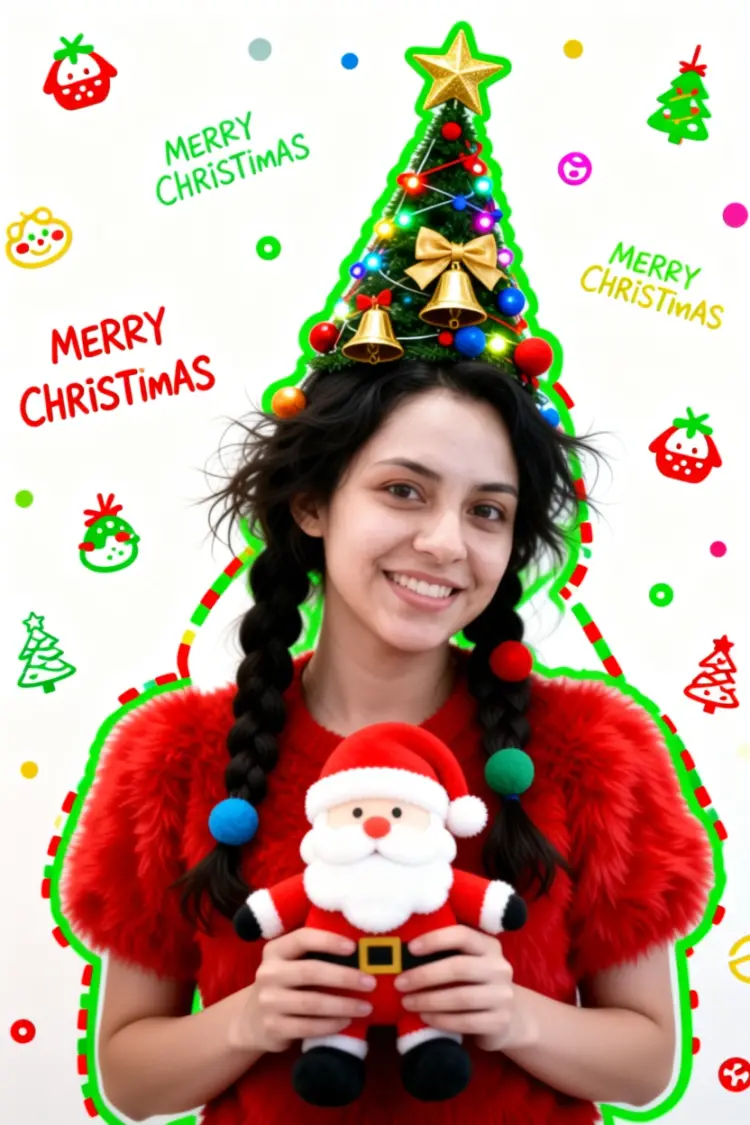
Generate a Christmas-themed image of a beautiful young girl with a "pure desire" (innocent yet alluring) aesthetic. Keep the face consistent with the reference.
Character Appearance & Styling
Hair: Loose, low double-braids decorated with colorful fabric balls. Messy, fluffy strands of hair blend naturally with the headpiece.
Headpiece: A small, neat, cone-shaped Christmas tree fixed to the top of her head. It features a gold star on top and is richly decorated with colorful lights, gold bells, bow knots, and small red, blue, and gold ornaments.
Face & Makeup: Fair "cold-white" skin, smooth as jade. Natural red-brown eyeshadow gradient. An innocent gaze with a dreamy "pure desire" filter.
Clothing: A soft, fluffy red plush top.
Pose & Atmosphere
Action: Holding a Santa Claus plush toy with both hands. She is tilting her head slightly in a playful, cute, and beautiful pose.
Expression: Full of festive celebration; a contrast of cuteness and sexiness.
Vibe: A warm, healing Christmas atmosphere.
Technical & Artistic Style
Photography: Studio soft lighting, 70mm film portrait style. Low contrast, low saturation, delicate film grain, and slight chromatic aberration/glow.
Composition: Medium shot, warm white background, unique but formal composition.
Artistic Elements: * The outline of the character is traced with green graffiti.
The surrounding white space is filled with cute hand-drawn Christmas doodles (collage style).
The silhouette is wrapped in fluorescent red, green, and gold dashed lines and polka dots.
The words "MERRY CHRISTMAS" are written everywhere in a cute font.
Entrada
Input 1
Resultado
Generate a Christmas-themed image of a beautiful young girl with a "pure desire" (innocent yet alluring) aesthetic. Keep the face consistent with the reference. Character Appearance & Styling Hair: Loose, low double-braids decorated with colorful fabric balls. Messy, fluffy strands of hair blend naturally with the headpiece. Headpiece: A small, neat, cone-shaped Christmas tree fixed to the top of her head. It features a gold star on top and is richly decorated with colorful lights, gold bells, bow knots, and small red, blue, and gold ornaments. Face & Makeup: Fair "cold-white" skin, smooth as jade. Natural red-brown eyeshadow gradient. An innocent gaze with a dreamy "pure desire" filter. Clothing: A soft, fluffy red plush top. Pose & Atmosphere Action: Holding a Santa Claus plush toy with both hands. She is tilting her head slightly in a playful, cute, and beautiful pose. Expression: Full of festive celebration; a contrast of cuteness and sexiness. Vibe: A warm, healing Christmas atmosphere. Technical & Artistic Style Photography: Studio soft lighting, 70mm film portrait style. Low contrast, low saturation, delicate film grain, and slight chromatic aberration/glow. Composition: Medium shot, warm white background, unique but formal composition. Artistic Elements: * The outline of the character is traced with green graffiti. The surrounding white space is filled with cute hand-drawn Christmas doodles (collage style). The silhouette is wrapped in fluorescent red, green, and gold dashed lines and polka dots. The words "MERRY CHRISTMAS" are written everywhere in a cute font.
2.9s
Ver Ejemplo
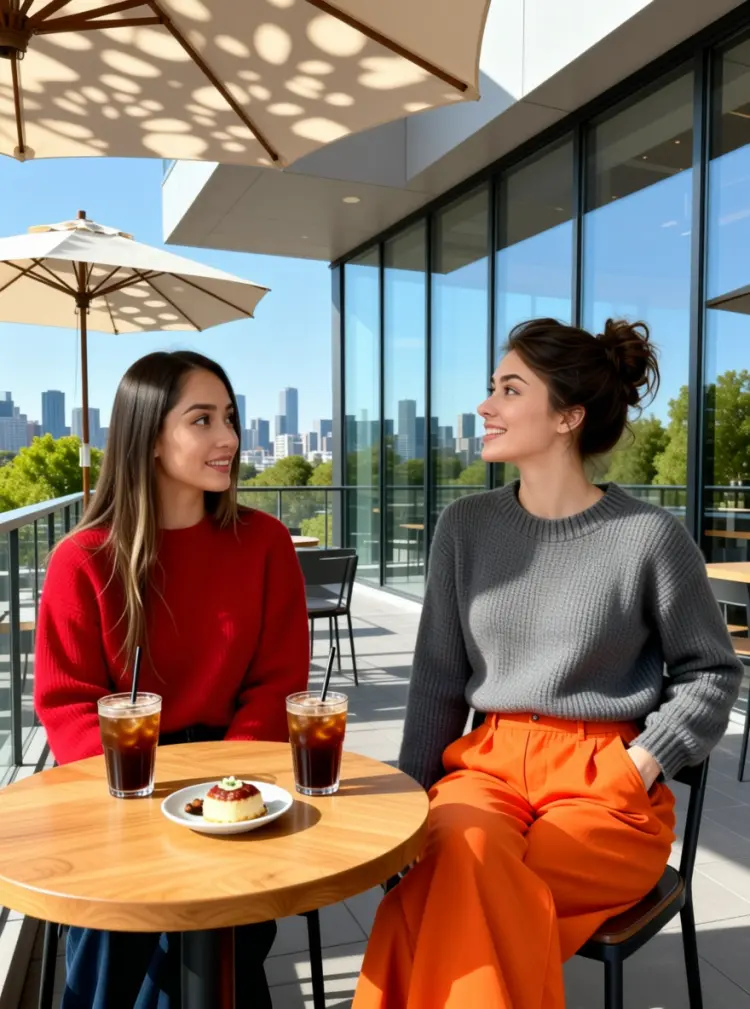
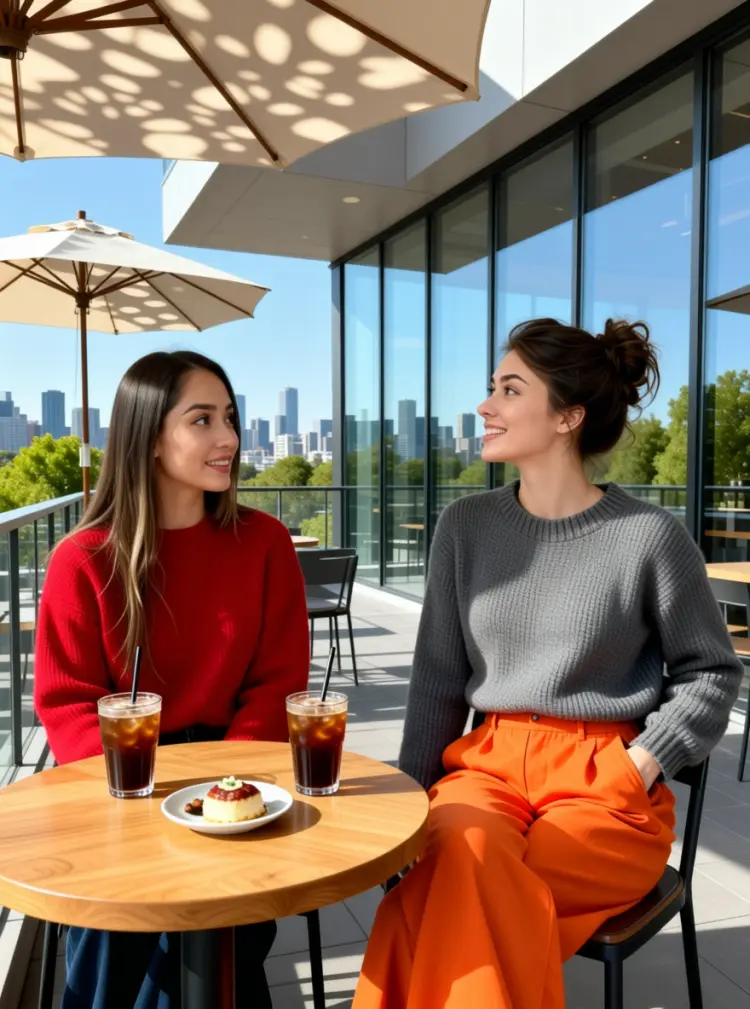
On the terrace of a modern art café, two young women are enjoying a leisurely afternoon. The woman on the left is wearing a red sweater. The woman on the right is wearing a gray neck knit sweater and a pair of eye-catching orange wide-leg pants; her left hand is casually tucked into her pocket, and she is tilting her head while talking to her companion.

They are sitting side-by-side at a small, natural wood-colored table topped with two iced coffees and a small plate of dessert. In the background, there is a city skyline visible through floor-to-ceiling windows and green trees in the distance, with sunlight casting dappled shadows through a parasol.
Entrada
Input 1
Input 2
Resultado
On the terrace of a modern art café, two young women are enjoying a leisurely afternoon. The woman on the left is wearing a red sweater. The woman on the right is wearing a gray neck knit sweater and a pair of eye-catching orange wide-leg pants; her left hand is casually tucked into her pocket, and she is tilting her head while talking to her companion. They are sitting side-by-side at a small, natural wood-colored table topped with two iced coffees and a small plate of dessert. In the background, there is a city skyline visible through floor-to-ceiling windows and green trees in the distance, with sunlight casting dappled shadows through a parasol.
4.6s
Ver Ejemplo

Cambiar Categoría

Efectos

Texto a Imagen

Texto a Imagen

Texto a Video

Modelos de Lenguaje Extensos

Modelos de Lenguaje Extensos

Texto a Voz

Texto a Voz

Super Resolución

Super Resolución

Sincronización Labial

Generación de Música con IA

Generación de Música con IA

Edición de Video

Voz a Texto

Voz a Texto

Mejorar Videos con IA

Eliminar Fondos

Eliminar Fondos