• Logo Picasso IA
    Logo Picasso IA
  • Accueil
  • IA Image
    Nano Banana 2
  • IA Vidéo
    Veo 3.1 Fast
  • IA Chat
    Gemini 3 Pro
  • Modifier les Images
  • Améliorer l'Image
  • Supprimer l'Arrière-plan
  • Texte en Parole
  • Effets
    NEW
  • Générations
  • Facturation
  • Support
  • Compte
  1. Collection
  2. Texte en Image
  3. Qwen Image Edit 2511

Modifiez n'importe quelle photo avec Qwen Image Edit 2511

Qwen Image Edit 2511 prend la photo que vous fournissez et une description en texte brut de ce que vous souhaitez modifier, puis génère une nouvelle version de cette image qui correspond à vos instructions. C'est utile lorsque vous devez ajuster un visuel existant sans le reconstruire à partir de zéro, que vous remplaciez un arrière-plan, changiez la couleur d'un produit ou modifiiez des détails dans une scène. Le modèle offre une cohérence visuelle nettement meilleure par rapport à son prédécesseur, ce qui signifie que les zones modifiées se fondent dans les parties inchangées de l'image au lieu de paraître retouchées. Il accepte les entrées JPEG, PNG, GIF et WEBP et produit des sorties dans les mêmes formats avec des paramètres de qualité allant jusqu'à 100. Vous pouvez également verrouiller le ratio d'aspect pour correspondre à l'image d'origine ou choisir un format standard comme 16:9 ou 1:1 pour adapter la sortie à une plateforme spécifique. Les gestionnaires de réseaux sociaux, les photographes de produits et les graphistes peuvent l'intégrer à leur pipeline de retouche pour gérer des ajustements d'image répétitifs sans retouche manuelle. Rédigez une courte instruction, téléversez l'image de référence et obtenez un résultat soigné en quelques secondes.

Officiel

Qwen

3.77m exécutions

Qwen Image Edit 2511

2025-12-22

Usage commercial

Modifiez n'importe quelle photo avec Qwen Image Edit 2511

Table des matières

  • Aperçu
  • Comment ça fonctionne
  • Foire aux questions
  • Coût des Crédits
  • Fonctionnalités
  • Cas d'utilisation
  • Exemples
Obtenir Nano Banana Pro

Aperçu

Qwen Image Edit 2511 est un modèle d'IA qui modifie des photos existantes à partir d'instructions en texte brut. Au lieu d'ouvrir un éditeur d'images et de travailler avec des calques ou des masques, vous décrivez la modification souhaitée et le modèle l'applique directement à votre fichier. Sur Picasso IA, vous téléversez une image JPEG, PNG, GIF ou WebP, tapez quelque chose comme "replace the background with a rainy street" ou "change the shirt color to navy," et obtenez une image révisée en quelques secondes. Cette version offre une cohérence nettement meilleure par rapport à son prédécesseur, ce qui signifie que les parties de l'image que vous n'avez pas mentionnées restent visuellement intactes d'une modification à l'autre.

Comment ça fonctionne

  • Téléversez une ou plusieurs images de référence au format JPEG, PNG, GIF ou WebP.
  • Rédigez une instruction en texte brut décrivant la modification spécifique souhaitée, par exemple "remove the text from the sign" ou "add fog to the background."
  • Choisissez un ratio d'aspect pour la sortie, ou laissez-le réglé pour correspondre aux dimensions de votre image d'origine.
  • Sélectionnez le format de sortie préféré (WebP, JPG ou PNG) et ajustez le niveau de qualité si nécessaire.
  • Lancez la génération et recevez l'image modifiée, généralement en quelques secondes.

Foire aux questions

Ai-je besoin de compétences en programmation ou de connaissances techniques pour utiliser cela ? Non, ouvrez simplement Qwen Image Edit 2511 sur Picasso IA, ajustez les paramètres souhaités et lancez la génération.

Est-ce gratuit à essayer ? Oui, vous pouvez utiliser Qwen Image Edit 2511 sans paiement initial. Consultez la page tarifaire de Picasso IA pour plus de détails sur les crédits et les limites du niveau gratuit.

Combien de temps faut-il pour obtenir des résultats ? La plupart des modifications se terminent en moins de 10 secondes avec le mode rapide activé par défaut. Les images plus volumineuses ou plus complexes peuvent prendre quelques secondes supplémentaires selon l'instruction.

Quels formats de sortie sont pris en charge ? Le modèle exporte en WebP, JPG ou PNG. WebP est le format par défaut et équilibre bien la taille du fichier et la qualité. PNG est le bon choix lorsque vous avez besoin d'un fichier sans perte et sans artefacts de compression.

Puis-je personnaliser la qualité ou le style de sortie ? Oui. Vous pouvez définir une valeur de qualité de 0 à 100 pour les sorties JPG et WebP, et vous pouvez choisir un ratio d'aspect différent de celui de votre image source si nécessaire. Définir un seed fixe vous permet de reproduire le même résultat pour des itérations cohérentes.

Que se passe-t-il si je ne suis pas satisfait du résultat ? Affinez votre instruction textuelle pour préciser davantage ce qui doit changer et ce qui doit rester identique. De petits ajustements de formulation dans le prompt produisent souvent des sorties nettement différentes, ce qui rend les itérations rapides et peu coûteuses en effort.

Où puis-je utiliser les résultats ? Les images modifiées vous appartiennent et peuvent être téléchargées et utilisées dans n'importe quel projet. Les applications courantes incluent les pages produit, les publications sur les réseaux sociaux, les présentations clients et les maquettes marketing. Aucun filigrane n'est ajouté aux fichiers téléchargés.

Coût des Crédits

Chaque génération consomme 1 crédit

1 crédit

ou 5 crédits pour 5 générations

Fonctionnalités

Tout ce que ce modèle peut faire pour vous

Modifications guidées par le texte

Décrivez en langage naturel le changement souhaité et récupérez une image modifiée en quelques secondes.

Cohérence améliorée

Les zones modifiées se fondent dans l'image d'origine sans coutures visibles ni transitions irrégulières.

Plusieurs formats d'entrée

Accepte des images de référence JPEG, PNG, GIF et WEBP sans conversion de format.

Ratios d'aspect flexibles

Sortez en 1:1, 16:9, 9:16, 4:3, 3:4, ou faites correspondre les dimensions de l'image d'origine.

Haute qualité de sortie

Définissez une qualité de sortie jusqu'à 100 pour des résultats nets, prêts à l'impression ou au web.

Génération plus rapide

Le mode vitesse optionnel traite votre demande avec des optimisations supplémentaires pour un délai d'exécution plus rapide.

Contrôle du seed

Définissez une valeur de seed pour reproduire le même résultat de modification sur plusieurs exécutions.

Cas d'utilisation

Remplacez l'arrière-plan d'une photo de produit par un décor de studio en décrivant la scène en quelques mots

Changez la couleur d'un élément dans une photo, par exemple en transformant une chemise rouge en bleue, en saisissant une instruction simple

Supprimez les objets indésirables d'une image en décrivant ce qu'il faut retirer et avec quoi remplir l'espace

Reformatez une photo existante au ratio 16:9 ou 9:16 tout en ajustant la composition pour qu'elle s'adapte au nouveau cadre

Retouchez l'éclairage ou la tonalité d'un portrait en décrivant l'ajustement souhaité sans ouvrir un éditeur d'images

Adaptez une image de produit à différents contextes en modifiant des détails visuels comme les couleurs, les accessoires ou les éléments d'arrière-plan

Transformez une photo extérieure de jour en scène du soir en décrivant l'éclairage et le ciel souhaités

Exemples

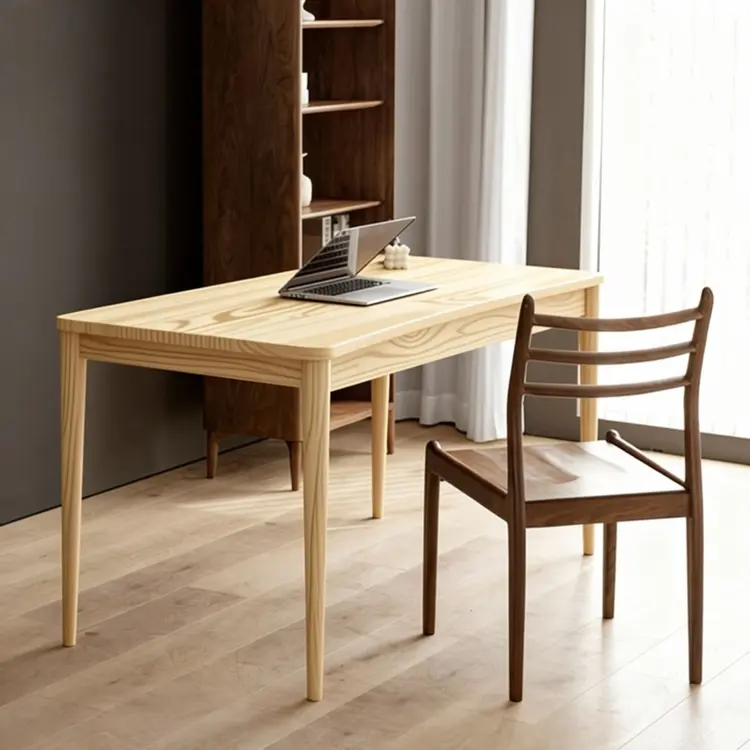
Replace the table top wood in Figure 1 with the light wood material from Figure 2
Entrée
Input 1
Input 2
Résultat
Replace the table top wood in Figure 1 with the light wood material from Figure 2
4.5s
Voir l'exemple
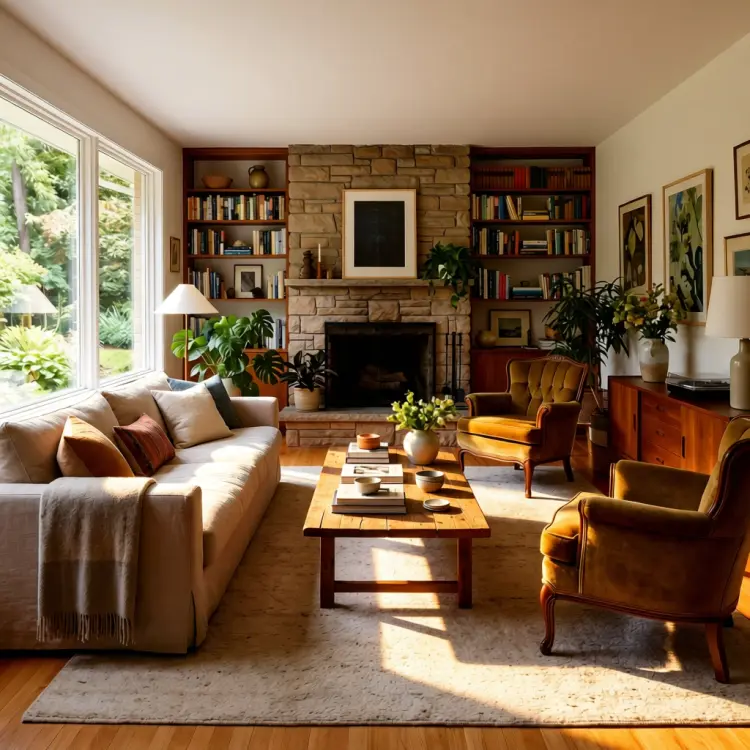
use soft lighting to relight the image.
Entrée
Input 1
Résultat
use soft lighting to relight the image.
2.8s
Voir l'exemple
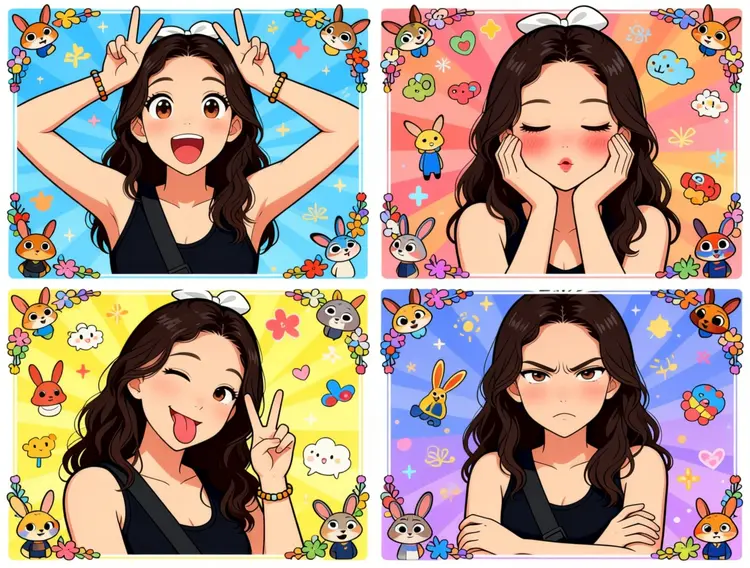
Generate a four-panel grid (2x2) image. The requirements are as follows:
Character & Panels
The character should remain consistent with the reference image, presented across four panels with different poses and expressions:
Top Left: Both hands raised above the head making double "V" (peace) signs. Eyes are wide open, mouth is open, showing a surprised and lively expression.
Top Right: Both hands cupping the cheeks. Eyes are slightly closed, mouth is pouting, and cheeks have a red blush, showing a cute and coquettish look.
Bottom Left: Head tilted slightly, one eye winking, tongue sticking out, and one hand making a "V" sign. A playful and mischievous look.
Bottom Right: Arms crossed over the chest. Brows are slightly furrowed, mouth is pouting, showing a slightly proud and "tsundere" (aloof but cute) expression.
Styling & Aesthetics
Clothing: Remains the same as in the reference image.
Background: A colorful background filled with cute cartoon elements like Zootopia.
Art Style: Overall 2D anime/manga style. Colors are vibrant, and the style is sweet and "healing" (comforting).
Details: Each small panel has an exquisite cartoon border decoration, filled with a sense of childhood wonder.
Entrée
Input 1
Résultat
Generate a four-panel grid (2x2) image. The requirements are as follows: Character & Panels The character should remain consistent with the reference image, presented across four panels with different poses and expressions: Top Left: Both hands raised above the head making double "V" (peace) signs. Eyes are wide open, mouth is open, showing a surprised and lively expression. Top Right: Both hands cupping the cheeks. Eyes are slightly closed, mouth is pouting, and cheeks have a red blush, showing a cute and coquettish look. Bottom Left: Head tilted slightly, one eye winking, tongue sticking out, and one hand making a "V" sign. A playful and mischievous look. Bottom Right: Arms crossed over the chest. Brows are slightly furrowed, mouth is pouting, showing a slightly proud and "tsundere" (aloof but cute) expression. Styling & Aesthetics Clothing: Remains the same as in the reference image. Background: A colorful background filled with cute cartoon elements like Zootopia. Art Style: Overall 2D anime/manga style. Colors are vibrant, and the style is sweet and "healing" (comforting). Details: Each small panel has an exquisite cartoon border decoration, filled with a sense of childhood wonder.
3.0s
Voir l'exemple
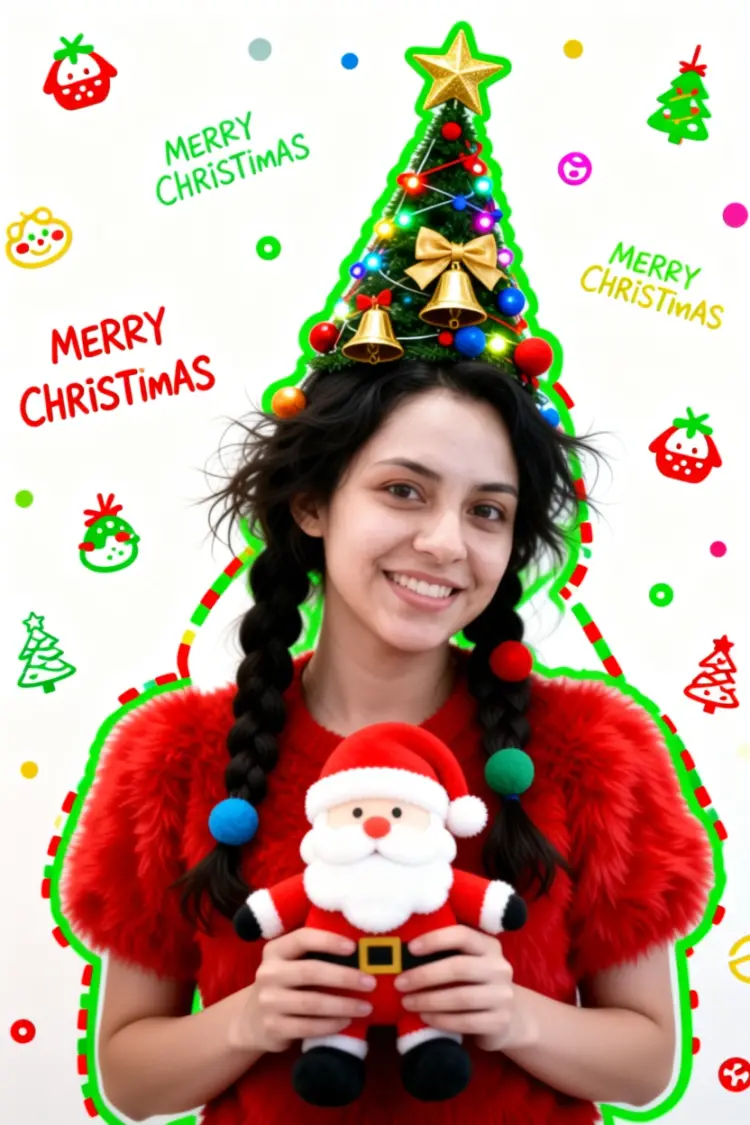
Generate a Christmas-themed image of a beautiful young girl with a "pure desire" (innocent yet alluring) aesthetic. Keep the face consistent with the reference.
Character Appearance & Styling
Hair: Loose, low double-braids decorated with colorful fabric balls. Messy, fluffy strands of hair blend naturally with the headpiece.
Headpiece: A small, neat, cone-shaped Christmas tree fixed to the top of her head. It features a gold star on top and is richly decorated with colorful lights, gold bells, bow knots, and small red, blue, and gold ornaments.
Face & Makeup: Fair "cold-white" skin, smooth as jade. Natural red-brown eyeshadow gradient. An innocent gaze with a dreamy "pure desire" filter.
Clothing: A soft, fluffy red plush top.
Pose & Atmosphere
Action: Holding a Santa Claus plush toy with both hands. She is tilting her head slightly in a playful, cute, and beautiful pose.
Expression: Full of festive celebration; a contrast of cuteness and sexiness.
Vibe: A warm, healing Christmas atmosphere.
Technical & Artistic Style
Photography: Studio soft lighting, 70mm film portrait style. Low contrast, low saturation, delicate film grain, and slight chromatic aberration/glow.
Composition: Medium shot, warm white background, unique but formal composition.
Artistic Elements: * The outline of the character is traced with green graffiti.
The surrounding white space is filled with cute hand-drawn Christmas doodles (collage style).
The silhouette is wrapped in fluorescent red, green, and gold dashed lines and polka dots.
The words "MERRY CHRISTMAS" are written everywhere in a cute font.
Entrée
Input 1
Résultat
Generate a Christmas-themed image of a beautiful young girl with a "pure desire" (innocent yet alluring) aesthetic. Keep the face consistent with the reference. Character Appearance & Styling Hair: Loose, low double-braids decorated with colorful fabric balls. Messy, fluffy strands of hair blend naturally with the headpiece. Headpiece: A small, neat, cone-shaped Christmas tree fixed to the top of her head. It features a gold star on top and is richly decorated with colorful lights, gold bells, bow knots, and small red, blue, and gold ornaments. Face & Makeup: Fair "cold-white" skin, smooth as jade. Natural red-brown eyeshadow gradient. An innocent gaze with a dreamy "pure desire" filter. Clothing: A soft, fluffy red plush top. Pose & Atmosphere Action: Holding a Santa Claus plush toy with both hands. She is tilting her head slightly in a playful, cute, and beautiful pose. Expression: Full of festive celebration; a contrast of cuteness and sexiness. Vibe: A warm, healing Christmas atmosphere. Technical & Artistic Style Photography: Studio soft lighting, 70mm film portrait style. Low contrast, low saturation, delicate film grain, and slight chromatic aberration/glow. Composition: Medium shot, warm white background, unique but formal composition. Artistic Elements: * The outline of the character is traced with green graffiti. The surrounding white space is filled with cute hand-drawn Christmas doodles (collage style). The silhouette is wrapped in fluorescent red, green, and gold dashed lines and polka dots. The words "MERRY CHRISTMAS" are written everywhere in a cute font.
2.9s
Voir l'exemple
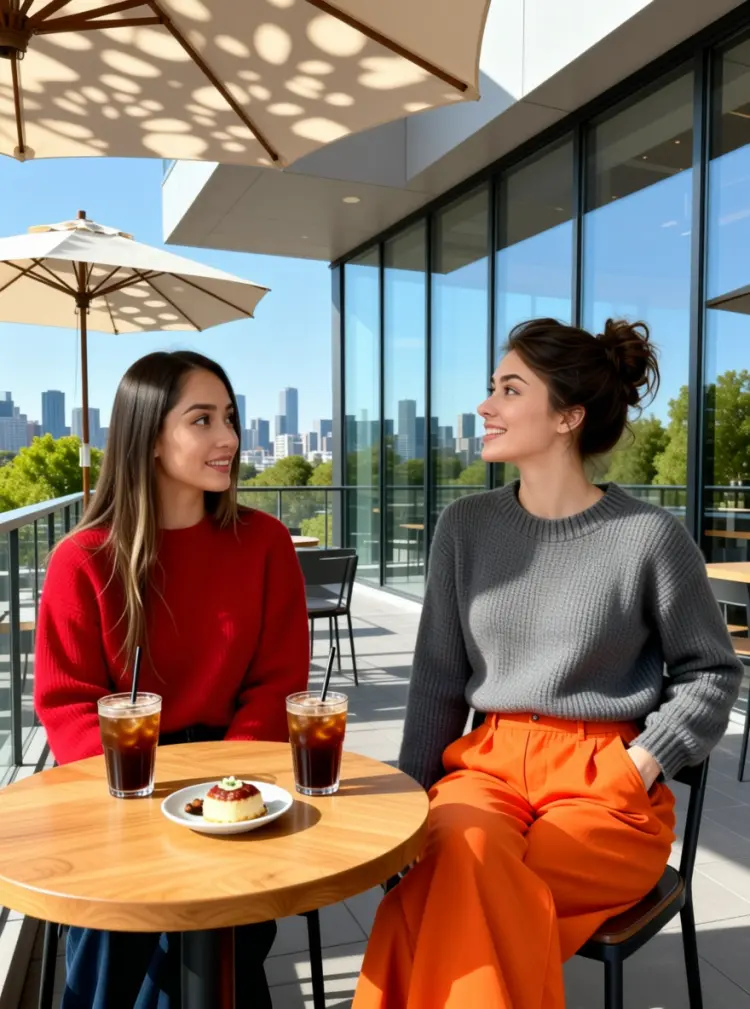
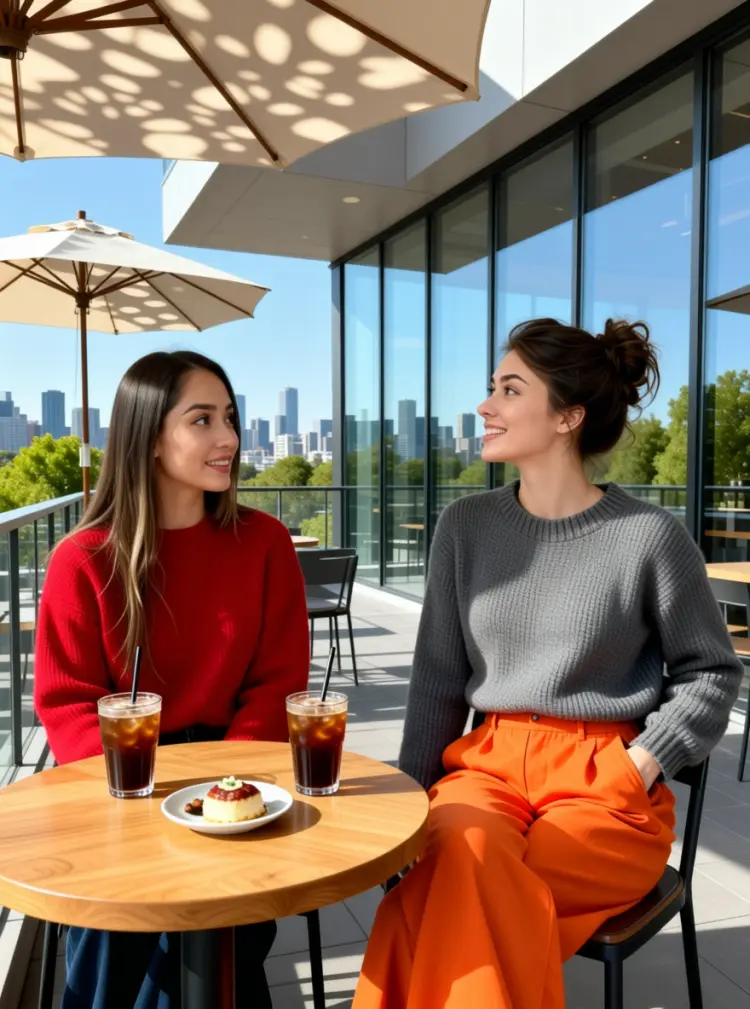
On the terrace of a modern art café, two young women are enjoying a leisurely afternoon. The woman on the left is wearing a red sweater. The woman on the right is wearing a gray neck knit sweater and a pair of eye-catching orange wide-leg pants; her left hand is casually tucked into her pocket, and she is tilting her head while talking to her companion.

They are sitting side-by-side at a small, natural wood-colored table topped with two iced coffees and a small plate of dessert. In the background, there is a city skyline visible through floor-to-ceiling windows and green trees in the distance, with sunlight casting dappled shadows through a parasol.
Entrée
Input 1
Input 2
Résultat
On the terrace of a modern art café, two young women are enjoying a leisurely afternoon. The woman on the left is wearing a red sweater. The woman on the right is wearing a gray neck knit sweater and a pair of eye-catching orange wide-leg pants; her left hand is casually tucked into her pocket, and she is tilting her head while talking to her companion. They are sitting side-by-side at a small, natural wood-colored table topped with two iced coffees and a small plate of dessert. In the background, there is a city skyline visible through floor-to-ceiling windows and green trees in the distance, with sunlight casting dappled shadows through a parasol.
4.6s
Voir l'exemple

Changer de Catégorie

Effets

Texte en image

Texte en image

Texte en vidéo

Grands Modèles de Langage

Grands Modèles de Langage

Texte en parole

Texte en parole

Super résolution

Super résolution

Synchronisation labiale

Génération de musique IA

Génération de musique IA

Édition vidéo

Parole en texte

Parole en texte

Amélioration vidéo IA

Suppression d'arrière-plan

Suppression d'arrière-plan