• Picasso IA लोगो
    Logo Picasso IA
  • होम
  • AI इमेज
    Nano Banana 2
  • AI वीडियो
    Veo 3.1 Fast
  • AI चैट
    Gemini 3 Pro
  • इमेज एडिट करें
  • इमेज सुधारें
  • बैकग्राउंड हटाएं
  • टेक्स्ट टू स्पीच
  • इफ़ेक्ट्स
    NEW
  • पीढ़ियाँ
  • बिलिंग
  • सहायता
  • खाता
  1. संग्रह
  2. टेक्स्ट टू इमेज
  3. Qwen Image Edit 2511

Qwen Image Edit 2511 के साथ किसी भी फोटो को संपादित करें

Qwen Image Edit 2511 आपके द्वारा दी गई एक फोटो और आप क्या बदलना चाहते हैं, इसका एक सादा-पाठ विवरण लेता है, फिर उस छवि का एक नया संस्करण बनाता है जो आपके निर्देशों से मेल खाता है। यह तब उपयोगी है जब आपको किसी मौजूदा दृश्य को शुरू से बनाए बिना समायोजित करना हो, चाहे आप पृष्ठभूमि बदल रहे हों, किसी उत्पाद का रंग बदल रहे हों, या किसी दृश्य में विवरण संशोधित कर रहे हों। यह मॉडल अपने पूर्ववर्ती की तुलना में उल्लेखनीय रूप से बेहतर दृश्य सुसंगतता प्रदान करता है, जिसका अर्थ है कि संपादित क्षेत्र छवि के अपरिवर्तित हिस्सों में पैच किए हुए नहीं लगते, बल्कि उनमें घुल-मिल जाते हैं। यह JPEG, PNG, GIF, और WEBP इनपुट स्वीकार करता है और गुणवत्ता सेटिंग्स 100 तक के साथ उन्हीं प्रारूपों में आउटपुट देता है। आप मूल छवि से मिलाने के लिए पहलू अनुपात को भी लॉक कर सकते हैं या 16:9 या 1:1 जैसे मानक अनुपात चुनकर आउटपुट को किसी विशिष्ट प्लेटफ़ॉर्म के लिए पुन: प्रारूपित कर सकते हैं। सोशल मीडिया प्रबंधक, उत्पाद फ़ोटोग्राफ़र, और ग्राफ़िक डिज़ाइनर इसे अपने संपादन वर्कफ़्लो में शामिल करके बिना मैन्युअल रीटचिंग के दोहराए जाने वाले छवि समायोजन संभाल सकते हैं। एक छोटा निर्देश लिखें, संदर्भ छवि अपलोड करें, और कुछ ही सेकंड में एक परिष्कृत परिणाम वापस पाएँ।

आधिकारिक

Qwen

3.77m रन

Qwen Image Edit 2511

2025-12-22

व्यावसायिक उपयोग

Qwen Image Edit 2511 के साथ किसी भी फोटो को संपादित करें

विषय-सूची

  • अवलोकन
  • यह कैसे काम करता है
  • अक्सर पूछे जाने वाले प्रश्न
  • क्रेडिट लागत
  • विशेषताएँ
  • उपयोग के मामले
  • उदाहरण
Nano Banana Pro प्राप्त करें

अवलोकन

Qwen Image Edit 2511 एक AI मॉडल है जो सादा-पाठ निर्देशों के आधार पर मौजूदा फ़ोटो संपादित करता है। इमेज एडिटर खोलने और लेयर्स या मास्क के साथ काम करने के बजाय, आप अपनी इच्छित बदलाव का वर्णन करते हैं और मॉडल उसे सीधे आपकी फ़ाइल पर लागू करता है। Picasso IA पर, आप एक JPEG, PNG, GIF, या WebP छवि अपलोड करते हैं, "replace the background with a rainy street" या "change the shirt color to navy" जैसे कुछ टाइप करते हैं, और कुछ ही सेकंड में संशोधित छवि वापस पा लेते हैं। यह संस्करण अपने पूर्ववर्ती की तुलना में उल्लेखनीय रूप से बेहतर सुसंगतता प्रदान करता है, जिसका अर्थ है कि छवि के वे हिस्से जिनका आपने उल्लेख नहीं किया, वे संपादनों के दौरान दृश्य रूप से सुरक्षित रहते हैं।

यह कैसे काम करता है

  • JPEG, PNG, GIF, या WebP प्रारूप में एक या अधिक संदर्भ छवियाँ अपलोड करें।
  • आप जो विशिष्ट संपादन चाहते हैं, उसका वर्णन करते हुए एक सादा-पाठ निर्देश लिखें, जैसे "remove the text from the sign" या "add fog to the background."
  • आउटपुट के लिए एक पहलू अनुपात चुनें, या इसे अपनी मूल छवि आयामों से मिलाने के लिए छोड़ दें।
  • अपना पसंदीदा आउटपुट प्रारूप (WebP, JPG, या PNG) चुनें और आवश्यकता होने पर गुणवत्ता स्तर समायोजित करें।
  • जनरेट पर क्लिक करें और संपादित छवि प्राप्त करें, आमतौर पर कुछ ही सेकंड में।

अक्सर पूछे जाने वाले प्रश्न

क्या इसे उपयोग करने के लिए मुझे प्रोग्रामिंग कौशल या तकनीकी ज्ञान चाहिए? नहीं, बस Picasso IA पर Qwen Image Edit 2511 खोलें, अपनी इच्छित सेटिंग्स समायोजित करें, और जनरेट पर क्लिक करें।

क्या इसे आज़माना मुफ़्त है? हाँ, आप बिना किसी अग्रिम भुगतान के Qwen Image Edit 2511 चला सकते हैं। क्रेडिट और मुफ़्त स्तर की सीमाओं के लिए Picasso IA मूल्य निर्धारण पृष्ठ देखें।

परिणाम पाने में कितना समय लगता है? अधिकांश संपादन डिफ़ॉल्ट रूप से सक्षम फास्ट मोड के साथ 10 सेकंड से कम में पूरे हो जाते हैं। बड़े या अधिक जटिल चित्र, निर्देश के आधार पर, कुछ अतिरिक्त सेकंड ले सकते हैं।

कौन से आउटपुट प्रारूप समर्थित हैं? यह मॉडल WebP, JPG, या PNG में निर्यात करता है। WebP डिफ़ॉल्ट है और फ़ाइल आकार तथा गुणवत्ता के बीच अच्छा संतुलन देता है। जब आपको बिना किसी संपीड़न कलाकृतियों के लॉसलेस फ़ाइल चाहिए, तो PNG सही विकल्प है।

क्या मैं आउटपुट गुणवत्ता या शैली को अनुकूलित कर सकता हूँ? हाँ। आप JPG और WebP आउटपुट के लिए 0 से 100 तक का गुणवत्ता मान सेट कर सकते हैं, और आवश्यकता होने पर अपने स्रोत छवि से अलग पहलू अनुपात चुन सकते हैं। एक निश्चित seed सेट करने से आप सुसंगत पुनरावृत्तियों के लिए वही परिणाम पुन: उत्पन्न कर सकते हैं।

अगर मैं परिणाम से खुश नहीं हूँ तो क्या होगा? अपने पाठ निर्देश को अधिक विशिष्ट बनाकर स्पष्ट करें कि क्या बदलना चाहिए और क्या वैसा ही रहना चाहिए। prompt में छोटे-छोटे शब्द परिवर्तन अक्सर स्पष्ट रूप से अलग आउटपुट उत्पन्न करते हैं, इसलिए पुनरावृत्ति तेज़ और कम प्रयास वाली होती है।

मैं आउटपुट का उपयोग कहाँ कर सकता हूँ? संपादित छवियाँ आपकी हैं — आप उन्हें डाउनलोड करके किसी भी प्रोजेक्ट में उपयोग कर सकते हैं। सामान्य उपयोगों में उत्पाद पृष्ठ, सोशल मीडिया पोस्ट, क्लाइंट प्रस्तुतियाँ, और मार्केटिंग मॉकअप शामिल हैं। डाउनलोड की गई फ़ाइलों में कोई वॉटरमार्क नहीं जोड़ा जाता।

क्रेडिट लागत

प्रत्येक जेनरेशन 1 क्रेडिट का उपयोग करता है

1 क्रेडिट

या 5 क्रेडिट्स 5 जेनेरेशन के लिए

विशेषताएँ

यह मॉडल आपके लिए क्या कर सकता है

पाठ-आधारित संपादन

आप जो बदलाव चाहते हैं उसे सरल भाषा में बताएं और कुछ ही सेकंड में संपादित छवि वापस पाएं।

बेहतर सुसंगतता

संपादित क्षेत्र बिना दिखाई देने वाली सीमाओं या खंडित संक्रमणों के मूल छवि में घुल-मिल जाते हैं।

एकाधिक इनपुट प्रारूप

रूपांतरण की आवश्यकता के बिना JPEG, PNG, GIF, और WEBP संदर्भ छवियों को स्वीकार करता है।

लचीले पहलू अनुपात

1:1, 16:9, 9:16, 4:3, 3:4 में आउटपुट दें, या मूल छवि आयामों से मिलाएँ।

उच्च आउटपुट गुणवत्ता

तेज़, प्रिंट-तैयार या वेब-तैयार परिणामों के लिए आउटपुट गुणवत्ता 100 तक सेट करें।

तेज़ जनरेशन

वैकल्पिक स्पीड मोड अतिरिक्त अनुकूलनों के साथ आपके अनुरोध को संसाधित करता है ताकि परिणाम जल्दी मिले।

सीड नियंत्रण

कई रन में वही संपादन परिणाम पुन: उत्पन्न करने के लिए एक सीड मान सेट करें।

उपयोग के मामले

दृश्य को कुछ शब्दों में बताकर किसी उत्पाद फोटो की पृष्ठभूमि को स्टूडियो सेटिंग से बदलें

एक साधारण निर्देश टाइप करके फोटो में किसी वस्तु का रंग बदलें, जैसे लाल शर्ट को नीला करना

क्या हटाना है और उस जगह को किससे भरना है, यह बताकर छवि से अवांछित वस्तुएँ हटाएँ

नए फ़्रेम में फिट होने के लिए संरचना समायोजित करते हुए किसी मौजूदा फोटो को 16:9 या 9:16 अनुपात में पुन: प्रारूपित करें

बिना इमेज एडिटर खोले, अपनी इच्छित समायोजन का वर्णन करके पोर्ट्रेट की रोशनी या टोन सुधारें

रंग, प्रॉप्स, या पृष्ठभूमि तत्वों जैसे दृश्य विवरणों को संपादित करके किसी उत्पाद छवि को अलग-अलग संदर्भों के लिए अनुकूलित करें

आप जिस रोशनी और आकाश की चाह रखते हैं, उसका वर्णन करके दिन के समय की बाहरी फोटो को शाम के दृश्य में बदलें

उदाहरण

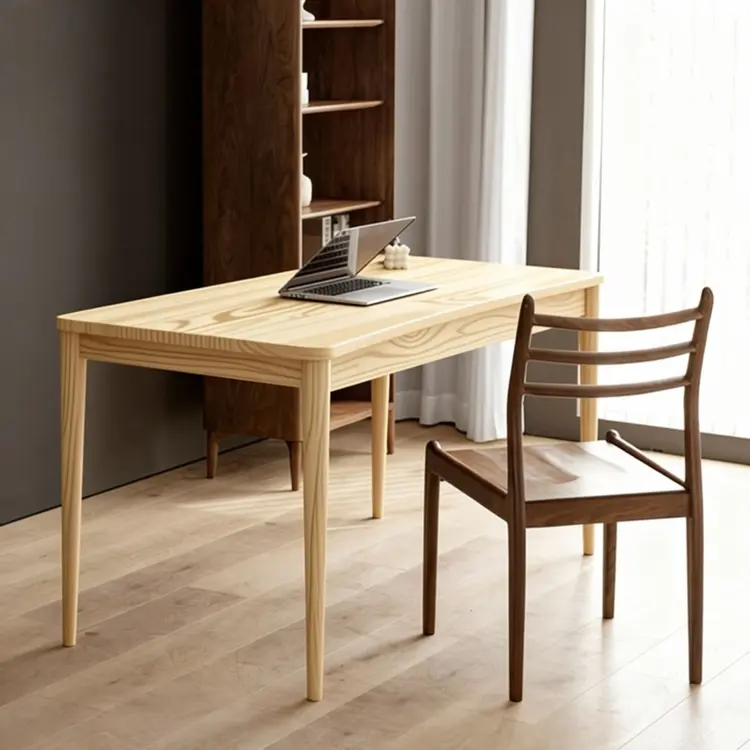
Replace the table top wood in Figure 1 with the light wood material from Figure 2
इनपुट
Input 1
Input 2
परिणाम
Replace the table top wood in Figure 1 with the light wood material from Figure 2
4.5s
उदाहरण देखें
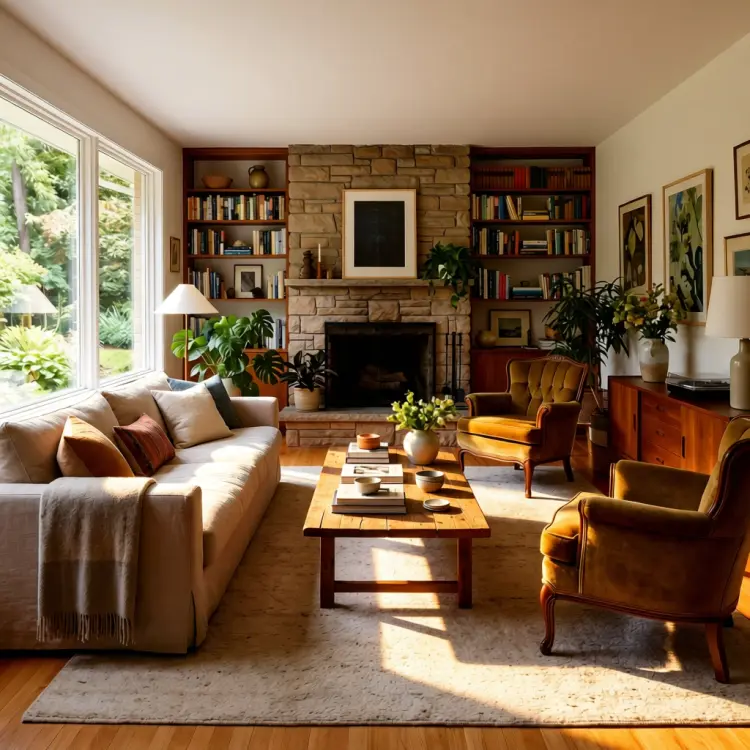
use soft lighting to relight the image.
इनपुट
Input 1
परिणाम
use soft lighting to relight the image.
2.8s
उदाहरण देखें
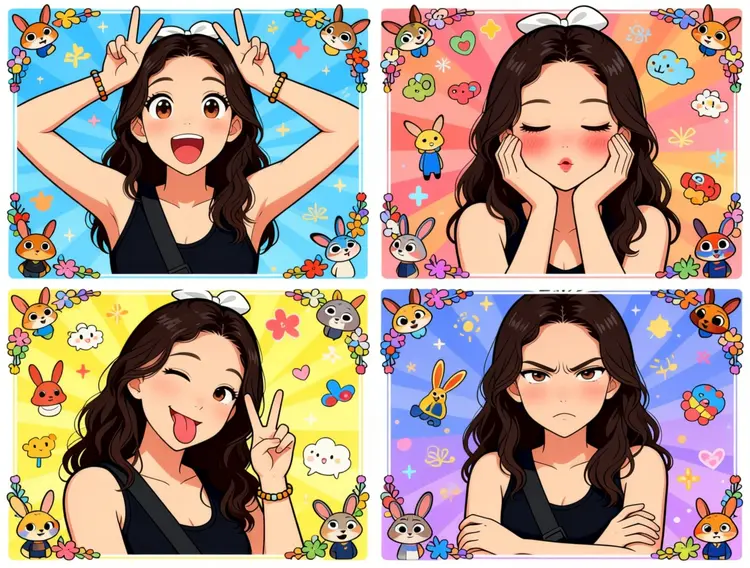
Generate a four-panel grid (2x2) image. The requirements are as follows:
Character & Panels
The character should remain consistent with the reference image, presented across four panels with different poses and expressions:
Top Left: Both hands raised above the head making double "V" (peace) signs. Eyes are wide open, mouth is open, showing a surprised and lively expression.
Top Right: Both hands cupping the cheeks. Eyes are slightly closed, mouth is pouting, and cheeks have a red blush, showing a cute and coquettish look.
Bottom Left: Head tilted slightly, one eye winking, tongue sticking out, and one hand making a "V" sign. A playful and mischievous look.
Bottom Right: Arms crossed over the chest. Brows are slightly furrowed, mouth is pouting, showing a slightly proud and "tsundere" (aloof but cute) expression.
Styling & Aesthetics
Clothing: Remains the same as in the reference image.
Background: A colorful background filled with cute cartoon elements like Zootopia.
Art Style: Overall 2D anime/manga style. Colors are vibrant, and the style is sweet and "healing" (comforting).
Details: Each small panel has an exquisite cartoon border decoration, filled with a sense of childhood wonder.
इनपुट
Input 1
परिणाम
Generate a four-panel grid (2x2) image. The requirements are as follows: Character & Panels The character should remain consistent with the reference image, presented across four panels with different poses and expressions: Top Left: Both hands raised above the head making double "V" (peace) signs. Eyes are wide open, mouth is open, showing a surprised and lively expression. Top Right: Both hands cupping the cheeks. Eyes are slightly closed, mouth is pouting, and cheeks have a red blush, showing a cute and coquettish look. Bottom Left: Head tilted slightly, one eye winking, tongue sticking out, and one hand making a "V" sign. A playful and mischievous look. Bottom Right: Arms crossed over the chest. Brows are slightly furrowed, mouth is pouting, showing a slightly proud and "tsundere" (aloof but cute) expression. Styling & Aesthetics Clothing: Remains the same as in the reference image. Background: A colorful background filled with cute cartoon elements like Zootopia. Art Style: Overall 2D anime/manga style. Colors are vibrant, and the style is sweet and "healing" (comforting). Details: Each small panel has an exquisite cartoon border decoration, filled with a sense of childhood wonder.
3.0s
उदाहरण देखें
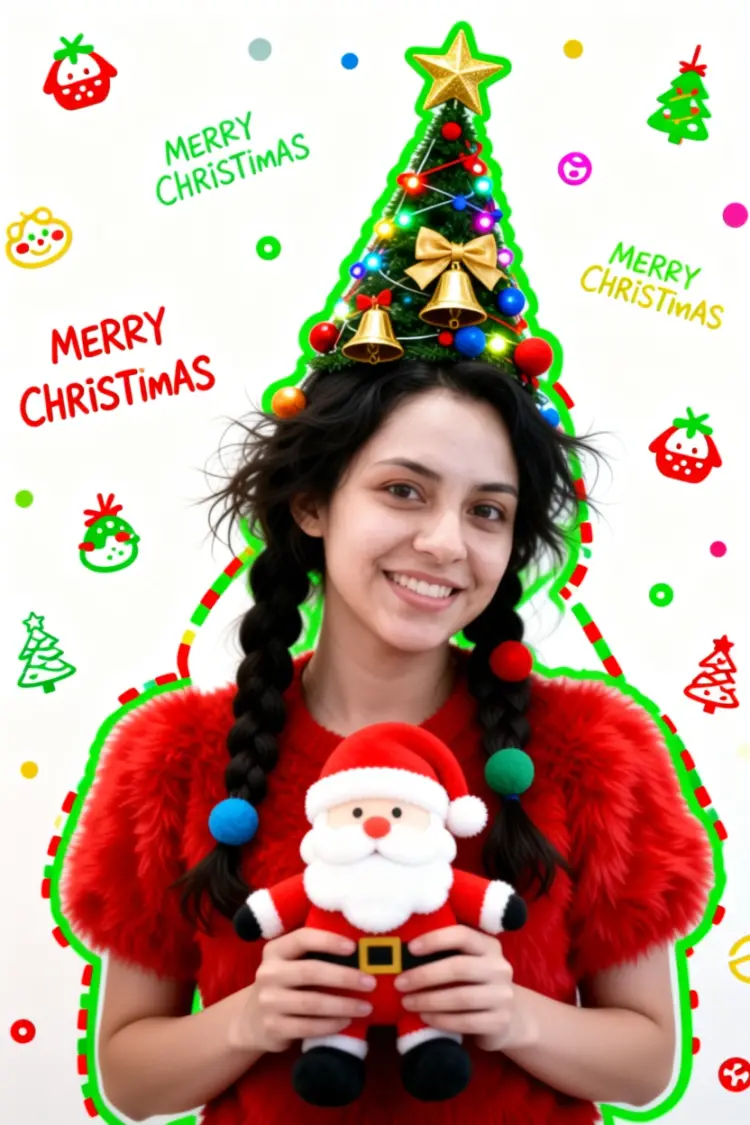
Generate a Christmas-themed image of a beautiful young girl with a "pure desire" (innocent yet alluring) aesthetic. Keep the face consistent with the reference.
Character Appearance & Styling
Hair: Loose, low double-braids decorated with colorful fabric balls. Messy, fluffy strands of hair blend naturally with the headpiece.
Headpiece: A small, neat, cone-shaped Christmas tree fixed to the top of her head. It features a gold star on top and is richly decorated with colorful lights, gold bells, bow knots, and small red, blue, and gold ornaments.
Face & Makeup: Fair "cold-white" skin, smooth as jade. Natural red-brown eyeshadow gradient. An innocent gaze with a dreamy "pure desire" filter.
Clothing: A soft, fluffy red plush top.
Pose & Atmosphere
Action: Holding a Santa Claus plush toy with both hands. She is tilting her head slightly in a playful, cute, and beautiful pose.
Expression: Full of festive celebration; a contrast of cuteness and sexiness.
Vibe: A warm, healing Christmas atmosphere.
Technical & Artistic Style
Photography: Studio soft lighting, 70mm film portrait style. Low contrast, low saturation, delicate film grain, and slight chromatic aberration/glow.
Composition: Medium shot, warm white background, unique but formal composition.
Artistic Elements: * The outline of the character is traced with green graffiti.
The surrounding white space is filled with cute hand-drawn Christmas doodles (collage style).
The silhouette is wrapped in fluorescent red, green, and gold dashed lines and polka dots.
The words "MERRY CHRISTMAS" are written everywhere in a cute font.
इनपुट
Input 1
परिणाम
Generate a Christmas-themed image of a beautiful young girl with a "pure desire" (innocent yet alluring) aesthetic. Keep the face consistent with the reference. Character Appearance & Styling Hair: Loose, low double-braids decorated with colorful fabric balls. Messy, fluffy strands of hair blend naturally with the headpiece. Headpiece: A small, neat, cone-shaped Christmas tree fixed to the top of her head. It features a gold star on top and is richly decorated with colorful lights, gold bells, bow knots, and small red, blue, and gold ornaments. Face & Makeup: Fair "cold-white" skin, smooth as jade. Natural red-brown eyeshadow gradient. An innocent gaze with a dreamy "pure desire" filter. Clothing: A soft, fluffy red plush top. Pose & Atmosphere Action: Holding a Santa Claus plush toy with both hands. She is tilting her head slightly in a playful, cute, and beautiful pose. Expression: Full of festive celebration; a contrast of cuteness and sexiness. Vibe: A warm, healing Christmas atmosphere. Technical & Artistic Style Photography: Studio soft lighting, 70mm film portrait style. Low contrast, low saturation, delicate film grain, and slight chromatic aberration/glow. Composition: Medium shot, warm white background, unique but formal composition. Artistic Elements: * The outline of the character is traced with green graffiti. The surrounding white space is filled with cute hand-drawn Christmas doodles (collage style). The silhouette is wrapped in fluorescent red, green, and gold dashed lines and polka dots. The words "MERRY CHRISTMAS" are written everywhere in a cute font.
2.9s
उदाहरण देखें
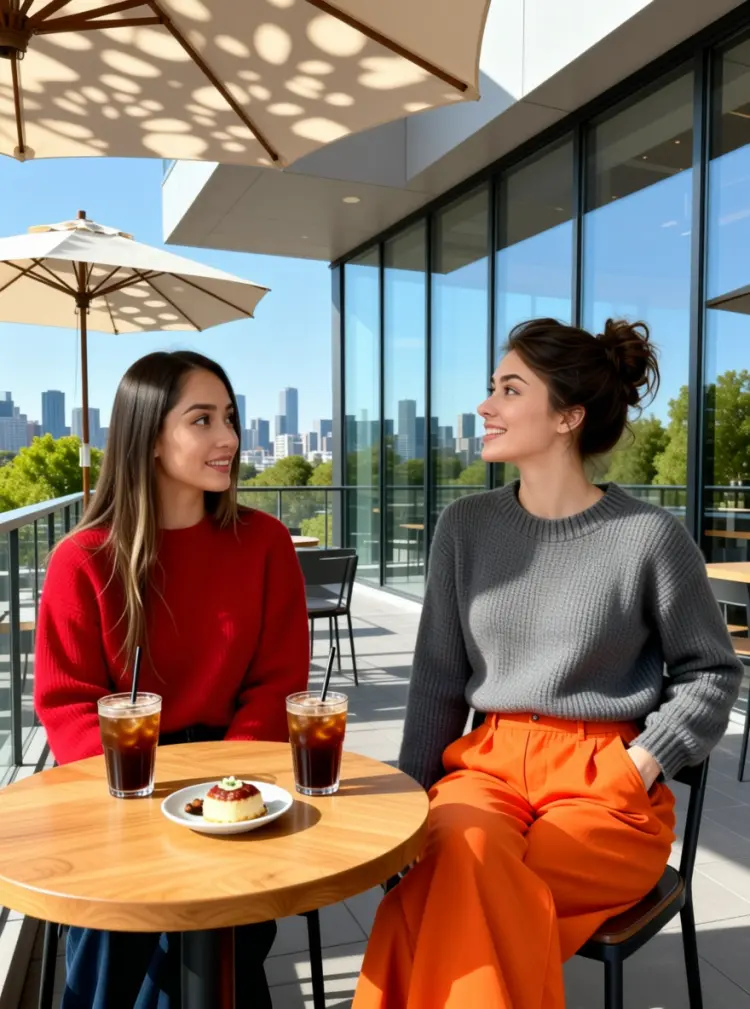
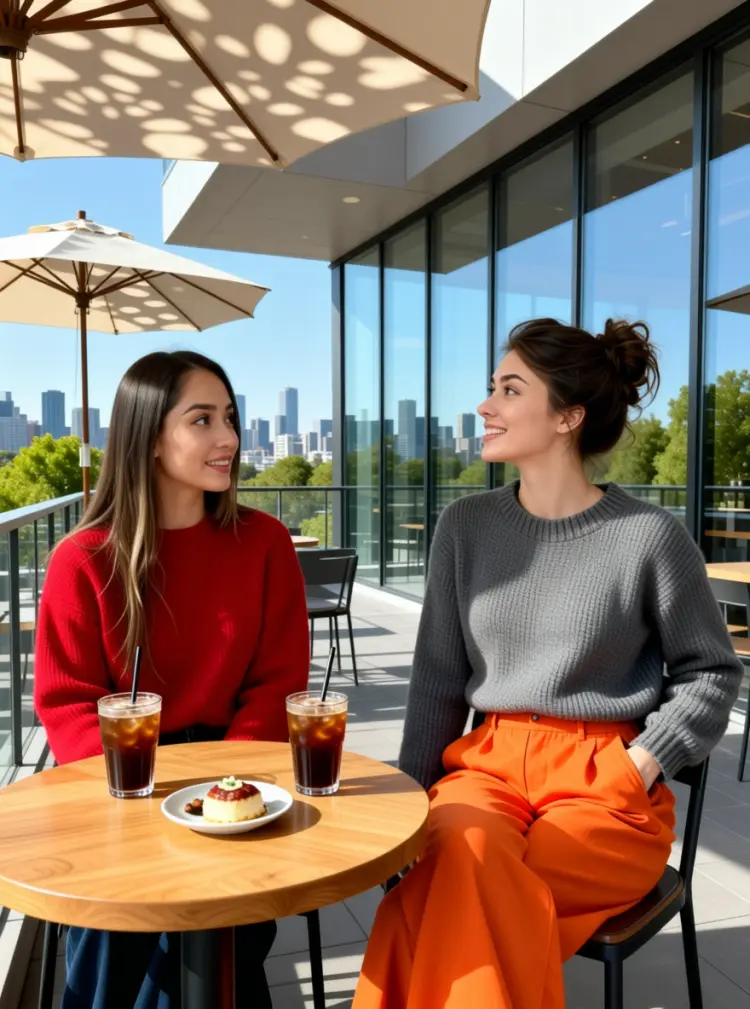
On the terrace of a modern art café, two young women are enjoying a leisurely afternoon. The woman on the left is wearing a red sweater. The woman on the right is wearing a gray neck knit sweater and a pair of eye-catching orange wide-leg pants; her left hand is casually tucked into her pocket, and she is tilting her head while talking to her companion.

They are sitting side-by-side at a small, natural wood-colored table topped with two iced coffees and a small plate of dessert. In the background, there is a city skyline visible through floor-to-ceiling windows and green trees in the distance, with sunlight casting dappled shadows through a parasol.
इनपुट
Input 1
Input 2
परिणाम
On the terrace of a modern art café, two young women are enjoying a leisurely afternoon. The woman on the left is wearing a red sweater. The woman on the right is wearing a gray neck knit sweater and a pair of eye-catching orange wide-leg pants; her left hand is casually tucked into her pocket, and she is tilting her head while talking to her companion. They are sitting side-by-side at a small, natural wood-colored table topped with two iced coffees and a small plate of dessert. In the background, there is a city skyline visible through floor-to-ceiling windows and green trees in the distance, with sunlight casting dappled shadows through a parasol.
4.6s
उदाहरण देखें

श्रेणी बदलें

इफेक्ट्स

टेक्स्ट से इमेज

टेक्स्ट से इमेज

टेक्स्ट से वीडियो

बड़े भाषा मॉडल

बड़े भाषा मॉडल

टेक्स्ट से स्पीच

टेक्स्ट से स्पीच

सुपर रेजोल्यूशन

सुपर रेजोल्यूशन

लिपसिंक

AI संगीत निर्माण

AI संगीत निर्माण

वीडियो संपादन

स्पीच से टेक्स्ट

स्पीच से टेक्स्ट

AI वीडियो एन्हांस

बैकग्राउंड हटाएँ

बैकग्राउंड हटाएँ