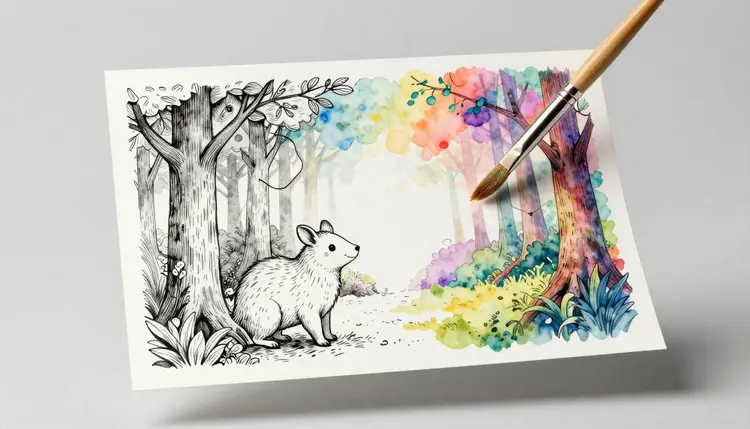
A coloring book needs thirty or forty pages that share one consistent style, and commissioning an illustrator per page turns a simple project into a months-long budget line. Text-to-image models trained on line art can turn a two-sentence prompt into a clean black-and-white page in minutes, which is what makes it realistic to publish a themed book on KDP or sell a printable set on Etsy without hiring anyone.
What Makes a Page Actually Colorable
Not every black-and-white image is a coloring page. Run a photo through a simple line filter and you typically get broken outlines, stray hatching, and gray patches where the original had shadow, none of which a child or an adult with a marker can work with cleanly. A page that colors well has three properties: outlines that close into complete shapes instead of trailing off into nothing, a line weight thick enough to survive printing and thin enough not to eat the white space inside it, and no baked-in shading or gradients competing with whatever color the person picks up next.
Naming these properties in the prompt gets better results than naming the subject alone. A phrase like "black and white line art, coloring book page, bold clean outlines, no shading, no color" steers a text-to-image model toward the flat, closed-contour look a coloring page needs, rather than toward the shaded illustration style most models default to. On Picasso IA this generation happens in the Toolkit, where a text-to-image model turns that kind of prompt into a full page in under a minute.
The single biggest driver of whether a page gets finished is whether its complexity matches the person holding the crayon. A toddler pushing a fat crayon around needs large, simple shapes with wide open interiors; the same page handed to an adult who wants an hour of focused coloring will feel finished in ninety seconds and get set aside. Complexity is a prompt variable, not a fixed property of the tool, so naming the target age directly in the prompt, simple chunky shapes for a preschooler, or fine intricate patterns for an adult, changes what comes back.
| Audience | Line complexity | Good subjects |
|---|
| Toddler and preschool | Very simple, thick outlines, few internal lines | Single large animal, a shape, one object |
| Young child | Simple scenes, moderate detail, clear regions | A pet, a vehicle, a short scene |
| Older child | More elements, some pattern, smaller regions | Adventure scenes, multiple characters |
| Adult coloring book | Dense pattern, fine linework, small regions | Mandalas, botanical detail, intricate florals |
A whole book aimed at one audience should stay in one band. Mixing a toddler-level page into an adult mandala book, or the reverse, reads as inconsistent even if every individual page is well made.
Printing Coloring Pages at the Right Size
A page that looks sharp on screen can print blurry, and the fix has to happen before the whole book is compiled, not after. Two numbers matter: the pixel dimensions relative to the print size, and the trim the platform expects. KDP paperbacks come in fixed trim sizes, commonly 8.5 by 11 inches for an activity or coloring book, and each page needs enough resolution to hold that size at roughly 300 dpi without visible softness. A standalone printable sheet sold as a single download has more freedom, but US letter or A4 at the same 300 dpi is still the safe default, since you cannot know in advance what printer a buyer owns.
Generate pages at the largest resolution the model offers, then check the actual print dimensions before treating a page as final. A line-art image that is technically high resolution but was upscaled from a small original can still look soft once it hits paper, so a real print test, not just a screen preview, is the only reliable check.
A book where every page looks like a different artist made it reads as unfinished, even when each individual page is clean. The fix is mechanical rather than artistic: write one prompt template that fixes the style, line weight and framing, then change only the subject line from page to page. "Black and white line art, coloring book page, bold clean outlines, no shading, centered composition, [subject]" keeps the tool's decisions constant and lets only the content vary.
Pro tip: generate every page in one sitting, back to back, rather than spreading a thirty-page book over several weeks. Models get incremental updates over time, and a book started in January and finished in June can show a subtle shift in linework between the first and last pages that a same-day batch never will.
How to Generate Coloring Book Pages
Building a full book is the same five-step loop repeated once per page, with the first two steps done once for the whole project.
- Decide the age and complexity band. Pick one row from the table above for the entire book, since this decision drives every prompt that follows.
- Write one subject prompt per page. Keep the style phrasing identical across pages and change only what the page is actually of, an animal, a scene, a pattern.
- Generate the line art. Run the prompt through a text-to-image model in the Toolkit, generating a few variations per page so you have a choice rather than a single result to accept or reject.
- Check each page at full print resolution. Zoom to actual size and look for stray disconnected lines, accidentally filled-in areas, or regions too small to color, since these are far cheaper to catch on one page than after printing a whole run.
- Compile into the final format. Assemble the checked pages into a print-ready PDF at the target trim size, whether that is a KDP interior file or a set of individually downloadable printable sheets.
Where AI Coloring Pages Need a Careful Eye
Generated line art gets you most of the way to a finished book, but a few honest limits are worth knowing before you commit a whole print run to it.
- Stray lines happen: an occasional page comes back with a disconnected outline or a small filled-in patch that would frustrate a colorer, so every page needs a visual check at full size before it goes in the book, not a spot-check of a few.
- Character likeness is a legal risk: a themed book that leans too close to an existing copyrighted character or franchise can get a KDP listing pulled or draw a takedown, so keep prompts to generic subjects and your own original characters.
- Consistency takes a template, not luck: reusing the exact style phrasing across every prompt is what keeps a book coherent; skipping that step and writing each prompt from scratch tends to produce a book that looks like several different projects stapled together.
- Text inside the art is unreliable: if a page needs a caption or a title worked into the illustration itself, treat any generated lettering as a placeholder and typeset the real text separately rather than trusting the model's spelling.
- A book is still a batch job: generating one page is fast, but generating and checking thirty or forty is still real work measured in hours, not minutes, and no tool removes that step entirely.
Can AI actually generate coloring pages clean enough to print?
Yes, when the prompt asks for the right format. A prompt that specifically requests black-and-white line art with bold, closed outlines and no shading produces pages that print and color well far more reliably than a generic image request. The model still needs a human check at full size before a page goes into a finished book, since an occasional page comes back with a small flaw a screen preview at thumbnail size will not show.
How do I stop lines from being broken or open?
Ask for it directly in the prompt, using language like "clean closed outlines" and "bold line weight," and generate a few variations per page rather than accepting the first result. Broken lines are more common at very fine detail levels, so if a page keeps coming back with gaps, simplifying the complexity slightly usually fixes it faster than regenerating the same dense prompt repeatedly.
What complexity level should I use for young children?
Large, simple shapes with thick outlines and minimal internal detail, aimed at a crayon or a fat marker rather than a fine pen. A toddler page should have very few enclosed regions, each one large enough that a wandering crayon stroke stays inside it. As the target age rises, complexity can increase in steps, more internal lines, smaller regions, finer patterns, up to the dense linework adult coloring books are known for.
What resolution do I need for a printed coloring book?
Roughly 300 dpi at the final trim size is the standard target for crisp print, which for an 8.5 by 11 inch KDP interior page means generating at the highest resolution the model offers and checking the result at that exact size before finalizing. Generating small and stretching a page up afterward tends to look soft on paper even when the file dimensions technically meet the requirement.
Can I publish an AI-generated coloring book on Amazon KDP?
Yes, KDP accepts print-on-demand coloring books, and the workflow is the same as any other interior file: a print-ready PDF sized to your chosen trim, with each page checked for clean, closed line art. Read KDP's current content and formatting guidelines before publishing, since platform rules do shift, and make sure your subjects are original rather than close copies of existing copyrighted characters.
Will a generated coloring page accidentally copy a copyrighted character?
It can, if the prompt names one directly or describes it closely enough that the model reconstructs a recognizable likeness. The safer path for a commercial book is prompting for generic subjects, "a friendly dragon," "a cottage in the woods," rather than named characters from an existing franchise, and reviewing pages with that risk specifically in mind before publishing anything for sale.
How do I keep every page in my book looking consistent?
Reuse one prompt template for the whole book and change only the subject. Fix the style language, the line weight description and the framing instruction once, then swap in a new subject line for each page. Because the rest of the prompt stays identical, the pages share a visual family even though a text-to-image model rarely produces pixel-identical results twice.
How many pages does a typical coloring book need?
There is no fixed rule, but a common range for a themed KDP coloring book is twenty-five to fifty single-sided pages, and printable download sets sold individually are often shorter. Decide the page count before generating, since it affects both the complexity budget per page and how much checking time the project realistically needs.
Is Picasso IA free to try for a coloring book project?
New accounts get free credits, enough to generate and compare several candidate pages before deciding whether the workflow fits your project. Generation past that point spends credits, and current plans are listed on the pricing page; there is no separate tier for coloring pages specifically, the same credits work across every model in the catalog.
Can I turn a finished coloring page into a colored illustration too?
Yes, using an image-to-image model on the same line art. Feed the finished outline back in with a prompt describing the palette you want, and the model fills the regions in with color while respecting the existing lines, useful for a cover mockup or a sample colored-in preview page even though the interior pages themselves stay black and white.
A themed set of pages is only half a product; the cover is what actually sells it on a shelf or a listing page, and the book cover design workflow covers building one to match. Once the pages are checked and compiled, the model catalog is where the same account handles the cover, any marketing images, and everything else the launch needs.