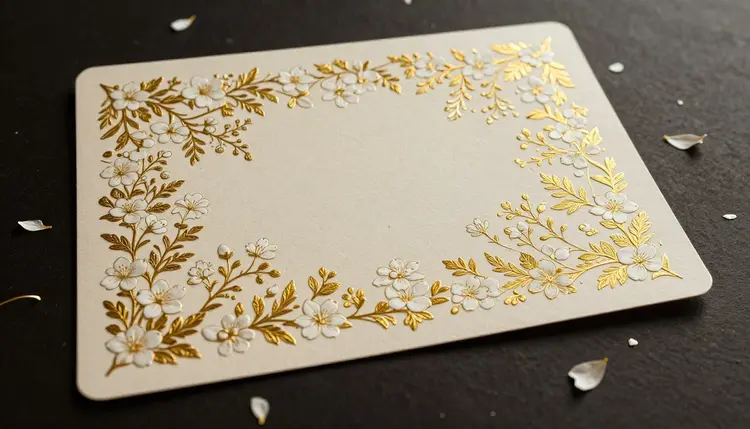
A generic template says nothing about the wedding it announces. A custom one, built around the couple's actual palette, season and mood, says almost everything before a guest reads a single word. Text-to-image models can produce that decorative layer, the florals, the pattern, the border, in an exact color story, for the price of a few tries instead of a commissioned illustration. The one part they should never touch is the part that has to be correct: the names, the date and the venue.
A wedding invitation is really two things stacked on top of each other: a piece of art and a piece of information. Stationery shops sell both bundled together, which is why a fully custom suite from a human designer often costs several hundred dollars before printing. A text-to-image model is good at one of those two things, the art, and that is enough to change the economics of the project.
Describe the wedding's palette and mood, sage green and cream, terracotta and rust, black and gold, and the model returns a background built around that story: a loose watercolor floral corner, a botanical border, a repeating pattern for an envelope liner. Because it generates from a description rather than picking from a fixed catalog, the palette can match the actual flowers, venue or dress, instead of the nearest preset a template site happens to offer.
This is where the couple's job stays exactly what it always was: choosing colors, choosing a mood, deciding whether the day feels rustic, formal or minimal. The model removes the step where that vision had to be handed to an illustrator and waited on. On Picasso IA, generation happens in the Toolkit, turning a written description into artwork in minutes rather than a week of email revisions.
This is the one rule that matters more than any style choice: never ask a generative model to render the couple's names, the date or the venue as part of the image. Generated lettering is decorative, not typographic. It can drift into near-words, misspell a name, invert a digit in the date or simply become illegible at print size, and none of that is something you can proofread reliably by eye on a screen.
A wedding invitation has exactly one job that cannot fail, telling guests when and where to show up with the right names spelled right. That job belongs to real text, typed into a design tool as an actual font, not painted into an image as texture. The generated artwork supplies everything around that text: the background, the border, the corner ornament, the color field the words sit on.
The practical split is simple. Generate the decoration first, then open it in a layout tool, Canva, Adobe Express, or any program with editable text boxes, and type the real details on top: names, date, time, venue, RSVP instructions. That text gets spell-checked the normal way, by a human reading it slowly, ideally more than one, because a misspelled name on a wedding invitation is not a fixable typo once it is printed and mailed.
A wedding is not one printed piece, it is a small family of them: a save-the-date, a formal invitation, an RSVP card, and day-of signage. Guests see all of them across several months, and a mismatched set reads as unplanned even when every individual piece looks fine on its own.
The way to keep them coherent is to reuse the description, not just the color names. Write one detailed prompt for the first piece, specifying the palette, the botanical or pattern style and the density of the design, and keep that wording for every other piece, changing only the shape or orientation needed. A tall corner floral for the invitation becomes a wide horizontal version of the same motif for a welcome sign, generated from the same description at a different aspect ratio.
Small variations are fine and often better than an identical repeat. The RSVP card can use a smaller, quieter version of the invitation's border, and the welcome sign can use the same florals scaled up. What has to stay constant is the palette and the botanical vocabulary, not the exact crop.
Pro tip: save the exact wording of the prompt that produced the design you like, palette, style words, composition, all of it, in a note you keep next to the wedding planning documents. Every future piece, including thank-you cards after the wedding, starts from that same text instead of you trying to remember what "sage and cream, loose watercolor florals, asymmetric corner" actually meant three months later.
Different pieces in a stationery suite carry different amounts of information, and that changes how much of the surface should be decoration versus how much needs to stay clear for text.
| Piece | What the artwork should do | What must be added as real text |
|---|
| Save-the-date | Set the palette and mood early, light touch, plenty of open space | Names, date, "invitation to follow" |
| Formal invitation | Full decorative treatment, border or corner florals, the most detail in the suite | Names, date, time, venue address, RSVP method |
| RSVP card | Quiet, minimal version of the invitation's motif, mostly white space | Response line, meal choice, song request, return-by date |
| Day-of welcome sign | Large-scale version of the same florals or pattern, bold and legible at a distance | Couple's names, wedding date, a short welcome line |
Reading the table left to right, the pattern is consistent: the more information a piece carries, the more open space its design needs to leave, so the save-the-date and the welcome sign both lean toward simpler backgrounds.
Generated artwork is a real shortcut for the decorative half of wedding stationery, and it is worth being honest about where it stops being one.
- No reliable text: never trust a model to render names, dates or venue details inside the image itself, add every word of real information afterward in a design tool with editable text.
- Print is different from screen: colors and fine pattern detail shift between a monitor and paper, so order a physical print proof at the real card size before committing to a full run.
- Copyright caution: check that a generated botanical or pattern design is not suspiciously close to an existing designer's named stationery line before using it commercially.
- Not a full layout tool: the model generates artwork, it does not typeset a card or handle bleed and trim marks, that work still happens in a design or print tool.
- Fine detail can drift: intricate botanical illustration sometimes produces a stray extra petal or an asymmetric flourish, so review generated art at full size before it goes near a printer.
None of these limits erase the value of the shortcut, they define its edges. The artwork gets generated in minutes for the cost of a few credits, the information still gets typed, checked and printed the careful way it always had to be.
Most couples can go from a blank page to a full four-piece suite ready for text in an afternoon, with most of that time spent deciding on the palette rather than waiting on generation itself.
- Decide the palette and style first. Pick two or three colors and a mood word, romantic, modern, rustic, before opening any tool, since a clear brief gives a cleaner first result.
- Generate the decorative background. In the Toolkit, describe the palette, botanical or pattern style and composition, corner florals, full border, repeating pattern, and generate several versions.
- Add the real event details as text. Open the artwork in a design tool and type the names, date, time, venue and RSVP details as an editable text layer, then proofread it slowly, more than once.
- Apply the same design across the suite. Reuse the saved prompt for the save-the-date, RSVP card and day-of signage, adjusting only composition and aspect ratio for each piece.
- Order a print proof before the full run. Print one physical copy at true size and check the color, paper stock and every word before ordering the quantity you need.
Can AI actually design a full wedding invitation, text included?
It can generate the decorative parts, the floral background, the border, the pattern, but it should never render the actual names, date or venue as part of the image. Treat the output as the artwork layer only. The real information gets added afterward as editable text in a design tool, where it can be typed correctly, checked by more than one person, and fixed instantly if something changes.
Why can't I just ask the model to write the names and date directly on the invitation?
Generative image models paint letterforms as visual texture, not verified characters, so they frequently misspell words, distort digits or drift into near-legible gibberish, especially with uncommon names. A wedding invitation cannot survive a misspelled name or a wrong date reaching print, so that information has to come from real, typed, spell-checked text placed over the artwork, never the model.
How do I keep the save-the-date, invitation and RSVP card looking like one set?
Reuse the exact prompt wording, not just the color names, across every piece. Write one detailed description of the palette, the botanical style and the general composition for the first item, save that wording, and use it again for every other piece, adjusting only shape and orientation. The underlying description stays identical, so the outputs land in the same visual family.
What palette or style should I ask for if I don't know where to start?
Name two or three colors pulled from something already decided, the flowers, the venue, the dress, or the season, and add one mood word: romantic, modern, minimal, rustic. "Sage green and cream, loose watercolor florals, asymmetric corner" is a workable starting prompt. Generate a handful of versions from that description before refining further.
Do I need design software to finish the invitation after generating the artwork?
Yes, some layout tool with editable text is required, since the generated image never contains the real event details. Free options like Canva or Adobe Express both support placing text boxes over an uploaded image and are enough for a home-printed or print-shop-ready suite; nothing more specialized is needed unless producing a very large commercial run.
Can I use a generated design to sell wedding stationery to other couples?
You can, but check first that the design is not close enough to an existing, named designer's stationery line to raise a copyright concern, since that risk sits with the seller, not the generation step. It is also worth generating distinct variations rather than reusing one exact design across many paying clients.
Will the colors on my screen match the printed invitation?
Not exactly, and this catches more couples than any other step. Screens are backlit and printers are not, so a color that looks vivid on a laptop can come back muted or shifted on paper, and the shift varies by printer and stock. Always order one physical proof at the real card size and check it under normal indoor light before approving a full run.
How many versions should I generate before picking a final design?
Plan on generating more than one and comparing them side by side rather than approving the first result. Each attempt costs a small number of credits, so generating four to eight variations, changing one detail at a time, palette, density, composition, is normal and inexpensive, and far more reliable than judging a single image alone.
Can I generate matching signage for the wedding day itself, not just the invitation?
Yes, the same decorative description works for a welcome sign, a seating chart border, or a menu card, generated at whatever aspect ratio the piece needs, tall for a standing sign, wide for a table banner. Reuse the saved prompt from the invitation so the signage reads as part of the same set guests already received, then add the seating or menu information as text the same way as every other piece.
Is Picasso IA free to try for wedding stationery?
New accounts receive free credits, enough to generate and compare several background designs before deciding whether the workflow fits your project. Generation beyond that draws from paid credits, listed on the pricing page. There is no separate stationery tier; the same 488 models cover this alongside every image, video, audio and 3D task on the platform.
The florals, the border or the pattern take a few minutes and a few credits to get right in the Toolkit, and the rest of the suite reuses that same design once it is dialed in.