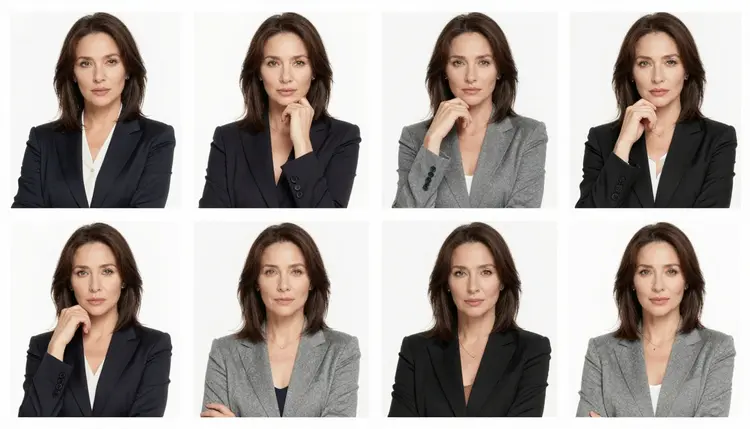
Picasso IA's catalog holds 488 models, but for adult content only 6 of them are confirmed to generate it directly, with no safety filter stepping in to refuse the prompt. Seedream 4.5 is one of those six, and it happens to be a strong fit for a specific technique: running one detailed prompt several times in a single batch and picking the strongest result instead of settling for whatever a single generation gives you.
The reason this matters specifically for NSFW work is that most general-purpose image models apply a content filter that inspects a prompt before generating anything. If the prompt reads as adult content, the filter can refuse it outright, and the app shows a message that the content isn't supported by that model. That's an ordinary, expected outcome, not a bug, and it happens on models that were never confirmed to handle adult prompts in the first place. Seedream 4.5 doesn't have that problem, which means you can run the same prompt across a full batch without worrying that some of the runs will simply refuse and waste your credits.
Batch generation works well here because image generation isn't perfectly repeatable. The same prompt fed into the same model produces a different pose, a different expression, a different composition each time. Running it once gives you one outcome. Running it four, five, or six times gives you a spread of outcomes to compare, and Seedream 4.5 stays consistent enough across a full batch that it's worth building a habit around, rather than accepting the first image that comes back.
This page focuses on that batch workflow: how to set it up, how to prompt for it, and how to pick a winner once the results are in front of you.
Seedream 4.5 is a text to image model. You describe what you want in a prompt, and it renders that description into an image. It doesn't edit an existing photo, that's a job for Picasso Image Editor Pro, and it doesn't produce video, that's what Picasso Video and LTX 2.3 Pro handle. What Seedream 4.5 does well is follow a detailed written description, including a fictional character's appearance, pose, setting, and overall art style, and turn that description into an image without a safety filter blocking the request because the content is adult in nature.
That last part is the strength this page is built around. Most models in the catalog aren't confirmed to handle adult prompts, and sending that kind of prompt to an unconfirmed model risks a refusal partway through a batch, where some images render and others don't. Seedream 4.5 is confirmed alongside five other models to generate adult content directly:
| Model | Type |
|---|
| Seedream 4.5 | Text to image |
| Qwen Image 2 | Text to image |
| Recraft V4.1 Pro | Text to image |
| Picasso Image Editor Pro | Image editing |
| Picasso Video | Text to video |
| LTX 2.3 Pro | Text to video |
Outside of those six, the other 482 models in the catalog should be treated as unconfirmed for adult prompts, not assumed to behave the same way just because they're capable image or video models in general.
For the batch technique this page covers, the strength that matters most is consistency. A prompt that describes a fictional character clearly enough will keep producing recognizable versions of that same character across an entire batch, even as pose, lighting, and framing shift between each generation. That's what makes running the same prompt multiple times a useful technique instead of a gamble.
The workflow is straightforward once you treat batch generation as repetition and comparison, not as writing five different prompts. Here's the process from an empty prompt box to a finished pick.
- Write one detailed prompt. Describe the fictional character's appearance, pose, setting, and art style in a single prompt, since Seedream 4.5 reuses this exact text for every image in the batch.
- Open Seedream 4.5 from the toolkit. Head to the toolkit and select Seedream 4.5, one of the six models confirmed to generate adult content without a filter refusing the request.
- Set the output count above one. Choose how many images to generate in a single run, so the same prompt produces several distinct results instead of one.
- Run the batch and let it finish. Generate the full set in one pass and let every image load, rather than judging quality from a single result partway through.
- Compare the results side by side. Look across the whole set for the strongest pose, composition, and lighting, then keep or download the one image that best matches what you had in mind.
How many images to generate in one batch depends on what you're trying to do:
| Batch size | Good for |
|---|
| 2 to 3 | A quick check of whether a new prompt is working at all |
| 4 to 6 | A real side by side comparison, with enough spread to see differences in pose and lighting |
| 7 or more | Digging for one specific detail, like a particular expression, across a wider spread |
There's no single correct number. A smaller batch is cheaper and faster to review, a larger one gives more to choose from, and the right choice depends on how far along the prompt already is.
Because Seedream 4.5 reads the whole prompt as one instruction, a few habits make batches more useful.
Anchor the character description first. Hair, build, clothing or the lack of it, and any distinguishing details should come before the scene, so the model treats the character as the fixed part of the prompt and the scene as what's allowed to vary across the batch.
Name a specific art style. Whether you want an illustrated look, a painterly look, or a photorealistic look, stating it directly gives the whole batch a consistent visual identity instead of several unrelated styles competing with each other.
Describe the setting and the light source. A prompt that only covers the character but skips the environment tends to produce inconsistent backgrounds across a batch, since the model has to invent that part fresh each time.
Leave the pose loosely defined if variety is the point. Describe the character and setting precisely, but don't over specify the pose, and let the batch supply that variation on its own.
Avoid stacking contradictory details. A prompt that asks for two incompatible things, like a specific pose combined with an unrelated action, tends to produce weaker results across the whole batch, not just in one image.
None of this involves rewording a prompt to sneak past a filter. Seedream 4.5 doesn't apply that kind of filter to adult prompts, so there's no filter to work around. If a different, unconfirmed model refuses a prompt, the fix is switching to one of the six confirmed models, not disguising the request.
Picasso IA's adult content tools are for fictional characters only, generated for adult users. That line isn't a suggestion. Do not use any prompt, reference, or model, including Seedream 4.5, to generate a real person's likeness, a public figure, or anyone who could be read as a minor. This applies no matter how the prompt is phrased or how the character is described.
Batch generation doesn't change these rules, it just produces more images from the same prompt. If a single prompt violates the fictional characters only rule, running it five times produces five violations, not one. The same standard applies to every image in every batch, without exception.
Within that boundary, fictional characters give real creative range: original characters, characters built from a general description rather than a real person, characters in a specific art style or setting, and so on. The batch technique described on this page is meant to help land on the strongest version of a fictional character already described, not to test how far the platform's rules can be pushed.
Generating with Seedream 4.5 uses credits like any other model on Picasso IA, and running a batch of several images uses more credits than generating one, since each image in the batch is a separate generation. The exact cost depends on your plan and any free credits on your account, so check pricing for current numbers rather than relying on a figure here that could go out of date.
If you're trying the batch technique for the first time, a smaller batch is a reasonable way to see how Seedream 4.5 handles a given prompt before committing more credits to a larger run. Once a prompt is producing results you like, scaling up the batch size is a matter of spending more credits, not a change to the workflow itself.
Seedream 4.5 isn't the only option if you want to compare cost or style against another confirmed model. Qwen Image 2 and Recraft V4.1 Pro are also confirmed to handle adult prompts directly, and both are worth checking against pricing and the full catalog if you want to weigh cost against the kind of image each one tends to produce.
What is Seedream 4.5, and why is it recommended for this technique?
Seedream 4.5 is a text to image model available in the toolkit, and it's one of six models on Picasso IA confirmed to generate adult content directly, without a safety filter refusing an adult prompt before generation even starts. That reliability is what makes it a good fit for running the same prompt across a full batch.
Can I use this technique to generate real people or celebrities?
No. Picasso IA's adult content tools are restricted to fictional characters only, and that applies to every model, including Seedream 4.5. Generating a real person's likeness, a public figure, or anyone who could be read as a minor is not permitted, regardless of how the prompt is written.
How many images can I generate from a single prompt at once?
That depends on the output count you choose before running the batch. The point of the technique is setting that count above one, so the same prompt produces several images in a single pass, which you then compare and pick the strongest one from.
Why did a different model refuse my adult prompt?
Most models in the catalog apply a content filter that inspects a prompt before generating anything, and if the prompt reads as adult content, the filter can refuse it. When that happens, the app shows a message that the content isn't supported by that model and points toward the confirmed models instead, carrying your prompt over so you don't have to retype it.
Which models besides Seedream 4.5 can generate adult content directly?
Five others are confirmed: Qwen Image 2, Recraft V4.1 Pro, Picasso Image Editor Pro, Picasso Video, and LTX 2.3 Pro. Out of 488 models in the catalog, these six are confirmed to handle adult prompts without a filter blocking the request, and every other model should be treated as unconfirmed for this use.
Should I reword my prompt to get past a content filter on another model?
No. Trying to disguise or reword a prompt to sneak past a filter isn't the intended path, and it isn't reliable. If a model refuses an adult prompt, the straightforward move is switching to one of the six confirmed models, such as Seedream 4.5, and running the same prompt there instead.
Does generating a batch of images cost more credits than generating one?
Yes. Each image in a batch is a separate generation, so a batch of several images uses more credits than a single image would. Exact costs depend on your plan, so check pricing for current numbers.
Can Seedream 4.5 also be used for non-adult image generation?
Yes. Seedream 4.5 is a general text to image model, not a tool limited to adult content, and it can be used for any prompt that fits Picasso IA's rules, adult or otherwise.
What should I do if none of the images in a batch look right?
Adjust the prompt and run another batch. If the character description, setting, or style wasn't specific enough, the whole batch tends to drift, so tightening those details before the next run usually produces a more consistent set of results.
Can I generate NSFW video as well as images with this method?
The batch technique described here is for image generation with Seedream 4.5. For video, Picasso Video and LTX 2.3 Pro are the two models confirmed to handle adult prompts directly, though they're separate tools from Seedream 4.5.