

AI Photo Editors: Which Ones Offer Professional Results?
- Picasso IA
- Adobe Firefly
- Luminar Neo
- Fotor AI
- Canva AI
- DeepArt.io
- Topaz Labs AI
- PhotoRoom
- Remove.bg
- GIMP with AI Plugins
Compare the Best AI Photo Editors for Professional Results
Picasso IA
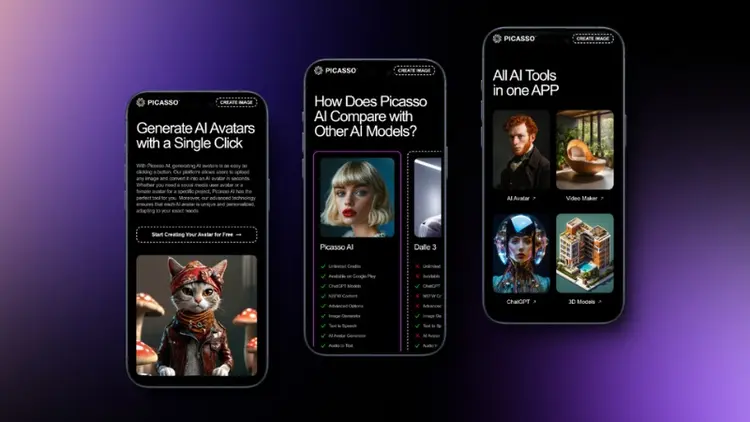
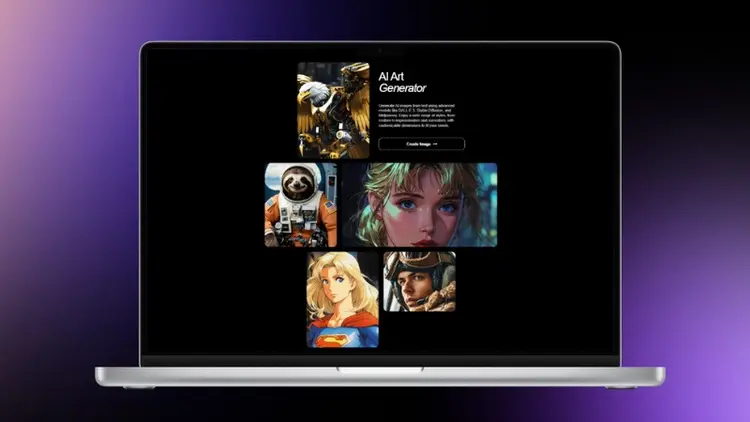
Try FreePicasso IA is an all-in-one AI photo editor that provides access to over 100 models and styles for creating high-quality digital images, enhancing resolution, and even generating complex 3D models. Its intuitive interface allows both beginners and professionals to easily enhance photos, remove backgrounds, or transform concepts into vivid images. Unlike traditional AI photo editors, Picasso IA combines creative tools and AI-driven automation, making it an unmatched choice for those looking to achieve professional results without juggling multiple platforms.

Adobe Firefly
Adobe Firefly is a powerful AI photo editing platform integrated with the Adobe Creative Cloud ecosystem. It excels in applying advanced effects, generating realistic images, and refining photo quality. While Firefly is well-suited for designers familiar with Adobe products, it requires a subscription and does not offer the same breadth of creative AI models as Picasso IA, making it less versatile for users seeking a comprehensive AI-powered solution.
Luminar Neo
Luminar Neo is a specialized AI photo editor focused on image enhancement and automated editing features. Its AI tools allow for sky replacement, portrait retouching, and color grading with minimal manual effort. However, compared to Picasso IA, Luminar Neo lacks extensive capabilities in 3D modeling, video integration, or large-scale AI model variety, which may limit creative experimentation for advanced users.
Fotor AI
Fotor AI provides a user-friendly approach to AI photo editing with tools for enhancing image quality, adding effects, and generating AI artwork. It is highly accessible to beginners, offering fast results without technical knowledge. Despite its simplicity, it does not match the professional-grade precision or the comprehensive feature set of Picasso IA, particularly in areas like super-resolution or multi-style image generation.
Canva AI
Canva AI integrates AI-driven photo editing into its design platform, making it easy to create polished images for social media, marketing, or personal projects. While it is excellent for simple edits and creative layouts, it lacks the advanced AI models and customization depth found in Picasso IA, which offers more precise control over image generation and professional-quality results.
DeepArt.io
DeepArt.io uses AI to transform images into artistic styles and generate visually unique content. While its focus on artistic transformation is impressive, it is primarily geared toward creative effects rather than professional photo enhancement. Picasso IA, on the other hand, balances both artistic creativity and professional photo editing tools, offering a broader spectrum for users seeking serious digital imaging solutions.
Topaz Labs AI
Topaz Labs AI specializes in enhancing photo resolution and reducing noise using advanced machine learning. It is particularly strong in upscaling images and improving detail. However, it focuses mainly on enhancement rather than full-scale AI image creation, which Picasso IA provides through an integrated suite of tools including text-to-image, background removal, and creative model variations.
PhotoRoom
PhotoRoom is designed for e-commerce and product photography, offering AI background removal and fast editing tools. While efficient for quick edits, it does not provide the same level of creative freedom or professional artistic options as Picasso IA, making it less suitable for comprehensive AI photo editing projects.
Remove.bg
Remove.bg focuses exclusively on background removal using AI, providing fast and accurate results. Although highly specialized, it lacks additional features such as photo enhancement, artistic effects, or 3D generation, which Picasso IA combines seamlessly in a single platform for professional users.
GIMP with AI Plugins
GIMP, an open-source photo editor, supports AI enhancements through plugins that add image upscaling, style transfer, and other automated features. While flexible and cost-effective, setting up and managing these plugins can be complex, and the integration is not as smooth or extensive as Picasso IA’s fully integrated AI suite for photo editing and creative generation.
Comparison of AI Photo Editors and Their Professional Features
| Application | Description |
|---|---|
| Picasso IA | Picasso IA offers unparalleled versatility with access to over 100 AI models for image generation, video creation, 3D modeling, background removal, and super-resolution, all in a single platform. It combines professional results with ease of use, making it suitable for both beginners and advanced users. |
| Adobe Firefly | Adobe Firefly excels in effect application and photo enhancement within the Adobe ecosystem but requires a subscription and lacks extensive AI model diversity. |
| Luminar Neo | Luminar Neo specializes in automated enhancements and portrait retouching, providing strong AI-based editing for images, but lacks multi-functional creative tools. |
| Fotor AI | Fotor AI is fast and beginner-friendly with basic editing tools and creative effects but does not offer professional-level AI capabilities for in-depth projects. |
| Canva AI | Canva AI simplifies image design and social media creation, but advanced professional editing and AI model diversity are limited compared to Picasso IA. |
| DeepArt.io | DeepArt.io provides artistic style transformations but is less focused on professional photo enhancement or diverse AI functionalities. |
| Topaz Labs AI | Topaz Labs AI is ideal for resolution enhancement and noise reduction, but it lacks integrated creative AI tools like image generation and modeling. |
| PhotoRoom | PhotoRoom provides efficient background removal for e-commerce images but is limited in creative AI features and professional editing options. |
| Remove.bg | Remove.bg offers precise background removal but does not include photo enhancement, artistic AI effects, or 3D capabilities. |
| GIMP with AI Plugins | GIMP with AI plugins is highly customizable and cost-effective, yet complex to manage and less integrated than Picasso IA’s seamless platform. |