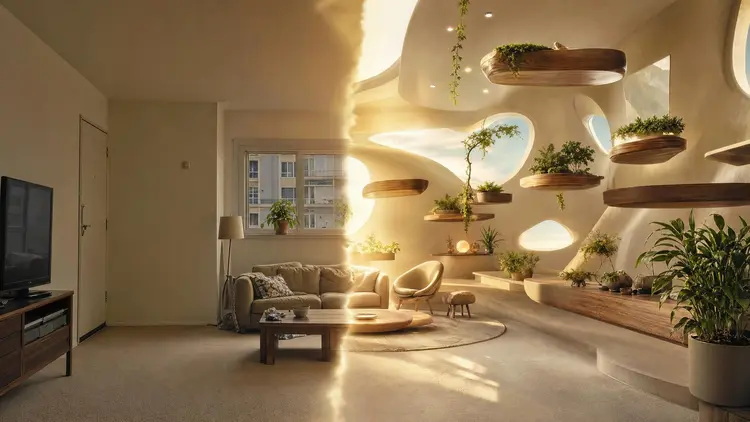
Repainting a wall the wrong shade of green costs a weekend. Buying a sofa that fights the room costs a lot more. AI interior design flips the order of operations: you photograph the room you have, describe the room you want, and look at the result before spending anything. The layout stays put, the materials and colors change, and a decision that used to take weeks of squinting at swatches takes an afternoon.
Mood boards collect furniture that looks good somewhere else. The question you actually need answered is what that furniture looks like in your room, with your ceiling height, your window light and that radiator you cannot move. Image-to-image models answer it directly, because they start from your photo instead of a blank canvas.
When you upload a picture of your living room and ask for a japandi version, the model reads the geometry of the space, keeps the architecture, and re-dresses it: oak replaces laminate, the sofa slims down, the palette drops to warm neutrals. You are no longer looking at a stranger's apartment on Pinterest, you are looking at your own square meters, restyled.
This matters most for awkward rooms: long narrow lounges, attic bedrooms with sloped ceilings, rentals where the landlord's brown tiles are staying no matter what. Generic inspiration photos never look like those rooms. A restyled photo of the actual space shows which ideas survive contact with reality.
On Picasso IA the restyling happens in the Toolkit, where you can pick an editing model such as FLUX Kontext, nano banana or Seedream, upload the photo, and type what should change. New accounts get free credits, so the first experiments cost nothing but a few minutes.
The workflow for homeowners and renters is deliberately conservative: change the dressing, respect the bones. A good prompt names what must stay ("keep the window, the door and the fireplace exactly where they are") and what may go ("replace the furniture, the rug and the wall color"). Editing models such as FLUX Kontext and nano banana follow keep-and-replace prompts well, which is why they are the usual starting point for room work.
Style transfer is the fun part. The same photo can come back as five different rooms: japandi, industrial, mid-century, coastal, art deco. Because every version shares the same camera angle and architecture, the comparison is honest. You are judging styles, not photography.
Renters get a specific benefit: the ability to test reversible changes. Ask for the same room with a different rug, different curtains and rearranged furniture, and nothing else. If the result looks better, you have a shopping list that will not cost you your deposit.
Pro tip: restyle in two passes instead of one. First ask only for the wall color and flooring you are considering, and once a version convinces you, run a second pass that swaps the furniture. Single prompts that change everything at once give the model too much freedom, and the room drifts away from the original geometry.
Naming a style in your prompt beats describing forty details, because the models have seen thousands of labeled examples of each one. These six cover most of what people ask for.
| Style | Ask the model for | Where it tends to work |
|---|
| Japandi | light oak, low furniture, warm neutrals, no clutter | small rooms that need calm and air |
| Mid-century modern | walnut, tapered legs, mustard and teal accents | living rooms with good natural light |
| Industrial | black steel, exposed brick, concrete, leather | lofts, high ceilings, open kitchens |
| Scandinavian | white walls, pale wood, wool textures, plants | dark rooms and northern light |
| Coastal | white and sand palette, linen, rattan, airy layout | bedrooms and bright living areas |
| Art deco | brass, dark green velvet, geometric patterns | dining rooms and statement corners |
Run the same photo through three of these and the differences teach you something no catalog can: which style flatters your room's proportions. A style that looks heavy in the photo will look heavier in person.
Agents have paid for physical staging for decades because empty rooms photograph badly and buyers struggle to imagine scale. AI staging attacks the same problem from a photo: upload the empty room, ask for tasteful furniture in a neutral contemporary style, and get a version where the space reads as livable.
The practical advice here is restraint. Staging exists to communicate scale and purpose ("this room fits a queen bed and two nightstands"), not to sell furniture that does not exist. Keep the staging simple, keep the architecture untouched, and disclose. In many markets, listings that use virtually staged photos are expected to say so, and often must also show the unedited original. Staged honestly, an agent gets a faster read on an empty floor plan without decorating over a defect.
Interior designers use the same mechanic in reverse: staging a client's empty new build in three candidate styles before the first meeting, so the conversation starts from pictures of the property instead of adjectives. A generated piece can even become a rotatable object through the image to 3D workflow.
The whole process takes ten to twenty minutes the first time, most of it spent deciding what you actually want. Credits are only spent on generation, and you can check what a run costs on the pricing page before committing to anything.
- Photograph the room in daylight. Stand in a corner, hold the phone at chest height, and get as much of the room in frame as you can, because the model can only restyle what it sees.
- Open the Toolkit and pick an editing model. FLUX Kontext, nano banana and Seedream all handle room edits; start with one and stay with it so your comparisons stay fair.
- Write a keep-and-change prompt. Name the style you want, then list what must not move: walls, windows, doors, and anything you own and intend to keep.
- Generate several variations. Run four to eight images, tweaking one variable between runs (palette, flooring, furniture density) instead of rewriting the whole prompt each time.
- Upscale the winner and save the prompt. A crisp upscale makes the image usable in a listing or a client deck, and the saved prompt lets you apply the identical style to the next room.
An honest tool page tells you where the tool breaks. Restyled photos are a decision aid, not a construction document, and five limits show up repeatedly.
- No real measurements: the model does not know your room is 3.4 meters wide, so generated furniture may be subtly out of scale, and nothing it outputs replaces a tape measure before you order a sofa.
- Structural changes are fiction: ask it to remove a load-bearing wall and it will happily comply in pixels; only an architect can tell you whether the idea survives in the real world.
- Products are invented: that perfect armchair in the render does not exist in any store, so treat it as a search query for something similar, not a catalog item.
- Fine details drift: text on book spines, plug socket positions, and the exact pattern of your existing rug can come back warped, which matters if you needed those details preserved.
- Lighting is idealized: models tend to render rooms at their flattering best, so a north-facing room will usually look brighter in the output than it ever will at 4 pm in November.
None of these limits change the tool's actual job, comparing directions cheaply before money moves; they define where the job ends. Beyond restyling, the model catalog covers background removal, upscaling and object cleanup, and the Canva AI comparison shows where a design suite stops and a model library starts.
Can AI really redesign a room from just one photo?
Yes, and one good photo beats three bad ones. Image-to-image models read the geometry, lighting and contents of a single frame and generate a restyled version that keeps the same viewpoint. The catch is that the model only knows what the photo shows, so a wide shot taken from a corner in daylight gives it far more to work with than a dim close-up of one wall. If you want the whole room rethought, photograph the whole room.
Does the furniture layout stay the same when I restyle a photo?
Only if you ask for it. Editing models follow instructions about what to preserve, so a prompt that says to keep the layout and swap the materials will usually return the same arrangement in new finishes. If you leave the layout unspecified, the model may rearrange things while restyling. Being explicit in both directions, what stays and what changes, is the single biggest factor in getting a usable result.
Which models work best for interior restyling?
Editing models that accept an input image plus a text instruction are the right family. On Picasso IA that means FLUX Kontext, nano banana and Seedream as the usual starting points, with 488 models in the catalog if you want alternatives. There is no single best; try two on the same photo and keep the one whose output you trust.
Can I use AI-staged photos in a real estate listing?
In most markets yes, with disclosure. Virtual staging is an established practice, and the AI version is the same idea at lower cost. The rules that matter are honesty rules: label staged images as virtually staged, keep the original photo available, and never use generation to hide damage or alter the property itself. Check the listing rules of your local portal or MLS, since several now have explicit clauses about AI-modified photos.
How do I keep the same style consistent across several rooms?
Reuse the prompt, not just the style name. Write one detailed prompt for the first room, listing palette, wood tone, metal finish and mood, and then apply that exact wording to every other room's photo with only the preserve list changed. Because the style description is identical, the outputs land in the same visual family, which is exactly what you want for a whole-house concept or a multi-room listing.
Can it help me pick a paint color that matches my furniture?
Yes, and it is one of the cheapest wins. Upload the room, keep everything fixed except the walls, and generate the same frame in three or four candidate colors. You see each color against your actual sofa, floor and light instead of against a white card in a store. Buy a sample pot of the winner before painting, since screens and printers both shift color, but you will be sampling one color instead of six.
Is Picasso IA free to try for interior mockups?
New accounts receive free credits, which is enough to restyle a room several times and decide whether the workflow earns a place in your process. After that, generation costs credits and plans are listed on the pricing page. There is no separate interior design tier; the same credits work across image, video, audio and 3D models.
Can I turn a redesigned room into a video?
Yes. Take your favorite restyled frame and feed it to an image-to-video model such as Kling, asking for a slow camera push or pan. The result is a short clip that makes a listing or a client presentation feel considerably more finished than a still. Keep the motion gentle: slow pans preserve the room's geometry, while fast movement gives the model room to invent details that were never in your photo.
Will the AI get perspective and proportions right?
Usually, because it inherits both from your photo rather than inventing them. The restyled image keeps your camera angle, so vanishing lines and relative sizes generally hold. Where it slips is object scale: a generated coffee table may be a little too large or small for the real room, since the model reasons visually rather than in centimeters. Treat proportions as approximately right and measure before buying anything that has to fit.
Can I empty a furnished room before restyling it?
Yes, in the same editing flow. Ask the model to remove all furniture and decor while keeping the walls, floor and windows, and you get a clean shell to stage from scratch. This two-step route, empty first and stage second, usually beats restyling a cluttered room directly, because the model no longer has to fight your existing furniture while placing the new pieces.
Your room is already photographed on your phone, and the first few experiments cost nothing. Upload it to the Toolkit and see the japandi version before you buy so much as a cushion.