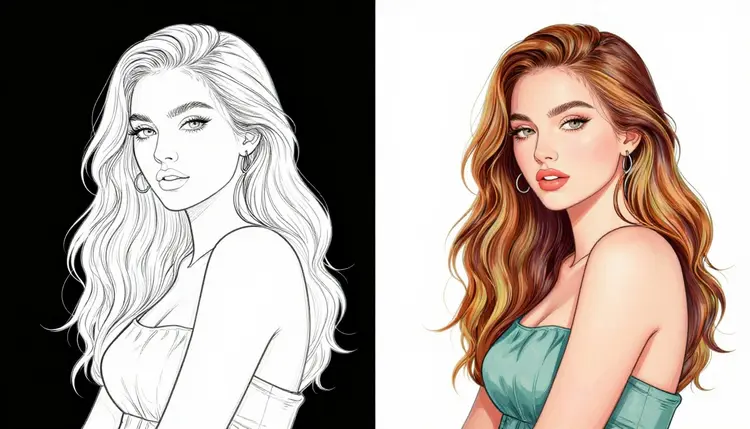
Line art is often the starting point for character illustration: clean linework with no color, no shading, and no material definition. Turning that into a finished adult illustration usually means importing it into image editing software and manually laying down flats, gradients, and highlights by hand, one region at a time. On Picasso IA you can do the same job with a single plain instruction instead.
Picasso Image Editor Pro is one of six models in the full catalog of 488 that is confirmed to generate NSFW content without a content filter blocking the request, and unlike a text to image model it edits an image you already have instead of generating one from a blank prompt. Upload the line art, describe the palette and the shading style you want, and the model paints directly onto your linework while keeping the pose, anatomy, and composition you drew in place.
This page covers what the editor actually does, the five steps to colorize a line art from upload to finished result, a few habits that make the first pass land closer to what you pictured, and the rules that apply to every adult generation on the platform. Everything below is written for fictional characters only.
Picasso Image Editor Pro is a general purpose image editor, not a generator that starts from nothing. You give it two things: an existing image and a plain instruction describing what should change. The model reads the instruction, locates the part of the image it applies to, and edits that part while leaving the rest of the picture alone. That is the same underlying mechanic whether you are swapping a background, changing an outfit, adjusting lighting, or, in this case, adding color and shading to a black and white line drawing.
For NSFW work specifically, Picasso Image Editor Pro is one of six models in the full catalog of 488 that is confirmed to process adult prompts directly, without a safety filter stepping in to block the request. That distinction matters because most models on the platform, and most image models in general, apply some form of content filter to sexual content and will refuse a flagged prompt outright. Picasso Image Editor Pro does not do that.
Because it edits rather than replaces, the line art you upload keeps its identity through the process. Your character's proportions, their pose, and the composition you drew stay intact. What changes is exactly what you described: color where there was none, shading where there was flat line, and nothing else unless you ask for it. You can find the model directly from the toolkit whenever you have a line art ready.
Colorizing a line art on Picasso IA is an edit, not a fresh generation, so the workflow is short. Here is the full process from a blank upload to a finished, colored illustration.
- Upload your line art. Open Picasso Image Editor Pro from the toolkit and attach the black and white image you want to colorize. A clean scan or export with closed lines gives the model the clearest shapes to fill.
- Describe the palette. Write out the colors you want by area, for example warm skin tones, a deep red for the hair, and a muted teal background. Naming colors by region gets a more accurate result than a single vague word like colorful.
- Specify the shading style. Add a second instruction for how light should behave: flat cel shading, soft airbrushed gradients, or hard directional highlights. This is the detail that separates a flat color fill from a finished illustration.
- Run the edit. Submit the prompt. Picasso Image Editor Pro applies the color and shading directly onto your line art in one pass, keeping the original linework and pose untouched.
- Refine with a follow up edit. If one area needs adjusting, such as a color that reads wrong or a highlight that is too strong, describe just that change and run the edit again on the new result rather than starting over.
Each step is its own edit instruction, so you never have to describe the whole image at once. The model only needs to know what should change from what is already there.
A few habits make a real difference in how close the first result lands to what you pictured.
- Name colors by body part or object, not the whole image at once. An instruction like pale skin, dark purple hair, and a black leather jacket edits more predictably than a single word like colorful.
- Describe one shading pass at a time. Asking for flat colors first, then adding rim lighting in a second edit, gives you more control than requesting everything in a single instruction.
- Keep the line art itself clean before uploading. Gaps in the linework can let color bleed across a boundary the model was otherwise supposed to respect.
- Reuse the same wording across edits. If you called a garment a leather jacket in step one, keep calling it that in follow up edits instead of switching to coat or vest partway through.
- Treat every edit as a draft. Because Picasso Image Editor Pro edits in place, you can keep iterating on the same image, one instruction at a time, until the palette and shading match your original concept.
- Separate style from color. Mentioning a shading style, such as cel shading or watercolor, in its own sentence tends to read more clearly to the model than folding it into a long list of colors.
Every adult generation on Picasso IA, including a line art colorization, is limited to fictional characters and adults only. Never upload or describe a real person, a public figure, or anyone who could be read as a minor. This applies to the character already in the line art and to anything you ask the editor to add on top of it.
Picasso Image Editor Pro is one of six models confirmed to generate NSFW content without a content filter. The other five are Seedream 4.5, Qwen Image 2, Recraft V4.1 Pro, Picasso Video, and LTX 2.3 Pro. Out of 488 models in the full catalog, these six are the only ones confirmed to handle adult prompts directly.
| Model | Type | Good for |
|---|
| Picasso Image Editor Pro | Image editing | Colorizing line art, changing an existing image |
| Seedream 4.5 | Text to image | Generating a new illustration from a prompt |
| Qwen Image 2 | Text to image | Generating a new illustration from a prompt |
| Recraft V4.1 Pro | Text to image | Generating a new illustration from a prompt |
| Picasso Video | Text to video | Animating a scene or character |
| LTX 2.3 Pro | Text to video | Animating a scene or character |
Every other model in the catalog, including well known names for image and video generation, applies its own content filter and is not confirmed to bypass it for adult prompts. If you try an adult prompt on one of those models and it refuses, Picasso IA shows a "Content Not Supported by This Model" message and offers to carry your prompt over to one of the six models above, Picasso Image Editor Pro included when the task is an edit. That handoff is the intended path when a filter blocks a request. Rewriting or disguising a prompt to slip past a filter is not supported and is not what that message is for.
Picasso Image Editor Pro is billed like the rest of the catalog: through credits rather than a flat per image subscription tier. New accounts start with free credits, enough to try a colorization pass and a follow up refinement before deciding whether to add more. Exact credit costs and current plans are listed on pricing, since they can change as new models are added to the catalog.
If you plan to colorize several line arts in one session, it helps to budget a few credits per image for the initial color and shading pass plus a couple of smaller refinement edits, rather than treating each colorization as a single one shot generation. Because the model edits in place, a refinement pass is typically a smaller, more targeted instruction than the first pass, which is worth keeping in mind when deciding how many credits to set aside.
Can Picasso Image Editor Pro colorize a line art that already has some shading?
Yes. The model reads whatever is already in the image, including partial shading, and edits from there. Describe only the parts you want changed, such as adding color to a line art that already has grayscale shading, and the editor builds on what already exists rather than erasing it.
Do I need special software to prepare the line art first?
No. Any black and white image file works as long as the lines are reasonably clean and closed. You do not need to flatten layers or pre select regions before uploading, since the plain instruction you write is what tells the model where to apply color and shading.
Is Picasso Image Editor Pro the only model that can do this?
It is the model built for this workflow because it edits an existing image and is confirmed to handle NSFW prompts without a filter. Text to image models like Seedream 4.5 or Qwen Image 2 generate a new image from a prompt rather than editing one you already have, so they suit creating art from scratch better than colorizing an existing line art.
What happens if I try to colorize a line art of a real person?
Picasso IA only supports fictional characters for adult content. Do not upload or describe a real person, a public figure, or anyone who could be mistaken for a minor. This rule applies to every model on the platform, not just Picasso Image Editor Pro.
Why did another model refuse my colorization prompt?
Most models on the platform apply a content filter to adult prompts and will refuse a flagged request outright. When that happens, Picasso IA shows a "Content Not Supported by This Model" message and lets you carry your prompt over to one of the six confirmed models, including Picasso Image Editor Pro for edits like this one.
Can I ask for a specific art style, like cel shading or watercolor?
Yes. Naming a shading style in your instruction, such as flat cel shading or soft airbrushed gradients, is one of the more reliable ways to control how the final colorization looks, and it is worth describing separately from the color palette.
How many times can I edit the same image?
There is no fixed limit built into the workflow itself. Each edit uses credits, so the practical limit is how many credits you have available, which you can check any time on pricing.
Can I turn the colorized art into a video afterward?
Picasso IA includes video models such as Picasso Video and LTX 2.3 Pro that are also confirmed for adult content, so animating a finished illustration is a separate step you can take once the colorization itself is done.
Will the model change my character's pose or proportions while colorizing?
No, that is the point of using an editor rather than a generator. Picasso Image Editor Pro applies your color and shading instruction to the existing linework and leaves the pose, proportions, and composition exactly as drawn.
Where can I find other NSFW capable models besides Picasso Image Editor Pro?
The full catalog lists all 488 models on Picasso IA, and the six confirmed filter free models, Picasso Image Editor Pro, Seedream 4.5, Qwen Image 2, Recraft V4.1 Pro, Picasso Video, and LTX 2.3 Pro, are the ones confirmed to handle adult prompts directly. You can also start from the toolkit and pick whichever fits the task at hand.