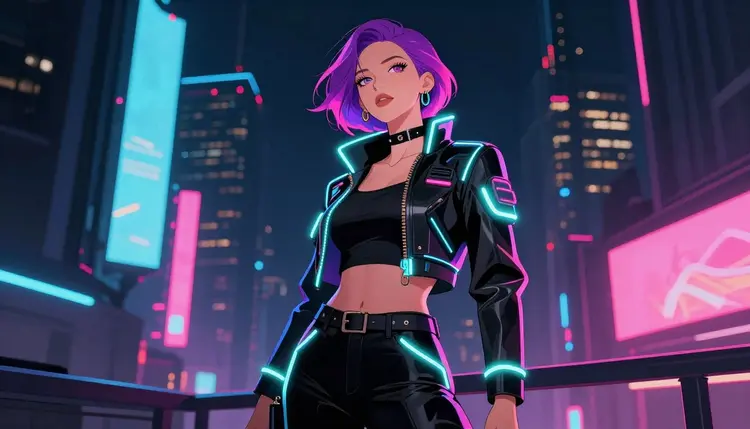
Cyberpunk art leans on specific, loaded imagery: augmented bodies, exposed chrome, tight synthetic clothing, neon-lit skin under rain. That's exactly the kind of prompt most AI image models flag and refuse, even when the character is entirely fictional and clearly adult. Recraft V4.1 Pro is one of six models on Picasso IA confirmed to generate NSFW content directly, with no safety filter standing between your prompt and the render, which makes it the model worth reaching for when a cyberpunk scene needs to go further than a filtered model will allow.
The rest of the catalog is a mixed picture. Big names like Nano Banana, Nano Banana Pro, Seedance, Sora 2, Veo 3.1, and Kling are not confirmed filter-free, and an adult cyberpunk prompt run through one of them can come back blocked instead of rendered. When that happens, the toolkit shows a "Content Not Supported by This Model" message and carries your prompt forward so you can try it on a different model without retyping anything. Recraft V4.1 Pro is one of the models it points you toward.
What makes Recraft a particularly good match for this specific genre, beyond being filter-free, is that cyberpunk art is inherently a design-forward style. Neon signage, chrome reflections, controlled color grading between magenta and cyan, and clean character silhouettes against a busy cityscape are illustration problems, not photography problems, and Recraft V4.1 Pro is built as an illustration and design model first. If a photorealistic cyberpunk scene is closer to what you have in mind, Seedream 4.5 and Qwen Image 2 are the other two confirmed filter-free image models, both stronger at photoreal rendering than Recraft is. Every one of them, Recraft included, is restricted to fictional, adult characters only.
If you've already hit a refusal screen trying to build a cyberpunk character elsewhere, switching to Recraft V4.1 Pro is usually the faster fix. Instead of softening or rewording a prompt to see what a filter will let through, you write the scene plainly once and Recraft either renders it or it doesn't, no guesswork about which word tripped a block.
Recraft V4.1 Pro is a design and illustration model, and that shows most clearly in how it handles the visual language cyberpunk art depends on. It holds a controlled color palette well, which matters for a genre built on saturated neon against dark backgrounds, and it renders clean linework and defined silhouettes rather than the noisy detail some photoreal models default to. Chrome, exposed circuitry, augmented limbs, and glowing implants read as clean design elements instead of a blur of texture.
It also takes explicit style direction seriously. Naming the register in the prompt, cel-shaded anime, synthwave digital painting, cyberpunk comic ink, vector-clean concept art, produces a visibly different result each time rather than defaulting to one generic look. That's useful for cyberpunk work specifically, since the genre spans a wide range from painterly anime influence to flat vector poster art to gritty concept-art shading, and Recraft can move between those registers when the prompt tells it to.
Backgrounds are a real strength too. A rain-slicked street under stacked neon signage, a megacity skyline with layered holographic billboards, a cramped market alley lit by a single flickering sign, Recraft composes these settings with enough control that the character stays legible against a busy scene instead of getting lost in it.
What it isn't is a photorealistic portrait model. If your prompt is really describing a photo-style cyberpunk scene, skin texture, camera lighting, lens depth, a filter-free photoreal model will get closer to it than Recraft will. Match the model to the register you actually want, and the full catalog has the complete lineup if you're unsure which one that is.
It's also a solid pick for building out a recurring character. Because Recraft responds consistently to repeated style keywords, prompting the same augmented character description with the same style terms across several generations tends to produce a set that reads as one continuous character rather than a handful of unrelated designs, useful for a comic page, a character sheet, or a small illustrated scene sequence.
Getting a first cyberpunk render out of Recraft V4.1 Pro takes a few minutes from a cold start. Here's the process.
- Create an account and claim your free credits. Sign up on Picasso IA to get a starting credit balance, no card required to try your first generations.
- Open the toolkit and select Recraft V4.1 Pro. From the toolkit, search the model by name or find it in the full catalog under text to image.
- Write a detailed cyberpunk prompt. Describe the character, fictional and adult, the augmentation or wardrobe detail, the art style, and the neon-lit setting in one clear prompt rather than a vague one.
- Generate and review the result. Run the prompt, check the color grading, linework, and background against what you pictured, and note what to adjust.
- Refine or save. Tweak one element, a style keyword, the lighting, the palette, and regenerate rather than rewriting the whole prompt, then keep the version you want.
Each generation draws from your credit balance, and because Recraft doesn't run a content filter, an adult cyberpunk prompt goes through the same way a general prompt does, no refusal screen to work around.
Name the palette directly. Cyberpunk art lives or dies on color, so terms like magenta and cyan neon, cold blue shadow, warm sodium streetlight glow tell Recraft exactly what mood to render instead of leaving it to guess.
Describe the augmentation clearly. Chrome plating, glowing circuitry lines, a cybernetic limb, an ocular implant, name the specific detail rather than a vague cyborg and it shows up as a deliberate design choice instead of an afterthought.
Separate character from scene. A prompt that clearly splits who, the character, pose, and augmentation, from where, the street, skyline, or interior and its lighting, tends to render cleaner than one long run on description.
Keep the same wording across a series. If you're building a recurring character, describe hair, build, augmentation, and outfit identically each time rather than rephrasing, that consistency is what keeps the character recognizable from one panel to the next.
Write plainly rather than coding the prompt. Since Recraft V4.1 Pro is filter-free, there's no need to soften or disguise a prompt to get it through. Describe what you actually want to see, clearly, and let the model do its job.
Iterate in small steps. If a result is close but the mood is off, change one thing, the palette, the style keyword, the lighting source, and regenerate rather than rewriting the whole prompt from scratch.
Every model on Picasso IA, Recraft V4.1 Pro included, is for adults generating fictional characters only. That's a hard rule, not a suggestion, and it applies to cyberpunk work the same as any other genre.
No real person's likeness. Don't prompt for a specific named individual, a public figure, a celebrity, or anyone based on a real photo of a real person, augmented, chromed, or otherwise. That applies whether the result is stylized or meant to look realistic.
No one who could be read as a minor. Any character, however stylized or however many cybernetic parts it has, must read clearly as an adult. Prompts aimed at making a character look younger, or any depiction resembling a minor, are not permitted, in any style, for any model.
Don't try to route around a filter on another model. If a different model refuses your cyberpunk prompt, the answer is switching to a confirmed filter-free model like Recraft V4.1 Pro, not rewording or disguising the prompt to sneak past that model's filter. The toolkit makes the switch a couple of clicks and carries your prompt over automatically.
These limits exist to keep the platform usable for everyone and to keep generation squarely inside fiction. Accounts that violate them are subject to enforcement.
New accounts start with free credits, enough to try Recraft V4.1 Pro on a cyberpunk scene and see whether its illustration style is the right fit before spending anything. Each generation draws from your credit balance, and topping up or subscribing unlocks a larger allowance for ongoing use.
Full plan details, credit amounts, and subscription tiers are on pricing. If a more photorealistic cyberpunk look is what you're after, the same credit balance works across the full catalog, including the platform's other confirmed filter-free image models and its text to video option, Picasso Video, for anyone who wants to take a finished cyberpunk character into motion.
There's no separate signup for NSFW generation and no extra tier to unlock it. Recraft V4.1 Pro sits in the same catalog and draws from the same credit balance as every other model, the only difference is that it won't stop an adult cyberpunk prompt at the filter stage.
Is Recraft V4.1 Pro actually uncensored for cyberpunk art?
Yes. Recraft V4.1 Pro is one of six models on Picasso IA confirmed to generate content, including adult content, without a safety filter blocking the prompt. Most other models on the platform do run a filter and can refuse a flagged adult cyberpunk prompt.
What happens if a cyberpunk prompt gets refused on a different model?
If a model applies a content filter and your prompt gets flagged, the toolkit shows a "Content Not Supported by This Model" message and carries your prompt forward so you can try it on a different model, like Recraft V4.1 Pro, without retyping anything.
Can I generate a real person as a cyberpunk character?
No. Every model on Picasso IA, including Recraft V4.1 Pro, is restricted to fictional characters only. Prompts aimed at a real person's likeness, a public figure, or a celebrity are not permitted, even with augmentation or stylization added.
Is Recraft V4.1 Pro good for photorealistic cyberpunk scenes?
Not primarily. Recraft V4.1 Pro is a design and illustration model, so it's strongest with stylized cyberpunk art like anime, comic ink, vector-clean concept art, and synthwave painting. For a photorealistic look, Seedream 4.5 or Qwen Image 2 are better matched to that style.
Do I need a subscription to try it?
No. New accounts get free credits that can be spent on Recraft V4.1 Pro or any other model in the catalog, so you can test the cyberpunk style before deciding whether to subscribe or buy more credits.
Why do some cyberpunk prompts still get refused on Recraft V4.1 Pro?
Recraft V4.1 Pro doesn't run a content filter, but every model still requires adult, fictional subject matter. A prompt describing a minor or a real identifiable person falls outside the platform's rules regardless of which model you're using.
Can I keep the same cyberpunk character consistent across multiple images?
Yes, within limits. Describing the character with the same wording, augmentation, build, outfit, and style, in each prompt keeps results closer to consistent, though Recraft V4.1 Pro doesn't guarantee pixel identical characters between separate generations.
What cyberpunk styles work best with Recraft V4.1 Pro?
Illustration forward styles work best: cel-shaded anime, comic ink line art, synthwave digital painting, and vector-clean concept art. Naming the style and palette directly in the prompt has a real, visible effect on the output.
How is credit cost calculated for a generation?
Each generation on Recraft V4.1 Pro draws credits from your account balance based on your plan. Exact plan allowances and credit costs are listed on pricing.
Where can I see other filter-free models if Recraft isn't the right fit?
The full catalog lists every model on the platform, including the other confirmed filter-free options: Qwen Image 2, Seedream 4.5, Picasso Image Editor Pro, Picasso Video, and LTX 2.3 Pro, alongside the general text-to-image and text-to-video lineup.