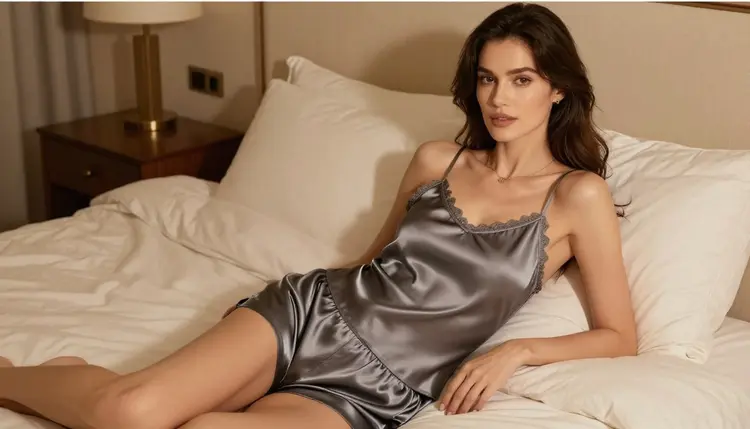
Most of the 488 models in Picasso IA's catalog are general purpose, and many of them apply a content filter that blocks adult material by design. When a prompt gets flagged, the app doesn't just fail quietly, it shows a message that says "Content Not Supported by This Model" and recommends switching to a model built to handle it, carrying your original prompt over automatically so nothing gets lost. That's the real mechanic behind NSFW generation on this platform. It has nothing to do with tricking a filter and everything to do with choosing a model that was never filtered for adult content in the first place.
Seedream 4.5 is one of six models in the catalog confirmed to generate NSFW content directly, with no safety filter standing between your prompt and the result. The other five are Qwen Image 2, Recraft V4.1 Pro, Picasso Image Editor Pro, Picasso Video, and LTX 2.3 Pro. Every model outside that list of six, including well known names like GPT Image 1, DALL-E 3, Imagen 4, Flux, Stable Diffusion, and Nano Banana, is not confirmed filter-free, and this page won't tell you otherwise.
For lingerie photography in particular, Seedream 4.5 tends to be the first stop because it's a text-to-image model built around following long, descriptive prompts closely, which matters when you're specifying fabric, pose, lighting, and framing all in the same request. You can open it directly from the toolkit or from its own page at Seedream 4.5, and everything you generate stays tied to your account rather than posted anywhere public.
Seedream 4.5 is a text-to-image model, which means every generation starts from a written description rather than an existing photo. If you already have an image and want to change it, Picasso Image Editor Pro is the right tool instead, and it happens to be on the same confirmed filter-free list. Within its own lane, Seedream 4.5 handles the details that make or break a lingerie shot: fabric texture and sheerness, how light falls across skin, believable proportions, and a pose that reads naturally rather than stiffly. It rewards specificity, so a prompt that names the lace pattern, the light source, and the camera angle will generally land closer to what you had in mind than a short, generic one.
It's still a generative model rather than a camera, so two runs of the same prompt won't produce identical results, and an oddly phrased pose or an unusual fabric description can come out wrong. That's normal. Generating a small handful of variations from one prompt and keeping the strongest is standard practice with any image model, Seedream 4.5 included, not a sign that something is broken.
If a still image isn't the endpoint you want, Picasso Video and LTX 2.3 Pro are the two confirmed filter-free video models, and both can take a Seedream 4.5 image and turn it into a short clip without you having to re-describe the character from scratch.
Generating a lingerie photo with Seedream 4.5 follows the same basic workflow as any other image in Picasso IA, adults-only content included. Here's the process from opening the model to walking away with a finished image.
- Open Seedream 4.5 from the toolkit. Go to the toolkit, search for Seedream 4.5 by name, and select it as your active model before writing anything.
- Write a detailed, fictional-character prompt. Describe an invented character, the lingerie's style, color, and material, the setting, and the camera angle in plain language, and keep every detail fictional from the first word.
- Set the resolution and aspect ratio. Choose portrait framing for a single figure or a wider aspect ratio for a fuller scene, matching however you plan to use the finished image.
- Generate and compare a few variations. Run the same prompt two or three times rather than settling for the first result, then keep the version with the cleanest anatomy and lighting.
- Download it or send it to the editor. Save the image straight from the generation screen, or pass it into Picasso Image Editor Pro for small fixes before you're done.
None of these steps require a special account tier beyond having enough credits to cover the generation, and the same five steps work whether it's your first image or your fiftieth.
A few habits make a real difference in how close a Seedream 4.5 output lands to what you actually wanted, especially for something as detail dependent as lingerie photography.
- Name the fabric and construction directly: lace, satin, mesh, underwire, adjustable straps. A vague word like "sexy" or "hot" gives the model far less to work with than an actual material description.
- Set the lighting on purpose: soft window light, a studio softbox, a warm bedroom lamp. Lighting shapes the mood of a lingerie shot more than almost any other single word in the prompt.
- Keep the character fictional from the start: give her an invented name, or simply write "a fictional woman," and never anchor the description to a real actor, model, influencer, or other public figure.
- State the pose and camera angle without ambiguity: standing, seated, three quarter turn, close crop from the waist up. A prompt that skips this tends to come back stiff or oddly framed.
- Separate the outfit from the body: describe the lingerie's cut and color in one clause and the figure's build, skin tone, and hair in another, rather than folding everything into a single run-on sentence.
- Iterate instead of overloading: if a first attempt misses on lighting or pose, adjust just that one element and regenerate, rather than rewriting the whole prompt at once.
Picasso IA's NSFW generation exists for adults, and for fictional characters only. That line isn't a soft suggestion, it's the boundary the platform is built around: never prompt for a real person's likeness, never for a public figure, and never for anyone who could read as a minor, in lingerie or in any other context. Seedream 4.5 and the other five confirmed models give adult users a direct, unfiltered path to fictional adult content. They are not a workaround for the rules that keep real people and minors out of that content.
If you're ever unsure whether a prompt crosses a line, the safer move is to rewrite it around a character who is clearly invented rather than test where the boundary sits. And if a prompt does get blocked on a model outside the confirmed six, the sanctioned response is switching to one of those six models, never rewording the same request to slip past a filter somewhere else. Picasso IA makes that switch easy on purpose, carrying your prompt across automatically, precisely so there's no reason to try disguising a flagged request instead.
Picasso IA runs on a credit system: each generation costs a number of credits set by the model and the settings you choose, and every new account starts with free credits to try models like Seedream 4.5 before spending anything. Once those run out, pricing lays out the paid plans, each adding a monthly credit allowance along with access to the full catalog, which covers everything beyond the six models confirmed for NSFW generation.
Because Seedream 4.5 is a text-to-image model rather than a video model, a single lingerie photo generally costs fewer credits than a video generation on Picasso Video or LTX 2.3 Pro, which makes it a practical starting point if you're working with a limited free balance and want to see several variations before committing more credits.
Is Seedream 4.5 actually free of content filters for NSFW prompts?
Yes. Seedream 4.5 is one of six models in Picasso IA's catalog confirmed to generate NSFW content directly, with no safety filter blocking adult prompts, and its text-to-image format suits detailed lingerie photography particularly well.
Can I use Seedream 4.5 to generate a real person in lingerie?
No. Seedream 4.5 is for fictional characters only, and prompting for a real person's likeness or for a public figure is against the platform's rules regardless of which model you use.
What happens if a model other than the six confirmed ones refuses my prompt?
You'll see a message reading "Content Not Supported by This Model," and the app will recommend switching to one of the six confirmed models, carrying your original prompt over automatically so you don't have to retype it.
Which other models can generate NSFW content besides Seedream 4.5?
The other five confirmed models are Qwen Image 2, Recraft V4.1 Pro, Picasso Image Editor Pro, Picasso Video, and LTX 2.3 Pro. Every other model in the catalog, including names like GPT Image 1, DALL-E 3, Imagen 4, Flux, Stable Diffusion, Grok Imagine, and Nano Banana, is not confirmed filter-free and shouldn't be relied on for adult content.
Can I edit a Seedream 4.5 image afterward?
Yes. Picasso Image Editor Pro is built for exactly that, and it's also on the confirmed filter-free list, so touch-ups stay inside the same unfiltered workflow rather than routing through a different, filtered model.
Can I turn a lingerie photo into a video?
Yes, using Picasso Video or LTX 2.3 Pro, the two video models confirmed filter-free, both of which can animate a still image into a short clip.
Do I need a subscription to try Seedream 4.5?
No. New accounts receive free credits to try Seedream 4.5 and the rest of the catalog before committing to anything paid. See pricing for what each plan adds once those credits are used up.
Why does the same prompt sometimes produce different results?
Seedream 4.5 is a generative model rather than a fixed template, so the same prompt can produce noticeably different results between runs. Generating a couple of variations and keeping the strongest is the normal way to work with it, not a workaround for a problem.
Is my generated content private?
Yes. Generations are tied to your account and are not made public unless you actively choose to share them.
Where do I find Seedream 4.5 in the app?
Open the toolkit and search for Seedream 4.5, or go directly to its page at Seedream 4.5. Either path lets you select it as your active model and start writing a prompt right away.