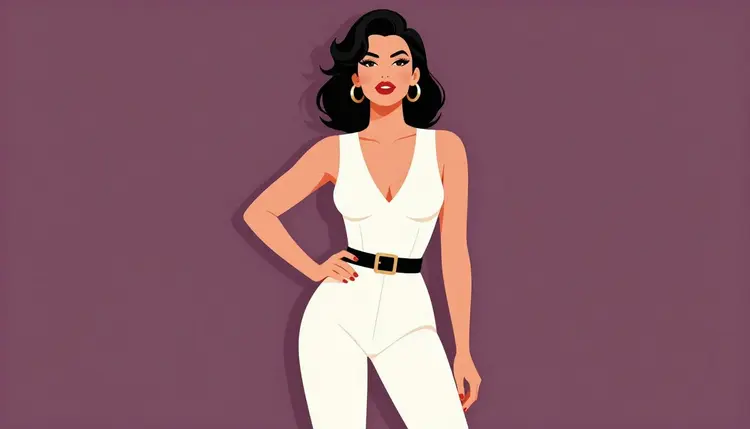
Pin-up art lives or dies on line and color, not camera realism: a confident pose, a clean ink outline, a palette that pops off the page. That is a different job from what most image models on Picasso IA are built for, and it collides with a second problem too. Out of Picasso IA's catalog of 488 models, only six are confirmed to generate adult content with no safety filter standing in the way. Recraft V4.1 Pro is one of them, and it happens to be the one built as a design and illustration engine rather than a photoreal camera simulator, which makes it the natural starting point for pin-up work, not just an available option.
The other five confirmed models, Seedream 4.5, Qwen Image 2, Picasso Image Editor Pro, Picasso Video, and LTX 2.3 Pro, cover photorealism, editing, and video, not flat color blocks and poster composition. Everything else in the catalog, names like Nano Banana, Flux, Stable Diffusion, Imagen 4, and Grok Imagine, runs a content filter that treats an adult pin-up prompt as a flag and refuses it, no matter how clearly fictional the subject is.
When that refusal happens on a filtered model, the toolkit shows a "Content Not Supported by This Model" message instead of an image, and carries the prompt forward automatically so nothing has to be retyped. Recraft V4.1 Pro is one of the models it points toward. The goal is not to reword a refused prompt until it slips past a filter, that is not something this app supports, it is to run the same clear prompt on a model that was never going to refuse it.
That is the case for Recraft V4.1 Pro on this brief: it draws the way pin-up art needs to be drawn, and it attempts an adult prompt on the first try.
Recraft V4.1 Pro's real skill is drawn imagery, not photographed imagery, and pin-up art sits comfortably inside that. Ink outlines hold their shape well, flat color fields stay clean rather than muddying into gradients, and a poster-style composition, a single figure centered against a simple background, tends to come out looking finished rather than like a rough draft. Two pin-up directions both work reliably: a retro, golden-age poster look with saturated primary colors and a banner or vignette background, and a cleaner, modern glamour illustration look with glossier shading and simpler flat backgrounds. Naming the direction plainly in the prompt moves the model between the two, not a vague style word.
Color instructions carry through with real precision. Naming two or three specific colors, a teal one-piece against a coral background, gives Recraft something concrete to place, and the result generally holds those colors rather than drifting toward a generic palette.
The model does best with a single figure and a pose that reads clearly. Pin-up poses often ask a lot regardless of style, an arm bent behind the head, legs crossed at an angle, a hand on a hip, and Recraft V4.1 Pro is no exception: complicated limb positions are harder to land cleanly on a first generation than a simpler stance is. That is not a filter limitation, it is the same challenge every illustration model faces with hands and overlapping limbs, and it is why the five-step process below leaves room for a second pass.
What it is not built for is photorealism. A prompt written for skin texture, fabric weight, and natural light under a specific lens reads closer to what was pictured on Seedream 4.5 or Qwen Image 2, both also confirmed filter-free, but built around a camera rather than a pen. Match the brief to the model: illustration goes to Recraft V4.1 Pro, a photographic scene goes to one of those two.
From an empty prompt box to a finished pin-up illustration, the process below is the same five stops every time.
- Write the brief in one prompt. Describe the fictional adult character, the pose, the outfit, the color palette, and the style direction, retro poster or modern glamour, in a single clear sentence or two rather than a list of disconnected keywords.
- Open Recraft V4.1 Pro in the toolkit. Find it inside the toolkit or search it by name in the full catalog under text to image, no other model needs testing first for this style.
- Generate more than one variant. Running the same prompt two or three times shows whether the pose and palette are landing consistently or whether the wording needs to be sharper.
- Change one detail and regenerate. Keep the strongest result on screen, adjust a single element, the pose, a color, the background, and run it again rather than rewriting the whole prompt from the start.
- Clean up the keeper. Send the winning image into Picasso Image Editor Pro to fix a hand or tighten a line, then download it and check the edges of the frame before calling it finished.
Each step draws from the same credit balance, and because Recraft V4.1 Pro does not run a content filter, none of them get interrupted by a refusal screen.
Lead with the pose, described plainly. Pin-up poses have a small, recognizable set: a wink over the shoulder, a hand on the hip, a reclining pose with one leg raised, leaning against a doorway. Naming one directly gives Recraft V4.1 Pro a clear target, a vague instruction like a flirty pose leaves too much to interpretation and tends to come back stiffer than expected.
Decide the line before the color. Bold ink outline, thin pen line, or soft cel-shaded edge changes how the whole image is built, so settling that first, then naming the palette second, tends to match how the model actually constructs the piece.
Pick one lane and stay in it. Golden-age poster terms, 1950s pin-up style, vignette border, pull one direction. Modern glamour terms, flat vector shading, glossy highlight, pull another. Blending both in one prompt usually produces a muddier result than committing to one.
Name colors, not moods. Coral and navy, or blush and gold, gives the model something exact to place. A word like sultry or vibrant describes a feeling rather than a palette, and tends to produce a less predictable result than two or three named colors would.
Keep the frame to one figure. A single subject with a legible pose is where line and color hold up best. A second figure, or limbs overlapping at an unusual angle, is harder for any illustration model to land cleanly, so it is worth generating the simpler version first even when the idea calls for more.
Write the prompt straight, not in code words. Since Recraft V4.1 Pro does not filter adult prompts, there is no reason to soften the wording to get it through. Plain, direct language produces a more predictable result than euphemism does, on this model or any other.
Recraft V4.1 Pro runs without a content filter, but it still runs inside the same rules every model on Picasso IA follows, and pin-up art gets no exception.
Every figure is a fictional adult. Not a real person's likeness, not a public figure, not a character based on a real photo, in any pose, in any style. The absence of a content filter changes what gets generated on the first try, it does not change what is allowed.
Nobody who could read as a minor. A character has to look clearly adult regardless of how stylized the illustration is. Prompts aimed at making a figure look younger, or any result that reads as a minor, are not permitted on Recraft V4.1 Pro or anywhere else in the catalog.
No prompt rewording to slip past a different model's filter. If a filtered model refuses a prompt, the fix is switching to Recraft V4.1 Pro or one of the other five confirmed models, not disguising the wording to sneak the same prompt past. The toolkit does the switch in a couple of clicks and keeps the prompt intact.
An illustration style does not guarantee clean anatomy. A hand on a hip or an arm bent behind the head can still render wrong even without a filter involved, so it is worth checking hands along with the pose before calling a piece finished.
These limits keep generation inside fiction and keep the platform usable for everyone on it. Accounts that ignore them are subject to enforcement.
New accounts start with a free credit balance, enough to write a first pin-up prompt, generate a few variants, and run one image through an edit pass on Picasso Image Editor Pro before spending anything further. Every generation on Recraft V4.1 Pro draws credits the same way a generation on any other model does, no extra charge tied to it being an adult prompt. What changes is only that the prompt does not stop at a filter first.
Full plan tiers and pricing live on pricing rather than printed here, since plans update more often than this page does. If pin-up illustration is not the right style, the same balance covers the full catalog, including the other filter-free models and Picasso Video for turning a finished character into motion.
Is Recraft V4.1 Pro really uncensored for pin-up prompts?
Yes. Recraft V4.1 Pro is one of six models on Picasso IA confirmed to generate adult content with no safety filter blocking the prompt, pin-up illustration included. Most of the rest of the catalog runs a filter that can refuse an adult prompt outright, even a clearly fictional one.
Why is Recraft V4.1 Pro better than a photoreal model for pin-up art?
Pin-up art is defined by bold linework, flat color, and poster-style composition rather than camera realism, and Recraft V4.1 Pro is built as a design and illustration engine, so it reads terms like ink outline and vignette border the way a photoreal model reads lens and lighting terms. Seedream 4.5 and Qwen Image 2 are also filter-free, but tuned for photographic results, not illustration.
What happens if I try a pin-up prompt on a model that filters adult content?
The generation stops and a "Content Not Supported by This Model" message appears in place of the image. Picasso IA carries the prompt over and recommends switching to a confirmed filter-free model, Recraft V4.1 Pro among them, rather than rewording the prompt to try to get it past that filter.
Can I generate a pin-up image of a real person or celebrity?
No. Every model on Picasso IA, Recraft V4.1 Pro included, is restricted to fictional characters only. A prompt aimed at a real person's likeness, a public figure, or a celebrity is not permitted, stylized or photorealistic.
Which pin-up styles does Recraft V4.1 Pro handle best?
Two directions work reliably: a retro, golden-age poster look with saturated primary colors and a vignette or banner background, and a cleaner, modern glamour illustration look with glossy shading and a simple flat background. Naming the direction plainly is what moves the model between the two.
Why do hands or overlapping limbs still come out wrong sometimes?
Recraft V4.1 Pro not running a content filter changes whether an adult prompt gets attempted, it does not change how well any illustration model handles hand positions or overlapping limbs, both of which pin-up poses ask for often. A simpler pose on the first pass, followed by a fix through Picasso Image Editor Pro, resolves it more reliably than rewriting the whole prompt.
Do I need a subscription to try Recraft V4.1 Pro?
No. New accounts get a free credit balance that covers Recraft V4.1 Pro along with every other model in the catalog, enough to test the style and run an edit pass before deciding whether to subscribe.
Can I keep a pin-up character consistent across several images?
To a real degree, yes. Describing the character with the same wording for hair, build, outfit, and style direction in each prompt keeps results closer together, though Recraft V4.1 Pro does not guarantee an identical character between separate generations.
How is the credit cost worked out for a Recraft V4.1 Pro generation?
Each generation on Recraft V4.1 Pro draws credits from the account balance according to the current plan. Exact credit costs and plan allowances are kept on pricing, since they update more often than this page does.
What if pin-up illustration is not the exact style I need?
The full catalog lists every model on the platform, including the other confirmed filter-free options, Qwen Image 2, Seedream 4.5, Picasso Image Editor Pro, Picasso Video, and LTX 2.3 Pro, alongside the general text-to-image and text-to-video lineup.