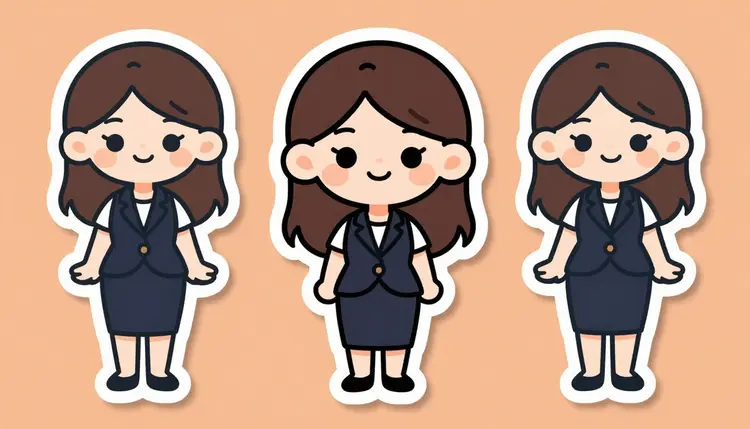
A sticker pack lives or dies on two things: a bold, flat illustration style, and a character that can hold a wide range of expressions and poses without breaking. Most models on the market never get to prove whether they can do either for adult content, because a hard safety filter blocks the prompt before rendering even starts. That filter does not care whether the sticker is a blushing wink or a fully explicit pose, it blocks the whole category outright.
Recraft V4.1 Pro is one of only six models on Picasso IA confirmed to generate NSFW content directly, with no safety filter standing between the prompt and the render. It is also an illustration-first model, which is exactly the rendering style a sticker set needs: clean outlines, flat color fills, and a consistent character across separate generations rather than one blended composition.
That combination, uncensored plus illustration-native, is why Recraft V4.1 Pro is the pick here over a photorealistic model. A sticker pack is not trying to look like a photograph, it is trying to look like a small, expressive drawing of the same character repeated across a set, and that is precisely the lane this model was built for.
This page covers what Recraft V4.1 Pro is actually good at, a five-step workflow for building a full NSFW sticker pack with it, prompting tips specific to sticker-style output, and the rules every generation on the platform follows. Adults only, fictional characters only, no real likeness, no public figure, nothing resembling a minor, enforced on every generation. For everything else Picasso IA offers, the full catalog lists all 488 models with their own generation pages.
Recraft V4.1 Pro is a text-to-image model built around illustration and character work rather than photorealism, and that focus lines up directly with what a sticker pack needs.
Bold, flat linework. The model renders clean outlines and flat, evenly saturated color fills without the heavy shading a photorealistic model adds by default. That flat look is what makes a sticker read as a sticker instead of a cropped photo.
Consistent character identity across separate generations. A sticker pack is a set, the same character shown happy, winking, blushing, surprised. Recraft V4.1 Pro holds a described character's hair, eye color, build, and outfit steady across separate prompts more reliably than a model tuned for single-shot realism.
Expression and pose range. The model follows explicit instructions about facial expression, hand gesture, and body pose closely, which matters more for a sticker set than for a single hero image, since every sticker needs a distinct, readable pose.
Style keyword responsiveness. Terms like chibi, anime sticker, flat vector illustration, or thick outline meaningfully change the render toward what you asked for, rather than being ignored in favor of a default look.
Recraft V4.1 Pro is one piece of a small confirmed-filter-free set on Picasso IA, and the other five are each built for a different job:
If a sticker needs a touch-up after the fact, such as fixing a hand or a color, Picasso Image Editor Pro can edit that single sticker directly instead of regenerating it from scratch.
Building a sticker pack is the same single-image workflow repeated with one variable changed each time.
- Open the toolkit and select Recraft V4.1 Pro. Go to the toolkit, choose text-to-image as the mode, and pick Recraft V4.1 Pro from the model list, or generate directly from its model page.
- Write one fixed character description you will reuse. Describe hair, eye color, build, outfit, and art style once, in detail. This description is the anchor for the entire pack, so get it right before generating the first sticker.
- Add the sticker style keywords. Append terms like sticker style, thick bold outline, flat colors, chibi proportions if wanted, and a plain or isolated background, so every generation shares the same illustration treatment.
- Generate one sticker per expression or pose, changing only that variable. Keep the character and style description identical across prompts and swap only the expression, gesture, or pose line, for example winking with a blush, then surprised, then a coy over-the-shoulder look.
- Review each sticker, refine, and download the set. Regenerate any sticker that drifted off-model or has a broken hand, then download each finished image from the generation panel to assemble your pack.
Every generation draws from your account's credit balance, shown before you confirm the run.
A sticker pack has one requirement a single image does not: everything has to look like it belongs to the same set. These habits help.
Write the character description once and paste it every time. Do not retype the character from memory for sticker four. Reuse the exact wording verbatim, changing only the expression or pose clause at the end. Small wording drift is the single biggest cause of a character looking different sticker to sticker.
Name the outline and fill style explicitly. Phrases like thick black outline and flat cel-shaded color lock in a sticker look better than a vague sticker style tag alone, since they tell the model exactly how to handle line weight and shading.
Keep the background simple. A plain solid color or a described isolated background renders faster and keeps attention on the character, which matters when the sticker is eventually viewed at a small size.
Vary one thing per sticker, not several. Changing the expression, gesture, and camera angle all at once makes it harder to tell what caused an off-model result. Change one variable, check the result, then move on.
Describe expressions precisely. A wink is not the same instruction as a coy smile with one eye closed. The more specific the facial description, the less the model has to guess, and a sticker pack lives or dies on expressions reading clearly at a glance.
Build an original character rather than naming a copyrighted one. Describe the archetype and physical details directly. You get a consistent, original result across the whole pack instead of the model guessing at a character it was never trained to reproduce.
Every image generated on Picasso IA, on Recraft V4.1 Pro or any other model, has to stay inside the same boundary: adults only, fictional characters only. That means no real person's likeness, no public figure, and nothing that resembles a minor, whether the request comes through a text prompt or an uploaded reference image. This is not a soft guideline, it is the line the platform enforces on every generation, sticker packs included.
A sticker pack built around an original character fits this boundary cleanly, since the entire point is a repeatable, invented character rather than a real individual. Keep the description original or archetypal, and every sticker stays within bounds.
It is also worth understanding what happens on a model outside the confirmed six. Most models on Picasso IA, including GPT Image 1, Flux, Stable Diffusion, and Nano Banana, run their own content filter and refuse a flagged adult prompt outright, sticker style or not. When that happens, the app shows a "Content Not Supported by This Model" message and recommends switching to one of the six confirmed models, carrying your prompt over so nothing typed gets lost. Rewording or disguising a prompt to slip past a filter is not supported, switching to a model built for the content is the direct route to the result you want.
Every new Picasso IA account starts with free credits, enough to generate the first several stickers of a pack on Recraft V4.1 Pro before committing to anything paid. Credits are shared across the whole catalog, so the same balance covers this model, the other five confirmed filter-free models, and every other tool on the platform.
Because a sticker pack means generating several images rather than one, plan the credit budget up front. Each generation shows its exact credit cost in the toolkit before you confirm the run, so you always know the running total.
Beyond the free credits, pricing lists the available subscription tiers and their monthly credit allowances, from lighter plans for occasional use up to higher tiers built for regular generation. There is no separate paywall or add-on for NSFW generation or for a multi-image sticker pack.
Is Recraft V4.1 Pro actually uncensored for a NSFW sticker pack?
Yes. Recraft V4.1 Pro is one of six models on Picasso IA confirmed to generate NSFW content directly, with no safety filter blocking the request.
Does Picasso IA generate the whole sticker pack in one click?
No. Each sticker is its own generation. Reuse one fixed character description and generate one image per expression or pose, then assemble the finished images into your own pack.
Can I keep the same character consistent across every sticker in the pack?
Recraft V4.1 Pro holds character details like hair, eye color, and outfit steady when you reuse the exact same description wording and only change the expression or pose line. Pixel-level identical consistency is not guaranteed, since each generation is independent, but style and identity stay close.
Can I generate a sticker of a real celebrity or public figure?
No. Picasso IA does not allow generating a real person's likeness or a public figure on any model, including Recraft V4.1 Pro. Every character has to be fictional, enforced platform-wide, not per model.
Why did my sticker prompt get refused on a different model?
Most models outside the confirmed six run their own content filter and refuse an adult prompt automatically, regardless of the sticker art style. When that happens, Picasso IA shows a "Content Not Supported by This Model" message and suggests switching to one of the six confirmed models, carrying your prompt over so you don't lose your work.
Which other models on Picasso IA are confirmed filter-free besides Recraft V4.1 Pro?
The other five are Seedream 4.5, Qwen Image 2, Picasso Image Editor Pro, Picasso Video, and LTX 2.3 Pro, covering realistic images, prompt-driven generation, editing, and video.
Does the sticker come out with a transparent background automatically?
Recraft V4.1 Pro generates a full image, not a pre-cut transparent asset. Describing a plain, isolated background in the prompt keeps the character easy to separate afterward, and the full catalog also includes background removal tools for a clean cutout as a separate step.
Can I fix a broken hand or a color mistake on one sticker without redoing the whole pack?
Yes. Picasso Image Editor Pro can edit a single existing image directly, faster than regenerating a sticker from scratch over one small mistake.
How much does a full NSFW sticker pack cost to generate?
Each sticker is billed at the credit cost shown in the toolkit for your chosen resolution, so the total depends on how many stickers you generate. Full plan details are on the pricing page.
Do I need a paid subscription to start a sticker pack?
No. New accounts get free credits that can be spent on Recraft V4.1 Pro or any other model, enough to generate several stickers and judge the quality first. A subscription from pricing adds a larger monthly allowance but isn't required to try the model.