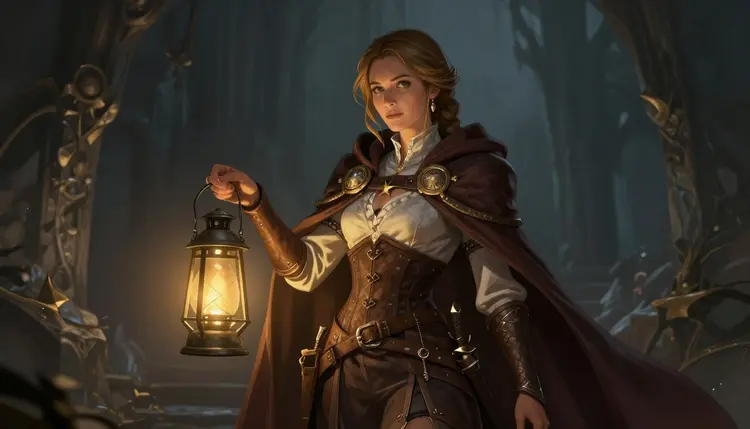
Most text-to-image models on Picasso IA are built to refuse adult content outright. The moment a prompt reads as sexual or explicit, the model stops and the app shows a message that the content is not supported. That is by design for models trained with a strict safety layer, and it is the right behavior for a general purpose tool. But it makes those models useless for tabletop RPG art that leans into the genre's long history of mature themes, from battle scarred mercenaries in torn armor to seductive sorceresses, tiefling rogues, orc warlords, and every other adult character concept a game master or player might want illustrated.
Qwen Image 2 is one of six models on Picasso IA confirmed to generate adult content directly, with no safety filter standing between your prompt and the finished image. You do not need to trick it, soften the wording, or run the prompt twice hoping it slips through. You describe the character, the scene, and the level of explicitness you want, and Qwen Image 2 renders it in one pass. For a hobby built around morally gray anti heroes, seductive villains, and monster girl companions, that directness is the difference between a tool that works and one that fights you at every prompt.
You can open the model directly from Qwen Image 2, or browse it alongside the other 487 models in the full catalog.
Game masters commission NPC art for their table, players build a visual reference for their own character sheet, and some people just want to see a favorite archetype rendered well. Whatever the reason, Qwen Image 2 handles the same explicit content a filtered model would refuse, from partial nudity to full nudity, without asking you to negotiate with a refusal message first.
Qwen Image 2 is a text-to-image model. You write a description and it returns a finished image in a single generation, with no separate sketch or editing pass required. That fits the way most tabletop art actually gets used, as one off character portraits, NPC references, and scene illustrations rather than a multi step production pipeline.
Inside Picasso IA, Qwen Image 2 sits in the text-to-image collection alongside models like Seedream 4.5 and Recraft V4.1 Pro. What sets it apart for this use case is not a marketing claim about quality, it is the fact that it is one of the confirmed models that will actually attempt an adult prompt instead of rejecting it. You give it a written description, whatever detail you care about such as species, class, armor or the lack of it, pose, setting, and lighting, and it generates a still image from that text.
If you later want to touch up a generated portrait, swap a background, or adjust a detail without starting the prompt over, Picasso Image Editor Pro is the other confirmed filter free option, built for editing an existing image rather than generating one from scratch.
Because each generation is a single call from text to a finished image, Qwen Image 2 does not require you to build a scene in layers or start from a rough sketch. That keeps the loop tight: write a prompt, generate, look at the result, adjust the wording, generate again. For tabletop art you plan to print, share at the table, or keep as a personal reference sheet, that tight loop matters more day to day than any single stylistic claim.
Getting from a blank prompt box to a finished character portrait takes five steps.
- Open Qwen Image 2 in the toolkit. Go to the toolkit and select Qwen Image 2 from the text-to-image models, or jump straight to it from Qwen Image 2.
- Write a detailed character description. Name the species or class, describe the body, the outfit or armor or its absence, the pose, and the expression. The more specific the prompt, the closer the result matches what you pictured.
- Set the scene around the character. Add a location such as a tavern, a battlefield, a dungeon cell, or a throne room, plus a lighting style and a mood. Scene details anchor the character in a world instead of a blank void.
- Generate the image and review it. Run the prompt and check proportions, anatomy, and whether the outfit or pose matches your description. Qwen Image 2 will attempt the full prompt with no filter, so review is about matching your intent, not getting past a refusal.
- Refine or regenerate as needed. Adjust the wording for anything that came out wrong, whether that is a pose, a color, or a level of detail, and generate again. Small prompt changes usually fix a specific issue faster than rewriting the whole thing.
- Describe the character before the scene. Species, build, hair, outfit, and pose first, then the background and lighting.
- Be exact about explicitness. Vague prompts get vague results, so state plainly what the scene should show.
- Name a camera angle if you want one, such as a close portrait, a full body shot, or an action pose mid swing.
- Keep armor and clothing descriptions concrete. "Cracked leather pauldron over a bare shoulder" reads more consistently than "sexy armor."
- Iterate in small steps. Change one element at a time between generations so you can tell what the wording actually affected.
- Skip character names tied to real people or existing copyrighted franchises. Describe the archetype instead, such as a battle worn ranger or a horned sorceress, so the model has something concrete to render.
- Specify material and texture words like leather, scale mail, silk, or bare skin, since concrete materials render more predictably than vague adjectives like fancy or revealing.
- If a first result looks generic, add one unusual detail such as a scar, a specific weapon, or a tattoo. A single distinctive element usually does more for a portrait than piling on extra adjectives.
Every image generated on Picasso IA, including with Qwen Image 2, is for adults only and fictional characters only. Do not attempt to generate the likeness of a real person, a public figure, or anyone who could be read as a minor. That line is not adjustable, on any model, for any reason.
Not every model on Picasso IA accepts adult prompts. Most apply a content filter, and when a prompt is flagged, the app shows a message that the content is not supported by that model. When that happens, it recommends the confirmed filter free models instead and carries your prompt over automatically, so nothing is lost. The correct response to a filtered model is to switch to one of the six confirmed models below, never to reword or disguise the prompt to try to sneak it past the filter. That workaround is not supported and is not the intended use of the filtered models.
This rule set applies across the whole Picasso IA catalog, not only to the six confirmed models. A model without a content filter is not a model without content rules, it simply does not need to guess at your intent the way a filtered model does. The fictional, adults only rule sits above every model, filtered or not, and above every art style, tabletop or otherwise.
Generating with Qwen Image 2 uses credits like every other model on Picasso IA. Exact credit costs and plan tiers change as models and plans are updated, so check pricing for the current numbers rather than relying on a figure printed on this page. New accounts can try Qwen Image 2 and the rest of the catalog before committing to a paid plan, so you can test whether it fits your workflow before you subscribe.
Is Qwen Image 2 really uncensored for NSFW content?
Yes. Qwen Image 2 is one of six models on Picasso IA confirmed to generate adult content directly with no safety filter blocking the prompt, alongside Seedream 4.5, Recraft V4.1 Pro, Picasso Image Editor Pro, Picasso Video, and LTX 2.3 Pro.
Can I generate real people, celebrities, or anyone who looks underage?
No. Every generation on Picasso IA, including with Qwen Image 2, must be a fictional character. Generating the likeness of a real person or public figure, or anyone who could be read as a minor, is never allowed, on this model or any other.
What happens if I use an NSFW prompt on a model that is not confirmed filter free?
The model's content filter flags the prompt and the app shows a message that the content is not supported by that model. It then recommends the confirmed filter free models and carries your prompt over automatically so you can try again without retyping it.
Can I trick a filtered model into accepting an NSFW prompt by rewording it?
That is not a supported or intended use of a filtered model. If a model refuses your prompt, the correct move is to switch to one of the confirmed filter free models, such as Qwen Image 2, rather than trying to disguise or reword the prompt to slip past the filter.
Does Qwen Image 2 also generate video?
No, Qwen Image 2 generates still images from a text prompt. If you want NSFW tabletop RPG content as video, Picasso Video and LTX 2.3 Pro are the two confirmed filter free video models.
How much does it cost to generate an image with Qwen Image 2?
Costs are set in credits and can change as plans and models are updated, so the current numbers live on the pricing page rather than here. New accounts get free credits to try Qwen Image 2 before subscribing to a paid plan.
Do I need to sign up to try Qwen Image 2?
You need a Picasso IA account to generate images, but new accounts start with free credits so you can test Qwen Image 2 before choosing a paid plan. Visit pricing for the current plan details.
Can Qwen Image 2 create multiple fantasy characters in one scene?
You can describe multiple characters in a single prompt, though results are most consistent when you keep the description focused and specific about each character's position and role in the scene. Crowded prompts with many competing details are harder for any text-to-image model to render precisely.
Which other models are confirmed to generate NSFW content on Picasso IA?
Besides Qwen Image 2, the confirmed filter free models are Seedream 4.5, Recraft V4.1 Pro, and Picasso Image Editor Pro for images, and Picasso Video and LTX 2.3 Pro for video. All six are available through the toolkit or the full catalog.
Can I edit an existing tabletop RPG portrait instead of starting from scratch?
Yes. Picasso Image Editor Pro is the confirmed filter free model built for editing an existing image, such as adjusting an outfit, background, or pose on a portrait you already generated with Qwen Image 2.