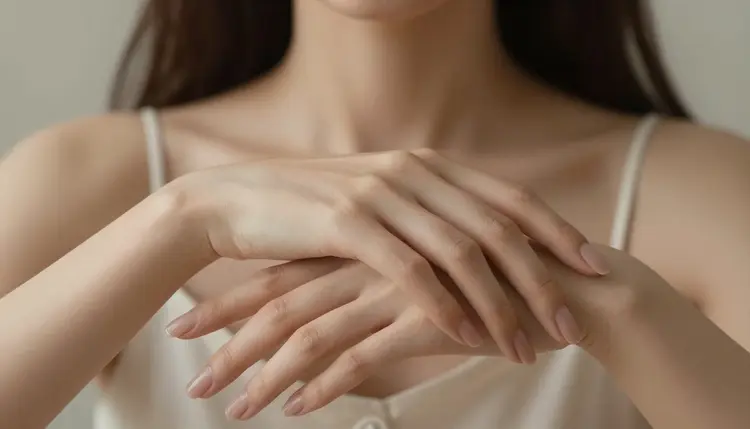
AI image generators are good at faces and bad at hands. Extra fingers, fused knuckles, a thumb growing out of the wrong joint: it is the single most common failure across the whole field, and it shows up more often in NSFW work because close poses put hands right in the frame. A negative prompt, a short list of things you explicitly do not want, is the cheapest fix available, but it only helps if the model underneath is not stopping your prompt before it ever reaches the image.
That is where Seedream 4.5 fits in. It is one of six models on Picasso IA confirmed to generate adult content directly, without an added safety filter blocking the request first. Most large image models on the platform, and most flagship models anywhere, apply a filter that reads the prompt and refuses anything flagged as adult before generation starts. When that happens on Picasso IA, the app shows a message that the content is not supported by that model and points you to the confirmed alternatives instead, carrying your prompt over so you do not have to retype it. Seedream 4.5 skips that step for adult prompts, which means the negative prompt techniques in this guide actually reach the render instead of getting rejected on the way in.
Seedream 4.5 is a text to image model, and inside Picasso IA's six confirmed filter free models it is the one built around straightforward text to image generation rather than editing or video. That makes it a natural starting point for a new adult scene: describe the character, the pose, and the setting in full, and it renders directly from that description, no separate editing pass required first.
If you already have an image and want to fix or extend it rather than start over, Picasso Image Editor Pro is the confirmed filter free option built for that job, useful for touching up a single hand after the fact without regenerating the whole scene. If you want a different rendering style for the same kind of adult prompt, Qwen Image 2 and Recraft V4.1 Pro are the other two confirmed filter free image models, and both take the same negative prompt approach described below. For motion, Picasso Video and LTX 2.3 Pro are the confirmed filter free video models, and the same hand problems show up frame by frame there too, so the fixes in this guide carry over.
Negative prompting is not complicated, but the order you do things in matters more than the exact wording. Here is a five step routine that works whether you are starting a scene from nothing or trying to rescue one that already came out with six fingers.
- Write the positive prompt first, completely. Describe the character, the pose, the framing, and the setting in full before thinking about exclusions. A negative prompt cannot save a positive prompt that never says what the hands are doing.
- Add a short, specific negative prompt. List the exact failures to avoid: extra fingers, fused fingers, missing fingers, deformed hand, extra limb, warped wrist. Naming the actual anatomy problem does more work than a generic phrase like bad quality.
- Generate a small batch instead of one image. Hands stay inconsistent even with a good negative prompt, so three or four variations from the same prompt give you a real choice instead of one roll of the dice.
- Pick the cleanest result and fix the rest with an editor. If one version has a good face and a bad hand, Picasso Image Editor Pro can touch up just the hand region instead of forcing a full regeneration.
- If the model blocks the prompt, switch models instead of rewording it. A refusal is not a puzzle to solve with clever phrasing. Move the same prompt to Seedream 4.5 or one of the other confirmed models and let the content through honestly.
A few habits make negative prompts more effective on Seedream 4.5, and they are worth applying every time rather than only after a hand comes out wrong.
Say the finger count out loud in the positive prompt itself, for example one hand resting on the table, five fingers visible, rather than assuming the model defaults to a normal hand. Keep hands out of extreme close up when the pose allows it: a hand filling a third of the frame gives the model far more detail to get wrong than one visible at a natural distance. Describe what the hand is doing rather than just that a hand exists, since gripping a glass renders more reliably than hand on its own because it gives the model a physical task to solve.
The table below pairs common hand problems with negative prompt phrasing aimed at that specific problem.
| Problem you are seeing | Negative prompt phrase to add |
|---|
| Six or seven fingers on one hand | extra fingers, too many fingers |
| Two fingers rendered as one | fused fingers, merged fingers |
| A finger missing entirely | missing fingers, incomplete hand |
| Hand looks twisted or broken | deformed hand, malformed hand |
| An extra hand or arm in frame | extra limb, extra arm |
| Wrist bent at an impossible angle | warped wrist, broken wrist |
None of these phrases guarantee a fix on the first try. Treat the table as a starting vocabulary, then lean on the batch of three or four from the steps above so you are choosing from options instead of betting everything on one generation.
Picasso IA's adult generation tools are for fictional characters only, and only for adult content. Do not use a prompt, a reference image, or a name that depicts a real person, a public figure, or anyone who could be read as a minor. That line does not bend for a fictional version of a real person either. If the output resembles a real, identifiable individual, it does not belong on this platform.
On the model side, only six models are confirmed to generate adult content without an added safety filter: Seedream 4.5, Qwen Image 2, Recraft V4.1 Pro, Picasso Image Editor Pro, Picasso Video, and LTX 2.3 Pro. Every other model in the full catalog, including flagship models from other providers, may refuse an adult prompt outright. When that happens the app says plainly that the content is not supported by that model and offers the six confirmed models as the next step, carrying the prompt over automatically.
Do not try to reword or disguise a flagged prompt to slip it past a filter on a model that is not built for adult content. That is not a supported workflow and it wastes a generation on a model designed to refuse it anyway. The honest move, and the one built into the app itself, is switching to one of the six confirmed models above.
Every generation on Picasso IA, adult or otherwise, is paid for with credits rather than a flat fee per image, and new accounts start with a batch of free credits so you can test how Seedream 4.5 and the other confirmed models handle your prompts before spending anything. Exact credit costs vary by model, and for some models by the resolution or duration you choose, so check pricing for current numbers rather than a figure quoted somewhere else.
If you generate through the toolkit, you can compare a few of the confirmed filter free models on the same prompt without leaving the page, a quick way to see which one handles a specific pose or hand position best before committing more credits to a longer batch.
What is a negative prompt?
A negative prompt is a short list of things you explicitly do not want in the generated image, written alongside the normal, positive description of the scene. Instead of only saying what should appear, you also name specific failures to avoid, such as extra fingers or a deformed hand, so the model has a target to steer away from as well as a target to steer toward.
Why do AI image generators get hands wrong so often?
A hand has many small joints that can bend and overlap in a huge number of valid positions, and in most training images hands are partly hidden, in motion, or off to the side rather than shown clearly and fully open. Faces, by comparison, appear clearly and consistently across far more images. That imbalance is why hands remain one of the most common visible errors in generated images across the industry, not just on one model or one platform.
Which models on Picasso IA are confirmed to generate NSFW content without a filter?
Six models are confirmed: Seedream 4.5, Qwen Image 2, Recraft V4.1 Pro, Picasso Image Editor Pro, Picasso Video, and LTX 2.3 Pro. These are the only models on the platform confirmed to generate adult content directly, without an added safety filter refusing the request first.
What happens if I try an adult prompt on a model that is not confirmed filter free?
Many models on Picasso IA, including flagship models from other providers, apply a filter that reads the prompt and refuses anything flagged as adult content. When that happens the app shows a message that the content is not supported by that model, and it recommends the six confirmed filter free models instead, carrying your prompt over automatically so nothing you typed is lost.
Can I use a real person's photo or name in a prompt?
No. Every character generated through these tools must be fictional and adult. Do not use a real person's name, likeness, or reference photo, and do not use a public figure, even as a starting point for a fictional character. If a result could be read as a real, identifiable individual or as anyone who looks underage, it is not an acceptable use of the tool.
Can I reword a blocked prompt to get around a content filter?
No. If a model refuses a prompt, the intended response is switching to one of the six confirmed filter free models, not disguising or rewording the same request to slip past the filter on a model built to refuse it. That workaround is not supported, and it wastes a generation on a result that was designed to fail anyway.
Does a negative prompt work the same way on every model?
Not exactly the same way on every model. Some models accept a negative prompt as a separate field alongside the main description, while others expect the exclusions folded directly into the single prompt as plain text. Either way, the underlying idea is the same: name the specific failure you want to avoid, such as extra fingers or a fused hand, rather than relying only on a positive description.
Can I fix a bad hand after the image is already generated?
Yes. Picasso Image Editor Pro is one of the six confirmed filter free models and it is built for exactly this kind of touch up, letting you correct a single hand, finger, or limb without regenerating the entire image from scratch.
Do negative prompts help with video too, not just still images?
Yes. Picasso Video and LTX 2.3 Pro are the two confirmed filter free video models, and hand problems show up frame by frame in video the same way they do in a still image, so the same negative prompt habits from this guide apply there too.
How much does it cost to try Seedream 4.5 and the other confirmed models?
New accounts get a batch of free credits to test models before spending anything, and every generation afterward draws from a credit balance rather than a flat per-image subscription fee. Exact costs vary by model and, for some models, by the resolution or duration selected, so check pricing for current numbers instead of relying on a figure from elsewhere.