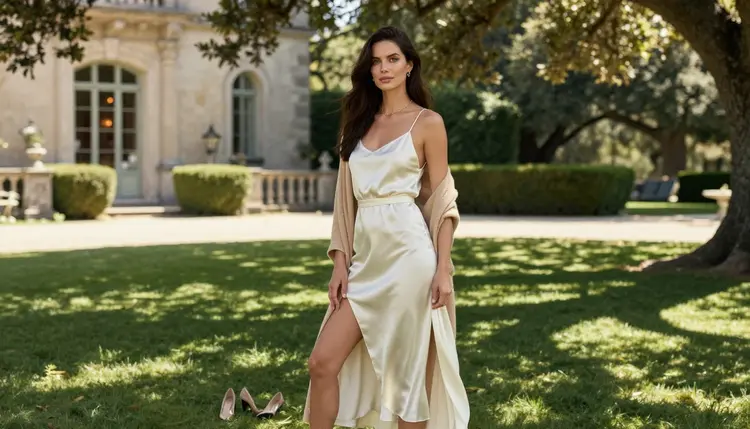
The old money look is the opposite of loud. No logos, no flash, no tight glitter. It is a cashmere cardigan over a silk robe, a wood-paneled library, a villa lawn in late afternoon, a glass of champagne held loosely. When you add an adult mood to that world, the result is spicy but calm: suggestive through fabric, light and posture rather than through anything explicit. This page shows you how to generate that kind of photo with Seedream 4.5 inside the toolkit, what to type, and how to fix the details that usually go wrong.
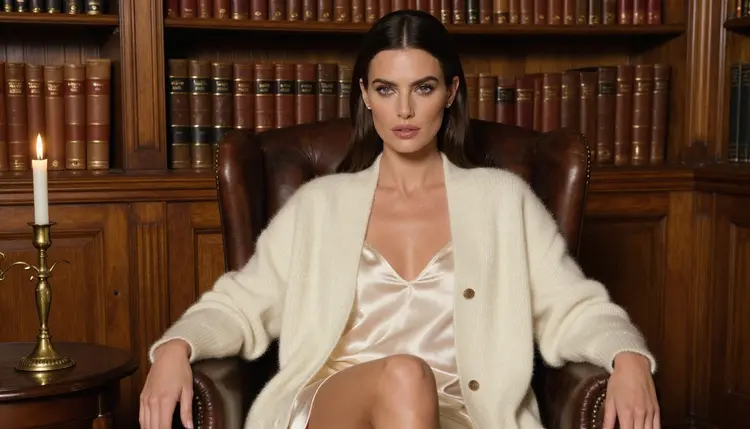
Everything here is for adults and about fictional characters. The pictures are glamour and boudoir photography in a quiet luxury setting: robes, satin slips, cashmere, jewelry, books, candles. Nothing needs to be shown for the scene to feel intimate, and that restraint is exactly what makes the style read as expensive.
Old money is a wardrobe and a place more than a pose. The palette is cream, ivory, camel, burgundy, navy and black. The materials are cashmere, wool, silk and satin. The places are libraries with leather armchairs, stone balustrades, gravel paths, long lawns and terraces that look like they have belonged to the same family for a century. A good prompt names the material and the place, because the model can then build the whole mood from two or three concrete nouns.
Seedream 4.5 is a good fit because it is a photoreal text to image model that works up to 4K, according to its catalog title ("Create 4K Images from Text with Seedream 4.5"). Fabric is where quiet luxury lives or dies. A silk robe has to fall with a soft sheen, a cashmere cuff has to show its knit, a satin slip has to catch the lamp without turning plastic. At 4K there is enough resolution for those textures to hold up when you zoom in on the sleeve or the collar. Picasso IA also lists it as a confirmed model: adult prompts were tested against it repeatedly and it generated instead of rejecting. That is the app's own observation, not a published setting of the model's maker, so it can change.
The second thing the style needs is restraint in the light. Old money photography prefers candlelight, a warm tungsten lamp, dappled shade on a lawn, soft window daylight and the blue hour. Hard flash ruins it. If you write the light into the prompt, as in "warm tungsten lamp light, 135mm f/2, film grain", the model tends to give you a shallow depth of field and a soft falloff, which is the look of a good editorial shoot. A lens and an aperture help more than adjectives such as luxurious or elegant.
Third, keep the person simple. The model in these pictures is one woman, described once at the start of a prompt and then repeated word for word when you want a series. If you want the same face across a library scene, a terrace scene and a window scene, keep that description identical and change only the wardrobe, the place and the light. For a themed set built around different clothing, the boudoir photo guide for Seedream 4.5 covers the same repeat-the-description method with a bedroom setting.
Picasso IA keeps a short list of models it has tested with adult prompts and marks them as confirmed. For this look you will mostly use the image models, then move a favorite frame into video. Here is the list with what each one is best for, using only what the catalog says about it.
| Model | Best for | Format |
|---|
| Seedream 4.5 | Photoreal robe, cashmere and library scenes | Text to image, 4K |
| Recraft V4.1 Pro | Illustrated or design-led versions of the look | Print-ready images, 2K |
| Picasso Image Editor Pro | Changing one detail of a picture you already have | Image editing, unlimited |
| LTX 2.3 Pro | Slow moving shots from a text description | Text to video, 4K |
| Picasso IA Video | Turning a frame into a clip, or writing a clip from text | Text or image to video, unlimited |
| Seedance 2.5 Lite | Short clips of a walk or a turn of the head | Video, listed up to 10 seconds |
If you are choosing only one, start with Seedream 4.5 for the picture and Picasso Image Editor Pro for the touch-ups. Recraft V4.1 Pro is the odd one in the list: it is strongest on illustration and design, so it suits a printed poster of the same scene rather than a camera-style photo. The unlimited tag on a model means it does not spend credits on the plans that include unlimited generation, and the details are on the pricing page.
Beyond the confirmed list, the catalog holds hundreds of models that are untested. Untested means exactly that: they are worth a try, and nobody has confirmed them either way. Qwen Image 2 is one of them for images, and Picasso Video (Pruna P-Video) is an untested option for clips. If you want to compare how different models treat cashmere and silk, browse the full catalog and run the same prompt on two of them side by side. When a model does not accept a prompt, the app tells you, and the confirmed models above are the place to go next.
The workflow is short. You pick the model, describe the clothes and the room, set the light, generate, and then check the three places where this style breaks: hands, fabric and face. The lead-in below assumes you start with a still image and add video later.
- Open the toolkit and pick Seedream 4.5. Go to the toolkit, choose the text to image mode and select Seedream 4.5 as the model. Pick a wide landscape ratio if you want the library to appear around the person.
- Describe the wardrobe and the room. Start with the woman (hair, eyes, makeup), then the clothes layer by layer: cream cashmere cardigan, ivory silk robe, satin slip. Add the place: wood-paneled library, leather armchair, tall window, villa lawn.
- Set the light and the mood. Write one light source and one lens, for example candlelight and 24mm f/2.8, or golden hour backlight and 35mm f/2. Add "film grain" and a calm word such as quiet or unhurried.
- Generate and review. Look at the hands first, then the fall of the fabric and then the face. Cashmere should show its knit, silk should have a soft sheen, and a robe should rest on the shoulder in a way that looks believable.
- Refine or switch. Send the picture to Picasso Image Editor Pro to fix one detail, or run the same prompt on another model if the composition is not what you wanted.
These are written as full scene descriptions. Copy one, replace the woman's description with your own fixed one, and change only the part you want to test. Every idea names wardrobe, setting, light and angle, because those four decide the result.
The library armchair. A woman seated upright in a leather armchair in a wood-paneled library, cream cashmere cardigan over an ivory satin slip and a silk robe, shelves of old books behind her, candlelight as the only source, eye-level three-quarter view, 24mm f/2.8, film grain. The candle gives warm highlights on the silk and deep shadow between the shelves.
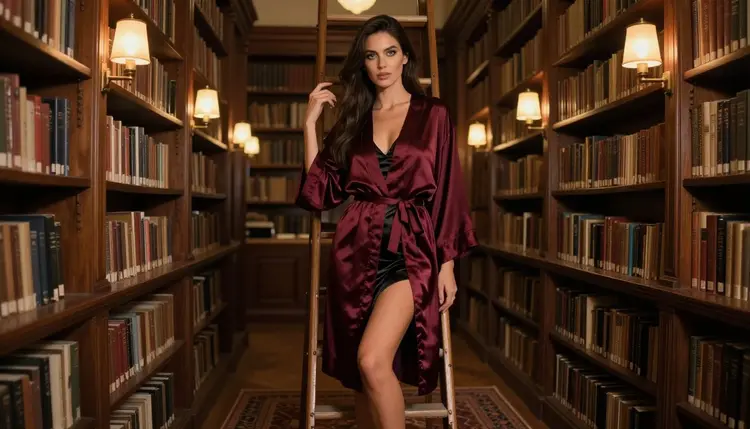
The ladder in the stacks. A full-length frame of the woman standing beside a rolling library ladder in a burgundy silk robe over a black satin slip, warm tungsten lamp light from the left, 135mm f/2. The long lens compresses the shelves into a soft backdrop and keeps the robe sharp.
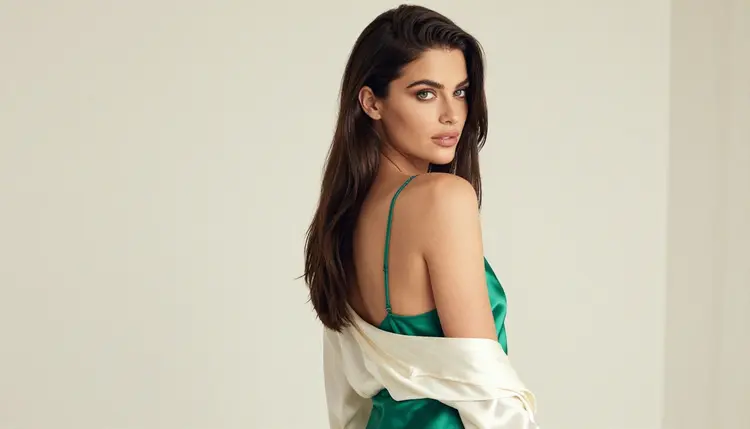
The slipping robe, from behind. An over-the-shoulder frame: ivory silk robe sliding off one shoulder over an emerald satin slip, soft diffused daylight in a studio, 50mm f/1.4. She looks back at the camera. This is a flirty, suggestive frame, and the camera stays on the shoulder and the fabric.
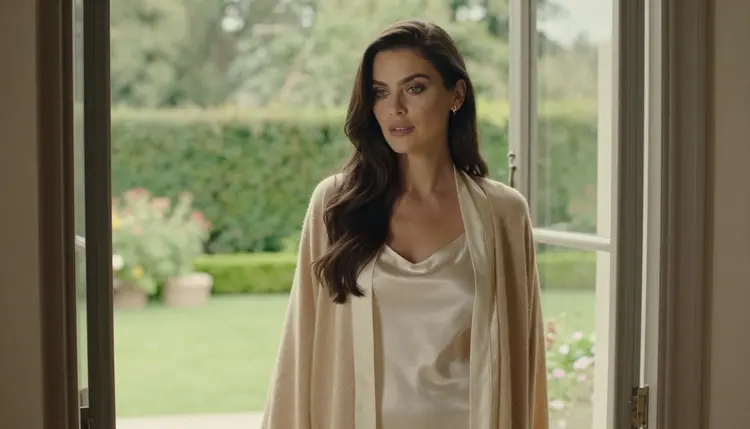
The window. The woman at a tall library window looking out over a villa garden, camel cashmere wrap and cream silk robe, soft daylight, 70mm f/2.8, no mirror and no reflection. The window light gives you a clean side gradient on the face and the knit.
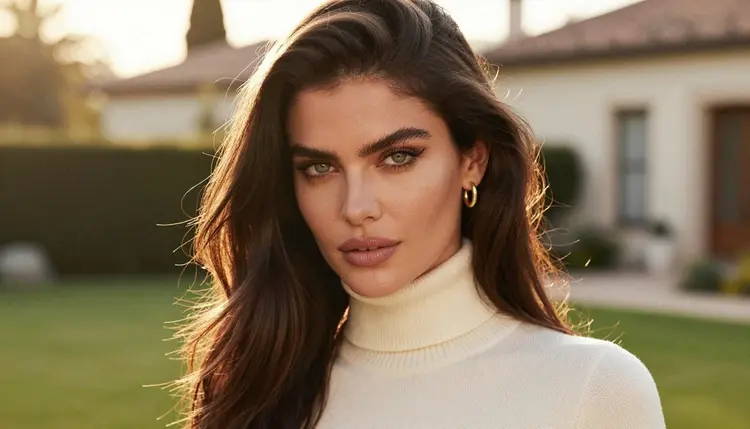
The cashmere collar, close up. A tight close-up portrait with a cream cashmere collar and gold earrings, golden hour backlight on a lawn, 35mm f/2. Glowing hair edges, a soft background and a calm expression carry the picture.
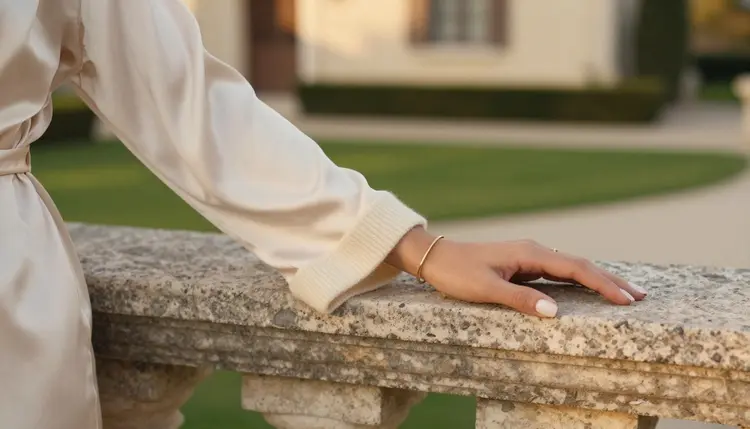
The cuff and the balustrade. A detail shot of a champagne silk robe sleeve and a cashmere cuff, exactly one hand resting on a stone balustrade, golden hour backlight, 35mm f/2. Write "exactly one hand in frame" in the prompt; it avoids the extra fingers that appear when a model has to guess how many hands to draw.
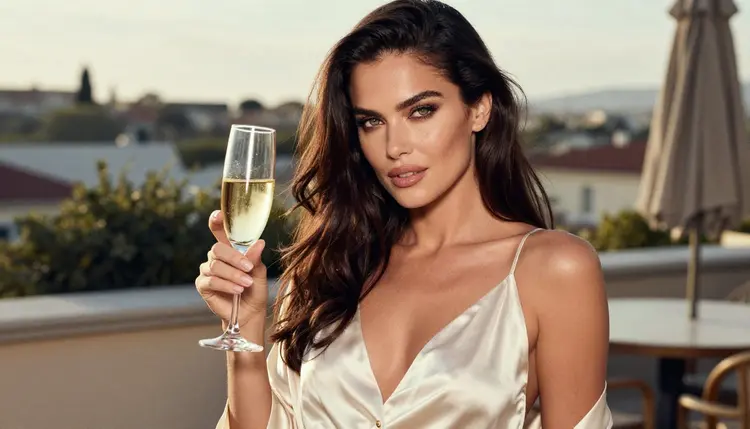
The terrace toast. A medium waist-up shot of the woman holding a champagne flute, ivory satin slip under a navy silk robe, a villa terrace behind her, late-afternoon side light, 85mm f/1.8. If you want a boat deck instead of a terrace, the yacht deck photo guide has prompts for water, rail and sun.
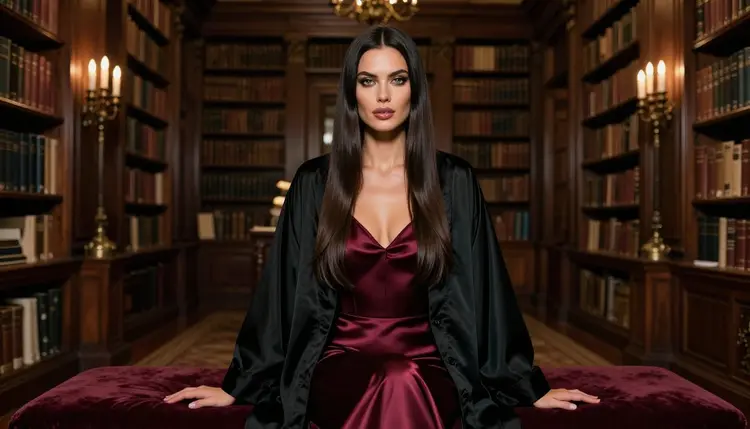
The velvet bench. A wide environmental portrait of the woman seated upright on a velvet bench in a vast library, black silk robe over a burgundy satin slip, candelabras on the tables, 50mm f/1.4. The room does the work here, so keep the pose still.
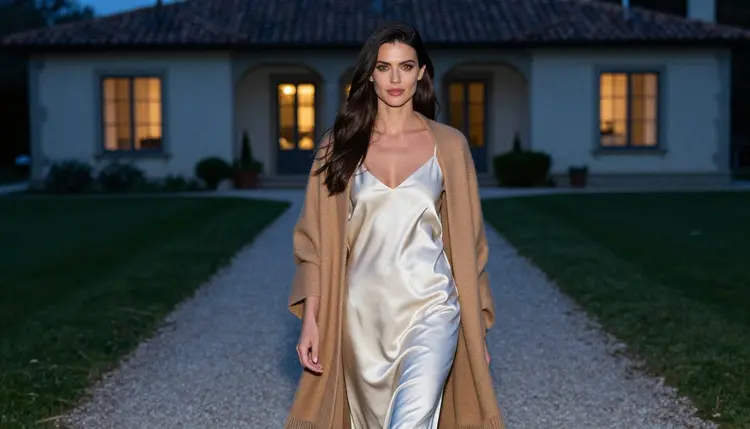
The gravel path at dusk. A candid walking shot on a gravel path in blue-hour light, ivory silk robe and a camel cashmere shawl, 70mm f/2.8. A cool background against warm fabric is the strongest color contrast in the whole set.
If your scene happens indoors in a hotel instead of a house, the hotel room photo guide follows a similar structure, and the corset photo guide is a better fit when the wardrobe is more structured and less soft.
Picasso IA is for adults. This page and every tool on it are 18+ only, and the pictures are meant for people who are old enough to look at suggestive photography. If you are not an adult, this is not for you.
Every character is a fictional adult, in the mid twenties or older. Do not use a real person's name, a celebrity or a photo of someone you know, and do not write a prompt for anyone who could read as a minor. That includes a prompt that lists a school, a toy or a childlike detail next to adult clothes. If a prompt drifts in that direction, rewrite it.
What you generate is private by default. It is tied to your account and is not published or shown to other people. You decide whether anything leaves your account, and the same adult-and-fictional standard applies to whatever you choose to share.
A new account gets a small free trial on selected models: Picasso IA Image, Picasso Image Editor Pro, Picasso IA Video and Seedance 2.5 Lite. It is enough to run a first robe and library prompt and see whether the style suits you. The trial does not cover the whole catalog, and models such as Seedream 4.5 spend credits that vary with options such as resolution. Plans, prices and the models marked unlimited are explained on the pricing page.
For a quick test of the style without spending much, you can write the prompt in the toolkit, try the free models for the picture and the clip, and move to Seedream 4.5 once you like the composition. If you want to experiment further, the full catalog lists the untested models. Qwen Image 2 is an untested image model, and Picasso Video (Pruna P-Video) is an untested video model. Treat both as open experiments: the same prompt, a different model, and a look at what comes back. If a result is not what you wanted, the confirmed models are the fallback and your prompt carries over, so there is nothing to retype.
Which models are confirmed for adult old money photos?
Picasso IA marks a short list of models as confirmed after testing adult prompts against them repeatedly: Seedream 4.5, Recraft V4.1 Pro and Picasso Image Editor Pro for images, and LTX 2.3 Pro, Picasso IA Video and Seedance 2.5 Lite for video. This is the app's own result and not a published setting of each maker, so it can change. Every other model in the catalog is untested, and you can try it from the full catalog.
Why start with Seedream 4.5 for this look?
Quiet luxury depends on fabric and light, and Seedream 4.5 is a photoreal text to image model that works up to 4K. That resolution keeps the knit of a cashmere cuff and the sheen of a silk robe readable when you zoom in. It is also one of the confirmed models, so you are not guessing whether an adult prompt will be accepted.
How should I word the prompt?
Name the clothes layer by layer, name the place, then add one light source and one lens. "Cream cashmere cardigan over ivory satin slip, silk robe, wood-paneled library, candlelight, 24mm f/2.8, film grain" works better than a string of adjectives. Keep the description of the woman identical between prompts if you want the same face across a series.
Can I put two people in one scene?
You can, but it needs more care. Describe each person separately, say who stands where, and keep both fully adult and fictional. Models can blend two faces, so generate a few frames and keep the best. For romantic pairs in a suggestive setting, the hotel room photo guide shows how to write two people into one room.
What happens when a model refuses a prompt?
The app shows a message titled "Content Not Supported by This Model". It recommends models that accept adult prompts and carries your prompt over, so you do not retype anything. Pick one of the confirmed models and run the same text again, or soften the wording of the wardrobe and try once more.
Are the characters adults and fictional?
Yes, always. Picasso IA is 18+ only, every character is a fictional adult, and you should never use a real or identifiable person or anyone who could read as a minor. If a prompt could be read that way, rewrite it before you generate.
Are my pictures private?
Yes. Generations are private by default: they are tied to your account and are not published or shown to other people. Anything you decide to share is your own choice, and the same rules about adults and fictional characters still apply to it.
Can I turn a picture into a video?
Yes. Take a frame you like and use Picasso IA Video, which does text or image to video, or LTX 2.3 Pro for 4K video from text. Seedance 2.5 Lite is listed up to 10 seconds. For this look, ask for a slow turn of the head, a robe sleeve moving, or a walk on the gravel path.
How do I fix one detail without starting over?
Open the picture in Picasso Image Editor Pro and describe the single change: a different robe color, a hand that needs correcting, a cleaner background shelf. It edits an existing image, so the rest of the composition stays as it was.
Can I try this before paying?
A new account gets a small free trial on selected models, including Picasso IA Image, Picasso Image Editor Pro, Picasso IA Video and Seedance 2.5 Lite. It does not cover the whole catalog. Plans and the models marked unlimited are on the pricing page, and you can run your first prompt in the toolkit right away.